bit
v1.1.2

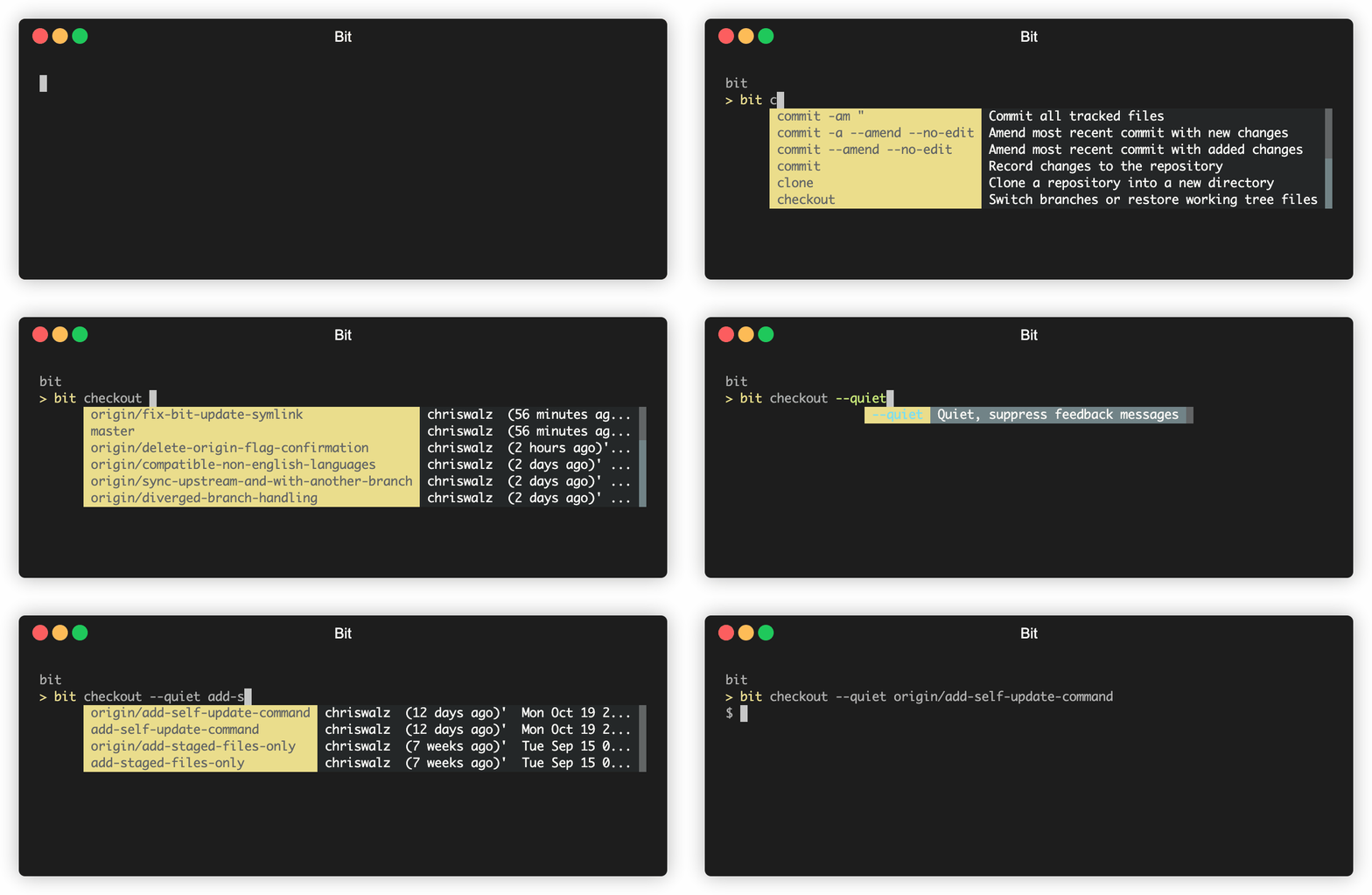
bit是一種實驗性的現代GIT CLI,建立在GIT之上,提供了快樂的默認和其他細節:
bit add或bit checkout時,文件和分支名稱的自動完成bit sync這樣的新命令,極大地簡化了您的工作流程bit release和bit infobit --debug 。- -新的- -
bit pr視圖和結帳式拉動請求(需要GitHub CLI) bit update - -即將推出- -
bit fixbit sync單擊此處以獲取安裝說明
運行bit update
自定義:
BIT_THEME=invertedBIT_THEME=monochrome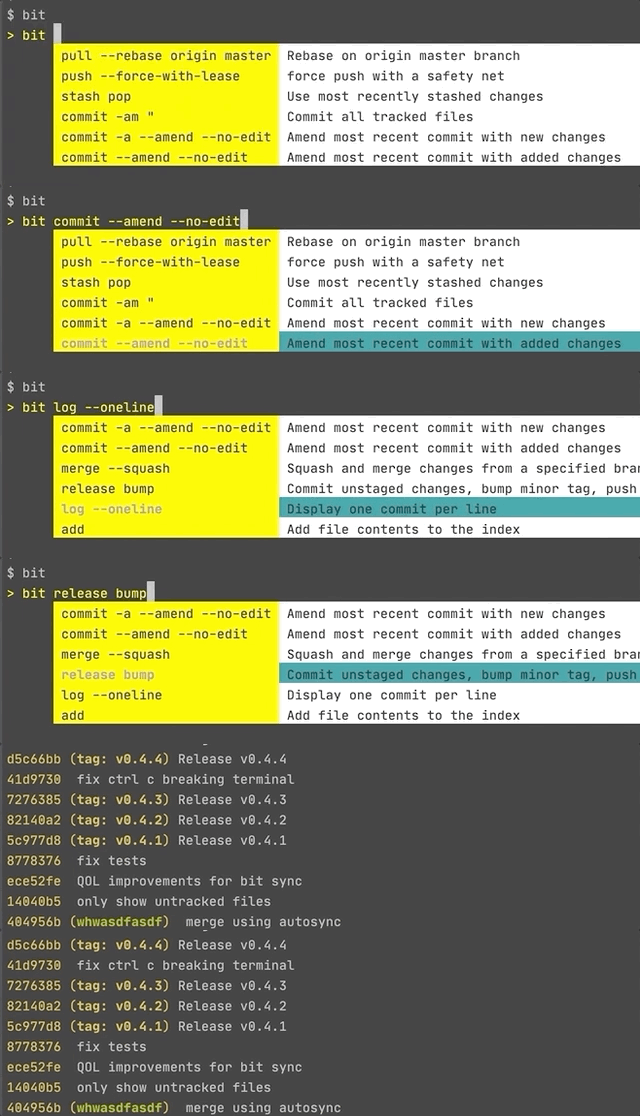


創建一個新的提交(大致相當於git commit -am "commit message" )
bit save [commit message]
將您的更改保存到當前分支[修改當前的提交時(大致相當於git commit -a或有條件地git commit -a --amend --no-edit )
bit save
將您的更改同步到Origin Branch(Beta) (大致相當於git pull -r; git push )
bit sync
(大致相當於git pull -r; git push; git pull -r origin master; git push ) bit sync origin master
您也可以訪問所有git命令。
bit commit -m "I can still use git commands" , bit pull -r origin master
bit switch example-branch分支不存在。您想創建它嗎?是/n
是的
切換到新的分支“示例分支”
[進行一些更改]
bit save "add important feature"
對於多行委員
[修復重要功能的錯誤]
bit save
[將變化推向原點]
bit sync
[兩天后確認您的分支與原始分支同步]
bit sync
[從原始大師中反彈您的變化]
bit sync origin master
如果您想支持BIT的發展,請考慮贊助我。
多虧了Gitless,Git-Extras,該領域的研究人員以及git本身的開發人員!另外,感謝Go-Prompt的交互提示庫
v1.1.2
bit sw作為bit switch的別名v1.0
bit release bump的不良釋放標籤v0.9
bit sync <upstream> <branch> bit merge建議v0.8
gh pr list才能正常工作) brew install bit-git BIT_THEME=inverted或BIT_THEME=monochrome終端背景v0.7
bit update更新您的CLIv0.6
v0.5
bit switch , bit co , bit checkout將顯示提示v0.4
bit sync Go Binaries是獨立的,因此卸載僅需要刪除二進制(IES)
rm `which bit`
如果您bit complete請選擇從您的bash_profile , .zshrc等中刪除一行。
complete -o nospace -C /Users/{_USER_}/go/bin/bit bit
cURL (最簡單的安裝方式)喜歡點? $ 5的讚助商位
curl -sf https://gobinaries.com/chriswalz/bit | sh ;
bit complete ;
echo " Type bit then press <ENTER> to show interactive prompt "
bit ;
覆蓋安裝位置
export PREFIX=/opt/bit/git && mkdir -p ${PREFIX} ## optional: override default install location /usr/local/bin
bit bit checkout和bit switch將在您按Enter後顯示交互式提示
go警告:需要設置Gopath和Gobin。使用go env進行驗證。如果未設置它們,請將其添加到您的.bashrc或.bash_profile等
 export GOPATH= $HOME /go
export GOBIN= $( go env GOPATH ) /bin
go install github.com/chriswalz/bit@latest ;
bit completeHomebrew (適用於MacOS用戶) brew install bit-git
bit complete
bit不起作用?嘗試brew doctor
MacPorts (用於MacOS用戶) sudo port selfupdate
sudo port install bitgo (適用於Windows用戶) go env -w GO111MODULE=on
# if latest is not working, replace it with the latest tag found here https://github.com/chriswalz/bit/releases
go get github.com/chriswalz/bit@latest ;
bitChocolatey (適用於Windows用戶) choco install bit-gitzinit zinit ice lucit wait " 0 " as " program " from " gh-r " pick " bit "
zinit light " chriswalz/bit "注意:在Windows上,僅交互提示完成工作而不是經典選項卡完成
用於從源構建穩定版本,請使用bit軟件包
對於從源構建最新的git版本,請使用bit-git軟件包
注意:這些軟件包是由社區驅動的,並且沒有在我的BIT MAINTER上發表。
用以下方式驗證安裝:
bit
依賴項:git
平台支持:





