bit
v1.1.2

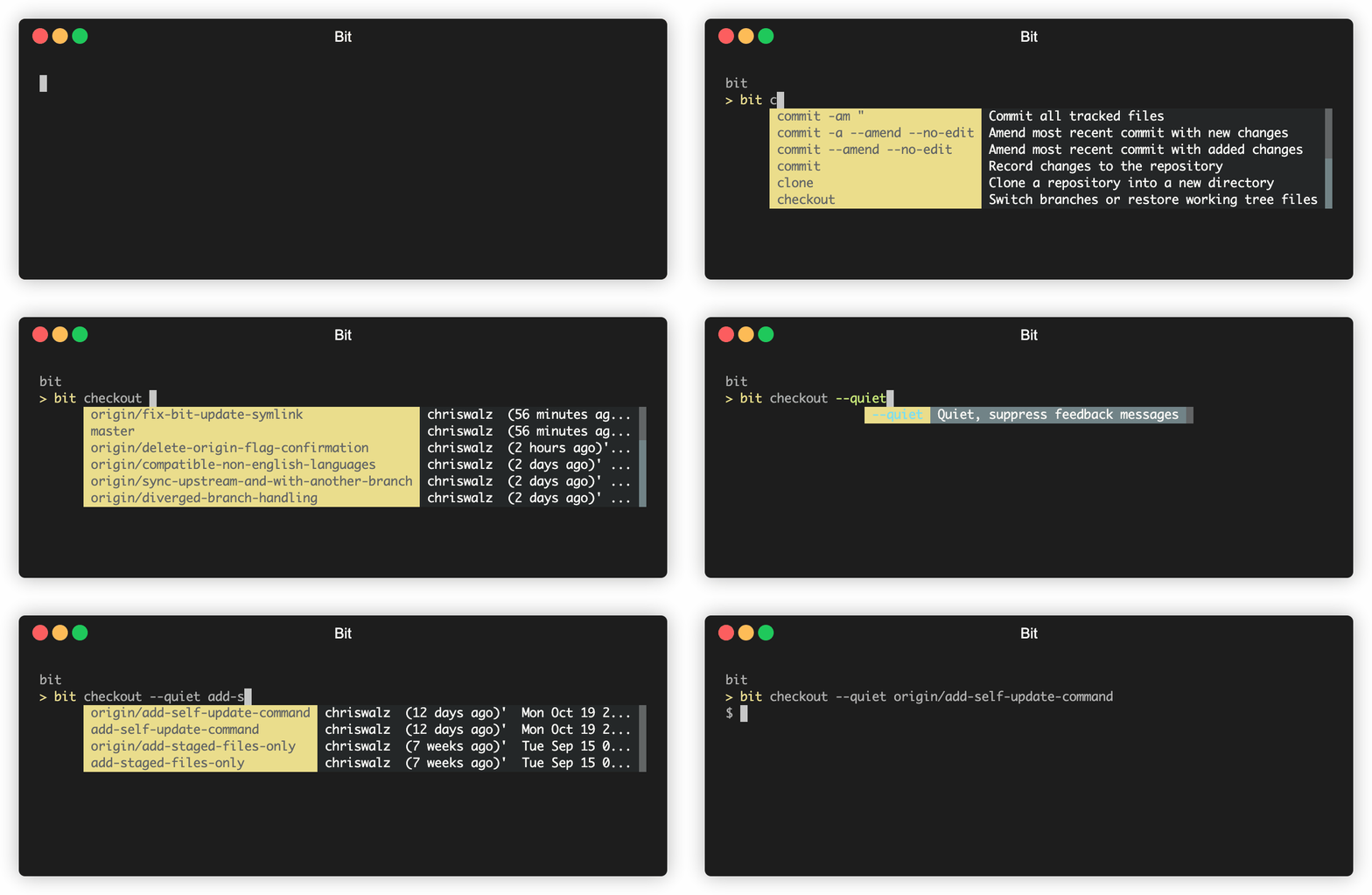
bit เป็น GIT CLI ที่ทันสมัยในการทดลองที่สร้างขึ้นบน GIT ที่ให้ค่าเริ่มต้นที่มีความสุขและ niceties อื่น ๆ :
bit add หรือ bit checkoutbit sync ซึ่งทำให้เวิร์กโฟลว์ของคุณง่ายขึ้นอย่างมากbit release & bit infobit --debug--- ใหม่ ---
bit pr และการชำระเงินดึงคำขอจาก GitHub (ต้องใช้ GitHub CLI) bit update --- เร็วๆ นี้ ---
bit fix ตลอดเวลาที่คุณทำสิ่งที่คุณหวังว่าคุณจะไม่ทำbit syncคลิกที่นี่สำหรับคำแนะนำในการติดตั้ง
รัน bit update
การปรับแต่ง:
BIT_THEME=invertedBIT_THEME=monochrome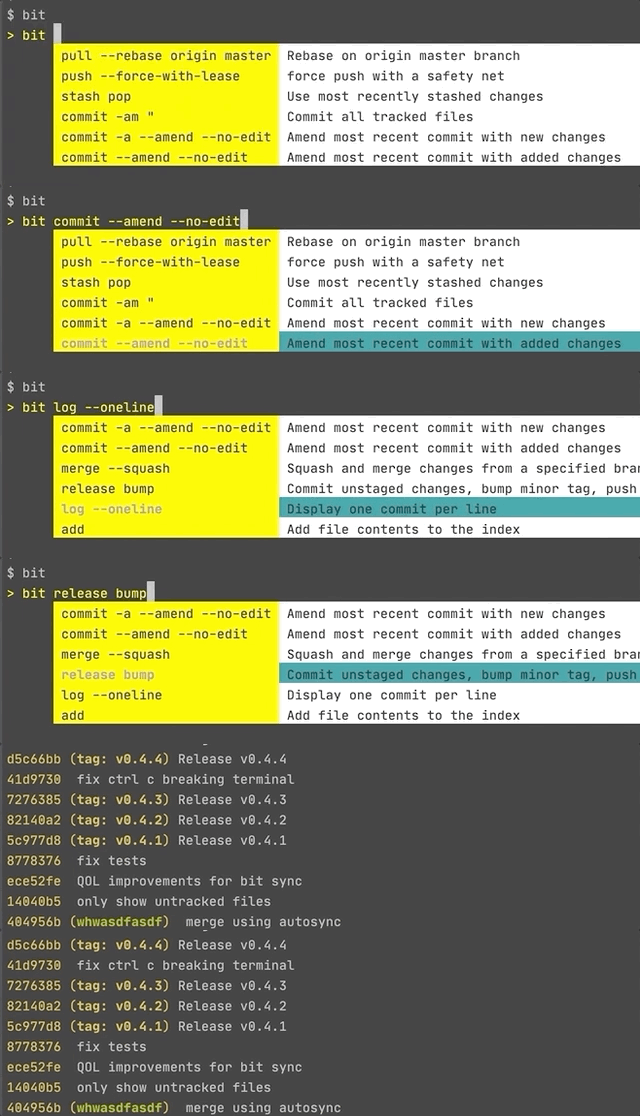


สร้างคอมมิวนิกใหม่ (เทียบเท่ากับ git commit -am "commit message" ))
bit save [commit message]
บันทึกการเปลี่ยนแปลงของคุณไปยังสาขาปัจจุบัน [แก้ไขการกระทำในปัจจุบันเมื่ออยู่ข้างหน้าต้นกำเนิด] (เทียบเท่ากับ git commit -a หรือ git commit -a --amend --no-edit )
bit save
ซิงโครไนซ์การเปลี่ยนแปลงของคุณไปยังสาขา Origin (beta) (เทียบเท่ากับ git pull -r; git push )
bit sync
(เทียบเท่ากับ git pull -r; git push; git pull -r origin master; git push ) bit sync origin master
คุณสามารถเข้าถึงคำสั่ง GIT ทั้งหมดได้เช่นกัน
bit commit -m "I can still use git commands" , bit pull -r origin master
bit switch example-branch ไม่มีอยู่ คุณต้องการสร้างมันหรือไม่? y/n
ใช่
เปลี่ยนเป็นสาขาใหม่ 'ตัวอย่าง-สาขา'
[ทำการเปลี่ยนแปลงบางอย่าง]
bit save "add important feature"
สำหรับ multiline commits เพียงอย่าใส่ใบเสนอราคาสุดท้ายจนกว่าคุณจะพิมพ์เสร็จ
[แก้ไขข้อผิดพลาดสำหรับคุณสมบัติที่สำคัญ]
bit save
[ผลักดันการเปลี่ยนแปลงไปยังแหล่งกำเนิด]
bit sync
[สองวันต่อมายืนยันว่าสาขาของคุณสอดคล้องกับสาขา Origin]
bit sync
[Rebase การเปลี่ยนแปลงของคุณจาก Origin Master]
bit sync origin master
หากคุณต้องการสนับสนุนการพัฒนาบิตให้พิจารณาสนับสนุนฉัน
ต้องขอบคุณ Gitless, Git-extras นักวิจัยในสาขาและแน่นอนนักพัฒนาของ git เอง! นอกจากนี้ต้องขอบคุณ Go-Prompt สำหรับห้องสมุดพรอมต์แบบโต้ตอบ
v1.1.2
bit sw เป็นนามแฝงสำหรับ bit switch v1.0
bit release bump v0.9
bit sync <upstream> <branch> bit mergev0.8
gh pr list ทำงานได้) brew install bit-git BIT_THEME=inverted หรือ BIT_THEME=monochrome v0.7
bit updatev0.6
v0.5
bit switch , bit co , bit checkout จะแสดงพรอมต์ v0.4
bit sync Go Binaries มีอยู่ในตัวเองดังนั้นการถอนการติดตั้งเพียงแค่ต้องลบไบนารี (IEs)
rm `which bit`
หากคุณใช้ bit complete ทางเลือกลบบรรทัดจาก bash_profile , .zshrc ฯลฯ
complete -o nospace -C /Users/{_USER_}/go/bin/bit bit
cURL (วิธีการติดตั้งที่ง่ายที่สุด)ชอบบิต? บิตสปอนเซอร์ราคา $ 5
curl -sf https://gobinaries.com/chriswalz/bit | sh ;
bit complete ;
echo " Type bit then press <ENTER> to show interactive prompt "
bit ;
เพื่อเขียนทับตำแหน่งการติดตั้ง
export PREFIX=/opt/bit/git && mkdir -p ${PREFIX} ## optional: override default install location /usr/local/bin
bit bit checkout และ bit switch จะแสดงพรอมต์แบบโต้ตอบหลังจากที่คุณกด Enter
go ข้อแม้: ต้องตั้งค่า Gopath และ Gobin ตรวจสอบกับ go env หากไม่ได้ตั้งค่าให้เพิ่มสิ่งนี้ลงใน. bashrc หรือ. -bash_profile ฯลฯ และเปิดเทอร์มินัลใหม่
 export GOPATH= $HOME /go
export GOBIN= $( go env GOPATH ) /bin
go install github.com/chriswalz/bit@latest ;
bit completeHomebrew (สำหรับผู้ใช้ MacOS) brew install bit-git
bit complete
bit ไม่ทำงาน? ลอง brew doctor
MacPorts (สำหรับผู้ใช้ MACOS) sudo port selfupdate
sudo port install bitgo (สำหรับผู้ใช้ Windows) go env -w GO111MODULE=on
# if latest is not working, replace it with the latest tag found here https://github.com/chriswalz/bit/releases
go get github.com/chriswalz/bit@latest ;
bitChocolatey (สำหรับผู้ใช้ Windows) choco install bit-gitzinit zinit ice lucit wait " 0 " as " program " from " gh-r " pick " bit "
zinit light " chriswalz/bit "หมายเหตุ : บน Windows เฉพาะการเสร็จสมบูรณ์แบบโต้ตอบไม่ทำงานแท็บแบบคลาสสิกให้เสร็จสมบูรณ์
สำหรับการสร้างเวอร์ชันที่เสถียรจากแหล่งที่มาให้ใช้แพ็คเกจ bit
สำหรับการสร้างเวอร์ชัน GIT ล่าสุดจากแหล่งที่มาให้ใช้แพ็คเกจ bit-git
หมายเหตุ : แพ็คเกจเหล่านี้เป็นตัวขับเคลื่อนชุมชนและไม่ได้เผยแพร่อย่างเป็นทางการของฉัน
ตรวจสอบการติดตั้งด้วย:
bit
การพึ่งพา: Git
การสนับสนุนแพลตฟอร์ม:





