jslib html5 camera photo
1.0.0

該軟件包的第一個目標來自具有JS庫,該庫可以通過HTML5視頻和帆布元素通過瀏覽器來捕獲手機或台式攝像頭的圖片。因此,我不必使用本機navigator.mediaDevices.getUserMedia()和管理stream和constraints ,而需要將其抽象為一個小的lib,該lib可以在相機之間切換並獲得所需的分辨率。
另一個JS攝像頭?是的!我找到了WebCAMJS和JPEG_CAMERA,但我需要輕鬆地從相機environment和user切換。您需要建立getusermedia()的約束...另一個需求是擁有一個sizeFactor而不是固定的“寬度”和“高度”,而“寬度”和“高度”無法符合相機可以選擇的分辨率之比。
facing mode或deviceId攝像頭之間進行選擇,請返回默認攝像頭。ideal resolution ,回到默認分辨率。maximum resolution ,回到默認分辨率。jpg或png之間的DataUri image format類型。jpg ,請選擇compression value是[0,1]之間。image mirror ,請選擇DataUri Image Mirror 。 https://mabelanger.github.io/jslib-html5-camera-photo/
https://caniuse.com/#search = getusermedia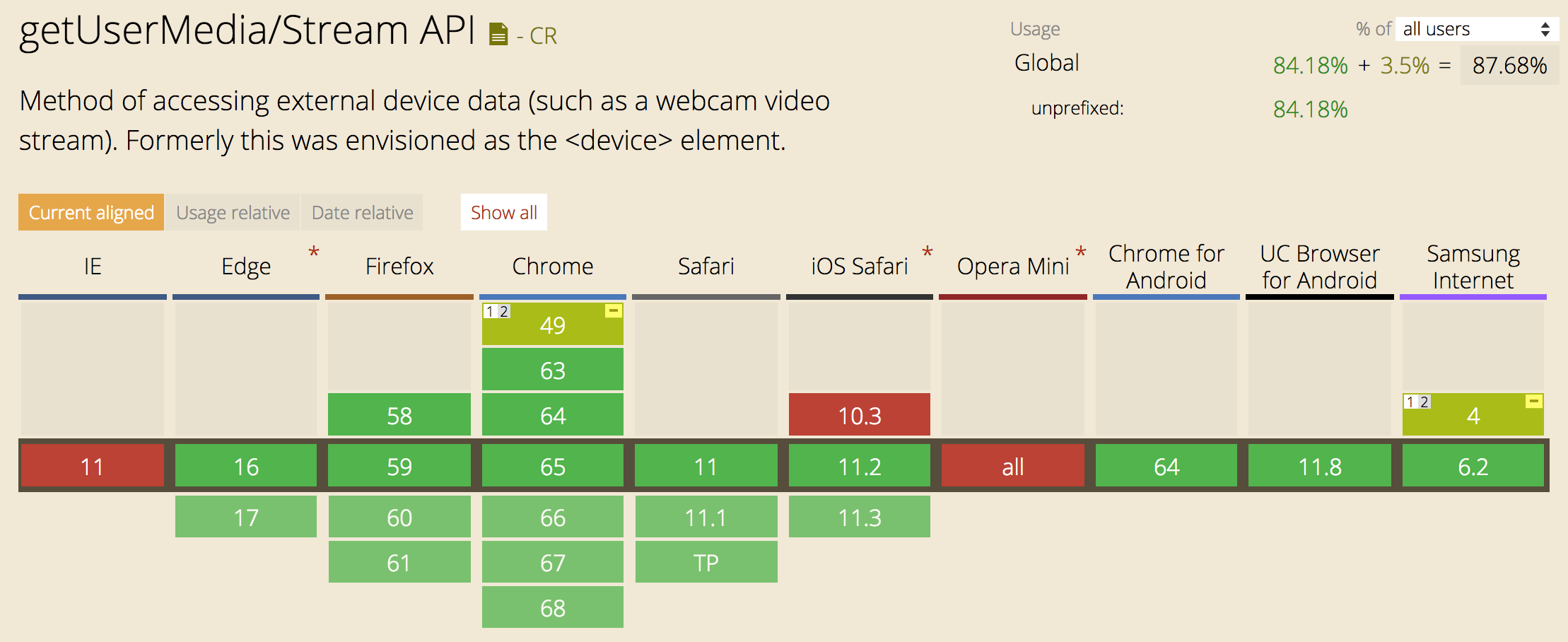 ...(2018年4月)
| facing_modes [] | 描述 |
|---|---|
| 用戶 | 來源面對用戶(一個自我查看攝像頭)。 |
| 環境 | 來源遠離用戶(查看環境)。 |
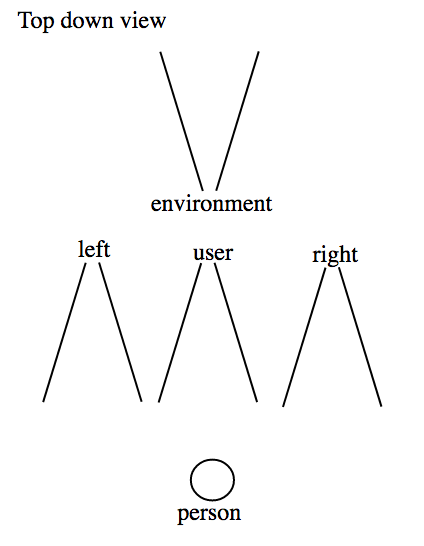
SRC:https://www.w3.org/tr/mediacapture-streams/#dom-videofacingmodeenum
您可以將圖書館與香草JavaScript,React,jQuery,Angular ...一起使用...
npm install --save jslib-html5-camera-photoyarn add jslib-html5-camera-photo import CameraPhoto , { FACING_MODES , IMAGE_TYPES } from 'jslib-html5-camera-photo' ;
// get your video element with his corresponding id from the html
let videoElement = document . getElementById ( 'videoId' ) ;
// pass the video element to the constructor.
let cameraPhoto = new CameraPhoto ( videoElement ) ; cameraPhoto . startCamera ( cameraDevice , resolution )| 參數 | 描述 |
|---|---|
| CameradeVice | 是朝相機面向模式或DeviceID的string |
| 解決 | 是object分辨率ex:。 { width: 640, height: 480 } |
如果您沒有指定任何首選分辨率和麵向模式,則使用默認值。該功能返回承諾。如果承諾成功,如果您想使用它,它將為您提供流。如果失敗,它將給您錯誤。
 // default camera and resolution
cameraPhoto . startCamera ( )
  . then ( ( stream ) => { /* ... */ } )
. catch ( ( error ) => { /* ... */ } ) ; // environment (camera point to environment)
cameraPhoto . startCamera ( FACING_MODES . ENVIRONMENT , { } )
. then ( ( stream ) => { /* ... */ } )
. catch ( ( error ) => { /* ... */ } ) ;
// OR user (camera point to the user)
cameraPhoto . startCamera ( FACING_MODES . USER , { } )
. then ( ( stream ) => { /* ... */ } )
. catch ( ( error ) => { /* ... */ } ) ; 您可以指定要使用的DeviceID(相機),而不是面對模式。要了解設備ID,您可以使用枚舉可用攝像機獲取它們的列表,因此您可以使用deviceId啟動相機而不是面對模式,例如
 // OR specify the deviceId (use a specific camera)
const deviceId = 'the_string_of_device_id' ;
cameraPhoto . startCamera ( deviceId , { } )
  . then ( ( stream ) => { /* ... */ } )
. catch ( ( error ) => { /* ... */ } ) ; // example of ideal resolution 640 x 480
cameraPhoto . startCamera ( facingMode , { width : 640 , height : 480 } )
. then ( ( stream ) => { /* ... */ } )
. catch ( ( error ) => { /* ... */ } ) ; 它將嘗試寬度[3840, 2560, 1920, 1280, 1080, 1024, 900, 800, 640, default] PX的範圍以最大寬度為3840 px,如果不能,則為2560 px,等於相機默認值的後退值。 facingmode是可選的。
 // It will try the best to get the maximum resolution with the specified facingMode
cameraPhoto . startCameraMaxResolution ( cameraDevice )
  . then ( ( stream ) => { /* ... */ } )
. catch ( ( error ) => { /* ... */ } ) ; 返回相機當前幀的dataUri 。使用該函數使用相應的屬性構建配置對象。要使用默認值,只需輸入參數:
SizeFactor (數字):用於獲得所需的分辨率。例如, 1尺寸因子獲得相同的相機分辨率,而0.5的尺寸因子獲得相機的一半分辨率。 sizeFactor可以在]0, 1]之間,默認值為1 。
圖像類型(字符串):用於在jpg或png之間獲取所需的圖像類型。要指定圖像類型使用常數image_types,例如指定jpg格式使用image_types.jpg。默認圖像類型是png 。
想像力壓縮(數字):選擇jpg時用於獲得所需的壓縮。選擇[0, 1] ,1是最大的壓縮,0是最小值。默認值的想像壓縮為0.92 。
Isimagemirror (布爾值):用於在設置為true時獲得圖像鏡, dataUri的結果是實際攝像機數據的鏡像。許多使用攝像機鏡像等相機等軟件等...請注意,如果您想啟用此選項,為了與攝像機視頻保持一致,則需要使用CSS transform: rotateY(180deg)到<video>標籤來鏡像流,因為流不鏡像。它僅適用於Canvas DataUri。默認值為false (無鏡像)。
| image_types [] | 描述 |
|---|---|
| JPG | 將image/jpeg設置為數據URI |
| PNG | 將image/png設置為數據URI(默認值) |
 // Use all the default value
const config = { } ;
let dataUri = cameraPhoto . getDataUri ( config ) ;

// OR

// Specify sizeFactor, imageType, imageCompression, isImageMirror
const config = {
  sizeFactor : 1 ;
  imageType : IMAGE_TYPES . JPG
  imageCompression : .95 ;
  isImageMirror : false ;
}

let dataUri = cameraPhoto . getDataUri ( config ) ; 函數返回null如果不存在流(未啟動相機)或具有相機設置屬性的對象(factratio,framerate,height,width)。
 let cameraSettigs = cameraPhoto . getCameraSettings ( ) ;
if ( cameraSettigs ) {
  let { aspectRatio , frameRate , height , width } = cameraSettigs ;
  let settingsStr =
      `aspectRatio: ${ aspectRatio } ` +
      `frameRate: ${ frameRate } ` +
      `height: ${ height } ` +
      `width: ${ width } ` ;
  console . log ( settingsStr ) ;
} enumerateCameras()返回承諾,該承諾接收了一系列MediaDeviceInfo IE:。 {kind, label, deviceId}當承諾實現時。數組中的每個對像都描述了可用的攝像頭之一(僅授予許可的設備類型是“可用的”)。訂單很重要 - 默認捕獲設備將首先列出。如果相機打開,它只會返回承諾。如果相機接近,則確保在返回承諾之前授予相機:進行持續20毫秒的相機的啟動/停止週期。
 cameraPhoto . enumerateCameras ( )
  . then ( ( cameras ) => {
    cameras . forEach ( ( camera ) => {
      let { kind , label , deviceId } = camera ;
      let cameraStr = `
            kind: ${ kind }
            label: ${ label }
            deviceId: ${ deviceId }
        ` ;
      console . log ( cameraStr )
    } ) ;
} ) 您可以下載所拍攝的DataUri的照片,然後將其傳遞給downloadPhoto()函數。
 import { downloadPhoto } from 'jslib-html5-camera-photo' ;

let dataUri = cameraPhoto . getDataUri ( config ) ;
downloadPhoto ( dataUri , prefixFileName , number ) ;
// The filename will be saved as the format :
` ${ prefixFileName } - ${ number } .jpg|png}` downloadPhoto()函數的參數
| 參數 | 描述 |
|---|---|
| DataUri | 是照片的數據圖 |
| prefixFilename | 是文件名的string前綴 |
| 數字 | 是帶有0個填充的文件名的integer前綴 |
停止相機的功能。如果成功,則不會返回值。如果他們沒有相機停止,因為相機已經停止或從未啟動,他們可能會失敗。它將給出Error('no stream to stop!') 。請注意,每次我們啟動相機時,它都會在內部使用此停止功能來應用新約束。
 // It stop the camera
cameraPhoto . stopCamera ( )
  . then ( ( ) => { /* ... */ } )
. catch ( ( error ) => { /* ... */ } ) ; <!-- needed to by the camera stream -->
< video id =" videoId " autoplay =" true " > </ video >
<!-- needed if you want to display the image when you take a photo -->
< img alt =" imgId " id =" imgId " >
<!--buttons to trigger the actions -->
< button id =" takePhotoButtonId " > takePhoto </ button >
< button id =" stopCameraButtonId " > stopCamera </ button > import CameraPhoto , { FACING_MODES } from 'jslib-html5-camera-photo' ;
// get video and image elements from the html
let videoElement = document . getElementById ( 'videoId' ) ;
let imgElement = document . getElementById ( 'imgId' ) ;
// get buttons elements from the html
let takePhotoButtonElement = document . getElementById ( 'takePhotoButtonId' ) ;
let stopCameraButtonElement = document . getElementById ( 'stopCameraButtonId' ) ;
// instantiate CameraPhoto with the videoElement
let cameraPhoto = new CameraPhoto ( videoElement ) ;
/*
* Start the camera with ideal environment facingMode
* if the environment facingMode is not available, it will fallback
* to the default camera available.
*/
cameraPhoto . startCamera ( FACING_MODES . ENVIRONMENT )
. then ( ( ) => {
console . log ( 'Camera started !' ) ;
} )
. catch ( ( error ) => {
console . error ( 'Camera not started!' , error ) ;
} ) ;
// function called by the buttons.
function takePhoto ( ) {
const config = { } ;
let dataUri = cameraPhoto . getDataUri ( config ) ;
imgElement . src = dataUri ;
}
function stopCamera ( ) {
cameraPhoto . stopCamera ( )
. then ( ( ) => {
console . log ( 'Camera stoped!' ) ;
} )
. catch ( ( error ) => {
console . log ( 'No camera to stop!:' , error ) ;
} ) ;
}
// bind the buttons to the right functions.
takePhotoButtonElement . onclick = takePhoto ;
stopCameraButtonElement . onclick = stopCamera ;帶有React的項目與此庫React-HTML5相機合作
 import React from 'react' ;
import CameraPhoto , { FACING_MODES } from 'jslib-html5-camera-photo' ;

class App extends React . Component {
  constructor ( props , context ) {
    super ( props , context ) ;
    this . cameraPhoto = null ;
    this . videoRef = React . createRef ( ) ;
    this . state = {
      dataUri : ''
    }
  }

  componentDidMount ( ) {
    // We need to instantiate CameraPhoto inside componentDidMount because we
    // need the refs.video to get the videoElement so the component has to be
    // mounted.
    this . cameraPhoto = new CameraPhoto ( this . videoRef . current ) ;
  }

  startCamera ( idealFacingMode , idealResolution ) {
    this . cameraPhoto . startCamera ( idealFacingMode , idealResolution )
      . then ( ( ) => {
        console . log ( 'camera is started !' ) ;
      } )
      . catch ( ( error ) => {
        console . error ( 'Camera not started!' , error ) ;
      } ) ;
  }

  startCameraMaxResolution ( idealFacingMode ) {
    this . cameraPhoto . startCameraMaxResolution ( idealFacingMode )
      . then ( ( ) => {
        console . log ( 'camera is started !' ) ;
      } )
      . catch ( ( error ) => {
        console . error ( 'Camera not started!' , error ) ;
      } ) ;
  }

  takePhoto ( ) {
    const config = {
      sizeFactor : 1
    } ;

    let dataUri = this . cameraPhoto . getDataUri ( config ) ;
    this . setState ( { dataUri } ) ;
  }

  stopCamera ( ) {
    this . cameraPhoto . stopCamera ( )
      . then ( ( ) => {
        console . log ( 'Camera stoped!' ) ;
      } )
      . catch ( ( error ) => {
        console . log ( 'No camera to stop!:' , error ) ;
      } ) ;
  }

  render ( ) {
    return (
      < div >
        < button onClick = { ( ) => {
          let facingMode = FACING_MODES . ENVIRONMENT ;
          let idealResolution = { width : 640 , height : 480 } ;
          this . startCamera ( facingMode , idealResolution ) ;
        } } > Start environment facingMode resolution ideal 640 by 480 </ button >

        < button onClick = { ( ) => {
          let facingMode = FACING_MODES . USER ;
          this . startCamera ( facingMode , { } ) ;
        } } > Start user facingMode resolution default </ button >

        < button onClick = { ( ) => {
          let facingMode = FACING_MODES . USER ;
          this . startCameraMaxResolution ( facingMode ) ;
        } } > Start user facingMode resolution maximum </ button >

        < button onClick = { ( ) => {
          this . takePhoto ( ) ;
        } } > Take photo </ button >

        < button onClick = { ( ) => {
          this . stopCamera ( ) ;
        } } > Stop </ button >

        < video
          ref = { this . videoRef }
          autoPlay = "true"
        />
        < img
          alt = "imgCamera"
          src = { this . state . dataUri }
        />
      </ div >
    ) ;
  }
}

export default App ;您可以構建區域,然後將其提供:
$ npm run buildBrowser
$ npm run serve:dist
或者,您可以復制存儲庫的DIST文件夾。
例子 :
 < script src =" /jslib-html5-camera-photo.min.js " > </ script >
< script >
  ...
  var FACING_MODES = JslibHtml5CameraPhoto . FACING_MODES ;
  var cameraPhoto = new JslibHtml5CameraPhoto . default ( videoElement ) ;
  ...
</ script即使是Vanilla JS庫,我也會選擇創建反應應用程序的ENV開發人員,因為它易於使用,而且開發效率很高,但您不一定需要使用它來使用它。如果要修復錯誤或添加功能,請貢獻:)





