WinToast
v1.3.0

Wintoast是一個用C ++編寫的輕微庫,它可以完整整合Windows 8 , Windows 10和Windows 11的現代烤麵包通知。
Toast通知允許您的應用程序通知用戶有關他們應該在應用程序內部看到並採取行動的相關信息和及時的事件,例如新的即時消息,新朋友請求,新聞新聞或日曆事件。
Wintoast集成了ToastTemplateType枚舉中可用的所有標準模板。
| 模板 | 描述 | 例子 |
|---|---|---|
ImageAndText01 | 一個大圖和一個弦包裹在三行文本上。 |  |
ImageAndText02 | 一個大圖,第一行上的一串粗文本,一串常規文本包裹在第二行和第三行上。 |  |
ImageAndText03 | 一個大圖像,一串大膽的文本包裹在前兩行中,第三行上的一串常規文本串。 |  |
ImageAndText04 | 一個大圖,第一行上的一串粗文本,第二行上的一串常規文本,第三行上的一串常規文本。 |  |
Text01 | 單字符串包裹在三行文本上。 | 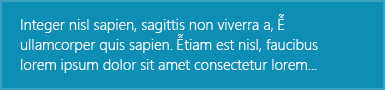 |
Text02 | 第一行上的一串大膽文本,一串常規文本包裹在第二行和第三行上。 | 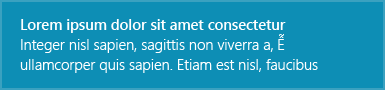 |
Text03 | 一串粗體文本包裹在前兩行中,第三行上的一串常規文本串。 | 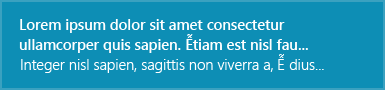 |
Text04 | 第一行上的一串粗體文本,第二行上的一串常規文本,第三行上的一串常規文本。 | 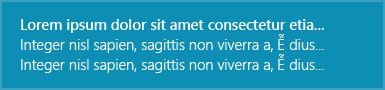 |
ImageAndText02模板的示例:
WinToastTemplate templ = WinToastTemplate(WinToastTemplate::ImageAndText02);
templ.setTextField( L" title " , WinToastTemplate::FirstLine);
templ.setTextField( L" subtitle " , WinToastTemplate::SecondLine);
templ.setImagePath( L" C:/example.png " ); 注意:用戶可以使用默認系統聲音或指定顯示敬酒通知時播放的聲音。烤麵包通知圖像的行為相同,默認情況下,Windows嘗試使用應用程序圖標。
Wintoast處理不同的事件:
創建您的自定義處理程序,通過將接口IWinToastHandler劃分來與用戶操作交互:
 class WinToastHandlerExample : public IWinToastHandler {
 public:
	WinToastHandlerExample ();
	// Public interfaces
	void toastActivated () const override ;
	void toastActivated ( int actionIndex) const override ;
	void toastDismissed (WinToastDismissalReason state) const override ;
	void toastFailed () const override ;
};此處的通知內容的完整文檔。
為了創建重要的通知,警報,提醒和傳入通知,您只需使用分配給它的方案值的普通應用通知即可。該方案調整了一些行為,以創建一致和統一的用戶體驗。有四個可能的方案值:
設置不再將敬酒通知的時間視為當前或有效的時間,不應顯示。 Windows試圖在您致電顯示後立即提出吐司通知,因此很少使用此屬性。
對於Windows 8.X應用程序,此屬性還會導致吐司通知一旦達到指定的數據和時間,就會從操作中心刪除。
注意:默認的Windows行為是在Windows易於訪問設置中設置的時間後自動隱藏通知。如果您需要在Windows Action Center中保存通知更長的時間,則必須調用WinToastTemplate::setExpiration方法。
Microsoft樣式指南建議用圓形圖像表示個人資料圖片,以提供跨應用程序和外殼的人的一致表示。將hintcrop特性設置為圓圈,以用圓形作物呈現圖像。
WinToastTemplate templ = WinToastTemplate(WinToastTemplate::ImageAndText02);
templ.setTextField( L" Matt sent you a friend request " , WinToastTemplate::FirstLine);
templ.setTextField( L" Hey, wanna dress up as wizards and ride around on hoverboards? " , WinToastTemplate::SecondLine);
templ.setImagePath( L" C:/example.png " );
templ.setHintCrop(WinToastTemplate::Circle);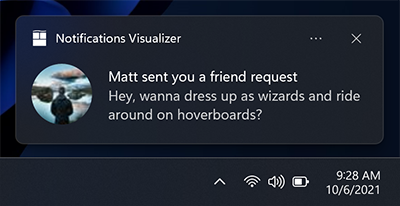
英雄圖像是出現在敬酒通知頂部的大圖像。英雄圖像是可選的,可用於為用戶提供其他上下文。
注意: Windows 8.1和Windows Phone 8.1不支持英雄圖像。
WinToastTemplate templ = WinToastTemplate(WinToastTemplate::ImageAndText02);
templ.setTextField( L" Mary Anne " , WinToastTemplate::FirstLine);
templ.setTextField( L" Check out where we camped last night! " , WinToastTemplate::SecondLine);
templ.setHeroImagePath( L" C:/example.png " );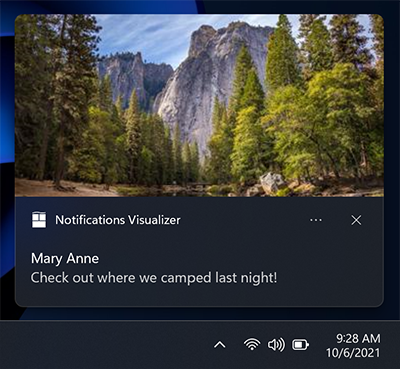
通過調用WinToastTemplate::setHeroImagePath方法來指定英雄圖像。圖像路徑可以是本地文件路徑或URI。
方法WinToastTemplate::setHeroImagePath的第二個參數是一個布爾值,該值指定圖像是否應在吐司通知中列入。
WinToastTemplate templ = WinToastTemplate(WinToastTemplate::ImageAndText01);
templ.setTextField( L" Feature image of the day " , WinToastTemplate::FirstLine);
templ.setHeroImagePath( L" C:/example.png " , true );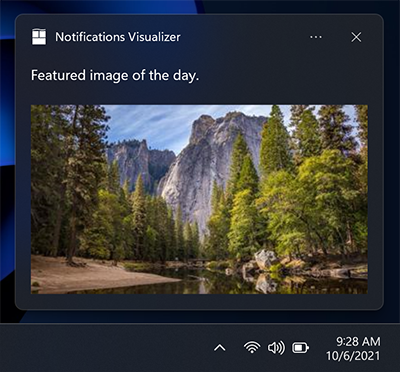
您可以添加自己的操作,這一事實使您可以以不同的方式與用戶交互:
WinToastTemplate templ = WinToastTemplate(WinToastTemplate::ImageAndText01);
templ.setTextField( L" New product in stock " , WinToastTemplate::FirstLine);

std::vector<std::wstring> actions;
actions.push_back( L" See more details " );
actions.push_back( L" Remind me later " );
// ...

for ( auto const &action : actions) {
    templ. addAction (action);
}
WinToast::instance ()->showToast(templ, handler) 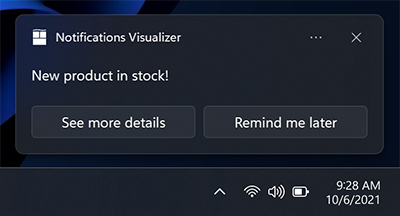
週年紀念更新中的新內容:如果您需要引用內容的來源,則可以使用歸因文本。該文本始終顯示在任何文本元素下方,但上方顯示了內聯圖像。該文本的尺寸比標准文本元素略小,以幫助區分常規文本元素。
WinToastTemplate templ = WinToastTemplate(WinToastTemplate::Text02);
templ.setTextField( L" Mary Anne " , WinToastTemplate::FirstLine);
templ.setTextField( L" Check out where we camped last night! " , WinToastTemplate::SecondLine);
templ.setHeroImagePath( L" C:/example.png " );
templ.setAttributionText( L" Via SMS " );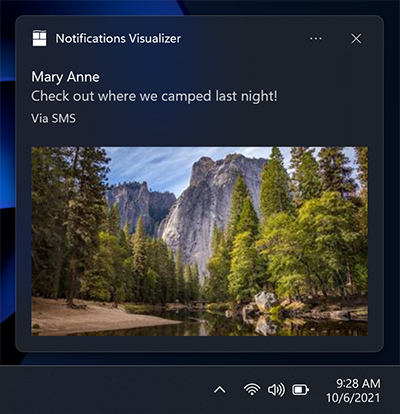
吐司應顯示的時間。此屬性可以具有以下值之一: -系統:默認系統配置。 -簡短:默認系統短期配置。 -長:默認系統長時間配置。
您可以修改聲音的不同行為: -默認值:僅一次播放音頻文件。 -沉默:關閉聲音。 -循環:在烤麵包存在期間,在循環中播放給定的聲音。
Wintoast允許修改默認音頻文件。將給定文件添加到您的項目資源中(必須是ms-appx://或ms-appdata:// path ),並通過致電:
WinToastTemplate::setAudioPath來定義它
默認情況下,Wintoast檢查您的系統是否支持這些功能,而忽略了不支持的功能。
Wintoast會失敗的原因有幾個原因,這就是為什麼圖書館通知呼叫者有關失敗原因的原因。這些是每個故障的代碼:
| Wintoasterror | 錯誤代碼 | 錯誤訊息 |
|---|---|---|
NoError | 0x00 | 沒有錯誤。該過程已正確執行 |
NotInitialized | 0x01 | 庫尚未初始化 |
SystemNotSupported | 0x02 | 操作系統不支持Wintoast |
ShellLinkNotCreated | 0x03 | 該庫無法為應用程序創建shell鏈接 |
InvalidAppUserModelID | 0x04 | AUMI不是有效的 |
InvalidParameters | 0x05 | 用於配置庫的參數由於無效的AUMI或APP名稱而無效 |
NotDisplayed | 0x06 | 吐司是正確創建的,但Wintoast無法顯示烤麵包 |
UnknownError | 0x07 | 未知錯誤 |
用法的一個常見示例是在初始化庫或顯示可能的失敗代碼時檢查或顯示吐司通知:
WinToast::WinToastError error;
const auto succedded = WinToast::instance()-> initialize (&error);
if (!succedded) {
    std::wcout << L" Error, could not initialize the lib. Error number: "
    << error << std::endl;
}
...
// Configure the template
...
const auto toast_id = WinToast::instance()-> showToast (templ, handler, &error);
if (toast_id < 0 ) {
    std::wcout << L" Error: Could not launch your toast notification. Error: "
     << error << std::endl;
}對於簡單的用法,您只需使用可用的Singleton實例即可。
第一步,將標題文件wintoastlib.h導入您的項目。您應該檢查庫是否支持Windows版本。
 using namespace WinToastLib ;
....
if (!WinToast::isCompatible()) {
    std::wcout << L" Error, your system in not supported! " << std::endl;
}
配置您的應用程序用戶模型ID,這可以使用現有的助手來完成:
 WinToast::instance ()->setAppName( L" WinToastExample " );
const auto aumi = WinToast::configureAUMI( L" mohabouje " , L" wintoast " , L" wintoastexample " , L" 20161006 " );
WinToast::instance ()->setAppUserModelId(aumi);
初始化所有依賴項,並檢查Wintoast是否已在您的系統中成功初始化:
 if (!WinToast::instance()-> initialize ()) {
  std::wcout << L" Error, could not initialize the lib! " << std::endl;
}通過將接口IWinToastHandler劃分並自定義模板來實現自己的操作處理程序:
WinToastHandlerExample* handler = new WinToastHandlerExample;
WinToastTemplate templ = WinToastTemplate(WinToastTemplate::ImageAndText02);
templ.setImagePath( L" C:/example.png " );
templ.setTextField( L" title " , WinToastTemplate::FirstLine);
templ.setTextField( L" subtitle " , WinToastTemplate::SecondLine);
最後顯示結果:
 const auto toast_id = WinToast::instance()-> showToast (templ, handler, &error);
if (toast_id < 0 ) {
    std::wcout << L" Error: Could not launch your toast notification! " << std::endl;
}
Shao Voon Wong寫了一篇關於Wintoast使用的精彩文章。您可以在這裡找到它。
如果您使用的是軟件包管理器,則有一個用於VCPKG的端口。否則,最簡單的方法是將源文件複製為外部依賴項。
Windows允許配置敬酒通知的默認行為。可以通過修改其他選項選項卡來易於訪問配置。
系統配置可幫助您定義要出現多長時間(5秒至5分鐘),以打開聲音的視覺通知。





