WinToast
v1.3.0

Wintoast是一个用C ++编写的轻微库,它可以完整整合Windows 8 , Windows 10和Windows 11的现代烤面包通知。
Toast通知允许您的应用程序通知用户有关他们应该在应用程序内部看到并采取行动的相关信息和及时的事件,例如新的即时消息,新朋友请求,新闻新闻或日历事件。
Wintoast集成了ToastTemplateType枚举中可用的所有标准模板。
| 模板 | 描述 | 例子 |
|---|---|---|
ImageAndText01 | 一个大图和一个弦包裹在三行文本上。 |  |
ImageAndText02 | 一个大图,第一行上的一串粗文本,一串常规文本包裹在第二行和第三行中。 |  |
ImageAndText03 | 一个大图像,一串大胆的文本包裹在前两行中,第三行上的一串常规文本串。 |  |
ImageAndText04 | 大图,第一行上的一串粗文本,第二行上的一串常规文本,第三行上的一串常规文本。 |  |
Text01 | 单字符串包裹在三行文本上。 | 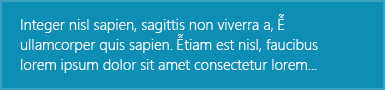 |
Text02 | 第一行上的一串大胆文本,一串常规文本包裹在第二行和第三行上。 | 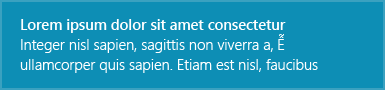 |
Text03 | 一串粗体文本包裹在前两行中,第三行上的一串常规文本串。 | 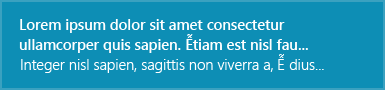 |
Text04 | 第一行上的一串粗体文本,第二行上的一串常规文本,第三行上的一串常规文本。 | 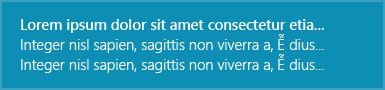 |
ImageAndText02模板的示例:
WinToastTemplate templ = WinToastTemplate(WinToastTemplate::ImageAndText02);
templ.setTextField( L" title " , WinToastTemplate::FirstLine);
templ.setTextField( L" subtitle " , WinToastTemplate::SecondLine);
templ.setImagePath( L" C:/example.png " ); 注意:用户可以使用默认系统声音或指定显示敬酒通知时播放的声音。烤面包通知图像的行为相同,默认情况下,Windows尝试使用应用程序图标。
Wintoast处理不同的事件:
创建您的自定义处理程序,通过将接口IWinToastHandler划分来与用户操作交互:
 class WinToastHandlerExample : public IWinToastHandler {
 public:
	WinToastHandlerExample ();
	// Public interfaces
	void toastActivated () const override ;
	void toastActivated ( int actionIndex) const override ;
	void toastDismissed (WinToastDismissalReason state) const override ;
	void toastFailed () const override ;
};此处的通知内容的完整文档。
为了创建重要的通知,警报,提醒和传入通知,您只需使用分配给它的方案值的普通应用通知即可。该方案调整了一些行为,以创建一致和统一的用户体验。有四个可能的方案值:
设置不再将敬酒通知的时间视为当前或有效的时间,不应显示。 Windows试图在您致电显示后立即提出吐司通知,因此很少使用此属性。
对于Windows 8.X应用程序,此属性还会导致吐司通知一旦达到指定的数据和时间,就会从操作中心删除。
注意:默认的Windows行为是在Windows易于访问设置中设置的时间后自动隐藏通知。如果您需要在Windows Action Center中保存通知更长的时间,则必须调用WinToastTemplate::setExpiration方法。
Microsoft样式指南建议用圆形图像表示个人资料图片,以提供跨应用程序和外壳的人的一致表示。将hintcrop特性设置为圆圈,以用圆形作物呈现图像。
WinToastTemplate templ = WinToastTemplate(WinToastTemplate::ImageAndText02);
templ.setTextField( L" Matt sent you a friend request " , WinToastTemplate::FirstLine);
templ.setTextField( L" Hey, wanna dress up as wizards and ride around on hoverboards? " , WinToastTemplate::SecondLine);
templ.setImagePath( L" C:/example.png " );
templ.setHintCrop(WinToastTemplate::Circle);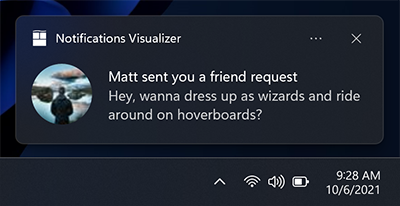
英雄图像是出现在敬酒通知顶部的大图像。英雄图像是可选的,可用于为用户提供其他上下文。
注意: Windows 8.1和Windows Phone 8.1不支持英雄图像。
WinToastTemplate templ = WinToastTemplate(WinToastTemplate::ImageAndText02);
templ.setTextField( L" Mary Anne " , WinToastTemplate::FirstLine);
templ.setTextField( L" Check out where we camped last night! " , WinToastTemplate::SecondLine);
templ.setHeroImagePath( L" C:/example.png " );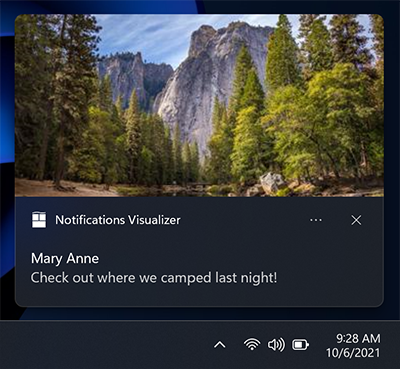
通过调用WinToastTemplate::setHeroImagePath方法来指定英雄图像。图像路径可以是本地文件路径或URI。
方法WinToastTemplate::setHeroImagePath的第二个参数是一个布尔值,该值指定图像是否应在吐司通知中列入。
WinToastTemplate templ = WinToastTemplate(WinToastTemplate::ImageAndText01);
templ.setTextField( L" Feature image of the day " , WinToastTemplate::FirstLine);
templ.setHeroImagePath( L" C:/example.png " , true );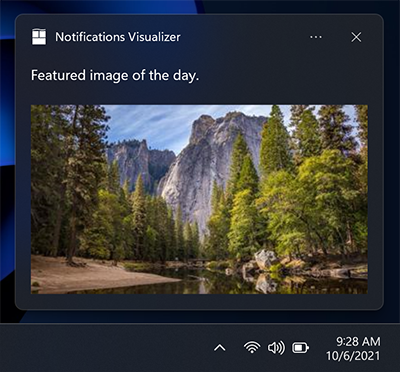
您可以添加自己的操作,这一事实使您可以以不同的方式与用户交互:
WinToastTemplate templ = WinToastTemplate(WinToastTemplate::ImageAndText01);
templ.setTextField( L" New product in stock " , WinToastTemplate::FirstLine);

std::vector<std::wstring> actions;
actions.push_back( L" See more details " );
actions.push_back( L" Remind me later " );
// ...

for ( auto const &action : actions) {
    templ. addAction (action);
}
WinToast::instance ()->showToast(templ, handler) 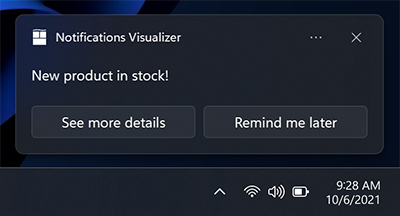
周年纪念更新中的新内容:如果您需要引用内容的来源,则可以使用归因文本。该文本始终显示在任何文本元素下方,但上方显示了内联图像。该文本的尺寸比标准文本元素略小,以帮助区分常规文本元素。
WinToastTemplate templ = WinToastTemplate(WinToastTemplate::Text02);
templ.setTextField( L" Mary Anne " , WinToastTemplate::FirstLine);
templ.setTextField( L" Check out where we camped last night! " , WinToastTemplate::SecondLine);
templ.setHeroImagePath( L" C:/example.png " );
templ.setAttributionText( L" Via SMS " );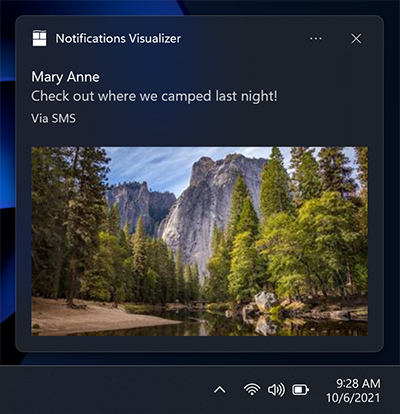
吐司应显示的时间。此属性可以具有以下值之一: -系统:默认系统配置。 -简短:默认系统短期配置。 -长:默认系统长时间配置。
您可以修改声音的不同行为: -默认值:仅一次播放音频文件。 -沉默:关闭声音。 -循环:在烤面包存在期间,在循环中播放给定的声音。
Wintoast允许修改默认音频文件。将给定文件添加到您的项目资源中(必须是ms-appx://或ms-appdata:// path ),并通过致电:
WinToastTemplate::setAudioPath来定义它
默认情况下,Wintoast检查您的系统是否支持这些功能,而忽略了不支持的功能。
Wintoast会失败的原因有几个原因,这就是为什么图书馆通知呼叫者有关失败原因的原因。这些是每个故障的代码:
| Wintoasterror | 错误代码 | 错误信息 |
|---|---|---|
NoError | 0x00 | 没有错误。该过程已正确执行 |
NotInitialized | 0x01 | 库尚未初始化 |
SystemNotSupported | 0x02 | 操作系统不支持Wintoast |
ShellLinkNotCreated | 0x03 | 该库无法为应用程序创建shell链接 |
InvalidAppUserModelID | 0x04 | AUMI不是有效的 |
InvalidParameters | 0x05 | 用于配置库的参数由于无效的AUMI或APP名称而无效 |
NotDisplayed | 0x06 | 吐司是正确创建的,但Wintoast无法显示烤面包 |
UnknownError | 0x07 | 未知错误 |
用法的一个常见示例是在初始化库或显示可能的失败代码时检查或显示吐司通知:
WinToast::WinToastError error;
const auto succedded = WinToast::instance()-> initialize (&error);
if (!succedded) {
    std::wcout << L" Error, could not initialize the lib. Error number: "
    << error << std::endl;
}
...
// Configure the template
...
const auto toast_id = WinToast::instance()-> showToast (templ, handler, &error);
if (toast_id < 0 ) {
    std::wcout << L" Error: Could not launch your toast notification. Error: "
     << error << std::endl;
}对于简单的用法,您只需使用可用的Singleton实例即可。
第一步,将标题文件wintoastlib.h导入您的项目。您应该检查库是否支持Windows版本。
 using namespace WinToastLib ;
....
if (!WinToast::isCompatible()) {
    std::wcout << L" Error, your system in not supported! " << std::endl;
}
配置您的应用程序用户模型ID,这可以使用现有的助手来完成:
 WinToast::instance ()->setAppName( L" WinToastExample " );
const auto aumi = WinToast::configureAUMI( L" mohabouje " , L" wintoast " , L" wintoastexample " , L" 20161006 " );
WinToast::instance ()->setAppUserModelId(aumi);
初始化所有依赖项,并检查Wintoast是否已在您的系统中成功初始化:
 if (!WinToast::instance()-> initialize ()) {
  std::wcout << L" Error, could not initialize the lib! " << std::endl;
}通过将接口IWinToastHandler划分并自定义模板来实现自己的操作处理程序:
WinToastHandlerExample* handler = new WinToastHandlerExample;
WinToastTemplate templ = WinToastTemplate(WinToastTemplate::ImageAndText02);
templ.setImagePath( L" C:/example.png " );
templ.setTextField( L" title " , WinToastTemplate::FirstLine);
templ.setTextField( L" subtitle " , WinToastTemplate::SecondLine);
最后显示结果:
 const auto toast_id = WinToast::instance()-> showToast (templ, handler, &error);
if (toast_id < 0 ) {
    std::wcout << L" Error: Could not launch your toast notification! " << std::endl;
}
Shao Voon Wong写了一篇关于Wintoast使用的精彩文章。您可以在这里找到它。
如果您使用的是软件包管理器,则有一个用于VCPKG的端口。否则,最简单的方法是将源文件复制为外部依赖项。
Windows允许配置敬酒通知的默认行为。可以通过修改其他选项选项卡来易于访问配置。
系统配置可帮助您定义要出现多长时间(5秒至5分钟),以打开声音的视觉通知。





