head_detector
1.0.0

Orest Kupyn 13 · Eugene Khvedchenia 2 ·基督徒Rupprecht 1 ·
1牛津大學· 2烏克蘭天主教大學· 3PiñataFarmsAI
VGGHEADS是用於人頭檢測的大規模完全合成數據集和3D網格估計,具有超過100萬張圖像的擴散模型。僅在合成數據上訓練的模型可以很好地推廣到現實世界,並且能夠同時從單個步驟中從單個圖像中進行重建。
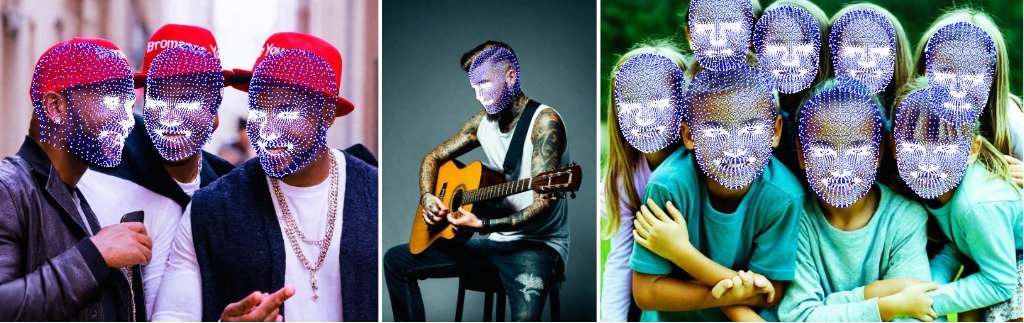
要下載vggheads數據集,您有兩個選擇:
pip install academictorrents
at-get 1ac36f16386061685ed303dea6f0d6179d2e2121
或使用Aria2c
aria2c --seed-time=0 --max-overall-download-limit=10M --file-allocation=none https://academictorrents.com/download/1ac36f16386061685ed303dea6f0d6179d2e2121.torrent完整的洪流鏈接
我們建議使用洪流方法,因為它通常更快,並有助於減少服務器上的負載。
wget https://thor.robots.ox.ac.uk/vgg-heads/VGGHeads.tar這將下載一個名為VGGHeads.tar的文件到您當前的目錄。
為了驗證下載文件的完整性,我們需要MD5校驗和。使用以下方式下載它們:
wget https://thor.robots.ox.ac.uk/vgg-heads/MD5SUMS下載兩個文件後,驗證VGGHeads.tar文件的完整性:
md5sum -c MD5SUMS如果下載成功並且文件完好無損,則應該看到一條“確定”消息。
如果驗證成功,請提取焦油文件的內容:
tar -xvf VGGHeads.tar這將將存檔的內容提取到您當前的目錄中。
筆記:
conda create --name vgg_heads python=3.10
conda activate vgg_headsgit clone https://github.com/KupynOrest/head_detector.git
cd head_detector
pip install -e ./或簡單地安裝
pip install git+https://github.com/KupynOrest/head_detector.git要在您自己的圖像上測試VGGHEADS模型,只需使用以下代碼:
 from head_detector import HeadDetector
import cv2
detector = HeadDetector ()
image_path = "your_image.jpg"
predictions = detector ( image_path )
# predictions.heads contain a list of heads with .bbox, .vertices_3d, .head_pose params
result_image = predictions . draw () # draw heads on the image
cv2 . imwrite ( "result.png" , result_image ) # save result image to preview it.您可以使用save_meshes方法將頭部網格作為OBJ文件導出:
 # After getting predictions
save_folder = "path/to/save/folder"
predictions . save_meshes ( save_folder )
這將保存指定文件夾中每個檢測到的頭部的單個OBJ文件。
要獲得對齊的頭部作物,請使用get_aligned_heads方法:
 # After getting predictions
aligned_heads = predictions . get_aligned_heads ()

# Process or save aligned head crops
for i , head in enumerate ( aligned_heads ):
    cv2 . imwrite ( f"aligned_head_ { i } .png" , head )
這返回了您可以進一步加工或保存的一排式頭部作物列表。
這是一個結合所有功能的完整示例:
 from head_detector import HeadDetector
import cv2
import os

# Initialize the detector
detector = HeadDetector ()

# Specify the path to your image
image_path = "your_image.jpg"

# Get predictions
predictions = detector ( image_path )

# Draw heads on the image
result_image = predictions . draw ()
cv2 . imwrite ( "result.png" , result_image )

# Save head meshes
save_folder = "head_meshes"
os . makedirs ( save_folder , exist_ok = True )
predictions . save_meshes ( save_folder )

# Get and save aligned head crops
aligned_heads = predictions . get_aligned_heads ()
for i , head in enumerate ( aligned_heads ):
    cv2 . imwrite ( f"aligned_head_ { i } .png" , head )

print ( f"Detected { len ( predictions . heads ) } heads." )
print ( f"Result image saved as 'result.png'" )
print ( f"Head meshes saved in ' { save_folder } ' folder" )
print ( f"Aligned head crops saved as 'aligned_head_*.png'" )
這個擴展的示例演示瞭如何使用VGGHEADS模型的所有功能,包括基本的頭部檢測,繪製結果,導出頭部網格以及獲得對齊的頭部作物。
此外,在HuggingFace上還可以使用ONNX權重。可以在:COLAB上找到推理的例子
我們還提供了一個Gradio演示,您可以在本地運行:
 cd gradio
pip install -r requirements.txt
python app.py您可以指定--server_port , --share , --server_name參數以滿足您的需求!
檢查yolo_head_training/Makefile以獲取火車腳本的示例。
要使用並行分佈式數據(DDP)對所有數據進行培訓,請使用以下命令:
torchrun --standalone --nnodes=1 --nproc_per_node=NUM_GPUS train.py --config-name=yolo_heads_l
    dataset_params.train_dataset_params.data_dir=DATA_FOLDER/large
    dataset_params.val_dataset_params.data_dir=DATA_FOLDER/large
    num_gpus=NUM_GPUS multi_gpu=DDP
替換以下佔位符:
NUM_GPUS :您要用於培訓的GPU數量。DATA_FOLDER :通往包含您提取的數據集的目錄的路徑。單個GPU培訓:如果您使用的是單個GPU,則可以簡化命令:
python train.py --config-name=yolo_heads_l
    dataset_params.train_dataset_params.data_dir=DATA_FOLDER/large
dataset_params.val_dataset_params.data_dir=DATA_FOLDER/large自定義配置:您可以修改--config-name參數以使用不同的模型配置。檢查項目目錄中的配置文件以獲取可用選項。
調整超參數:您可以通過將它們添加到命令行中調整各種超參數。例如:
python train.py --config-name=yolo_heads_l
    dataset_params.train_dataset_params.data_dir=DATA_FOLDER/large
    dataset_params.val_dataset_params.data_dir=DATA_FOLDER/large
    training_hyperparams.initial_lr=0.001
training_hyperparams.max_epochs=100恢復培訓:如果您需要從檢查站恢復培訓,則可以使用training_hyperparams.resume flag:
python train.py --config-name=yolo_heads_l
    dataset_params.train_dataset_params.data_dir=DATA_FOLDER/large
    dataset_params.val_dataset_params.data_dir=DATA_FOLDER/large
training_hyperparams.resume=True您可以通過控制台輸出監視訓練進度。考慮使用張量板等工具,以更詳細的監視和可視化培訓指標。
如果您發現Vggheads對您的研究和應用程序有用,請使用此Bibtex引用我們:
 @article { vggheads ,
      title = { VGGHeads: A Large-Scale Synthetic Dataset for 3D Human Heads } ,
      author = { Orest Kupyn and Eugene Khvedchenia and Christian Rupprecht } ,
      year = { 2024 } ,
      eprint = { 2407.18245 } ,
      archivePrefix = { arXiv } ,
      primaryClass = { cs.CV } ,
      url = { https://arxiv.org/abs/2407.18245 } ,
}
這項工作是根據創意共享歸因於非商業4.0國際許可證獲得許可的。





