head_detector
1.0.0

Orest Kupyn13 · Eugene Khvedchenia2 · Christian Rupprecht1 ·
1University of Oxford · 2Ukrainian Catholic University · 3PiñataFarms AI
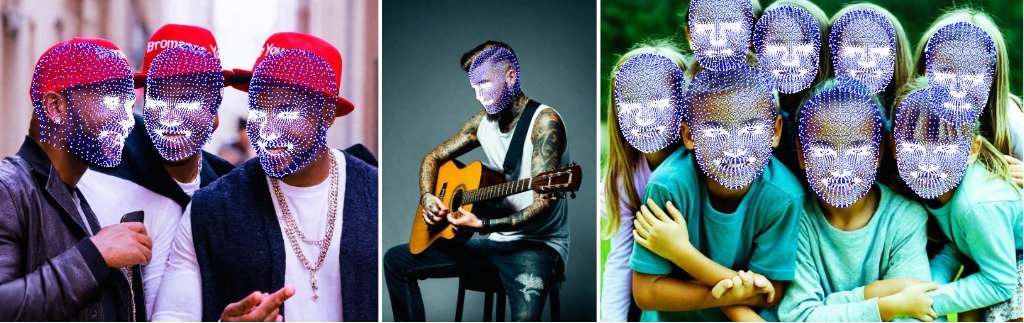
VGGHeads is a large-scale fully synthetic dataset for human head detection and 3D mesh estimation with over 1 million images generated with diffusion models. A model trained only on synthetic data generalizes well to real-world and is capable of simultaneous heads detection and head meshes reconstruction from a single image in a single step.
To download the VGGHeads dataset, you have two options:
pip install academictorrents
at-get 1ac36f16386061685ed303dea6f0d6179d2e2121
or use aria2c
aria2c --seed-time=0 --max-overall-download-limit=10M --file-allocation=none https://academictorrents.com/download/1ac36f16386061685ed303dea6f0d6179d2e2121.torrentFull Torrent Link
We recommend using the torrent method as it's typically faster and helps reduce the load on our servers.
wget https://thor.robots.ox.ac.uk/vgg-heads/VGGHeads.tarThis will download a file named VGGHeads.tar to your current directory.
To verify the integrity of the downloaded file, we'll need the MD5 checksums. Download them using:
wget https://thor.robots.ox.ac.uk/vgg-heads/MD5SUMSAfter both files are downloaded, verify the integrity of the VGGHeads.tar file:
md5sum -c MD5SUMSIf the download was successful and the file is intact, you should see an "OK" message.
If the verification was successful, extract the contents of the tar file:
tar -xvf VGGHeads.tarThis will extract the contents of the archive into your current directory.
Notes:
conda create --name vgg_heads python=3.10
conda activate vgg_headsgit clone https://github.com/KupynOrest/head_detector.git
cd head_detector
pip install -e ./Or simply install
pip install git+https://github.com/KupynOrest/head_detector.gitTo test VGGHeads model on your own images simply use this code:
from head_detector import HeadDetector
import cv2
detector = HeadDetector()
image_path = "your_image.jpg"
predictions = detector(image_path)
# predictions.heads contain a list of heads with .bbox, .vertices_3d, .head_pose params
result_image = predictions.draw() # draw heads on the image
cv2.imwrite("result.png",result_image) # save result image to preview it.You can export head meshes as OBJ files using the save_meshes method:
# After getting predictions
save_folder = "path/to/save/folder"
predictions.save_meshes(save_folder)
This will save individual OBJ files for each detected head in the specified folder.
To obtain aligned head crops, use the get_aligned_heads method:
# After getting predictions
aligned_heads = predictions.get_aligned_heads()

# Process or save aligned head crops
for i, head in enumerate(aligned_heads):
    cv2.imwrite(f"aligned_head_{i}.png", head)
This returns a list of aligned head crops that you can further process or save.
Here's a complete example incorporating all features:
from head_detector import HeadDetector
import cv2
import os

# Initialize the detector
detector = HeadDetector()

# Specify the path to your image
image_path = "your_image.jpg"

# Get predictions
predictions = detector(image_path)

# Draw heads on the image
result_image = predictions.draw()
cv2.imwrite("result.png", result_image)

# Save head meshes
save_folder = "head_meshes"
os.makedirs(save_folder, exist_ok=True)
predictions.save_meshes(save_folder)

# Get and save aligned head crops
aligned_heads = predictions.get_aligned_heads()
for i, head in enumerate(aligned_heads):
    cv2.imwrite(f"aligned_head_{i}.png", head)

print(f"Detected {len(predictions.heads)} heads.")
print(f"Result image saved as 'result.png'")
print(f"Head meshes saved in '{save_folder}' folder")
print(f"Aligned head crops saved as 'aligned_head_*.png'")
This extended example demonstrates how to use all the features of the VGGHeads model, including basic head detection, drawing results, exporting head meshes, and obtaining aligned head crops.
Additionally, the ONNX weights are available at HuggingFace. The example of the inference can be found at: Colab
We also provide a Gradio demo, which you can run locally:
cd gradio
pip install -r requirements.txt
python app.py
You can specify the --server_port, --share, --server_name arguments to satisfy your needs!
Check yolo_head_training/Makefile for examples of train scripts.
To run the training on all data with Distributed Data Parallel (DDP), use the following command:
torchrun --standalone --nnodes=1 --nproc_per_node=NUM_GPUS train.py --config-name=yolo_heads_l
    dataset_params.train_dataset_params.data_dir=DATA_FOLDER/large
    dataset_params.val_dataset_params.data_dir=DATA_FOLDER/large
    num_gpus=NUM_GPUS multi_gpu=DDP
Replace the following placeholders:
NUM_GPUS: The number of GPUs you want to use for training.DATA_FOLDER: The path to the directory containing your extracted dataset.Single GPU Training: If you're using a single GPU, you can simplify the command:
python train.py --config-name=yolo_heads_l
    dataset_params.train_dataset_params.data_dir=DATA_FOLDER/large
    dataset_params.val_dataset_params.data_dir=DATA_FOLDER/large
Custom Configuration:
You can modify the --config-name parameter to use different model configurations. Check the configuration files in the project directory for available options.
Adjusting Hyperparameters: You can adjust various hyperparameters by adding them to the command line. For example:
python train.py --config-name=yolo_heads_l
    dataset_params.train_dataset_params.data_dir=DATA_FOLDER/large
    dataset_params.val_dataset_params.data_dir=DATA_FOLDER/large
    training_hyperparams.initial_lr=0.001
    training_hyperparams.max_epochs=100
Resuming Training:
If you need to resume training from a checkpoint, you can use the training_hyperparams.resume flag:
python train.py --config-name=yolo_heads_l
    dataset_params.train_dataset_params.data_dir=DATA_FOLDER/large
    dataset_params.val_dataset_params.data_dir=DATA_FOLDER/large
training_hyperparams.resume=TrueYou can monitor the training progress through the console output. Consider using tools like TensorBoard for more detailed monitoring and visualization of training metrics.
If you find VGGHeads useful for your research and applications, please cite us using this BibTeX:
@article{vggheads,
      title={VGGHeads: A Large-Scale Synthetic Dataset for 3D Human Heads},
      author={Orest Kupyn and Eugene Khvedchenia and Christian Rupprecht},
      year={2024},
      eprint={2407.18245},
      archivePrefix={arXiv},
      primaryClass={cs.CV},
      url={https://arxiv.org/abs/2407.18245},
}
This work is licensed under a Creative Commons Attribution-NonCommercial 4.0 International License.





