dewy
v0.4.0


AI代應用的自以為是的知識提取和語義檢索。
探索文檔»
報告錯誤·請求功能
Dewy通過從文檔中提取知識並在提取的內容上實施語義搜索來幫助您構建AI代理和抹布應用程序。加載您的文檔,露水負責解析,分解,總結和索引以進行檢索。 Dewy建立在將真正的AI應用程序投入生產的課程的基礎上,因此您可以專注於獲得?完成,而不是比較矢量數據庫和構建數據提取基礎架構。
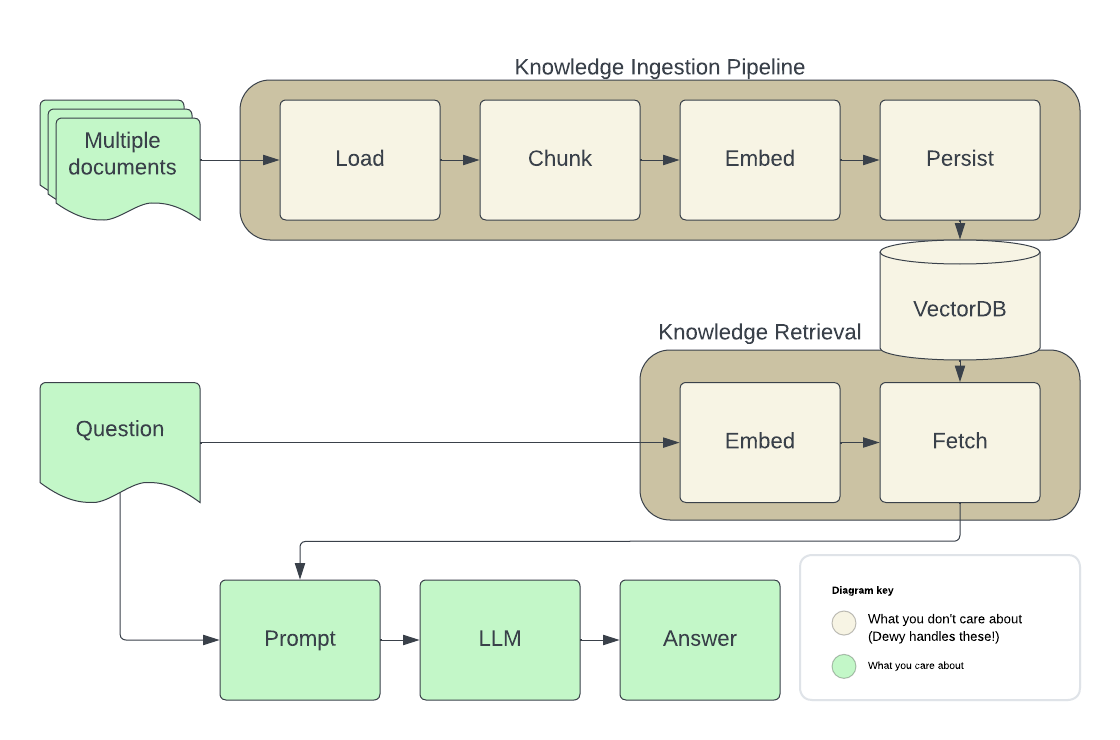
以下是執行抹布的AI代理的典型體系結構。露水處理棕色顯示的所有零件,因此您可以專注於應用程序 - 綠色的零件。
(返回到頂部)
要啟動並運行本地副本,請按照以下步驟操作。
(可選)啟動一個pgvector實例以持續您的數據
Dewy使用矢量數據庫存儲有關已加載的文檔以及用於提供語義搜索結果的嵌入的元數據。
docker run -d
  -p 5432:5432
  -e POSTGRES_DB=dewydb
  -e POSTGRES_USER=dewydbuser
  -e POSTGRES_PASSWORD=dewydbpwd
  -e POSTGRES_HOST_AUTH_METHOD=trust
ankane/pgvector如果您已經有一個pgvector實例,則可以創建一個數據庫,用於露水,並使用DB env var使用露水(見下文)。
安裝露水
pip install dewy
這將在您當地的Python環境中安裝Dewy。
配置露水。如果提供,露水將從.env文件中讀取Env vars。您也可以直接在環境中設置這些設置,例如,在配置Docker / Kubernetes中運行的實例時。
 # ~/.env
ENVIRONMENT=LOCAL
DB=postgresql://...
OPENAI_API_KEY=...
開火露水
dewy露水包括一個管理控制台,您可以用來創建集合,加載文檔和運行測試查詢。
open http://localhost:8000/admin安裝API客戶庫庫
npm install dewy-ts連接到露水的實例
 import { Dewy } from 'dewy_ts' ;
const dewy = new Dewy ( )
添加文檔
 await dewy . kb . addDocument ( {
  collection_id : 1 ,
  url : “https : //arxiv.org/abs/2005.11401”,
} )
檢索llm提示的文檔塊
 const context = await dewy . kb . retrieveChunks ( {
  collection_id : 1 ,
  query : "tell me about RAG" ,
  n : 10 ,
} ) ;

// Minimal prompt example
const prompt = [
  {
    role : 'system' ,
    content : `You are a helpful assistant.
    You will take into account any CONTEXT BLOCK that is provided in a conversation.
    START CONTEXT BLOCK
    ${ context . results . map ( ( c : any ) => c . chunk . text ) . join ( "n" ) }
    END OF CONTEXT BLOCK
    ` ,
  } ,
]

// Using OpenAI to generate responses
const response = await openai . chat . completions . create ( {
  model : 'gpt-3.5-turbo' ,
  stream : true ,
  messages : [ ... prompt , [ { role : 'user' : content : 'Tell me about RAG' } ] ]
} )安裝API客戶庫庫
pip install dewy-client連接到露水的實例
 from dewy_client import Client
dewy = Client ( base_url = "http://localhost:8000" )
添加文檔
 from dewy_client . api . kb import add_document
from dewy_client . models import AddDocumentRequest
await add_document . asyncio ( client = dewy , body = AddDocumentRequest (
  collection_id = 1 ,
  url = “ https : // arxiv . org / abs / 2005.11401 ”,
))
檢索llm提示的文檔塊
 from dewy_client . api . kb import retrieve_chunks
from dewy_client . modles import RetrieveRequest
chunks = await retrieve_chunks . asyncio ( client = dewy , body = RetrieveRequest (
  collection_id = 1 ,
  query = "tell me about RAG" ,
  n = 10 ,
))

# Minimal prompt example
prompt = f"""
You will take into account any CONTEXT BLOCK that is provided in a conversation.
  START CONTEXT BLOCK
  { " n " . join ([ chunk . text for chunk in chunks . text_chunks ]) }
  END OF CONTEXT BLOCK
"""
參見[ python-langchain.ipynb'](demos/python-langchain-notebook/python-langchain.ipynb) for an example using Dewy in LangChain, including an implementation of LangChain's 。
露水正在積極發展。這是我們當前路線圖的概述 - 請?對您來說很重要的問題。看不到可以使露水更適合您的應用程序的功能 - 創建功能請求!
貢獻是使開源社區成為學習,啟發和創造的驚人場所的原因。您所做的任何貢獻都非常感謝。
如果您有一個可以使情況變得更好的建議,請分配存儲庫並創建拉動請求。您也可以簡單地使用標籤“增強”打開問題。別忘了給項目一個明星!再次感謝!
git checkout -b feature/AmazingFeature )git commit -m 'Add some AmazingFeature' )git push origin feature/AmazingFeature )git clone https://github.com/DewyKB/dewy.gitpoetry install.env文件中讀取Env vars。您也可以直接在環境中設置這些設置,例如,在配置Docker / Kubernetes中運行的實例時。 cat > .env << EOF
ENVIRONMENT=LOCAL
DB=postgresql://...
OPENAI_API_KEY=...
EOF cd frontend && npm install && npm run build cd dewy-client && poetry installpoetry run dewy一些基於https://github.com/zhanymkanov/fastapi-best-practices的最佳實踐的骨架代碼。
以下命令運行測試並應用絨毛。如果您在poetry shell中,可以省略poetry run :
poetry run pytestpoetry run ruff check --fixpoetry run ruff formatpoetry run mypy dewy再生OpenAPI規範和客戶端庫:
poetry poe extract-openapi
poetry poe update-client
(返回到頂部)
釋放pyproject.toml用於dewy b。 dewy-client/pyproject.toml用於dewy-client c。 dewy/config.py d中的API版本。 openapi.yaml和dewy-client通過運行poe extract-openapi和poe update-client 。dewy和dewy-client套件。(返回到頂部)
根據Apache 2許可證分發。有關更多信息,請參見LICENSE.txt 。
(返回到頂部)





