dewy
v0.4.0


Opinionated knowledge extraction and semantic retrieval for Gen AI applications.
Explore the docs »
Report Bug
·
Request Feature
Dewy helps you build AI agents and RAG applications by managing the extraction of knowledge from your documents and implementing semantic search over the extracted content. Load your documents and Dewy takes care of parsing, chunking, summarizing, and indexing for retrieval. Dewy builds on the lessons of putting real Gen AI applications into production so you can focus on getting ? done, rather than comparing vector databases and building data extraction infrastructure.
Below is the typical architecture of an AI agent performing RAG. Dewy handles all of the parts shown in brown so you can focus on your application -- the parts in green.
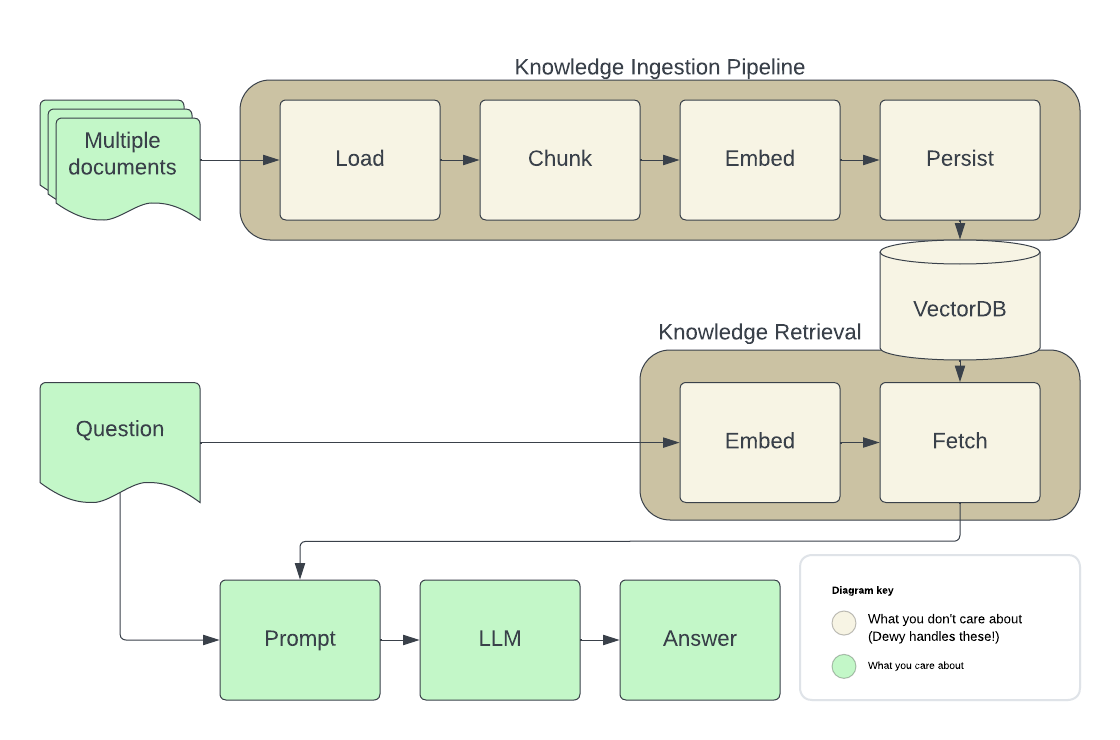
(back to top)
To get a local copy up and running follow these steps.
(Optional) Start a pgvector instance to persist your data
Dewy uses a vector database to store metadata about the documents you've loaded as well as embeddings used to provide semantic search results.
docker run -d
  -p 5432:5432
  -e POSTGRES_DB=dewydb
  -e POSTGRES_USER=dewydbuser
  -e POSTGRES_PASSWORD=dewydbpwd
  -e POSTGRES_HOST_AUTH_METHOD=trust
  ankane/pgvector
If you already have an instance of pgvector you can create a database for Dewy and configure Dewy use it using the DB env var (see below).
Install Dewy
pip install dewy
This will install Dewy in your local Python environment.
Configure Dewy.
Dewy will read env vars from an .env file if provided. You can also set these directly
in the environment, for example when configuring an instance running in docker / kubernetes.
# ~/.env
ENVIRONMENT=LOCAL
DB=postgresql://...
OPENAI_API_KEY=...
Fire up Dewy
dewyDewy includes an admin console you can use to create collections, load documents, and run test queries.
open http://localhost:8000/adminInstall the API client library
npm install dewy-tsConnect to an instance of Dewy
import { Dewy } from 'dewy_ts';
const dewy = new Dewy()
Add documents
await dewy.kb.addDocument({
  collection_id: 1,
  url: “https://arxiv.org/abs/2005.11401”,
})
Retrieve document chunks for LLM prompting
const context = await dewy.kb.retrieveChunks({
  collection_id: 1,
  query: "tell me about RAG",
  n: 10,
});

// Minimal prompt example
const prompt = [
  {
    role: 'system',
    content: `You are a helpful assistant.
    You will take into account any CONTEXT BLOCK that is provided in a conversation.
    START CONTEXT BLOCK
    ${context.results.map((c: any) => c.chunk.text).join("n")}
    END OF CONTEXT BLOCK
    `,
  },
]

// Using OpenAI to generate responses
const response = await openai.chat.completions.create({
  model: 'gpt-3.5-turbo',
  stream: true,
  messages: [...prompt, [{role: 'user': content: 'Tell me about RAG'}]]
})Install the API client library
pip install dewy-clientConnect to an instance of Dewy
from dewy_client import Client
dewy = Client(base_url="http://localhost:8000")
Add documents
from dewy_client.api.kb import add_document
from dewy_client.models import AddDocumentRequest
await add_document.asyncio(client=dewy, body=AddDocumentRequest(
  collection_id = 1,
  url = “https://arxiv.org/abs/2005.11401”,
))
Retrieve document chunks for LLM prompting
from dewy_client.api.kb import retrieve_chunks
from dewy_client.modles import RetrieveRequest
chunks = await retrieve_chunks.asyncio(client=dewy, body=RetrieveRequest(
  collection_id = 1,
  query = "tell me about RAG",
  n = 10,
))

# Minimal prompt example
prompt = f"""
You will take into account any CONTEXT BLOCK that is provided in a conversation.
  START CONTEXT BLOCK
  {"n".join([chunk.text for chunk in chunks.text_chunks])}
  END OF CONTEXT BLOCK
"""
See [python-langchain.ipynb'](demos/python-langchain-notebook/python-langchain.ipynb) for an example using Dewy in LangChain, including an implementation of LangChain's BaseRetriever` backed by Dewy.
Dewy is under active development. This is an overview of our current roadmap - please ? issues that are important to you. Don't see a feature that would make Dewy better for your application - create a feature request!
Contributions are what make the open source community such an amazing place to learn, inspire, and create. Any contributions you make are greatly appreciated.
If you have a suggestion that would make this better, please fork the repo and create a pull request. You can also simply open an issue with the tag "enhancement". Don't forget to give the project a star! Thanks again!
git checkout -b feature/AmazingFeature)git commit -m 'Add some AmazingFeature')git push origin feature/AmazingFeature)git clone https://github.com/DewyKB/dewy.gitpoetry install.env file if provided. You can also set these directly
in the environment, for example when configuring an instance running in docker / kubernetes.
cat > .env << EOF
ENVIRONMENT=LOCAL
DB=postgresql://...
OPENAI_API_KEY=...
EOFcd frontend && npm install && npm run buildcd dewy-client && poetry installpoetry run dewySome skeleton code based on best practices from https://github.com/zhanymkanov/fastapi-best-practices.
The following commands run tests and apply linting.
If you're in a poetry shell, you can omit the poetry run:
poetry run pytest
poetry run ruff check --fix
poetry run ruff format
poetry run mypy dewy
To regenerate the OpenAPI spec and client libraries:
poetry poe extract-openapi
poetry poe update-client
(back to top)
Releasingpyproject.toml for dewy
b. dewy-client/pyproject.toml for dewy-client
c. API version in dewy/config.py
d. openapi.yaml and dewy-client by running poe extract-openapi and poe update-client.dewy and dewy-client packages.(back to top)
Distributed under the Apache 2 License. See LICENSE.txt for more information.
(back to top)





