TalkWithGemini
v0.12.3

Deploy your private Gemini application for free with one click, supporting Gemini 1.5 Pro, Gemini 1.5 Flash, Gemini Pro and Gemini Pro Vision models.
一鍵免費部署您的私人Gemini 應用, 支持Gemini 1.5 Pro、Gemini 1.5 Flash、Gemini Pro 和Gemini Pro Vision 模型。
Web App / Desktop App / Issues
網頁版/ 客戶端/ 反饋
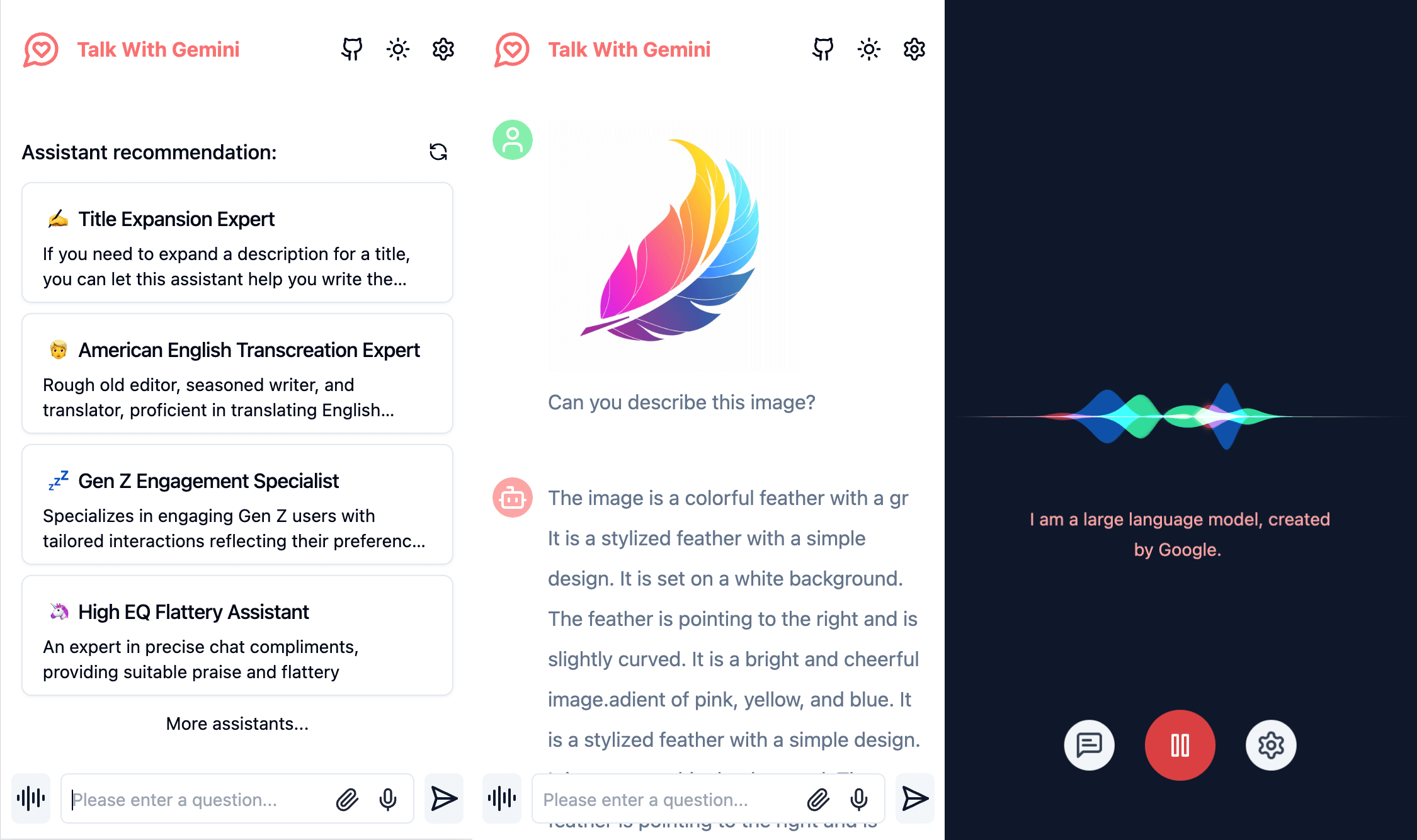
Simple interface, supports image recognition and voice conversation
簡潔的界面,支持圖片識別和語音對話
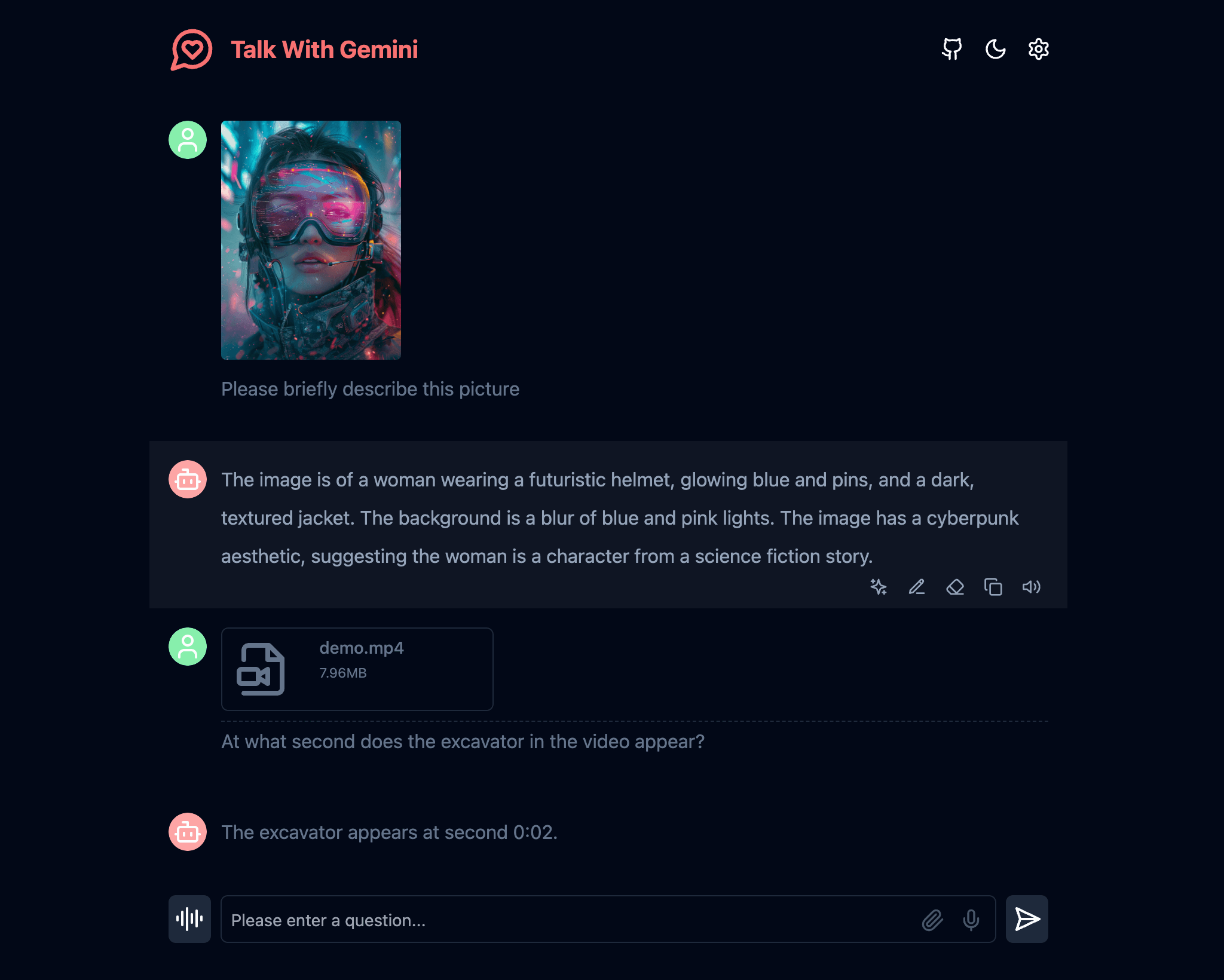
Supports Gemini 1.5 and Gemini 1.5 Flash multimodal models
支持Gemini 1.5 和Gemini 1.5 Flash 多模態模型
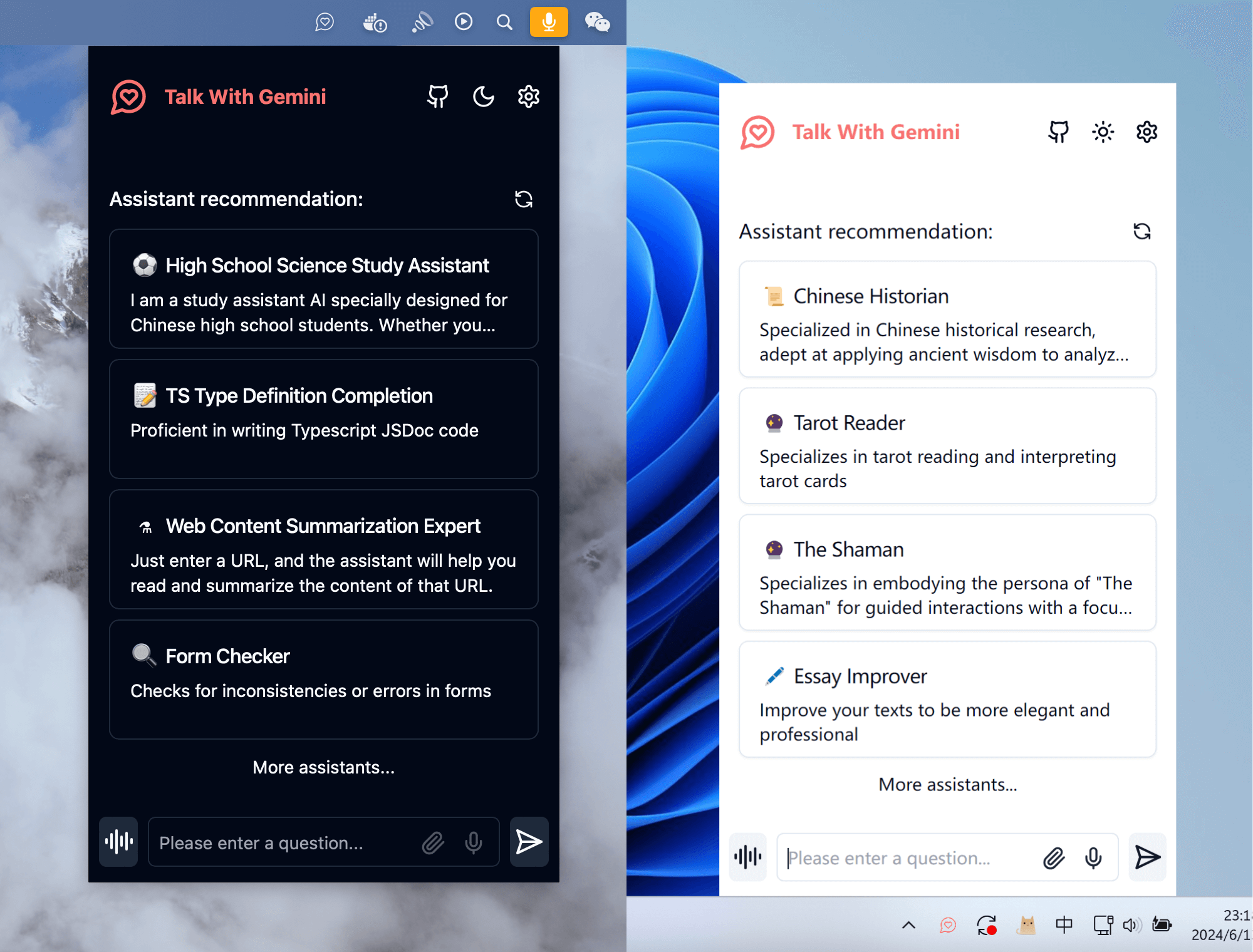
A cross-platform application client that supports a permanent menu bar, doubling your work efficiency
跨平台的應用客戶端,支持常駐菜單欄,讓您的工作效率翻倍
Note: If you encounter problems during the use of the project, you can check the known problems and solutions of FAQ.
注意:如果您項目使用過程中遇到問題,可以查看常見問題的已知問題及解決方案。
If you want to update instantly, you can check out the GitHub documentation to learn how to synchronize a forked project with upstream code.
You can star or watch this project or follow author to get release notifications in time.
如果你想立即更新,可以查看GitHub文檔以了解如何將分叉項目與上游代碼同步。
您可以關注該項目或關注作者以及時獲取發布通知。
This project provides limited access control. Please add an environment variable named ACCESS_PASSWORD on the vercel environment variables page.
After adding or modifying this environment variable, please redeploy the project for the changes to take effect.
項目提供訪問控制。請在.env文件或環境變量頁面添加名為ACCESS_PASSWORD的環境變量。
添加或修改此環境變量後,請重新部署項目以使更改生效。
This project supports custom model lists. Please add an environment variable named NEXT_PUBLIC_GEMINI_MODEL_LIST in the .env file or environment variables page.
The default model list is represented by all , and multiple models are separated by , .
If you need to add a new model, please directly write the model name all,new-model-name , or use the + symbol plus the model name to add, that is, all,+new-model-name .
If you want to remove a model from the model list, use the - symbol followed by the model name to indicate removal, ie all,-existing-model-name . If you want to remove the default model list, you can use -all .
If you want to set a default model, you can use the @ symbol plus the model name to indicate the default model, that is, all,@default-model-name .
本項目支持自定義模型列表。請在.env文件或環境變量頁面添加名為NEXT_PUBLIC_GEMINI_MODEL_LIST的環境變量。
默認模型列表使用all表示,多個模型之間使用,分隔。
如果需要增加新的模型請直接寫入模型名稱all,new-model-name ,或使用+符號加上模型all,+new-model-name 。
如果要移除模型列表中的某個模型,請使用-符號加上all,-existing-model-name name 。如果要移除默認模型列表,可以用-all表示。
如果要設定默認模型,可以使用@符號加上all,@default-model-name model-name 。
GEMINI_API_KEY (optional) Your Gemini api key. If you need to enable the server api, this is required.
GEMINI_API_BASE_URL (optional)Default:
https://generativelanguage.googleapis.com
Examples:
http://your-gemini-proxy.com
Override Gemini api request base url. **To avoid server-side proxy url leaks, links in front-end pages will not be overwritten. **
GEMINI_UPLOAD_BASE_URL (optional)Default:
https://generativelanguage.googleapis.com
Example:
http://your-gemini-upload-proxy.com
Override Gemini file upload api base url. **To avoid server-side proxy url leaks, links in front-end pages will not be overwritten. **
NEXT_PUBLIC_GEMINI_MODEL_LIST (optional)Custom model list, default: all.
NEXT_PUBLIC_ASSISTANT_INDEX_URL (optional)Default:
https://chat-agents.lobehub.com
Examples:
http://your-assistant-market-proxy.com
Override assistant market api request base url. The api link in the front-end interface will be adjusted synchronously.
NEXT_PUBLIC_UPLOAD_LIMIT (optional)File upload size limit. There is no file size limit by default.
ACCESS_PASSWORD (optional)Access password.
HEAD_SCRIPTS (optional)Injected script code can be used for statistics or error tracking.
EXPORT_BASE_PATH (optional)Only used to set the page base path in static deployment mode.
GEMINI_API_KEY (可選)您的Gemini api 密鑰。 如果您需要“啟用”服務器api,這是必需的。
GEMINI_API_BASE_URL (可選)默認值:
https://generativelanguage.googleapis.com
示例:
http://your-gemini-proxy.com
覆蓋Gemini api 請求基本url。為了避免服務端代理url 洩漏,不會覆蓋前端頁面中的鏈接。
GEMINI_UPLOAD_BASE_URL (可選)默認值:
https://generativelanguage.googleapis.com
示例:
http://your-gemini-upload-proxy.com
覆蓋Gemini 文件上傳api 基本url。為了避免服務端代理url 洩漏,不會覆蓋前端頁面中的鏈接。
NEXT_PUBLIC_GEMINI_MODEL_LIST (可選)自定義模型列表,默認為: all。
NEXT_PUBLIC_ASSISTANT_INDEX_URL (可選)默認值:
https://chat-agents.lobehub.com
示例:
http://your-assistant-market-proxy.com
覆蓋助理市場api 請求基本url。會同步調整前端界面中的api 鏈接。
NEXT_PUBLIC_UPLOAD_LIMIT (可選)文件上傳大小限制。默認不限製文件大小。
ACCESS_PASSWORD (可選)訪問密碼。
HEAD_SCRIPTS (可選)用於注入的腳本代碼可用於統計或錯誤跟踪。
EXPORT_BASE_PATH (可選)僅用於靜態部署模式下設置頁面基礎路徑。
NodeJS >= 18, Docker >= 20
NodeJS >= 18,Docker >= 20
If you have not installed pnpm
npm install -g pnpm # 1. install nodejs and yarn first
# 2. config local variables, please change `.env.example` to `.env` or `.env.local`
# 3. run
pnpm install
pnpm dev如果您沒安裝過pnpm
npm install -g pnpm # 1. 先安装nodejs和yarn
# 2. 配置本地变量,请将 `.env.example` 改为 `.env` 或 `.env.local`
# 3. 运行
pnpm install
pnpm devThe Docker version needs to be 20 or above, otherwise it will prompt that the image cannot be found.
️ Note: Most of the time, the docker version will lag behind the latest version by 1 to 2 days, so the "update exists" prompt will continue to appear after deployment, which is normal.
docker pull xiangfa/talk-with-gemini:latest

docker run -d --name talk-with-gemini -p 5481:3000 xiangfa/talk-with-gemini
You can also specify additional environment variables:
docker run -d --name talk-with-gemini
   -p 5481:3000
   -e GEMINI_API_KEY=AIzaSy...
   -e ACCESS_PASSWORD=your-password
   xiangfa/talk-with-gemini
If you need to specify other environment variables, please add -e key=value to the above command to specify it.
Deploy using docker-compose.yml :
version: ' 3.9 '
services:
   talk-with-gemini:
      image: xiangfa/talk-with-gemini
      container_name: talk-with-gemini
      environment:
         - GEMINI_API_KEY=AIzaSy...
         - ACCESS_PASSWORD=your-password
      ports:
- 5481:3000Docker 版本需要在20 及其以上,否則會提示找不到鏡像。
️ 注意:docker 版本在大多數時間都會落後最新的版本1 到2 天,所以部署後會持續出現“存在更新”的提示,屬於正常現象。
docker pull xiangfa/talk-with-gemini:latest

docker run -d --name talk-with-gemini -p 5481:3000 xiangfa/talk-with-gemini
您也可以指定額外的環境變量:
docker run -d --name talk-with-gemini
   -p 5481:3000
   -e GEMINI_API_KEY=AIzaSy...
   -e ACCESS_PASSWORD=your-password
xiangfa/talk-with-gemini如果您需要指定其他環境變量,請自行在上述命令中增加-e 环境变量=环境变量值來指定。
使用docker-compose.yml部署:
version: ' 3.9 '
services:
   talk-with-gemini:
      image: xiangfa/talk-with-gemini
      container_name: talk-with-gemini
      environment:
         - GEMINI_API_KEY=AIzaSy...
         - ACCESS_PASSWORD=your-password
      ports:
- 5481:3000 You can also build a static page version directly, and then upload all files in the out directory to any website service that supports static pages, such as Github Page, Cloudflare, Vercel, etc..
pnpm build:export If you deploy the project in a subdirectory and encounter resource loading failures when accessing, please add EXPORT_BASE_PATH=/path/project in the .env file or variable setting page.
您也可以直接構建靜態頁面版本,然後將out目錄下的所有文件上傳到任何支持靜態頁面的網站服務,比如Github Page、Cloudflare、Vercel 等。
pnpm build:export如果您將項目部署在子目錄下,在訪問時會遇到資源加載失敗的情況,請在.env文件或者變量設置頁面增加EXPORT_BASE_PATH=/路径/项目名称。
The currently known vercel and netlify both use serverless edge computing. Although the response speed is fast, they have size restrictions on uploaded files. Cloudflare Worker has relatively loose limits on large files (500MB for free users, 5GB for paid users) and can be used as an api proxy. How to deploy the Cloudflare Worker api proxy
Currently, the two models Gemini 1.5 Pro and Gemini 1.5 Flash support most images, audios, videos and some text files. For details, see Support List. For other document types, we will try to use LangChain.js later.
可以參考以下兩個Gemini Api 代理項目gemini-proxy 和palm-netlify-proxy 的部署方式。
注意Vercel 和Netlify 禁止用戶部署代理服務,該解決方案可能會導致封號,需謹慎使用
目前了解到的vercel 與netlify 都使用了無服務器的邊緣計算,雖然響應速度快,但對於上傳文件有大小限制。 Cloudflare Worker 對於大文件限制(免費用戶500MB,收費用戶5GB)相對寬鬆,可以用做api 代理。如何部署Cloudflare Worker api 代理
目前語音識別使用的是瀏覽器的SpeechRecognition 接口,系統會在部分不支持SpeechRecognition 接口的瀏覽器中隱藏語音對話功能。
由於大部分基於Chrome 內核的瀏覽器在SpeechRecognition 接口的實現上使用了Google 的語音識別服務,因此需要能夠正常訪問國際網絡的情況下使用。
目前Gemini 1.5 Pro和Gemini 1.5 Flash這兩個模型支持的大部分的圖片、音頻、視頻和部分文本類的文件,詳見支持列表。對於其他文檔類型,後續將嘗試使用LangChain.js 來實現。
vercel 部署後生成的域名在幾年前就已經被國內網絡屏蔽,但並沒有屏蔽服務器的ip 地址。可以自定義域名,就可以在國內正常訪問了。由於vercel 在國內並沒有服務器,所以有時候會出現些許的網絡波動,屬於正常現象。如何設置域名,可以參考我從網上找到的解決文章Vercel綁定自定義域名。
GPL-3.0-only





