magic cli
Version 0.0.6

Magic CLI是一個命令行實用程序,它使用LLMS幫助您更有效地使用命令行,靈感來自Amazon Q(Prov。FIG終端)和CLI的GitHub Copilot等項目。
magic-cli relies on the orch library for LLM interactions (execution, orchestration, model alignment, etc.).
閱讀公告博客文章。
警告
該項目仍處於早期發展。
期望破壞變化和錯誤,請報告您遇到的任何問題。
謝謝你!
筆記
有關如何安裝魔術CLI的更多選項,請參見“版本”頁面以獲取您要安裝的版本。
curl -LsSf https://github.com/guywaldman/magic-cli/releases/download/0.0.6/magic-cli-installer.sh | shbrew install guywaldman/tap/magic-clipowershell - c " irm https://github.com/guywaldman/magic-cli/releases/download/0.0.6/magic-cli-installer.ps1 | iex "有關平台的二進製文件,請參見發布頁面。
Add functions to your ~/.bashrc or ~/.zshrc to make formatting the prompts in the terminal easier (not requiring quotes).
例如:
 function mcs {
  model_prompt= " $* "
  magic-cli suggest " $model_prompt "
}

function mcf {
  model_prompt= " $* "
  magic-cli search " $model_prompt "
}

function mca {
  model_prompt= " $* "
  magic-cli ask " $model_prompt "
}提供提示,以獲取命令運行的建議。
這在您大約知道想要的東西(甚至工具)的情況下很有用,但不記得確切的論點或訂單。
This is especially useful with CLI tools like ffmpeg or kubectl .
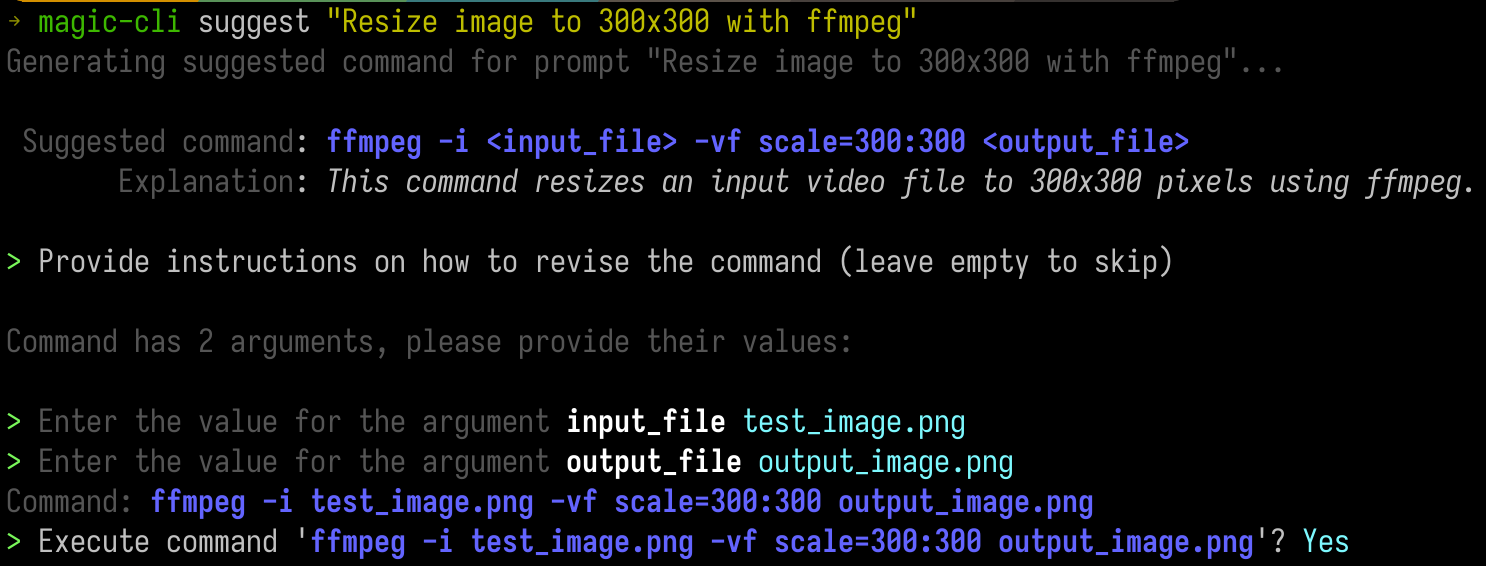
magic-cli suggest " Resize test_image.png to 300x300 with ffmpeg " Usage: magic-cli suggest <PROMPT>
Arguments:
<PROMPT> The prompt to suggest a command for (e.g., "Resize image to 300x300 with ffmpeg")
在您的外殼歷史記錄中搜索命令,並獲取最佳結果列表。
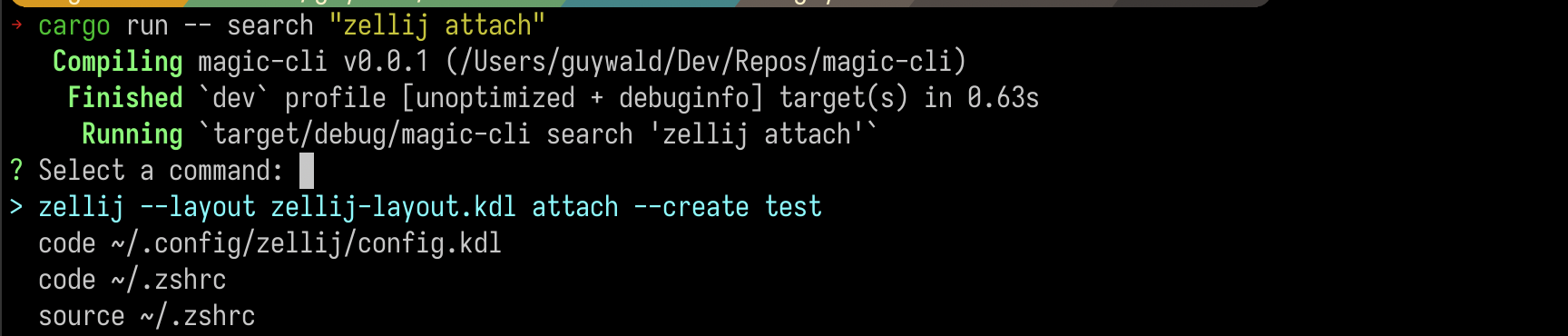
magic-cli search " zellij attach " Usage: magic-cli search [OPTIONS] <PROMPT>
Arguments:
<PROMPT> The prompt to search for
重要的
明智的話:如果您使用非本地LLM,請警惕嵌入的成本,尤其是對於長外殼歷史。
提供您希望該模型執行的任務的提示,並觀看它嘗試建議運行以實現目標的命令。如果需要更多上下文,它可能會促使您沿途運行命令。
magic-cli ask " Set up the dev environment as described in the README " Usage: magic-cli ask <PROMPT>
Arguments:
<PROMPT> The prompt to ask for (e.g., "Set up the development environment")
Magic CLI支持兩個LLM提供商:
ollama : Ollama is a local LLM provider.該命令期望在本地計算機上安裝並運行Ollama。openai : OpenAI is a cloud LLM provider.您可以配置API令牌,而Magic CLI將其與OpenAI API一起使用。 Magic CLI stores configurations in ~/.config/magic_cli/config.json .
Use magic-cli config (to see the options, use magic-cli config --help ) to set the configuration options:
 Usage: magic-cli config <COMMAND>

Commands:
  set    Set a value
  get    Get a value
  list   List the configurations
  reset  Reset the configurations to the default values
  path   Get the path to the configuration file
當前的提倡配置選項是:
llm : The LLM to use for generating responses.支持的價值:“ Ollama”,“ Openai”ollama.base_url : The base URL of the Ollama API (default: "http://localhost:11434")ollama.embedding_model : The model to use for generating embeddings (default: "nomic-embed-text:latest")ollama.model : The model to use for generating responses (default: "codestral:latest")openai.api_key (secret): The API key for the OpenAI APIopenai.embedding_model : The model to use for generating embeddings (default: "text-embedding-ada-002")openai.model : The model to use for generating responses (default: "gpt-4o")suggest.add_to_history : Whether to add the suggested command to the shell history (default: false)suggest.mode : The mode to use for suggesting commands.支持的值:“剪貼板”(複製命令到剪貼板),“不安全執行”(在當前的shell會話中執行)(默認值:“ UNSFAFE-SEXECTION”)Note:
unsafe-executionis named as such to make it clear that the CLI executes the command in the current shell session.使用此模式時,請非常小心 - 魔術CLI對執行建議的命令不承擔任何責任。
Windows支持(支持PowerShell,但尚未正確測試Windows)
支持更多的LLM提供商(例如,人為)
改善局部嵌入索引(目前以JSON的態度存儲起來,請研究帶有向量擴展的SQLLITE)
更多測試覆蓋範圍
安全受到認真對待,所有漏洞將以最大的謹慎和優先級處理。
在存儲的數據方面,魔術CLI當前處理的敏感數據是:
~/.config/magic_cli ).有計劃將此令牌存儲在系統的安全密鑰存儲中,但尚未實施。
magic-cli search command, which are stored in the configuration within the user home directory ( ~/.config/magic_cli ) and are generated using the LLM provider of choice.請參閱Security.md,以獲取更多信息以及有關如何報告潛在漏洞的說明。
歡迎捐款!
有關更多信息,請參見dragting.md。
我唯一的請求是,拉動請求遵循問題,以免由於缺乏背景或必要性而無法接受您的辛勤工作的情況。





