meshtastic map
1.0.0

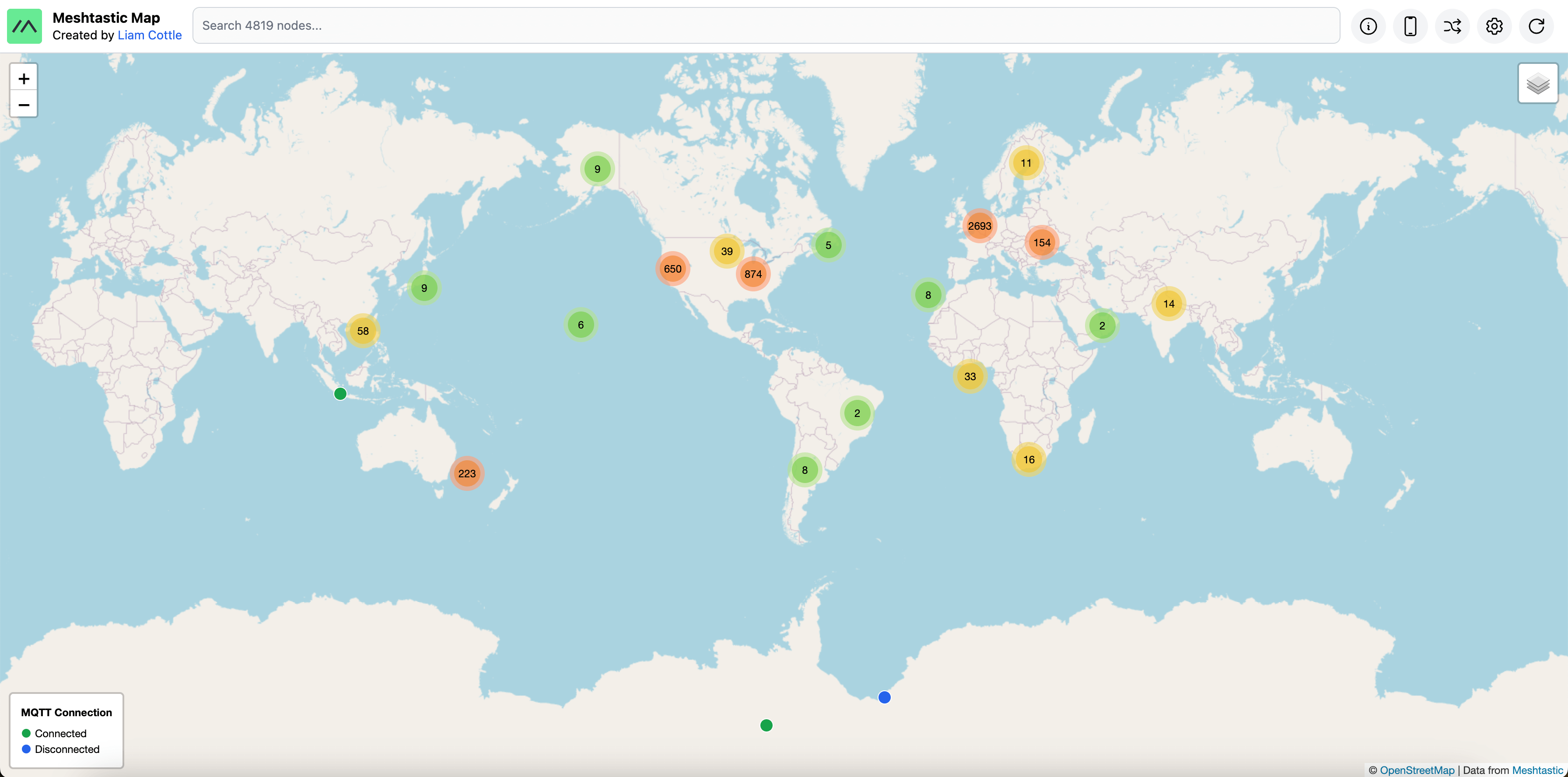
通过MQTT听到的所有网格节点的地图。
我的地图版本可在https://meshtastic.liamcottle.net上找到
查看我的新网格网络客户端:meshtxt
mqtt.meshtastic.org ,并订阅了msh/#主题。AQ==键解密。ServiceEnvelope ,则将被忽略。NODEINFO_APP数据包在数据库中添加一个节点。POSITION_APP数据包更新数据库中节点的位置。NEIGHBORINFO_APP数据包记录数据库的节点听到的邻居。TELEMETRY_APP数据包更新数据库中节点的电池和电压指标。TRACEROUTE_APP数据包记录一个节点对数据库执行的所有跟踪路由。MAP_REPORT_APP数据包存储在数据库中,但并未被广泛采用,因此尚未使用。TEXT_MESSAGE_APP数据包。 NEIGHBORINFO_APP 。克隆项目仓库。
 git clone https://github.com/liamcottle/meshtastic-map
cd meshtastic-map
安装nodejs依赖项
npm install
创建.env环境文件。
touch .env
将PRISMA的数据库连接字符串添加到.env文件中。
DATABASE_URL="mysql://root@localhost:3306/meshtastic-map?connection_limit=100"
注意:有些查询是特定于mySQL的。其他数据库提供商尚未进行测试。
迁移数据库。
npx prisma migrate dev
运行MQTT侦听器,以将数据包保存到数据库。
node src/mqtt.js
运行Express服务器,以服务/api和MAP UI。
 node src/index.js
# Server running at http://127.0.0.1:8080
注意:您也可以使用
--port 8123的自定义端口
从meshtastic-map存储库中运行以下命令。
 # update repo
git fetch && git pull

# migrate database
npx prisma migrate dev
现在,您需要重新启动index.js和mqtt.js脚本。
默认情况下,MQTT Collector连接到公共网状MQTT服务器。另外,您可以提供下面“帮助”部分中显示的相关选项,以连接到您自己的MQTT服务器以及您自己的解密键。
node src/mqtt.js --help
 Meshtastic MQTT Collector

  Collects and processes service envelopes from a Meshtastic MQTT server.

Options

  -h, --help                                    Display this usage guide.
  --mqtt-broker-url string                      MQTT Broker URL (e.g: mqtt://mqtt.meshtastic.org)
  --mqtt-username string                        MQTT Username (e.g: meshdev)
  --mqtt-password string                        MQTT Password (e.g: large4cats)
  --mqtt-topic                                  MQTT Topic to subscribe to (e.g: msh/#)
  --collect-service-envelopes                   This option will save all received service envelopes to the database.
  --collect-text-messages                       This option will save all received text messages to the database.
  --collect-waypoints                           This option will save all received waypoints to the database.
  --collect-neighbour-info                      This option will save all received neighbour infos to the database.
  --collect-map-reports                         This option will save all received map reports to the database.
  --decryption-keys <base64DecryptionKey> ...   Decryption keys encoded in base64 to use when decrypting service envelopes.
  --purge-interval-seconds number               How long to wait between each automatic database purge.
  --purge-nodes-unheard-for-seconds number      Nodes that haven't been heard from in this many seconds will be purged from the database.
要连接到自己的MQTT服务器,您可以执行以下操作;
node src/mqtt.js --mqtt-broker-url mqtt://mqtt.example.com --mqtt-username username --mqtt-password password --decryption-keys 1PG7OiApB1nwvP+rz05pAQ==
TODO:更新此部分,因为此信息现已过时。 MQTT状态是根据时间戳确定的,我们在该节点将数据包门控到MQTT时进行更新。
该地图根据节点与MQTT的连接状态显示了不同的彩色图标。
Green :在线(连接到MQTT)Blue :离线(与MQTT断开)这是通过在MQTT服务器上收听/stat/!ID主题来工作的。
当节点连接到MQTT时,它将online发布到该主题,当MQTT服务器检测客户端已断开连接时(通过LWT)将其offline发布到该主题。
网格固件配置了LWT(最后的遗嘱和遗嘱),MQTT服务器在客户端断开时发布。
节点启动后,在发布online状态之前有一个〜30秒的延迟。节点与MQTT断开连接后,在发布offline状态之前有〜30秒的延迟。
但是,当您的节点通过WiFi连接到MQTT时,这很好,但是,当使用MQTT Client Proxy功能时,您的节点将发送/接收数据包访问/从Android/ios设备发送,然后您的设备连接到MQTT并将消息定位到消息。
Meshtastic Node <-> Android/iOS <-> MQTT
不幸的是,当使用该功能时,您的online / offline状态将无法正常工作。
截至编写这些文档时,移动设备无法正确配置代理节点的LWT,因此不会发布节点的offline状态,因此您无法检测到节点是否从MQTT断开连接。
您的节点将保持在MQTT服务器中的online状态中。
可以使用Docker-compose.yml。您可以运行以下命令来启动所有内容;
docker compose up
这将:
要执行单元测试,请运行以下内容;
npm run test
如果您有功能请求或找到错误,请在GitHub上在Github上打开问题。
麻省理工学院
该项目不隶属于或隶属于网状项目。
网状徽标是Meshtastic LLC的商标。







