meshtastic map
1.0.0

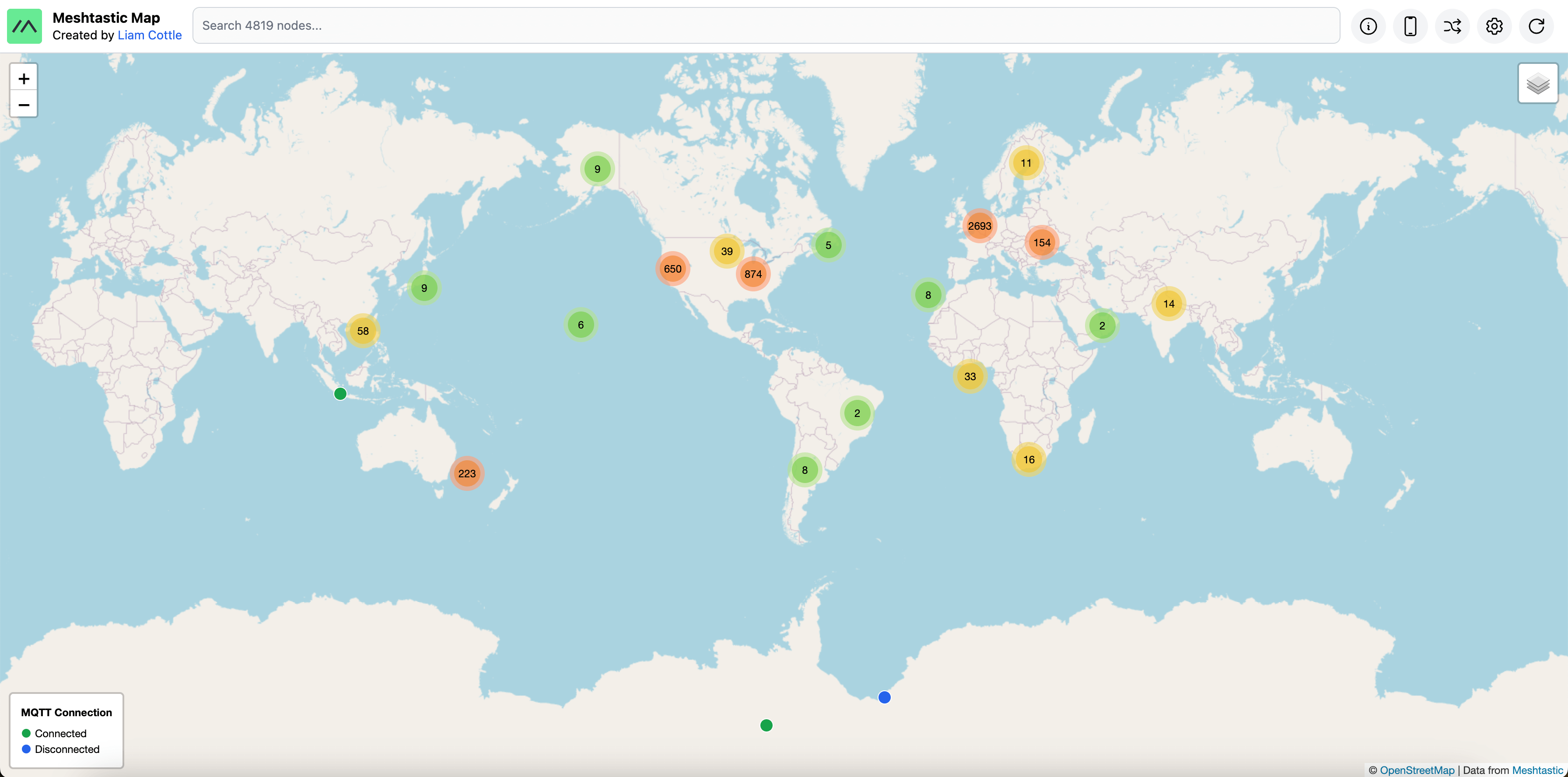
A map of all Meshtastic nodes heard via MQTT.
My version of the map is available at https://meshtastic.liamcottle.net
Check out my new Meshtastic Web Client: MeshTXT
mqtt.meshtastic.org and subscribed to the msh/# topic.AQ== key.ServiceEnvelope, it is ignored.NODEINFO_APP packets add a node to the database.POSITION_APP packets update the position of a node in the database.NEIGHBORINFO_APP packets log neighbours heard by a node to the database.TELEMETRY_APP packets update battery and voltage metrics for a node in the database.TRACEROUTE_APP packets log all trace routes performed by a node to the database.MAP_REPORT_APP packets are stored in the database, but are not widely adopted, so are not used yet.TEXT_MESSAGE_APP packets as they come in.NEIGHBORINFO_APP.Clone the project repo.
git clone https://github.com/liamcottle/meshtastic-map
cd meshtastic-map
Install NodeJS dependencies
npm install
Create a .env environment file.
touch .env
Add a database connection string for prisma to .env file.
DATABASE_URL="mysql://root@localhost:3306/meshtastic-map?connection_limit=100"
Note: Some queries are MySQL specific. Other db providers have not been tested.
Migrate the database.
npx prisma migrate dev
Run the MQTT listener, to save packets to database.
node src/mqtt.js
Run the Express Server, to serve the /api and Map UI.
node src/index.js
# Server running at http://127.0.0.1:8080
Note: You can also use a custom port with
--port 8123
Run the following commands from inside the meshtastic-map repo.
# update repo
git fetch && git pull

# migrate database
npx prisma migrate dev
You will now need to restart the index.js and mqtt.js scripts.
By default, the MQTT Collector connects to the public Meshtastic MQTT server. Alternatively, you may provide the relevant options shown in the help section below to connect to your own MQTT server along with your own decryption keys.
node src/mqtt.js --help
Meshtastic MQTT Collector

  Collects and processes service envelopes from a Meshtastic MQTT server.

Options

  -h, --help                                    Display this usage guide.
  --mqtt-broker-url string                      MQTT Broker URL (e.g: mqtt://mqtt.meshtastic.org)
  --mqtt-username string                        MQTT Username (e.g: meshdev)
  --mqtt-password string                        MQTT Password (e.g: large4cats)
  --mqtt-topic                                  MQTT Topic to subscribe to (e.g: msh/#)
  --collect-service-envelopes                   This option will save all received service envelopes to the database.
  --collect-text-messages                       This option will save all received text messages to the database.
  --collect-waypoints                           This option will save all received waypoints to the database.
  --collect-neighbour-info                      This option will save all received neighbour infos to the database.
  --collect-map-reports                         This option will save all received map reports to the database.
  --decryption-keys <base64DecryptionKey> ...   Decryption keys encoded in base64 to use when decrypting service envelopes.
  --purge-interval-seconds number               How long to wait between each automatic database purge.
  --purge-nodes-unheard-for-seconds number      Nodes that haven't been heard from in this many seconds will be purged from the database.
To connect to your own MQTT server, you could do something like the following;
node src/mqtt.js --mqtt-broker-url mqtt://mqtt.example.com --mqtt-username username --mqtt-password password --decryption-keys 1PG7OiApB1nwvP+rz05pAQ==
TODO: update this section as this info is now outdated. MQTT status is determined based on a timestamp we update when a packet is gated to MQTT by that node.
The map shows a different coloured icon for nodes based on their connection state to MQTT.
Green: Online (connected to MQTT)Blue: Offline (disconnected from MQTT)This works by listening to /stat/!ID topics on the MQTT server.
When a node connects to MQTT it publishes online to the topic, and when the MQTT server detects the client has disconnected (via an LWT) it publishes offline to the topic.
The Meshtastic firmware configures an LWT (Last Will and Testament), which the MQTT server publishes upon client disconnect.
After a node boots up, there is a ~30 second delay before the online state is published.
After a node disconnects from MQTT, there is a ~30 second delay before the offline state is published.
This works well when your node connects to MQTT over WiFi, however, when using the MQTT Client Proxy feature, your node sends/receives packets to/from your Android/iOS device, and then your device connects to MQTT and proxies the messages.
Meshtastic Node <-> Android/iOS <-> MQTT
Unfortunately, when using that feature your online / offline states will not work as expected.
As of the time of writing these docs, the mobile devices do not correctly configure the LWT for the node being proxied, and thus do not publish the offline state for the node, so you can't detect if your node disconnected from MQTT.
Your node will stay "stuck" in the online state in the MQTT server.
A docker-compose.yml is available. You can run the following command to launch everything;
docker compose up
This will:
To execute unit tests, run the following;
npm run test
If you have a feature request, or find a bug, please open an issue here on GitHub.
MIT
This project is not affiliated with or endorsed by the Meshtastic project.
The Meshtastic logo is the trademark of Meshtastic LLC.







