Directory Tree
v1.0.0

是否想将您的项目 /当前工作目录显示为整洁的树?不用担心!
Directory Tree是一个简单的Python实用程序包,它显示了用户定义的目录的树结构。
目前可用于所有平台。
在您的终端上运行以下命令以安装directory_tree :
1。使用pip安装软件包:
pip install directory_tree或者
pip3 install directory_tree2。克隆存储库:
git clone https://github.com/rahulbordoloi/Directory-Tree/
cd Directory-Tree
pip install -e .您可以使用上述任何一种方法来安装directory_tree 。
 DisplayTree (
    dirPath : str = '' ,
    stringRep : bool = False ,
    header : bool = False ,
    maxDepth : float = float ( 'inf' ),
    showHidden : bool = False ,
    ignoreList : List [ str ] = None ,
    onlyFiles : bool = False ,
    onlyDirs : bool = False ,
    sortBy : int = 0
) - > Union [ str , None ]:| 参数 | CLI参数 | 描述 |
|---|---|---|
| Dirpath | directory | 操作的根路径。默认情况下,指当前工作目录。 |
| StringRep | N/A。 | 直接控制台输出或同一字符串返回的布尔标志。默认情况下,它给出了控制台输出。 |
| 标题 | --header | 布尔值标志,用于在控制台中显示[OS和目录路径]信息。如果stringRep=True则不适用。 |
| maxdepth | -L , --max-depth | 目录树的最大深度。默认情况下,它达到了最深的目录/文件。 |
| 露面 | -a , --show-hidden | 布尔值标志,用于返回/显示隐藏的文件/目录,如果设置为True 。 |
| 无知主义者 | -I , --ignore-list | 文件和目录名称或图案列表要忽略。 |
| 只有files | -f , --only-files | 布尔标志仅显示文件 |
| 只有迪尔 | -d , --only-dirs | 布尔国旗仅显示目录 |
| 排序方式 | --sort-by | 排序顺序。可能的选项:0-默认值,1-文件,第2个 - 目录首先 |
| Raiseexception | --raise-exception | 布尔国旗提高例外。默认情况下,它不会引起异常 |
| 打印机托架 | --print-error-traceback | 布尔标志以打印错误追溯。默认情况下,它不会打印错误追溯 |
python directory_tree或者
python -m directory_tree使用内联帮助命令行选项:
python directory_tree --help
pip )python软件包才能工作) directory_tree使用内联帮助命令行选项:
directory_tree --help示例脚本以打印出用户定义的目录directoryPath的树结构!
 # Importing Libraries
from directory_tree import DisplayTree

# Main Method
if __name__ == '__main__' :
DisplayTree ( directoryPath )directoryPath是当前工作目录(CWD)。 样本目录树 -
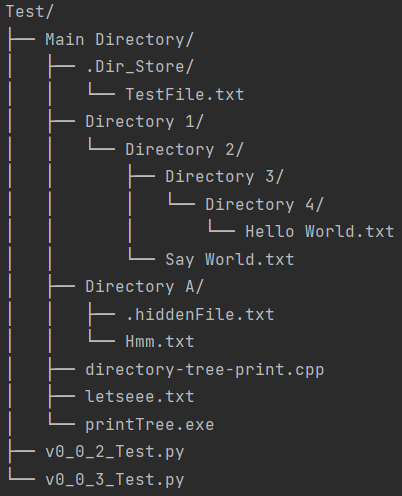
注意 - 这里, letseee.txt (文件)和Directory 4/ (目录)隐藏在自然界中。
False ] from directory_tree import DisplayTree
DisplayTree ( header = True )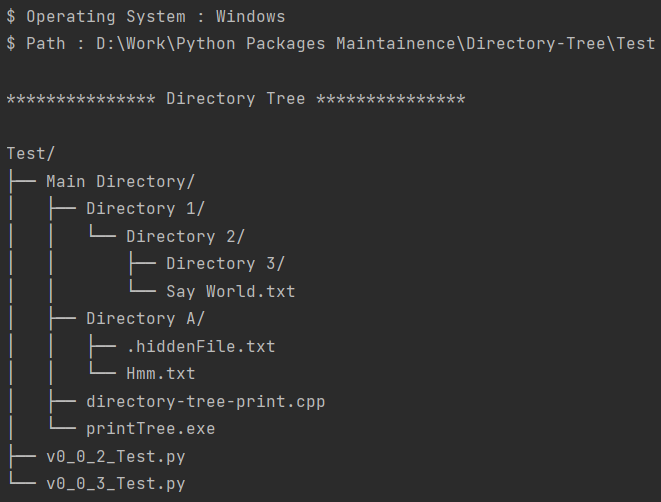
True ,显示隐藏实体= True ] from directory_tree import DisplayTree
customPath : str = 'Users/rahulbordoloi/Work/Python Packages Maintainence/Directory-Tree/Test/Main Directory'
stringRepresentation : str = DisplayTree ( customPath , stringRep = True , showHidden = True )
print ( stringRepresentation )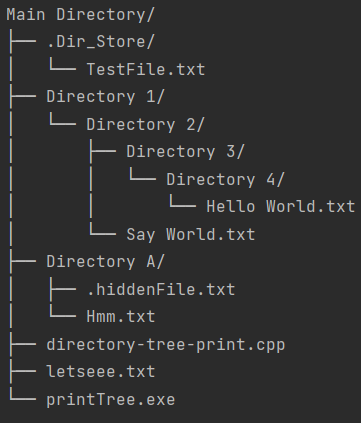
2 ] from directory_tree import DisplayTree
DisplayTree ( maxDepth = 2 )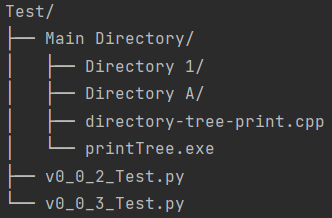
Directory Tree要安装directory_tree ,以及您需要开发和运行测试所需的工具,请在Virtualenv中使用以下任何命令:
pip install -e .[dev]或者
pip install -e " .[dev] " display_tree函数被弃用,并将在以后的版本中删除。请改用DisplayTree 。 display_tree的临终日期是2024年12月31日。
参数映射表-
| 新参数 | 弃用参数 |
|---|---|
| Dirpath | dir_path |
| StringRep | String_rep |
| maxdepth | max_depth |
| 露面 | show_hidden |
| 无知主义者 | ignore_list |
| 只有files | 唯一的_files |
| 只有迪尔 | 仅_dirs |
| 排序方式 | 排序方式 |
| Raiseexception | rise_exception |
| 打印机托架 | print_error_traceback |
Directory Tree使用递归。它将在真正深的目录树上提出一个RecursionError 。\而不是姓名: Rahul Bordoloi
网站:https://rahulbordoloi.me
电子邮件:[email protected]
用♥制造在Python!







