Directory Tree
v1.0.0

프로젝트 / 현재 작업 디렉토리를 깔끔한 트리로 표시하고 싶습니까? 걱정하지 마세요!
Directory Tree 사용자 정의 디렉토리의 트리 구조를 표시하는 간단한 Python 유틸리티 패키지입니다.
현재 모든 플랫폼에서 사용할 수 있습니다.
directory_tree 설치하려면 터미널에서 다음 명령을 실행하십시오.
1. pip 사용하여 패키지 설치 :
pip install directory_tree또는
pip3 install directory_tree2. 저장소 복제 :
git clone https://github.com/rahulbordoloi/Directory-Tree/
cd Directory-Tree
pip install -e .
위의 방법 중 하나를 사용하여 directory_tree 설치할 수 있습니다.
 DisplayTree (
    dirPath : str = '' ,
    stringRep : bool = False ,
    header : bool = False ,
    maxDepth : float = float ( 'inf' ),
    showHidden : bool = False ,
    ignoreList : List [ str ] = None ,
    onlyFiles : bool = False ,
    onlyDirs : bool = False ,
    sortBy : int = 0
) - > Union [ str , None ]:| 매개 변수 | CLI 매개 변수 | 설명 |
|---|---|---|
| Dirpath | directory | 작동의 루트 경로. 기본적으로 현재 작업 디렉토리를 나타냅니다. |
| StringRep | N/A | 직접 콘솔 출력을위한 부울 플래그 또는 동일한 문자열 반환. 기본적으로 콘솔 출력을 제공합니다. |
| 헤더 | --header | 콘솔에 [OS & Directory Path] 정보를 표시하기위한 부울 플래그. stringRep=True 인 경우 적용 할 수 없습니다. |
| Maxdepth | -L , --max-depth | 디렉토리 트리의 최대 깊이. 기본적으로 가장 깊은 디렉토리/파일로 올라갑니다. |
| Showhidden | -a , --show-hidden | True 으로 설정된 경우 숨겨진 파일/디렉토리를 반환/표시하기위한 부울 플래그. |
| 무시합니다 | -I , --ignore-list | 파일 및 디렉토리 이름 또는 무시할 패턴 목록. |
| 유일한 파일 | -f , --only-files | 파일 만 표시하는 부울 플래그 |
| 전용 | -d , --only-dirs | 부울 플래그는 디렉토리 만 표시합니다 |
| Sortby | --sort-by | 정렬 순서. 가능한 옵션 : 0- 기본값, 1- 파일 첫 번째, 2- 디렉토리 먼저 |
| Raiseexception | --raise-exception | 예외를 제기하기위한 부울 깃발. 기본적으로 예외가 발생하지 않습니다 |
| Printerrortraceback | --print-error-traceback | 오류 추적을 인쇄하는 부울 플래그. 기본적으로 오류 트레이스 백을 인쇄하지 않습니다 |
python directory_tree또는
python -m directory_tree명령 줄 옵션에 인라인 도움말을 사용하십시오.
python directory_tree --help
pip 패키지를 설치해야합니다.) directory_tree명령 줄 옵션에 인라인 도움말을 사용하십시오.
directory_tree --help 예제 스크립트 사용자 정의 디렉토리 directoryPath 의 트리 구조를 인쇄하려면!
 # Importing Libraries
from directory_tree import DisplayTree

# Main Method
if __name__ == '__main__' :
DisplayTree ( directoryPath )directoryPath 사용자가 지정하지 않는 한 현재 작업 디렉토리 (CWD)입니다. 샘플 디렉토리 트리 -
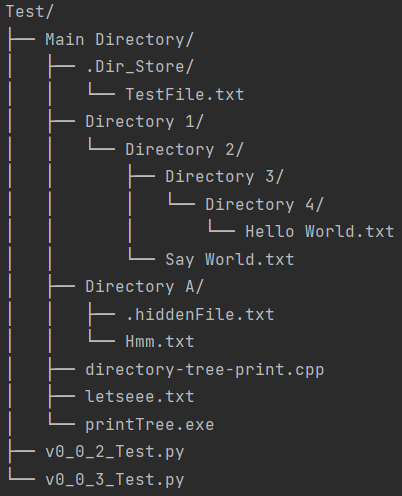
참고 - 여기, letseee.txt (파일) 및 Directory 4/ (디렉토리)는 본질적으로 숨겨져 있습니다.
False ] from directory_tree import DisplayTree
DisplayTree ( header = True )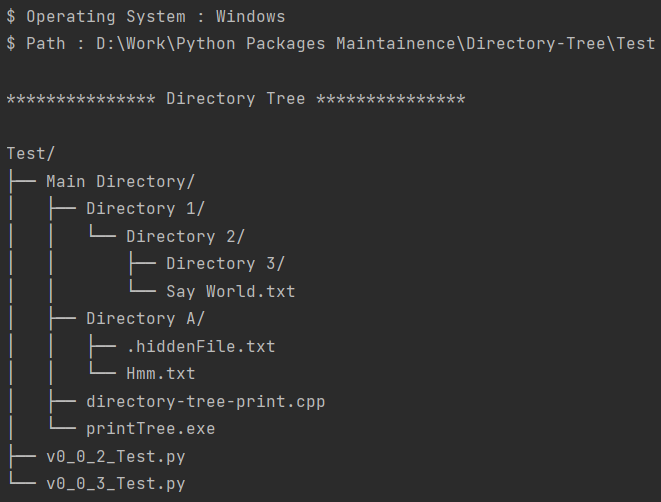
True , show hidden entities = True ] from directory_tree import DisplayTree
customPath : str = 'Users/rahulbordoloi/Work/Python Packages Maintainence/Directory-Tree/Test/Main Directory'
stringRepresentation : str = DisplayTree ( customPath , stringRep = True , showHidden = True )
print ( stringRepresentation )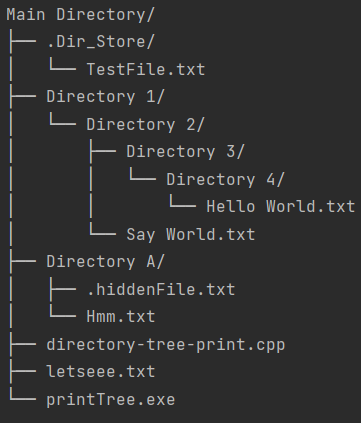
2 ] from directory_tree import DisplayTree
DisplayTree ( maxDepth = 2 )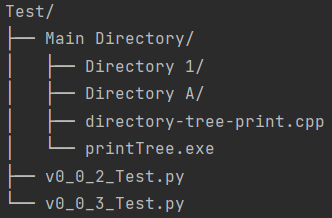
Directory Tree 개발 directory_tree 설치하려면 테스트를 개발하고 실행하는 데 필요한 도구와 함께 VirtualEnV에서 다음 명령을 사용하십시오.
pip install -e .[dev]또는
pip install -e " .[dev] " display_tree 함수는 더 이상 사용되지 않으며 향후 릴리스에서 제거됩니다. 대신 DisplayTree 사용하십시오. display_tree 의 수명 종료 날짜는 2024 년 12 월 31 일 입니다.
매개 변수 매핑 테이블 -
| 새로운 매개 변수 | 더 이상 사용되지 않은 매개 변수 |
|---|---|
| Dirpath | dir_path |
| StringRep | String_Rep |
| Maxdepth | max_depth |
| Showhidden | show_hidden |
| 무시합니다 | incor_list |
| 유일한 파일 | 유일한 _files |
| 전용 | 유일한 _dirs |
| Sortby | sort_by |
| Raiseexception | REAS_Exception |
| Printerrortraceback | print_error_traceback |
Directory Tree 재귀를 사용합니다. 정말 깊은 디렉토리 트리에서 RecursionError 올릴 것입니다.\ 대신 이름 : Rahul Bordoloi
웹 사이트 : https://rahulbordoloi.me
이메일 : [email protected]
파이썬에서 ♥ 로 만들어졌습니다!







