vite plugin webfont dl
v3.10.3

Collects webfont links, imports and definitions from your Vite project, downloads css and font files (privacy-first) , add the fonts to your bundle (or serves through dev server) , and injects font definitions using a non-render blocking method , meanwhile stores external css and font files in a persistent file cache , making them available for offline development.
npm i vite-plugin-webfont-dl -D从原始的Google字体代码段中提取,下载和注入字体。
<head>到“ Web上的使用”块中: < link rel =" preconnect " href =" https://fonts.googleapis.com " >
< link rel =" preconnect " href =" https://fonts.gstatic.com " crossorigin >
< link href =" https://fonts.googleapis.com/css2?family=Fira+Code:wght@300;400&family=Roboto:wght@100&display=swap " rel =" stylesheet " >webfontDownload添加到您的Vite插件中,并且插件自动将负责所有内容: // vite.config.js
import webfontDownload from 'vite-plugin-webfont-dl' ;
export default {
plugins : [
webfontDownload ( ) ,
] ,
} ;dist/index.html中替换: < style > @font-face{font-family:...;src:url(/assets/foo-xxxxxxxx.woff2) format('woff2'),url(/assets/bar-yyyyyyyy.woff) format('woff')}... </ style > 从配置的WebFont CSS URL(S)提取,下载和注入字体。
< link href =" [CSS URL] " rel =" stylesheet " >webfontDownload到您的Vite插件: // vite.config.js
import webfontDownload from 'vite-plugin-webfont-dl' ;
export default {
plugins : [
webfontDownload ( [
'https://fonts.googleapis.com/css2?family=Press+Start+2P&display=swap' ,
'https://fonts.googleapis.com/css2?family=Fira+Code&display=swap'
] ) ,
] ,
} ; webfont被注入并准备使用。
无论您是在本地开发服务器上工作还是生产构建,该插件都可以无缝地完成工作。
 h1 {
  font-family : 'Press Start 2P' , cursive;
}

h2 {
  font-family : 'Fira Code' , monospace;
}为了使其与Laravel Vite插件一起使用,将此行添加到您的刀片文件中:
@vite ( ' webfonts.css ' )
cdn.jsdelivr.net ):与零配置或简单配置一起使用rsms.me ):与零配置或简单配置一起使用@font-face定义)的提供商可用于简单配置injectAsStyleTag ( boolean ,默认值: true ):
注入webfonts作为<style> tag(嵌入式CSS)或外部.css文件
minifyCss ( boolean ,默认值: build.minify值。Minify):
在构建过程中缩小CSS代码。
embedFonts ( boolean ,默认: false ):
嵌入基本64编码的字体中的CSS。
在某些情况下,如果CSS包含对同一字体文件的多个引用,则可能导致文件大小。例子
async ( boolean ,默认值: true ):
防止使用可能导致内容安全策略问题的内联事件处理程序( webfonts.css )。
仅适用于injectAsStyleTag:false 。
cache ( boolean ,默认值: true ):
在本地文件缓存中持续存储下载的CSS和字体文件。
如果设置为false则将删除现有缓存。
proxy ( false|AxiosProxyConfig ,默认值: false ):
网络请求的代理配置。
assetsSubfolder ( string ,默认值: '' ):
将下载的字体文件移动到资产目录中的子文件夹。
用法:
 ViteWebfontDownload (
  [ ] ,
  {
    injectAsStyleTag : true ,
    minifyCss : true ,
    embedFonts : false ,
    async : true ,
    cache : true ,
    proxy : false ,
    assetsSubfolder : '' ,
  }
)
或者:
 ViteWebfontDownload (
  [
    'https://fonts.googleapis.com/css2?family=Poppins:wght@300;400;500;600;700&display=swap' ,
  ] ,
  {
    injectAsStyleTag : true ,
    minifyCss : true ,
    embedFonts : false ,
    async : true ,
    cache : true ,
    proxy : false ,
    assetsSubfolder : '' ,
  }
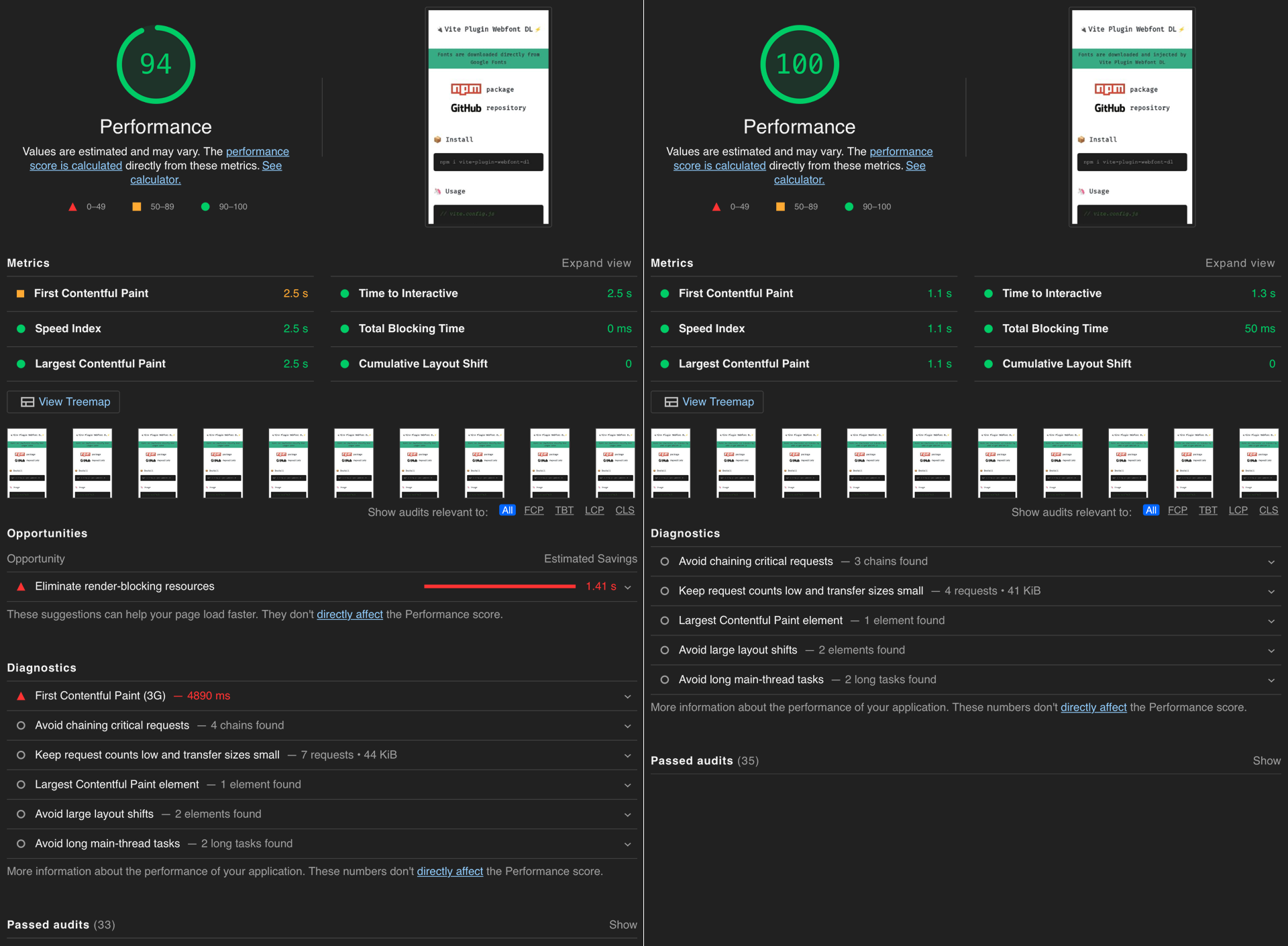
)?通过避免由第三方WebFonts引起的渲染障碍资源,您可以提高页面性能,从而可以提高用户体验,从而改善SEO结果。
该插件从第三方WebFont服务(如Google字体)下载给定字体,并将其动态注入您的Vite项目(作为内部或外部样式表) ,将第三方WebFonts转换为自托管的项目。 ?
?除了大幅提高性能外,您的访问者还将受益于隐私保护,因为不涉及第三方服务器。
Google字体生成以下代码,您必须将其注入网站的<head> ,示例:
 < link rel =" preconnect " href =" https://fonts.googleapis.com " >
< link rel =" preconnect " href =" https://fonts.gstatic.com " crossorigin >
< link href =" https://fonts.googleapis.com/css2?family=Fira+Code&display=swap " rel =" stylesheet " >Google字体上的客户端会发生什么:
fonts.googleapis.com开始连接握手(DNS,TCP,TLS) 。这发生在背景中以提高性能。 [ preconnect ]fonts.gstatic.com的另一个预连接提示。 [ preconnect ]fonts.googleapis.com加载并使用CSS stylesheet文件(带有font-display:swap ) 。 [ stylesheet ]@font-face定义,其中包含来自fonts.gstatic.com服务器的字体URL。fonts.gstatic.com下载所有相关字体。相反, WebFont-DL插件在构建时间完成了大部分工作,将最小值留给了浏览器。
WebFont-DL插件
index.html和生成的CSS)<style>标签)或WebFont /外部CSS文件<head> ,例如: < style >
@font-face {
font-family: 'Fira Code';
font-style: normal;
font-weight: 300;
font-display: swap;
src: url(/assets/uU9eCBsR6Z2vfE9aq3bL0fxyUs4tcw4W_GNsJV37Nv7g.9c348768.woff2) format('woff2');
unicode-range: U+0460-052F, U+1C80-1C88, U+20B4, U+2DE0-2DFF, U+A640-A69F, U+FE2E-FE2F;
}
...
</ style >或(使用开发服务器或injectAsStyleTag: false选项)
 < link rel =" preload " as =" style " href =" /assets/webfonts.b904bd45.css " >
< link rel =" stylesheet " media =" print " onload =" this.onload=null;this.removeAttribute('media'); " href =" /assets/webfonts.b904bd45.css " >使用WebFont-DL插件在客户端上会发生什么:
<style>标签)加载字体。或者
preload ]print ”样式表(非渲染阻止) 。加载后,它促进“ all ”媒体类型样式表(通过删除“ media ”属性)。 [ stylesheet ] 启动器Vite项目与
| ? | ||
|---|---|---|
| ? webfont.feat.agency | ? WebFont-dl.feat.agency |
麻省理工学院许可©2022 Feat。








