FontInstaller
v0.0.3

Windows的字体安装程序脚本
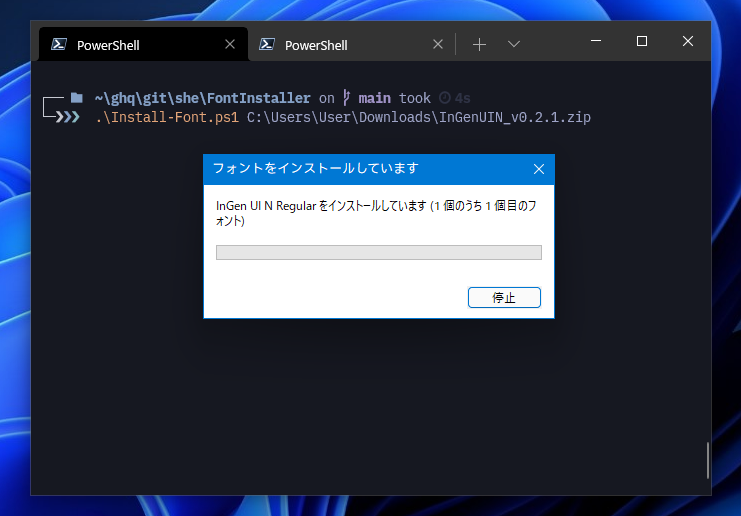
要安装字体,只需将字体文件的路径指定为第一个参数即可。该脚本自动解决路径,因此您可以指定通配符,例如*.ttf 。
❯ Install-Font.ps1 Somefont /             # Directory path
❯ Install-Font.ps1 path / to / SomeFont * .ttf # File path includes wild card当此脚本找到zip文件时,它会自动将zip文件提取到临时目录并安装存储在其中的所有字体。
❯ Install-Font.ps1 Somefont.zip要查看已经安装的字体的列表,请运行Get-Font.ps1 。您可以通过指定-Name , -Path参数来缩小列表。
 ❯ Get-Font.ps1 -Name udev

Name               Path
----               ----
UDEV Gothic 35NF   C:WindowsFontsUDEV Gothic 35NF
UDEV Gothic 35NFLG C:WindowsFontsUDEV Gothic 35NFLG
UDEV Gothic NF     C:WindowsFontsUDEV Gothic NF
UDEV Gothic NFLG   C:WindowsFontsUDEV Gothic NFLG
克隆或下载此存储库。否则,从最新版本的页面下载存档,然后将其提取。
要在Windows上运行本地PowerShell脚本,需要更改执行策略更改。在使用此脚本之前在下面运行。关闭控制台时会损失更改
Set-ExecutionPolicy RemoteSigned - Scope Process如果您想更改计算机设置并使它们持久,请使用管理员特权运行以下内容。
 # PowerShell (Administrator)
Set-ExecutionPolicy RemoteSigned - Scope CurrentUser麻省理工学院








