FontInstaller
v0.0.3

A font installer script for Windows
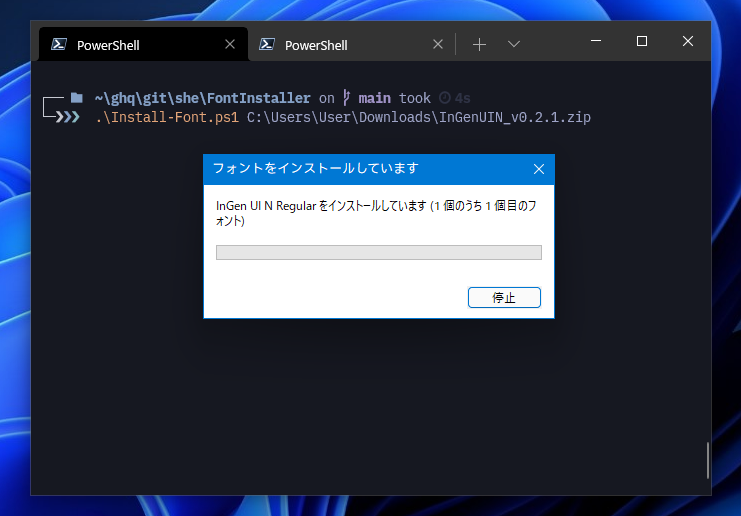
To install a font, simply specify the path of the font file as the first argument. This script resolves the path automatically, so you can specify wild card e.g. *.ttf.
❯ Install-Font.ps1 Somefont/             # Directory path
❯ Install-Font.ps1 path/to/SomeFont*.ttf # File path includes wild cardWhen this script finds the zip file, it automatically extract the zip file to a temporary directory and installs all the fonts stored in it.
❯ Install-Font.ps1 Somefont.zipTo see a list of already installed fonts, run Get-Font.ps1.
You can narrow the list by specifying the -Name, -Path parameter.
❯ Get-Font.ps1 -Name udev

Name               Path
----               ----
UDEV Gothic 35NF   C:WindowsFontsUDEV Gothic 35NF
UDEV Gothic 35NFLG C:WindowsFontsUDEV Gothic 35NFLG
UDEV Gothic NF     C:WindowsFontsUDEV Gothic NF
UDEV Gothic NFLG   C:WindowsFontsUDEV Gothic NFLG
Clone or download this repository. Otherwise download the archive from the latest release page then extract it.
To run local PowerShell script on Windows, execution policy changes are required. Run below before use this script. Changes are lost when the console is closed
Set-ExecutionPolicy RemoteSigned -Scope ProcessIf you want to change your computer settings and make them persistent, run the following with Administrator privileges.
# PowerShell (Administrator)
Set-ExecutionPolicy RemoteSigned -Scope CurrentUserMIT








