Cod Windows Runtime
1.0.0

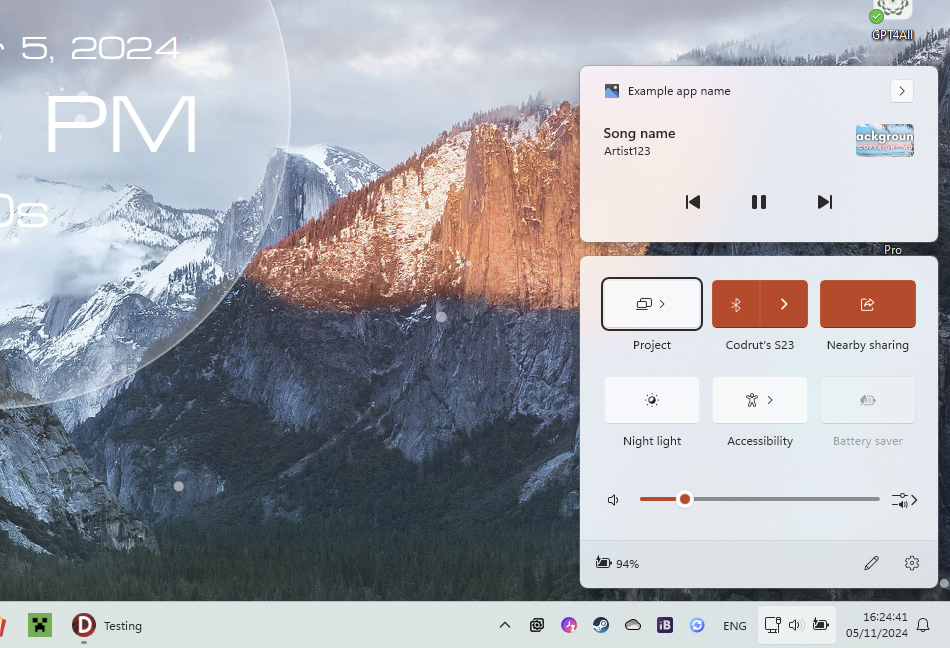
该库将许多Windows功能集成到Delphi X/11与现代类包装器和容器。此类实现是Windows Notification Manager,它允许向操作中心(Windows Media Transport Controls)发布通知,该通知可以将应用程序注册为播放媒体,并在音量弹出式和动作中心中显示控件,主卷管理器以及许多其他用于使用Windows Interfaces(例如IBuffers , IRandomAccessStream uff)和更多其他公用事业。
由于Windows 7,应用程序使用称为AppuserModelid的功能。这是Windows用来将您的应用程序与他人区分开并获取有关它的信息的唯一应用标识符。这是在两个地方注册的,即开始菜单和Windows注册表。安装应用程序时,它会氨气注册,因为它在开始菜单中添加了快捷方式。它可以在全球注册(需要管理员特权),也可以为当前用户注册。这是它被重新列出的地方:
| 开始菜单 | 注册表 | |
|---|---|---|
| 全球的 | %systemDrive% programData Microsoft Windows start Menu Program | hkey_local_machine software class appusermodelid |
| 只是当前用户 | 外壳:开始菜单 | hkey_current_user software class appusermodelid |
该图书馆使用TAppRegistration管理应用程序对两个地方的注册。在Cod.WindowsRT.AppRegistration中,有一个为当前应用程序定义的AppRegistration variabile,即类型TCurrentAppRegistration 。对于应用程序,在运行时,您需要设置一次AppuserModelid,因此:
AppRegistration.AppUserModelID := 'com.codrutsoft.test';
如果未定义,则默认情况下将是可执行文件的模块名称,例如firefox.exe 。
这是一个有关如何重新登录应用程序的示例,它在安装程序期间要执行此操作,但也可以在运行时完成,但是它并没有被提及,因为它意味着它将在运行时添加开始菜单快捷方式。
 with TAppRegistration.Create do
  try
    AppUserModelID := 'com.codrutsoft.test';
    AppExecutable := 'C:AppNameapplication.exe';
    AppName := 'Example app name';
    AppIconPath := ''; // location to ico file, can be left blank to create automatically
    AppDescription := 'Very interesting app description.';
    AppLaunchArguments := ''; // launch arguments for start menu shortcut
    AppShowInSettings := false; // show in settings the option to edit notification settings

    // Register
    RegisterApp( falsew ); // true = global, false = local
  finally
    Free;
  end;
要尚未重新注册该应用程序,它甚至更简单,也建议在卸载过程中进行操作,只需致电:
 with TAppRegistration.Create do
  try
    AppUserModelID := 'com.codrutsoft.test';
    AppName := 'Example app name'; // required to delete the start menu shortcut

    // Register
    UnregisterApp( not Settings.UserInstall );
  finally
    Free;
  end;
一旦使用ID注册应用程序,就可以从运行菜单(Win+R)和以下语法打开它
shell:appsfolder<AppUserModelID>