Cod Windows Runtime
1.0.0

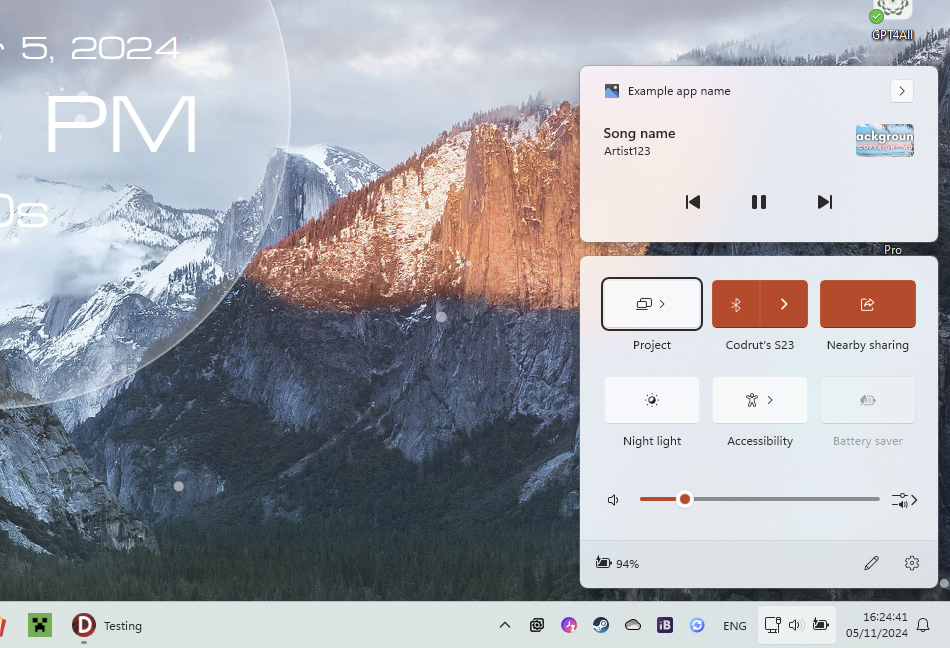
ไลบรารีนี้รวมฟังก์ชั่น Windows จำนวนมากเข้ากับ Delphi X/11 เข้ากับ wrappers และคอนเทนเนอร์คลาสที่ทันสมัย การใช้งานดังกล่าวคือ Windows Notification Manager ซึ่งช่วยให้สามารถโพสต์การแจ้งเตือนไปยังศูนย์ปฏิบัติการควบคุม Windows Media Transport ซึ่งอนุญาตให้แอปลงทะเบียนตัวเองเป็นการเล่นสื่อและมีการควบคุมที่แสดงในหนังสือ IBuffers อป IRandomAccessStream และศูนย์ปฏิบัติการ
ตั้งแต่ Windows 7 แอพใช้คุณสมบัติที่เรียกว่า AppUserModelid นี่คือตัวระบุแอพที่ไม่ซ้ำกันที่ Windows ใช้เพื่อแยกแอปพลิเคชันของคุณจากผู้อื่นและรับข้อมูลเกี่ยวกับมัน นี่คือการลงทะเบียนในสองแห่งเมนูเริ่มต้นและ Windows Registry มีการลงทะเบียนอย่างละเอียดเมื่อติดตั้งแอพเนื่องจากเพิ่มทางลัดในเมนูเริ่ม สามารถลงทะเบียนได้ทั่วโลก (ต้องการสิทธิ์ของผู้ดูแลระบบ) หรือเฉพาะสำหรับผู้ใช้ปัจจุบัน นี่คือที่ที่มันลงทะเบียน:
| เริ่มต้นเมนู | การลงทะเบียน | |
|---|---|---|
| ทั่วโลก | %SystemDrive% ProgramData Microsoft Windows Start Menu Programs | hkey_local_machine software classes appusermodelid |
| เพียงผู้ใช้ปัจจุบัน | เชลล์: เมนูเริ่ม | hkey_current_user software classes appusermodelid |
ห้องสมุดนี้ใช้ TAppRegistration เพื่อจัดการการลงทะเบียนของแอปไปยังทั้งสองแห่ง ใน Cod.WindowsRT.AppRegistration มี variabile AppRegistration ที่กำหนดไว้สำหรับแอปพลิเคชันปัจจุบันของประเภท TCurrentAppRegistration สำหรับแอปพลิเคชันในระหว่างการรันไทม์คุณจะต้องตั้งค่า appusermodelid หนึ่งครั้งเช่น:
AppRegistration.AppUserModelID := 'com.codrutsoft.test';
หากไม่ได้กำหนดไว้จะเป็นค่าเริ่มต้นชื่อโมดูลของปฏิบัติการเช่น firefox.exe
นี่คือตัวอย่างเกี่ยวกับวิธีการลงทะเบียนแอปมันได้รับการแนะนำให้ทำเช่นนี้ในระหว่างการติดตั้งโปรแกรม แต่ก็สามารถทำได้ในระหว่างการรันไทม์ แต่ก็ไม่ได้รับการแนะนำเนื่องจากหมายความว่าจะเพิ่มเมนูเริ่มต้นในระหว่างการรันไทม์
 with TAppRegistration.Create do
  try
    AppUserModelID := 'com.codrutsoft.test';
    AppExecutable := 'C:AppNameapplication.exe';
    AppName := 'Example app name';
    AppIconPath := ''; // location to ico file, can be left blank to create automatically
    AppDescription := 'Very interesting app description.';
    AppLaunchArguments := ''; // launch arguments for start menu shortcut
    AppShowInSettings := false; // show in settings the option to edit notification settings

    // Register
    RegisterApp( falsew ); // true = global, false = local
  finally
    Free;
  end;
ในการไม่ลงทะเบียนแอพมันง่ายกว่านี้แนะนำให้ทำในระหว่างการถอนการติดตั้งเพียงแค่โทร:
 with TAppRegistration.Create do
  try
    AppUserModelID := 'com.codrutsoft.test';
    AppName := 'Example app name'; // required to delete the start menu shortcut

    // Register
    UnregisterApp( not Settings.UserInstall );
  finally
    Free;
  end;
เมื่อแอปพลิเคชันลงทะเบียนกับ ID ของมันแล้วก็สามารถเปิดได้จากเมนู Run (Win+R) และไวยากรณ์ต่อไปนี้
shell:appsfolder<AppUserModelID>