HomeAssistant PREdistribuce
1.0.0

该传感器是从https://www.predistribuce.cz/cs/potrebuji-zaridit/zakaznici/stav-hdo/刮除数据。将接收器命令的ID放在配置中(请参阅与Pre Cz或您的能量计的合同)。
这个传感器总是显示
也可选
注意:您是CEZ的客户吗?在这里查看:https://github.com/zigul/homeassistant-cezdistribuce
将此文件夹复制到<config_dir>/custom_components/predistribuce/ 。
将以下内容添加到您的configuration.yaml文件:
 # Example configuration.yaml entry for showing current HDO state and HTML for rendering a time schedule
binary_sensor :
  platform : predistribuce
  name : nocni proud
  receiver_command_id : 605
# entry as above + extra binary sensors that show if a an applience (e.g. washing machine) can be run now to finish under low tariff
binary_sensor :
- platform : predistribuce
receiver_command_id : 605
periods :
- name : HDO Pračka
minutes : 30
- name : HDO Myčka
minutes : 150您可以全天显示视觉低/高的Tarrif概述。
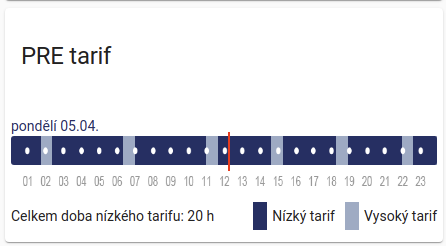
先决条件是安装Lovelace HTML卡,理想情况下是HACS。安装后,手动创建新的Lovelace卡。粘贴在内部的内容:
 type: 'custom:html-card'
title: PRE tarif
content: |
  [[binary_sensor.hdo_aktualne.attributes.html_values]]
不要忘记用实体名称替换hdo_aktualne 。





