SReC
1.0.0

Sheng Cao,Chao-Yuan Wu,PhilippKrähenbühl。
 @article { cao2020lossless ,
  title = { Lossless Image Compression through Super-Resolution } ,
  author = { Cao, Sheng and Wu, Chao-Yuan and and Kr{"a}henb{"u}hl, Philipp } ,
  year = { 2020 } ,
  journal = { arXiv preprint arXiv:2004.02872 } ,
}
如果您使用我们的代码库,请考虑也引用L3C
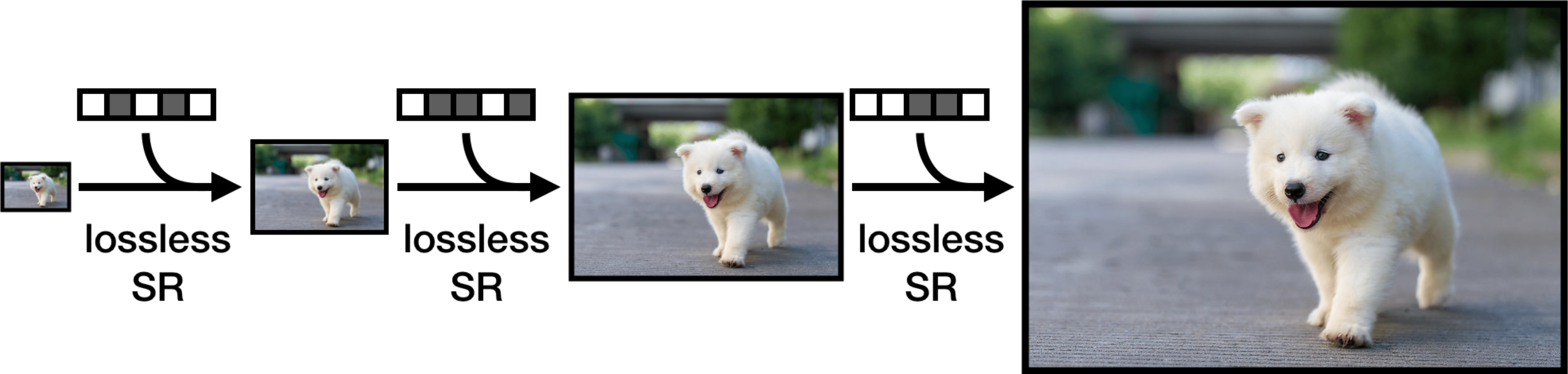
这是SREC在Pytorch中的正式实施。 SREC框架无损压缩是一个超分辨率问题,并应用神经网络来压缩图像。 SREC可以在实用的运行时实现大型数据集上的最新压缩率。培训,压缩和减压得到了充分的支持和开源。
我们建议以下步骤开始。
请参阅此处以获取安装说明。
我们已经发布了Imagenet64和Open Images(PNG)的训练有素的型号。所有压缩结果均以每个子像素(BPSP)的位衡量。
| 数据集 | bpsp | 模型重量 |
|---|---|---|
| Imagenet64 | 4.29 | 模型/Imagenet64.pth |
| 开放图像 | 2.70 | 模型/开放式 |
要运行代码,您需要处于顶级目录。
 python3 -um src.train
  --train-path "path to directory of training images"
  --train-file "list of filenames of training images, one filename per line"
  --eval-path "path to directory of eval images"
  --eval-file "list of filenames of eval images, one filename per line"
  --plot "directory to store model output"
  --batch "batch size"
培训图像必须以火车文件中的文件名的形式组织train-path/filename形式。同样的事情适用于评估图像。
我们将用于Imagenet64的培训和评估文件包括在datasets集目录中。
对于ImagEnet64,我们使用的是略有不同的超参数,而不是开放图像超参数(默认图)。根据我们的论文中的设置训练Imagenet64,运行
 python3 -um src.train
  --train-path "path to directory of training images"
  --train-file "list of filenames of training images, one filename per line"
  --eval-path "path to directory of eval images"
  --eval-file "list of filenames of eval images, one filename per line"
  --plot "directory to store model output"
  --batch "batch size"
  --epochs 10
  --lr-epochs 1
  --crop 64
运行python3 -um src.train --help可调式超参数列表。
给定模型检查点,该评估理论位/子像素(BPSP)基于对数似然。对数模型BPSP降低了实际压缩BPSP。
 python3 -um src.eval
  --path "path to directory of images"
  --file "list of filenames of images, one filename per line"
  --load "path to model weights"
安装了TORCHAC后,您可以运行压缩/解压缩以将任何图像转换为.srec文件。以下压缩图像目录。
 python3 -um src.encode
  --path "path to directory of images"
  --file "list of filenames of images, one filename per line"
  --save-path "directory to save new .srec files"
  --load "path to model weights"
如果您想要准确的运行时,我们建议使用-O标志运行Python来禁用断言。我们还包括一个可选的--decode标志,以便您可以检查解压缩.sRec文件是否提供了原始图像,并提供用于解码的运行时。
要将.srec文件转换为png,您可以运行
 python3 -um src.decode
  --path "path to directory of .srec images"
  --file "list of filenames of .srec images, one filename per line"
  --save-path "directory to save png files"
  --load "path to model weights"
您可以在此处下载Imagenet64培训和验证集。
我们使用与L3C相同的开放图像培训和验证图像。
对于验证图像,您可以在此处下载它们。
对于训练图像,请克隆L3C存储库并从这里运行脚本
有关开放图像JPEG和Open Images PNG之间的差异,请参见此问题。
感谢L3C的EDSR,Logistic混合物和算术编码的实现。特别感谢Fabian Mentzer让我们知道了开放式图像的预处理脚本的问题,并迅速解决了它们。








