lightbug_http
v0.1.5


?带有机翼的Mojo HTTP框架
LightBug是Mojo的简单甜美的HTTP框架,它基于系统编程的最佳实践,例如Golang Fasthttp和Rust May_minihttp。
这还没有准备好。我们的目标是跟上Mojo中的新发展,但是可能需要一些时间才能安全地在现实世界应用程序中使用。
Lightbug目前具有以下功能:
def键入(返回到顶部)
lightbug_http的唯一硬依赖性是Mojo。了解如何在模块化网站上与Mojo一起起床。一旦您在本地设置了Mojo项目,
将mojo-community频道添加到您的mojoproject.toml ,例如:
[ project ]
channels = [ " conda-forge " , " https://conda.modular.com/max " , " https://repo.prefix.dev/mojo-community " ]添加lightbug_http作为一个依赖项:
[ dependencies ]
lightbug_http = " >=0.1.5 "在项目的根部运行magic install ,其中mojoproject.toml所在
现在,应将灯泡安装为依赖项。您可以一次导入所有默认导入,例如:
from lightbug_http import *或导入单个结构和功能,例如
 from lightbug_http.service import HTTPService
from lightbug_http.http import HTTPRequest, HTTPResponse, OK , NotFound
您可以玩一些默认处理程序:
 from lightbug_http.service import Printer # prints request details to console
from lightbug_http.service import Welcome # serves an HTML file with an image (currently requires manually adding files to static folder, details below)
from lightbug_http.service import ExampleRouter # serves /, /first, /second, and /echo routes将您的处理程序添加到lightbug.通过传递满足以下特征的结构:
 trait HTTPService :
 fn func ( inout self , req : HTTPRequest) raises -> HTTPResponse:
...例如,制作Printer服务以打印有关主机请求的一些详细信息:
 from lightbug_http import *

 @value
 struct Printer ( HTTPService ):
     fn func ( inout self , req : HTTPRequest) raises -> HTTPResponse:
         var uri = req.uri
         print ( " Request URI: " , to_string(uri.request_uri))

         var header = req.headers
         print ( " Request protocol: " , req.protocol)
         print ( " Request method: " , req.method)
         print (
             " Request Content-Type: " , to_string(header[HeaderKey. CONTENT_TYPE ])
         )

         var body = req.body_raw
         print ( " Request Body: " , to_string(body))

         return OK(body)
启动服务器在端口上使用您的服务聆听。
 from lightbug_http import Welcome, Server

fn main () raises :
    var server = Server()
    var handler = Welcome()
server.listen_and_serve( " 0.0.0.0:8080 " , handler)随意更改listen_and_serve()中的设置以在特定主机和端口上服务。
现在发送请求0.0.0.0:8080 。您应该看到有关打印到控制台的请求的一些详细信息。
恭喜?您正在使用灯泡!
该库的路由不在范围内,但是您可以轻松地设置路线:
 from lightbug_http import *

@value
struct ExampleRouter ( HTTPService ):
    fn func ( inout self , req : HTTPRequest) raises -> HTTPResponse:
        var body = req.body_raw
        var uri = req.uri

        if uri.path == " / " :
            print ( " I'm on the index path! " )
        if uri.path == " /first " :
            print ( " I'm on /first! " )
        elif uri.path == " /second " :
            print ( " I'm on /second! " )
        elif uri.path == " /echo " :
            print (to_string(body))

return OK(body)我们计划在名为lightbug_api的将来的库中添加更高级的路由功能,请参阅路线图。
(返回到顶部)
默认的欢迎屏幕显示了如何使用LightBug使用图像或HTML(例如HTML)的示例。 Mojo已open , read和read_bytes方法,您可以用来读取文件并在路线上使用它们。假设您将HTML文件和图像从Lightbug Repo复制到仓库根源的static目录:
 from lightbug_http import *

@value
struct Welcome ( HTTPService ):
    fn func ( inout self , req : HTTPRequest) raises -> HTTPResponse:
        var uri = req.uri

        if uri.path == " / " :
            var html : Bytes
            with open ( " static/lightbug_welcome.html " , " r " ) as f:
                html = f.read_bytes()
            return OK(html, " text/html; charset=utf-8 " )

        if uri.path == " /logo.png " :
            var image : Bytes
            with open ( " static/logo.png " , " r " ) as f:
                image = f.read_bytes()
            return OK(image, " image/png " )

return NotFound(uri.path)使用以下代码创建一个文件,例如client.mojo 。运行magic run mojo client.mojo以执行给定URL的请求。
 from lightbug_http import *
from lightbug_http.client import Client

fn test_request ( inout client : Client) raises -> None :
    var uri = URI .parse_raises( " http://httpbin.org/status/404 " )
    var headers = Header( " Host " , " httpbin.org " )

    var request = HTTPRequest(uri, headers)
    var response = client.do(request ^ )

    # print status code
    print ( " Response: " , response.status_code)

    # print parsed headers (only some are parsed for now)
    print ( " Content-Type: " , response.headers[ " Content-Type " ])
    print ( " Content-Length " , response.headers[ " Content-Length " ])
    print ( " Server: " , to_string(response.headers[ " Server " ]))

    print (
        " Is connection set to connection-close? " , response.connection_close()
    )

    # print body
    print (to_string(response.body_raw))


fn main () -> None :
    try :
        var client = Client()
        test_request(client)
    except e:
        print (e)
默认情况下,基于纯Mojo的客户端可用。该客户端还用于内部测试服务器。
默认情况下,LightBug使用纯Mojo实现进行网络。要使用Python的socket库,只需将PythonServer而不是以下行导入Server :
from lightbug_http.python.server import PythonServer然后,您可以以与默认服务器相同的方式使用所有常规服务器命令。注意:截至2024年9月, PythonServer和PythonClient在启动时会出现汇编错误。有一个公开问题可以解决此问题 - 欢迎贡献!
我们正在努力支持以下(欢迎贡献者!):
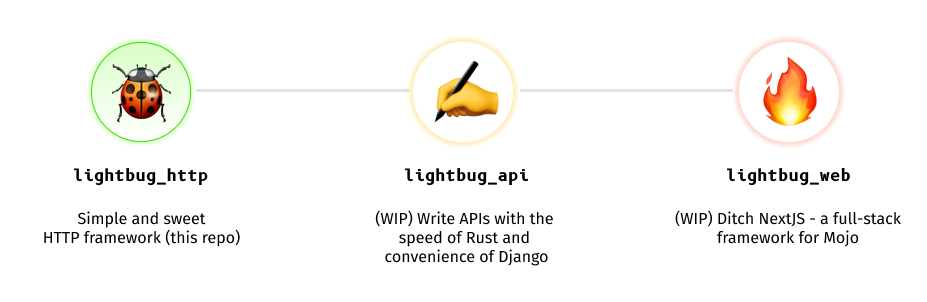
该计划是要获得类似于类似于星际旅行的Python框架的功能集,但性能更好。
我们的愿景是开发三个库,以lightbug_http (此存储库)为起点:
lightbug_http -HTTP基础架构和基本API开发lightbug_api (在2024年后期来!)快速制作出色API的工具,并支持OpenAPI规格和域驱动的设计lightbug_web (发布日期tbd)Mojo的全堆栈网络框架,类似于NextJS或Sveltekit这个想法是要达到一个可以用Mojo编写的简单现代Web应用程序的整个代码库。
不过,我们没有做出任何承诺 - 这只是一个愿景,无论我们是否到达那里取决于许多因素,包括社区的支持。
请参阅“开放问题”并提交您的提交,以帮助推动Lightbug的开发。
(返回到顶部)
贡献是使开源社区成为学习,启发和创造的惊人场所的原因。您所做的任何贡献都非常感谢。有关如何贡献的更多详细信息,请参见贡献。
如果您有一个可以使情况变得更好的建议,请分配存储库并创建拉动请求。您也可以简单地使用标签“增强”打开问题。别忘了给项目一个明星!
git checkout -b feature/AmazingFeature )git commit -m 'Add some AmazingFeature' )git push origin feature/AmazingFeature )(返回到顶部)
根据MIT许可分发。有关更多信息,请参见LICENSE.txt 。
(返回到顶部)
瓦伦丁·伊罗钦(Valentin Erokhin)
项目链接:https://github.com/saviorand/mojo-web
(返回到顶部)
我们在以下项目中绘制了很多:
(返回到顶部)
希望您的名字出现在这里吗?请参阅贡献。md!
用贡献制成。







