PosInformatique.AspNetCore.Server.AspNet
v1.0.0

posinformatique.aspnetcore.server.aspnet是一个基于.NET框架的ASP .NET非核心(WebForms和MVC)基础架构的ASP .NET Core Web API的库。
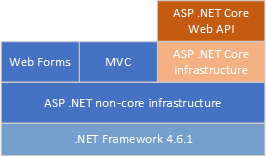
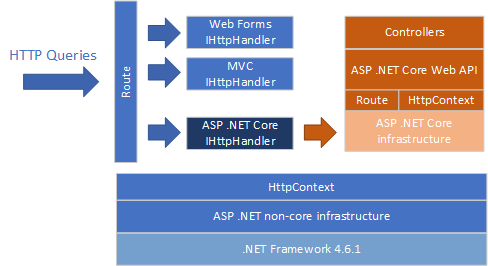
posinformatique.aspnetcore.server.aspnet是ASP .NET非核心IHttpHandler ,根据ASP .NET非核心基础架构中配置的路由执行。当posinformatique.aspnetcore.server.aspnet IHttpHandler内部实现被调用时,HTTP查询将发送到ASP .NET核心基础架构,如果在专用的IIS,Console或Kestrel主机中托管,则以相同的行为执行该查询。
posinformatique.aspnetcore.server.aspnet可直接在Nuget官方网站上获得。使用以下Nuget命令行下载并安装库到您的Visual Studio项目
Install-Package PosInformatique.AspNetCore.Server.AspNet
在新的ASP .NET Web Forms/MVC非核心项目中,使用以下Nuget命令安装ASP .NET Core 2.x基础架构:
 Install-Package Microsoft.AspNetCore
Install-Package Microsoft.AspNetCore.Mvc
在您的ASP .NET WebForms或MVC非核心项目中添加posinformatique.aspnetcore.server.aspnet包装套件之后,在您的HttpApplication类的Application_Start中构建并启动ASP .NET核心核心IWebHost实例,使用Classic web host.creathost.createatefefefefefefefeffbuilder( Startup API WebHost.CreateDefaultBuilder() (启动API)(启动)。相反,要选择kestrel或iis托管您的ASP .NET Core应用程序,请调用UseAspNet()方法,以在ASP .NET非核心基础结构上托管您的ASP .NET Core应用程序。
UseAspNet()需要定义将通过ASP .NET核心基础架构而不是ASP .NET非核心进行截获并处理的基本路线。
这是构建构建,启动ASP .NET Core应用程序的Global.asax.cs代码的一个示例,并将所有请求重定向/api和/swagger URL启动到ASP .NET CORE应用程序:
 public class Global : System . Web . HttpApplication
{
    protected void Application_Start ( object sender , EventArgs e )
    {
        WebHost . CreateDefaultBuilder ( )
            . UseAspNet ( options =>
            {
                options . Routes . Add ( "api" ) ;
                options . Routes . Add ( "swagger" ) ;
            } )
            . UseStartup < Startup > ( )
            . Start ( ) ;
    }
}您可以通过注册其他服务来与Startup类配置ASP .NET Core应用程序。这是一个Startup类的示例,该类别注册ASP .NET Core MVC基础架构和SwashBuckle.aspNetcore扩展程序,以使用Swagger UI添加文档。
 public class Startup
{
    public Startup ( IConfiguration configuration )
    {
        Configuration = configuration ;
    }

    public IConfiguration Configuration { get ; }

    // This method gets called by the runtime. Use this method to add services to the container.
    public void ConfigureServices ( IServiceCollection services )
    {
        services . AddMvc ( ) ;

        services . AddSwaggerGen ( c =>
        {
            c . SwaggerDoc ( "v1" , new Info { Title = "My API" , Version = "v1" } ) ;

            // Set the comments path for the Swagger JSON and UI.
            var xmlFile = $ " { Assembly . GetExecutingAssembly ( ) . GetName ( ) . Name } .xml" ;
            var xmlPath = Path . Combine ( AppContext . BaseDirectory , "bin" , xmlFile ) ;
            c . IncludeXmlComments ( xmlPath ) ;
        } ) ;
    }

    // This method gets called by the runtime. Use this method to configure the HTTP request pipeline.
    public void Configure ( IApplicationBuilder app , IHostingEnvironment env )
    {
        if ( env . IsDevelopment ( ) )
        {
            app . UseDeveloperExceptionPage ( ) ;
        }

        app . UseMvc ( routes =>
        {
            routes . MapRoute (
                name : "default" ,
                template : "{controller=Home}/{action=Index}/{id?}" ) ;
        } ) ;

        // Enable middleware to serve generated Swagger as a JSON endpoint.
        app . UseSwagger ( ) ;

        // Enable middleware to serve swagger-ui (HTML, JS, CSS, etc.),
        // specifying the Swagger JSON endpoint.
        app . UseSwaggerUI ( c =>
        {
            c . SwaggerEndpoint ( "/swagger/v1/swagger.json" , "My API V1" ) ;
        } ) ;
    }
} 您必须确定仅在控制器实现内使用ASP .NET核心的组件和服务。避免从控制器实现中访问ASP .NET非核心的组件或服务。例如,请确保访问控制器代码内部的ASP .NET Core HttpContext ,并且不使用ASP .NET非核心HttpContext 。
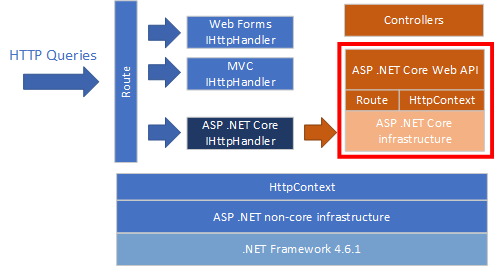
如先前的体系结构图中所示,在您的控制器代码中,您只能用于ASP .NET Core API,即使您可以访问ASP .NET非核心基础架构API。
因为ASP .NET Core 3.X仅基于.NET Core 3.0运行时(而不是像以前一样,在.NET标准2.0上,例如ASP .NET Core 2.x),因此该库不能用于托管ASP .NET Core 3.X Web API,ar asp .NET .NET非核心基础架构。
当前, posinformatique.aspnetcore.server.aspnet只能与RAW ASP .NET核心基础结构和Web API控制器实现一起使用。由于Visual Studio Project使用ASP .NET非核心Web编译器,因此无法将此库与MVC Razor视图一起使用。
请不要犹豫,克隆我的代码并提交一些更改...这是一个开源项目,因此欢迎每个人都可以改进这个库...顺便说一句,我是法国人...所以也许您会说我的英语并不是真正流利的...所以请不要犹豫,请不要修复我的资源字符串或文档... Merci ... Merci!
我要感谢Dilitrust Company测试,并向我提供了此库的反馈,以提供嵌入在ASP .NET Core Web上开发的ASP .NET WebForms应用程序。





