PosInformatique.AspNetCore.Server.AspNet
v1.0.0

posinformatique.aspnetcore.server.aspnet เป็นไลบรารีที่จะโฮสต์ ASP .NET Core Web API บน ASP .NET Non-core (WebForms และ MVC) โครงสร้างพื้นฐานตามเฟรมเวิร์ก. NET
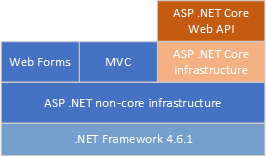
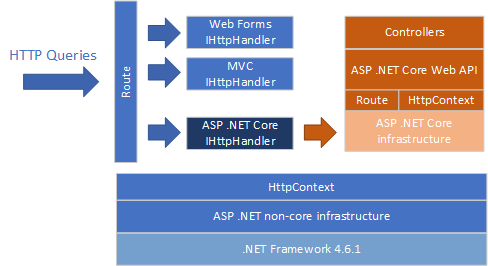
posinformatique.aspnetcore.server.aspnet เป็น asp .net non-core IHttpHandler ซึ่งดำเนินการขึ้นอยู่กับเส้นทางที่กำหนดค่าในโครงสร้างพื้นฐานที่ไม่ใช่คอร์ ASP .NET เมื่อ posinformatique.aspnetcore.server.aspnet การใช้งานภายใน IHttpHandler เรียกว่าการค้นหา HTTP จะถูกส่งไปยังโครงสร้างพื้นฐาน ASP .NET Core ซึ่งดำเนินการค้นหา ด้วยพฤติกรรมเดียวกัน
posinformatique.aspnetcore.server.aspnet มีให้บริการโดยตรงบนเว็บไซต์ทางการของ NuGet ในการดาวน์โหลดและติดตั้งไลบรารีไปยังโครงการ Visual Studio ของคุณโดยใช้บรรทัดคำสั่ง NUGET ต่อไปนี้
Install-Package PosInformatique.AspNetCore.Server.AspNet
ใน ASP .NET Web Forms/MVC ใหม่โครงการ Non-Core ติดตั้งโครงสร้างพื้นฐาน ASP .NET CORE 2.x โดยใช้คำสั่ง NUGET ต่อไปนี้:
 Install-Package Microsoft.AspNetCore
Install-Package Microsoft.AspNetCore.Mvc
หลังจากเพิ่มแพ็คเกจ posinformatique.aspnetcore.server.aspnet ใน ASP .NET WebForms หรือ MVC Project ภายใน Application_Start ของคลาส HttpApplication ของ WebHost.CreateDefaultBuilder() Startup และเริ่มต้น ASP .NET Core IWebHost แทนที่จะเลือก Kestrel หรือ IIS เพื่อโฮสต์แอปพลิเคชัน ASP .NET Core ของคุณโทรหาวิธี UseAspNet() เพื่อโฮสต์แอปพลิเคชัน ASP .NET Core ของคุณบนโครงสร้างพื้นฐานที่ไม่ใช่คอร์ ASP .NET
UseAspNet() ต้องกำหนดเส้นทางพื้นฐานซึ่งจะถูกดักจับและดำเนินการโดยโครงสร้างพื้นฐาน ASP .NET Core แทน ASP. NET Non-Core
นี่เป็นตัวอย่างของรหัส Global.asax.cs ที่อยู่เบื้องหลังซึ่งสร้างขึ้นเริ่มต้นแอปพลิเคชัน ASP .NET Core และเปลี่ยนเส้นทางคำขอทั้งหมดเริ่มต้นโดย /api และ /swagger URL ไปยังแอปพลิเคชัน ASP .NET Core:
 public class Global : System . Web . HttpApplication
{
    protected void Application_Start ( object sender , EventArgs e )
    {
        WebHost . CreateDefaultBuilder ( )
            . UseAspNet ( options =>
            {
                options . Routes . Add ( "api" ) ;
                options . Routes . Add ( "swagger" ) ;
            } )
            . UseStartup < Startup > ( )
            . Start ( ) ;
    }
}
คุณสามารถกำหนดค่าแอปพลิเคชัน ASP .NET Core ของคุณได้ตามปกติด้วยคลาส Startup โดยการลงทะเบียนบริการเพิ่มเติม นี่คือตัวอย่างของคลาส Startup ที่ลงทะเบียนโครงสร้างพื้นฐาน ASP .NET Core MVC และส่วนขยาย Swashbuckle.aspnetcore เพื่อเพิ่มเอกสารโดยใช้ Swagger UI
 public class Startup
{
    public Startup ( IConfiguration configuration )
    {
        Configuration = configuration ;
    }

    public IConfiguration Configuration { get ; }

    // This method gets called by the runtime. Use this method to add services to the container.
    public void ConfigureServices ( IServiceCollection services )
    {
        services . AddMvc ( ) ;

        services . AddSwaggerGen ( c =>
        {
            c . SwaggerDoc ( "v1" , new Info { Title = "My API" , Version = "v1" } ) ;

            // Set the comments path for the Swagger JSON and UI.
            var xmlFile = $ " { Assembly . GetExecutingAssembly ( ) . GetName ( ) . Name } .xml" ;
            var xmlPath = Path . Combine ( AppContext . BaseDirectory , "bin" , xmlFile ) ;
            c . IncludeXmlComments ( xmlPath ) ;
        } ) ;
    }

    // This method gets called by the runtime. Use this method to configure the HTTP request pipeline.
    public void Configure ( IApplicationBuilder app , IHostingEnvironment env )
    {
        if ( env . IsDevelopment ( ) )
        {
            app . UseDeveloperExceptionPage ( ) ;
        }

        app . UseMvc ( routes =>
        {
            routes . MapRoute (
                name : "default" ,
                template : "{controller=Home}/{action=Index}/{id?}" ) ;
        } ) ;

        // Enable middleware to serve generated Swagger as a JSON endpoint.
        app . UseSwagger ( ) ;

        // Enable middleware to serve swagger-ui (HTML, JS, CSS, etc.),
        // specifying the Swagger JSON endpoint.
        app . UseSwaggerUI ( c =>
        {
            c . SwaggerEndpoint ( "/swagger/v1/swagger.json" , "My API V1" ) ;
        } ) ;
    }
} คุณต้องใช้ เฉพาะ ส่วนประกอบและบริการของ ASP .NET Core ภายในการใช้งานคอนโทรลเลอร์ของคุณ หลีกเลี่ยงการเข้าถึงส่วนประกอบหรือบริการของ ASP .NET ที่ไม่ใช่คอร์จากการใช้งานคอนโทรลเลอร์ของคุณ ตัวอย่างเช่นอย่าลืมเข้าถึง ASP .NET CORE HttpContext ภายในรหัสคอนโทรลเลอร์ของคุณและอย่าใช้ ASP .NET NON-CORE HttpContext
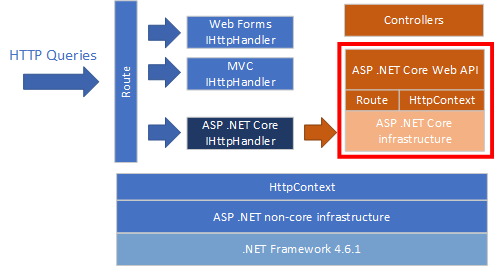
ดังที่แสดงในการวาดสถาปัตยกรรมก่อนหน้านี้ในรหัสคอนโทรลเลอร์ของคุณคุณควรใช้เฉพาะ ASP .NET Core API แม้คุณสามารถเข้าถึง ASP .NET NON-CORE API API
เนื่องจาก ASP .NET Core 3.x ขึ้นอยู่กับ. NET Core 3.0 Runtime (และไม่ได้อยู่ใน. NET Standard 2.0 เช่นเดียวกับ ASP .NET Core 2.x) ไลบรารีนี้ ไม่สามารถ ใช้เป็นโฮสต์ ASP .NET Core 3.x Web API บนโครงสร้างพื้นฐานที่ไม่ใช่คอร์
ปัจจุบัน posinformatique.aspnetcore.server.aspnet สามารถทำงานกับโครงสร้างพื้นฐาน ASP. NET Core Raw และสำหรับการใช้งาน Web API Controllers เป็น ไปไม่ได้ ที่จะใช้ไลบรารีนี้กับมุมมองมีดโกน MVC เนื่องจากโครงการ Visual Studio ใช้ ASP .NET Non-Core Web Compiler
อย่าลังเลที่จะโคลนรหัสของฉันและส่งการเปลี่ยนแปลงบางอย่าง ... มันเป็นโครงการโอเพ่นซอร์สดังนั้นทุกคนยินดีที่จะปรับปรุงห้องสมุดนี้ ... โดยวิธีการที่ฉันเป็นคนฝรั่งเศส ... ดังนั้นบางทีคุณอาจจะพูดว่าภาษาอังกฤษของฉันไม่คล่องแคล่วจริงๆ ...
ฉันต้องการขอบคุณ บริษัท Dilitrust ที่จะทดสอบและให้ข้อเสนอแนะของพวกเขาเกี่ยวกับห้องสมุดนี้สำหรับแอปพลิเคชัน ASP .NET WebForms ที่ฝัง API พัฒนาบน ASP .NET Core Web





