VectorETL
1.0.0

veTERETL:矢量数据库的轻量级ETL框架
VECTERETL按上下文数据是一个模块化框架,旨在在短短几分钟内帮助数据和AI工程师处理其AI应用程序的数据!
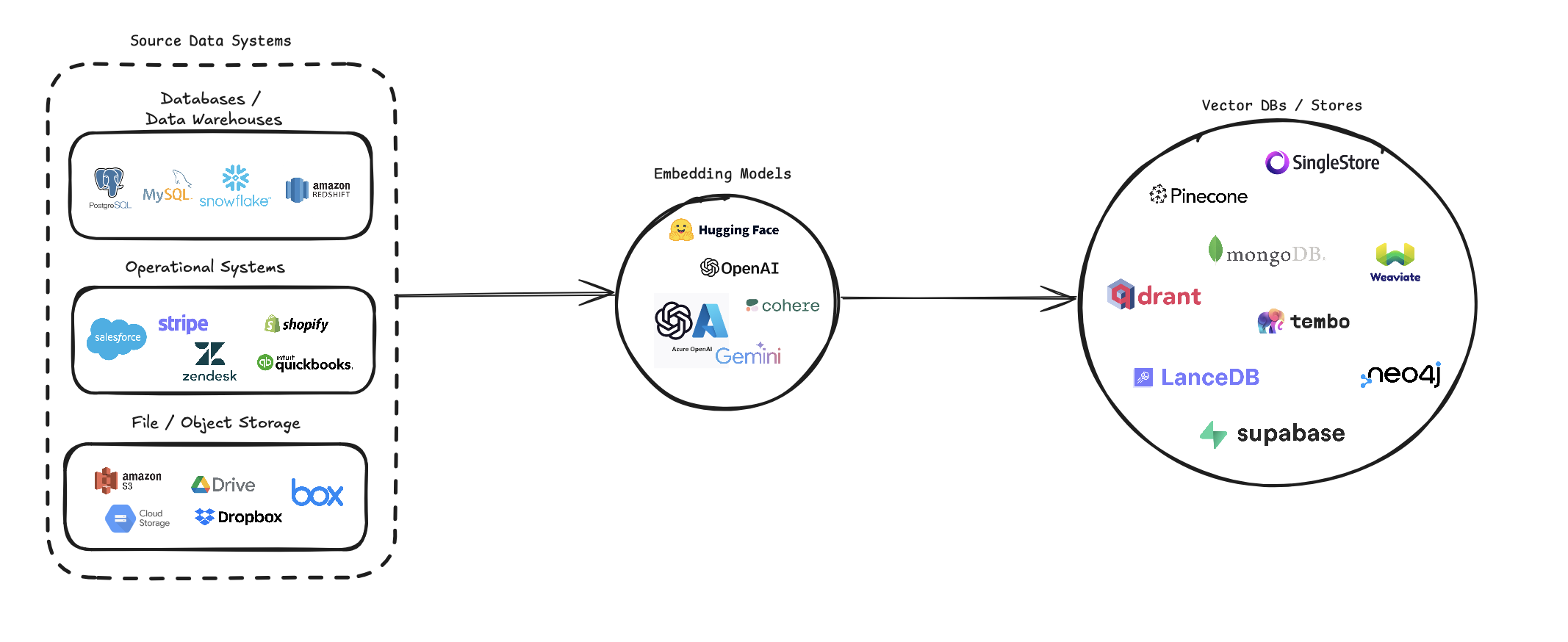
veTORETL简化了将各种数据源转换为向量嵌入并将其存储在各种矢量数据库中的过程。它支持多个数据源(数据库,云存储和本地文件),各种嵌入模型(包括OpenAI,Cohere和Google Gemini)以及几个矢量数据库目标(例如Pinecone,Qdrant和Weaviate)。
该管道旨在简化矢量搜索系统的创建和管理,使开发人员和数据科学家可以轻松地构建和扩展需要语义搜索,推荐系统或其他基于向量的操作的应用程序。
pip install --upgrade vector-etl
或者
pip install git+https://github.com/ContextData/VectorETL.git
本节提供了有关如何为矢量数据库使用ETL框架的说明。我们将介绍运行,验证配置并提供一些常见的用法示例。
假设您的配置文件类似于下面的文件。
 source :
  source_data_type : " database "
  db_type : " postgres "
  host : " localhost "
  database_name : " customer_data "
  username : " user "
  password : " password "
  port : 5432
  query : " SELECT * FROM customers WHERE updated_at > :last_updated_at "
  batch_size : 1000
  chunk_size : 1000
  chunk_overlap : 0

embedding :
  embedding_model : " OpenAI "
  api_key : ${OPENAI_API_KEY}
  model_name : " text-embedding-ada-002 "

target :
  target_database : " Pinecone "
  pinecone_api_key : ${PINECONE_API_KEY}
  index_name : " customer-embeddings "
  dimension : 1536
  metric : " cosine "

embed_columns :
  - " customer_name "
  - " customer_description "
  - " purchase_history "
然后,您可以将配置导入到Python项目中,并自动从那里运行
 from vector_etl import create_flow

flow = create_flow ()
flow . load_yaml ( '/path/to/your/config.yaml' )
flow . execute ()使用上面选项2的相同YAML配置文件,您可以直接从命令行运行该过程,而无需将其导入Python应用程序。
要运行ETL框架,请使用以下命令:
vector-etl -c /path/to/your/config.yaml from vector_etl import create_flow
source = {
"source_data_type" : "database" ,
"db_type" : "postgres" ,
"host" : "localhost" ,
"port" : "5432" ,
"database_name" : "test" ,
"username" : "user" ,
"password" : "password" ,
"query" : "select * from test" ,
"batch_size" : 1000 ,
"chunk_size" : 1000 ,
"chunk_overlap" : 0 ,
}
embedding = {
"embedding_model" : "OpenAI" ,
"api_key" : ${ OPENAI_API_KEY },
"model_name" : "text-embedding-ada-002"
}
target = {
"target_database" : "Pinecone" ,
"pinecone_api_key" : ${ PINECONE_API_KEY },
"index_name" : "my-pinecone-index" ,
"dimension" : 1536
}
embed_columns = [ "customer_name" , "customer_description" , "purchase_history" ]
flow = create_flow ()
flow . set_source ( source )
flow . set_embedding ( embedding )
flow . set_target ( target )
flow . set_embed_columns ( embed_columns )
# Execute the flow
flow . execute ()以下是如何将ETL框架用于不同方案的一些示例:
vector-etl -c config/postgres_to_pinecone.yaml postgres_to_pinecone.yaml可能看起来像:
 source :
  source_data_type : " database "
  db_type : " postgres "
  host : " localhost "
  database_name : " customer_data "
  username : " user "
  password : " password "
  port : 5432
  query : " SELECT * FROM customers WHERE updated_at > :last_updated_at "
  batch_size : 1000
  chunk_size : 1000
  chunk_overlap : 0

embedding :
  embedding_model : " OpenAI "
  api_key : ${OPENAI_API_KEY}
  model_name : " text-embedding-ada-002 "

target :
  target_database : " Pinecone "
  pinecone_api_key : ${PINECONE_API_KEY}
  index_name : " customer-embeddings "
  dimension : 1536
  metric : " cosine "

embed_columns :
  - " customer_name "
  - " customer_description "
- " purchase_history " vector-etl -c config/s3_to_qdrant.yaml s3_to_qdrant.yaml可能看起来像:
 source :
  source_data_type : " Amazon S3 "
  bucket_name : " my-data-bucket "
  prefix : " customer_data/ "
  file_type : " csv "
  aws_access_key_id : ${AWS_ACCESS_KEY_ID}
  aws_secret_access_key : ${AWS_SECRET_ACCESS_KEY}
  chunk_size : 1000
  chunk_overlap : 200

embedding :
  embedding_model : " Cohere "
  api_key : ${COHERE_API_KEY}
  model_name : " embed-english-v2.0 "

target :
  target_database : " Qdrant "
  qdrant_url : " https://your-qdrant-cluster-url.qdrant.io "
  qdrant_api_key : ${QDRANT_API_KEY}
  collection_name : " customer_embeddings "

embed_columns : [] veTORETL(提取,变换,负载)框架是一种功能强大且灵活的工具,旨在简化从各种来源提取数据,将其转换为向量嵌入并将这些嵌入到一系列矢量数据库中的过程。
它以模块化,可扩展性和易用性为基础,是希望利用矢量搜索在数据基础架构中的力量的组织的理想解决方案。
多功能数据提取:该框架支持广泛的数据源,包括传统数据库,云存储解决方案(例如Amazon S3和Google Cloud Storage)以及流行的SaaS平台(例如Stripe和Zendesk)。这种多功能性使您可以将来自多个源的数据合并到统一的向量数据库中。
高级文本处理:对于文本数据,该框架实现了复杂的块和重叠技术。这样可以确保在创建向量嵌入时保留文本的语义上下文,从而导致更准确的搜索结果。
最先进的嵌入模型:该系统与领先的嵌入模型集成在一起,包括OpenAI,Cohere,Google Gemini和Azure OpenAI。这使您可以选择最适合您特定用例和质量要求的嵌入模型。
多重矢量数据库支持:无论您是使用Pinecone,QDrant,Weaviate,Singlestore,Supabase还是LanceDB,此框架都可以覆盖。它旨在与这些流行的矢量数据库无缝接口,使您可以选择最适合您需求的媒介。
可配置和扩展:通过YAML或JSON配置文件,整个框架都是高度配置的。此外,随着您的需求,它的模块化体系结构可轻松使用新的数据源,嵌入模型或向量数据库扩展。
该ETL框架非常适合希望实施或升级其向量搜索功能的组织。
通过自动化提取数据,创建向量嵌入并将其存储在矢量数据库中的过程,该框架大大减少了设置矢量搜索系统所涉及的时间和复杂性。它允许数据科学家和工程师专注于得出见解和构建应用程序,而不是担心数据处理和矢量存储的复杂性。
ETL框架使用配置文件来指定源,嵌入模型,目标数据库和其他参数的详细信息。您可以将YAML或JSON格式用于配置文件。
配置文件分为三个主要部分:
source :指定数据源详细信息embedding :定义要使用的嵌入模型target :概述目标矢量数据库embed_columns :定义需要嵌入的列(主要用于结构化数据源) from vector_etl import create_flow
source = {
"source_data_type" : "database" ,
"db_type" : "postgres" ,
"host" : "localhost" ,
"port" : "5432" ,
"database_name" : "test" ,
"username" : "user" ,
"password" : "password" ,
"query" : "select * from test" ,
"batch_size" : 1000 ,
"chunk_size" : 1000 ,
"chunk_overlap" : 0 ,
}
embedding = {
"embedding_model" : "OpenAI" ,
"api_key" : ${ OPENAI_API_KEY },
"model_name" : "text-embedding-ada-002"
}
target = {
"target_database" : "Pinecone" ,
"pinecone_api_key" : ${ PINECONE_API_KEY },
"index_name" : "my-pinecone-index" ,
"dimension" : 1536
}
embed_columns = [ "customer_name" , "customer_description" , "purchase_history" ] source :
source_data_type : " database "
db_type : " postgres "
host : " localhost "
database_name : " mydb "
username : " user "
password : " password "
port : 5432
query : " SELECT * FROM mytable WHERE updated_at > :last_updated_at "
batch_size : 1000
chunk_size : 1000
chunk_overlap : 0
embedding :
embedding_model : " OpenAI "
api_key : " your-openai-api-key "
model_name : " text-embedding-ada-002 "
target :
target_database : " Pinecone "
pinecone_api_key : " your-pinecone-api-key "
index_name : " my-index "
dimension : 1536
metric : " cosine "
cloud : " aws "
region : " us-west-2 "
embed_columns :
- " column1 "
- " column2 "
- " column3 " {
"source" : {
"source_data_type" : " database " ,
"db_type" : " postgres " ,
"host" : " localhost " ,
"database_name" : " mydb " ,
"username" : " user " ,
"password" : " password " ,
"port" : 5432 ,
"query" : " SELECT * FROM mytable WHERE updated_at > :last_updated_at " ,
"batch_size" : 1000 ,
"chunk_size" : 1000 ,
"chunk_overlap" : 0
},
"embedding" : {
"embedding_model" : " OpenAI " ,
"api_key" : " your-openai-api-key " ,
"model_name" : " text-embedding-ada-002 "
},
"target" : {
"target_database" : " Pinecone " ,
"pinecone_api_key" : " your-pinecone-api-key " ,
"index_name" : " my-index " ,
"dimension" : 1536 ,
"metric" : " cosine " ,
"cloud" : " aws " ,
"region" : " us-west-2 "
},
"embed_columns" : [ " column1 " , " column2 " , " column3 " ]
}source部分根据source_data_type变化。这是不同源类型的示例:
{
  "source_data_type" : " database " ,
  "db_type" : " postgres " ,  # or "mysql", "snowflake", "salesforce"
  "host" : " localhost " ,
  "database_name" : " mydb " ,
  "username" : " user " ,
  "password" : " password " ,
  "port" : 5432 ,
  "query" : " SELECT * FROM mytable WHERE updated_at > :last_updated_at " ,
  "batch_size" : 1000 ,
  "chunk_size" : 1000 ,
  "chunk_overlap" : 0
}
source :
source_data_type : " database "
db_type : " postgres " # or "mysql", "snowflake", "salesforce"
host : " localhost "
database_name : " mydb "
username : " user "
password : " password "
port : 5432
query : " SELECT * FROM mytable WHERE updated_at > :last_updated_at "
batch_size : 1000
chunk_size : 1000
chunk_overlap : 0 {
"source_data_type" : " Amazon S3 " ,
"bucket_name" : " my-bucket " ,
"key" : " path/to/files/ " ,
"file_type" : " .csv " ,
"aws_access_key_id" : " your-access-key " ,
"aws_secret_access_key" : " your-secret-key "
} source :
source_data_type : " Amazon S3 "
bucket_name : " my-bucket "
key : " path/to/files/ "
file_type : " .csv "
aws_access_key_id : " your-access-key "
aws_secret_access_key : " your-secret-key " {
"source_data_type" : " Google Cloud Storage " ,
"credentials_path" : " /path/to/your/credentials.json " ,
"bucket_name" : " myBucket " ,
"prefix" : " prefix/ " ,
"file_type" : " csv " ,
"chunk_size" : 1000 ,
"chunk_overlap" : 0
} source :
source_data_type : " Google Cloud Storage "
credentials_path : " /path/to/your/credentials.json "
bucket_name : " myBucket "
prefix : " prefix/ "
file_type : " csv "
chunk_size : 1000
chunk_overlap : 0 从0.1.6.3版本开始,用户现在可以利用非结构化的无服务器API从基于众多的文件源中提取数据。
注意:这仅限于非结构化的无用API,不应用于非结构化的开源框架
这仅限于[pdf,docx,doc,txt]文件
为了使用非结构化,您需要三个其他参数
use_unstructured :( true/false)指示器告诉框架使用非结构化APIunstructured_api_key :输入您的非结构化API密钥unstructured_url :从您的非结构化仪表板输入您的API URL # Example using Local file
source :
source_data_type : " Local File "
file_path : " /path/to/file.docx "
file_type : " docx "
use_unstructured : True
unstructured_api_key : ' my-unstructured-key '
unstructured_url : ' https://my-domain.api.unstructuredapp.io '
# Example using Amazon S3
source :
source_data_type : " Amazon S3 "
bucket_name : " myBucket "
prefix : " Dir/Subdir/ "
file_type : " pdf "
aws_access_key_id : " your-access-key "
aws_secret_access_key : " your-secret-access-key "
use_unstructured : True
unstructured_api_key : ' my-unstructured-key '
unstructured_url : ' https://my-domain.api.unstructuredapp.io ' embedding部分指定要使用的嵌入模型:
 embedding :
  embedding_model : " OpenAI "  # or "Cohere", "Google Gemini", "Azure OpenAI", "Hugging Face"
  api_key : " your-api-key "
model_name : " text-embedding-ada-002 " # model name varies by provider target部分根据所选矢量数据库而变化。这是Pinecone的一个例子:
 target :
  target_database : " Pinecone "
  pinecone_api_key : " your-pinecone-api-key "
  index_name : " my-index "
  dimension : 1536
  metric : " cosine "
  cloud : " aws "
region : " us-west-2 " embed_columns列表指定了哪些来自源数据的列应用于生成嵌入(仅适用于数据库源):
 embed_columns :
  - " column1 "
  - " column2 "
- " column3 " embed_columns列表仅用于结构化数据源(例如PostgreSQL,MySQL,Snowflake)。对于所有其他来源,请使用一个空列表
embed_columns : []为了保护诸如API密钥和密码之类的敏感信息,请考虑使用环境变量或安全的秘密管理系统。然后,您可以在配置文件中引用这些:
 embedding :
  api_key : ${OPENAI_API_KEY}
这使您可以将配置文件保留在版本控制中,而无需公开敏感数据。
请记住,根据您的特定数据源,嵌入模型和目标数据库调整配置。请参阅每个服务的文档,以确保您提供所有必需的参数。
我们欢迎对矢量数据库的ETL框架的贡献!无论您是修复错误,改进文档还是提出新功能,都要感谢您的努力。您可以做出贡献:
如果您遇到错误或有改善ETL框架的建议:
我们一直在寻找使ETL框架更好的方法。如果您有想法:
我们积极欢迎您的拉请求:
main创建您的分支。为了在整个项目中保持一致性,请遵守这些编码标准:
始终感谢改进文档:
如果您正在考虑添加一个新功能:
source_mods目录中添加一个新文件。source_mods/__init__.py中更新get_source_class函数。embedding_mods目录中添加新文件。embedding_mods/__init__.py中的get_embedding_model函数。target_mods目录中添加一个新文件。target_mods/__init__.py中更新get_target_database函数。我们鼓励所有用户加入我们的Discord服务器,与上下文数据开发团队和其他贡献者合作,以建议升级,新集成和问题。





