sshfs win
SSH

下载
GUI前端
SSHFS胜利是Windows的SSHF的最小端口。在引擎盖下,它将Cygwin用于POSIX环境和WinFSP用于保险丝功能。
两者也很容易与Winget一起安装:
winget install SSHFS-Win.SSHFS-Win 安装WinFSP和SSHFS Win后,您可以使用Windows Explorer或net use命令将网络驱动器映射到SSHFS主机上的目录。
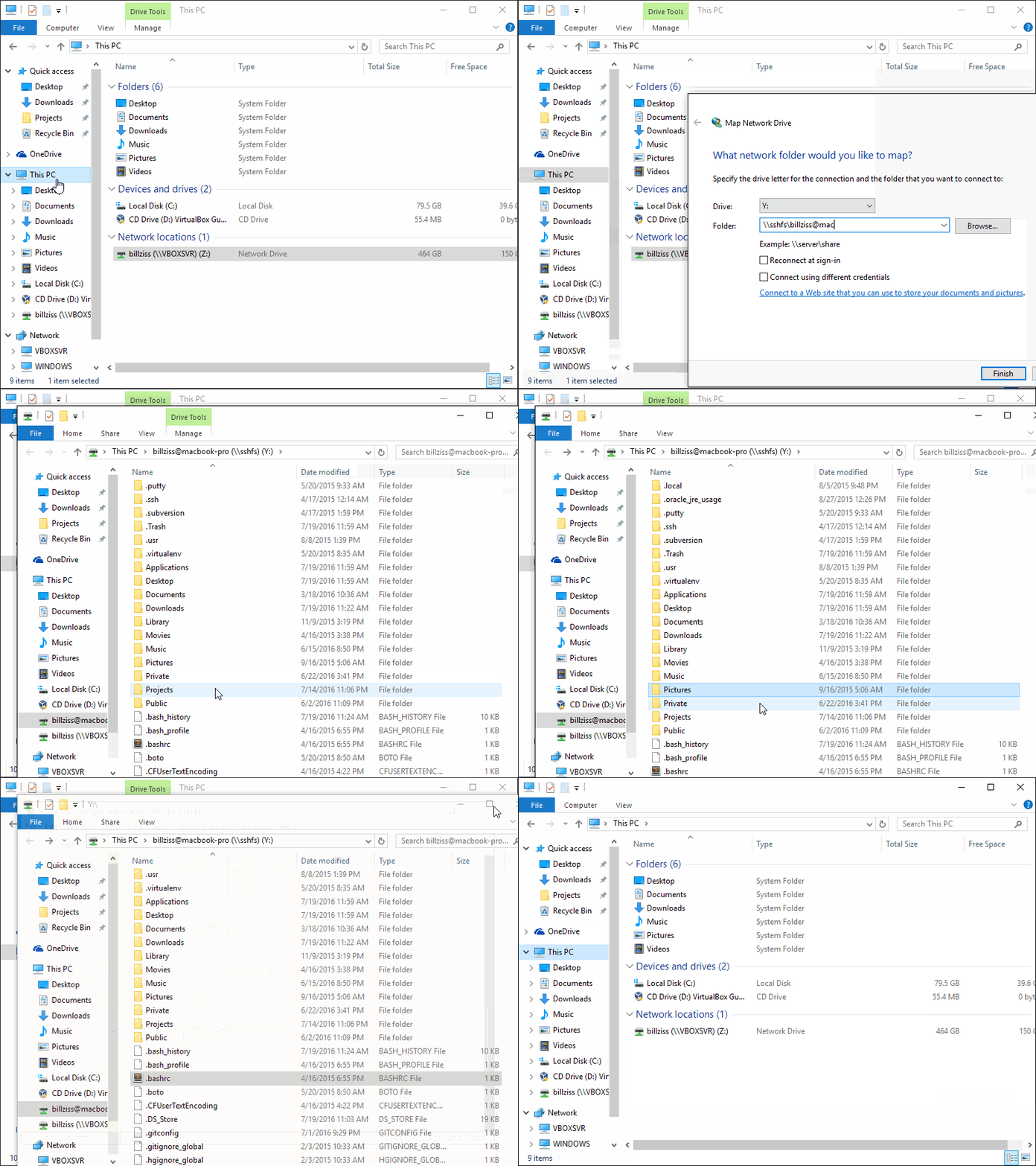
在Windows Explorer中,选择此PC> MAP网络驱动器,然后使用以下UNC语法输入所需的驱动器字母和SSHFS路径:
\sshfsREMUSER@HOST[PATH]
第一次映射特定的SSHFS路径时,您将被提示有关SSHFS用户名和密码的提示。您可以选择使用Windows凭据管理器保存这些凭据,在这种情况下,您将不会再次提示。
为了解开驱动器,请右键单击Windows Explorer中的驱动器图标,然后选择“断开连接”。
您可以使用net use命令从命令行映射网络驱动器:
 > net use X: \[email protected]
The password is invalid for \[email protected].

Enter the user name for 'sshfs': billziss
Enter the password for sshfs:
The command completed successfully.
您可以列出net use驱动器:
 $ net use
New connections will be remembered.


Status       Local     Remote                    Network

-------------------------------------------------------------------------------
             X:        \[email protected]
                                                WinFsp.Np
The command completed successfully.
最后,您可以按以下方式解开驱动器:
 $ net use X: /delete
X: was deleted successfully.
完整的UNC语法如下:
 \sshfs[LOCUSER=]REMUSER@HOST[!PORT][PATH]
\sshfs.r[LOCUSER=]REMUSER@HOST[!PORT][PATH]
\sshfs.k[LOCUSER=]REMUSER@HOST[!PORT][PATH]
\sshfs.kr[LOCUSER=]REMUSER@HOST[!PORT][PATH]
REMUSER是远程用户(即SSHFS主机上的用户,其凭据被用于访问)。HOST是SSHFS主机。PORT是SSHFS主机上的远程端口(可选;默认值为22)。PATH是远程路径。如下所示:sshfs前缀映射到HOST:~REMUSER/PATH (即相对于REMUSER的主目录)。sshfs.r前缀映射到sshfs主机上的host HOST:/PATH (即相对于HOST的根目录)。sshfs.k前缀映射要HOST:~REMUSER/PATH ,并在%USERPROFILE%/.ssh/id_rsa中使用SSH键(其中%USERPROFILE%是本地Windows用户的主目录)。要指定一个不同的特定键,请使用要在SSH配置中使用的特定私有SSH键来定义主机的别名。当心:仅支持没有通行证的键。sshfs.kr前缀映射HOST:/PATH并使用%USERPROFILE%/.ssh/id_rsa中的ssh键。要指定一个不同的特定键,请使用要在SSH配置中使用的特定私有SSH键来定义主机的别名。当心:仅支持没有通行证的键。LOCUSER是本地Windows用户(可选; USERNAME或DOMAIN+USERNAME格式)。SSHFS获胜目前有2个GUI前端:Sirikali和Sshfs Win-Manager。
Sirikali是SSHFS获胜(和其他文件系统)的GUI前端。可以在此链接上找到有关为SSHFS获胜设置Sirikali的说明。请在其问题页面上报告Sirikali的问题。
Sirikali支持:
SSHFS获胜的Manager是专门针对SSHFS Win的新的GUI前端,具有用户友好和直观的界面。 SSHFS获胜的经理与Windows很好地集成在一起,可以将其关闭到系统托盘上。请在其问题页面上报告SSHFS获胜经理的问题。
SSHFS获胜的经理支持:
SSHFS获胜本身当前不支持SSH隧道,但是使用内置的Windows可以实现类似的东西。
使用OpenSSH t通过跳转主机到目标创建本地端口
ssh -L <origin port of jump connection>:<target of tunnel>:<port of target to target> <adress of tunnel jump host>
SSH配置的所有标准设置都可以在此步骤中使用。
参考示例SSH配置:
 create the file C:Users<UserName>.sshconfig and/or add the following lines:

Host <jump host alias>
  Hostname <adress of jump host>
  User <user name at jump host>
  IdentityFile <path to private key for login to the jump host, may have a pass phrase>
  IdentitesOnly yes
使用以下内容连接到目标服务器
\sshfsREMUSER@localhost!<origin port of jump connection>
或类似。
可以直接将sshfs-win.exe和sshfs.exe程序直接用于高级用法方案。可以在SSHFS-Win安装的bin子目录中找到这两个程序(通常Program FilesSSHFS-Winbin )。
sshfs-win.exe程序可用于从cmd.exe提示( sshfs-win cmd )启动sshfs.exe或在WinFSP启动器( sshfs-win svc )的控制下启动sshfs.exe 。 sshfs-win.exe程序不应从Cygwin使用。 sshfs-win.exe程序具有以下用法:
 usage: sshfs-win cmd SSHFS_COMMAND_LINE
    SSHFS_COMMAND_LINE  command line to pass to sshfs

usage: sshfs-win svc PREFIX X: [LOCUSER] [SSHFS_OPTIONS]
    PREFIX              Windows UNC prefix (note single backslash)
                        sshfs[.SUFFIX][LOCUSER=]REMUSER@HOST[!PORT][PATH]
                        sshfs: remote user home dir
                        sshfs.r: remote root dir
                        sshfs.k: remote user home dir with key authentication
                        sshfs.kr: remote root dir with key authentication
    LOCUSER             local user (DOMAIN+USERNAME)
    REMUSER             remote user
    HOST                remote host
    PORT                remote port
    PATH                remote path (relative to remote home or root)
    X:                  mount drive
    SSHFS_OPTIONS       additional options to pass to SSHFS
sshfs.exe程序可以与现有的Cygwin安装一起使用,但是它需要在该Cygwin安装上事先安装Cygwin的保险丝。 WinFSP中包含Cygwin的保险丝,可以通过执行命令来安装Cygwin安装:
 $ sh "$(cat /proc/registry32/HKEY_LOCAL_MACHINE/SOFTWARE/WinFsp/InstallDir | tr -d '')"/opt/cygfuse/install.sh
FUSE for Cygwin installed.
当使用Windows Explorer中创建的映射网络驱动器或使用“ Net使用”时,您无法将选项直接传递给SSHFS。但是,您可以通过注册表补丁传递它们。然后,当您映射网络驱动器或使用“ Net使用”时,将在后台自动传递选项。提供以下常见问题的注册表补丁,并作为一个例子。
几分钟之后,连接将超时。为了防止这种情况,请将例如“ -O serveraliveinterval = 30”传递为sshfs_options。每30秒发送一次野生请求。
地图网络驱动器或“ Net使用”:使用提供的“ ServerAliveInterval.reg”注册表。
在共享文件服务器上,创建的新文件的默认权限可能太严格了,并阻止其他文件读取和编写它们。要设置宽松的权限,请传递“ -o create_file_umask = 0117,create_dir_umask = 0007”作为sshfs_options。这将允许所有者/小组读写新文件的权限以及所有者/组在新目录上读取,写和执行权限。
地图网络驱动器或“ Net使用”:使用提供的“ GrouPreadWrite.Reg”注册表。
这是一个简单的项目:
sshfs是指向原始SSHFS项目的子模块。sshfs-win.c是围绕SSHFS程序的简单包装器,用于实现“地图网络驱动器”功能。sshfs-win.wxs是描述sshfs-win安装程序的WIX文件。patches是一个目录,在SSHF上有几个简单的补丁。Makefile驱动了建立SSHFS胜利并将其包装到MSI的整体过程。 为了构建SSHFS胜,您将需要Cygwin和以下Cygwin软件包:
您还需要:
Fuse for Cygwin。它包含在WinFSP中,可以通过执行命令来安装Cygwin安装:
 $ sh "$(cat /proc/registry32/HKEY_LOCAL_MACHINE/SOFTWARE/WinFsp/InstallDir | tr -d '')"/opt/cygfuse/install.sh
FUSE for Cygwin installed.
WIX工具集。这是一个本机Windows软件包,用于构建SSHFS-WIN MSI安装程序。
构建:
make 。git submodule update --init sshfs初始化它。 SSHFS获胜使用与SSHFS(GPLV2+)相同的许可证。它与WinFSP连接为GPLV3,具有牙线例外。
它还包装以下组件:





