sshfs win
SSH


Download
GUI Frontends
SSHFS-Win is a minimal port of SSHFS to Windows. Under the hood it uses Cygwin for the POSIX environment and WinFsp for the FUSE functionality.
Both can also be easily installed with WinGet:
winget install SSHFS-Win.SSHFS-WinOnce you have installed WinFsp and SSHFS-Win you can map a network drive to a directory on an SSHFS host using Windows Explorer or the net use command.
In Windows Explorer select This PC > Map Network Drive and enter the desired drive letter and SSHFS path using the following UNC syntax:
\sshfsREMUSER@HOST[PATH]
The first time you map a particular SSHFS path you will be prompted for the SSHFS username and password. You may choose to save these credentials with the Windows Credential Manager in which case you will not be prompted again.
In order to unmap the drive, right-click on the drive icon in Windows Explorer and select Disconnect.
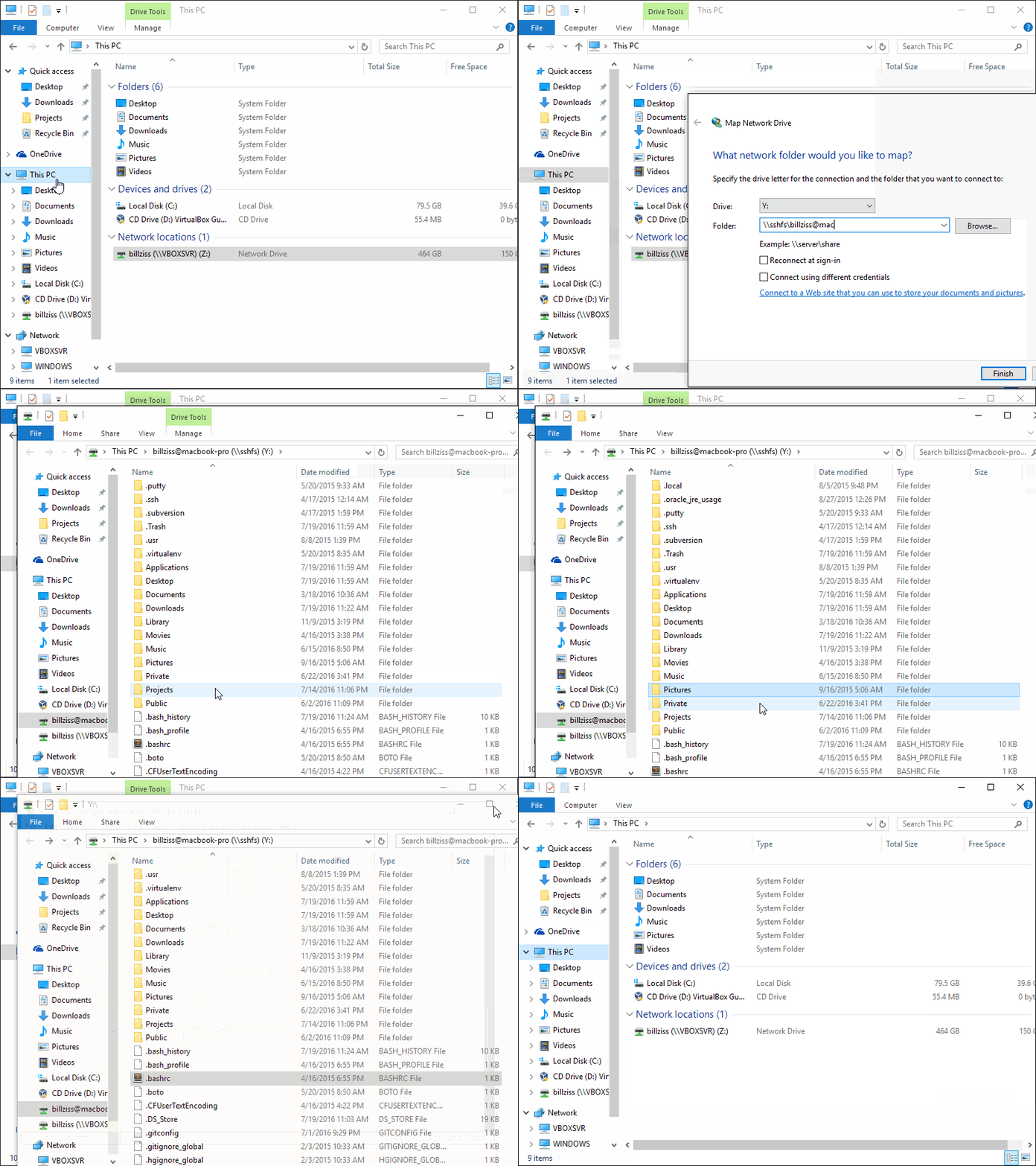
You can map a network drive from the command line using the net use command:
> net use X: \[email protected]
The password is invalid for \[email protected].

Enter the user name for 'sshfs': billziss
Enter the password for sshfs:
The command completed successfully.
You can list your net use drives:
$ net use
New connections will be remembered.


Status       Local     Remote                    Network

-------------------------------------------------------------------------------
             X:        \[email protected]
                                                WinFsp.Np
The command completed successfully.
Finally you can unmap the drive as follows:
$ net use X: /delete
X: was deleted successfully.
The complete UNC syntax is as follows:
\sshfs[LOCUSER=]REMUSER@HOST[!PORT][PATH]
\sshfs.r[LOCUSER=]REMUSER@HOST[!PORT][PATH]
\sshfs.k[LOCUSER=]REMUSER@HOST[!PORT][PATH]
\sshfs.kr[LOCUSER=]REMUSER@HOST[!PORT][PATH]
REMUSER is the remote user (i.e. the user on the SSHFS host whose credentials are being used for access).HOST is the SSHFS host.PORT is the remote port on the SSHFS host (optional; default is 22).PATH is the remote path. This is interpreted as follows:
sshfs prefix maps to HOST:~REMUSER/PATH on the SSHFS host (i.e. relative to REMUSER's home directory).sshfs.r prefix maps to HOST:/PATH on the SSHFS host (i.e. relative to the HOST's root directory).sshfs.k prefix maps to HOST:~REMUSER/PATH and uses the ssh key in %USERPROFILE%/.ssh/id_rsa (where %USERPROFILE% is the home directory of the local Windows user). To specify a different specific key, define an alias of the HOST with the specific private ssh key you want to use in the ssh config. BEWARE: only keys without a pass phrase are supported.sshfs.kr prefix maps to HOST:/PATH and uses the ssh key in %USERPROFILE%/.ssh/id_rsa. To specify a different specific key, define an alias of the HOST with the specific private ssh key you want to use in the ssh config. BEWARE: only keys without a pass phrase are supported.LOCUSER is the local Windows user (optional; USERNAME or DOMAIN+USERNAME format).
There are currently 2 GUI front ends for SSHFS-Win: SiriKali and SSHFS-Win-Manager.
SiriKali is a GUI front end for SSHFS-Win (and other file systems). Instructions on setting up SiriKali for SSHFS-Win can be found at this link. Please report problems with SiriKali in its issues page.
SiriKali supports:
SSHFS-Win-Manager is a new GUI front end specifically for SSHFS-Win with a user-friendly and intuitive interface. SSHFS-Win-Manager integrates well with Windows and can be closed to the system tray. Please report problems with SSHFS-Win-Manager in its issues page.
SSHFS-Win-Manager supports:
sshfs-win itself does not currently support ssh tunneling, but something similar can be achieved using the built-in openSSH of windows.
use openSSH t create a local port forward through the jump host to the target
ssh -L <origin port of jump connection>:<target of tunnel>:<port of target to target> <adress of tunnel jump host>
All standard settings of the ssh config may be used in this step.
Reference example ssh config:
create the file C:Users<UserName>.sshconfig and/or add the following lines:

Host <jump host alias>
  Hostname <adress of jump host>
  User <user name at jump host>
  IdentityFile <path to private key for login to the jump host, may have a pass phrase>
  IdentitesOnly yes
connect to the target server using the following
\sshfsREMUSER@localhost!<origin port of jump connection>
or similar.
It is possible to use the sshfs-win.exe and sshfs.exe programs directly for advanced usage scenarios. Both programs can be found in the bin subdirectory of the SSHFS-Win installation (usually Program FilesSSHFS-Winbin).
The sshfs-win.exe program is useful to launch sshfs.exe from a cmd.exe prompt (sshfs-win cmd) or to launch sshfs.exe under the control of the WinFsp Launcher (sshfs-win svc). The sshfs-win.exe program SHOULD NOT be used from Cygwin. The sshfs-win.exe program has the following usage:
usage: sshfs-win cmd SSHFS_COMMAND_LINE
    SSHFS_COMMAND_LINE  command line to pass to sshfs

usage: sshfs-win svc PREFIX X: [LOCUSER] [SSHFS_OPTIONS]
    PREFIX              Windows UNC prefix (note single backslash)
                        sshfs[.SUFFIX][LOCUSER=]REMUSER@HOST[!PORT][PATH]
                        sshfs: remote user home dir
                        sshfs.r: remote root dir
                        sshfs.k: remote user home dir with key authentication
                        sshfs.kr: remote root dir with key authentication
    LOCUSER             local user (DOMAIN+USERNAME)
    REMUSER             remote user
    HOST                remote host
    PORT                remote port
    PATH                remote path (relative to remote home or root)
    X:                  mount drive
    SSHFS_OPTIONS       additional options to pass to SSHFS
The sshfs.exe program can be used with an existing Cygwin installation, but it requires prior installation of FUSE for Cygwin on that Cygwin installation. FUSE for Cygwin is included with WinFsp and can be installed on a Cygwin installation by executing the command:
$ sh "$(cat /proc/registry32/HKEY_LOCAL_MACHINE/SOFTWARE/WinFsp/InstallDir | tr -d '')"/opt/cygfuse/install.sh
FUSE for Cygwin installed.
When using mapped network drives created in Windows Explorer or using "net use", you can't directly pass options to sshfs. You can, however, pass them via a registry patch. When you then map a network drive or use "net use", the options are automatically passed in the background. Registry patches for common issues below are provided and serve as an example.
A connection will timeout after some minutes when nothing is transferred. To prevent this, pass e.g. "-o ServerAliveInterval=30" as SSHFS_OPTIONS. A keep-alive request is sent every 30 seconds.
Map network drive or "net use": Use the provided "ServerAliveInterval.reg" registry patch.
On a shared file server, the default permissions for new files created may be too strict and prevent others from reading and writing them. To set looser permissions, pass e.g. "-o create_file_umask=0117,create_dir_umask=0007" as SSHFS_OPTIONS. This will allow owner/group read and write permissions on new files and owner/group read, write and execute permissions on new directories.
Map network drive or "net use": Use the provided "GroupReadWrite.reg" registry patch.
This is a simple project:
sshfs is a submodule pointing to the original SSHFS project.sshfs-win.c is a simple wrapper around the sshfs program that is used to implement the "Map Network Drive" functionality.sshfs-win.wxs is a the Wix file that describes the SSHFS-Win installer.patches is a directory with a couple of simple patches over SSHFS.Makefile drives the overall process of building SSHFS-Win and packaging it into an MSI.In order to build SSHFS-Win you will need Cygwin and the following Cygwin packages:
You will also need:
FUSE for Cygwin. It is included with WinFsp and can be installed on a Cygwin installation by executing the command:
$ sh "$(cat /proc/registry32/HKEY_LOCAL_MACHINE/SOFTWARE/WinFsp/InstallDir | tr -d '')"/opt/cygfuse/install.sh
FUSE for Cygwin installed.
Wix toolset. This is a native Windows package that is used to build the SSHFS-Win MSI installer.
To build:
make.git submodule update --init sshfs.SSHFS-Win uses the same license as SSHFS, which is GPLv2+. It interfaces with WinFsp which is GPLv3 with a FLOSS exception.
It also packages the following components:





