elnasmartmeter
1.0.0

该库仅适用于 Firmare 版本 1.7.14 或更低版本。
在较新的固件版本中,Eon 禁用了本地 API 并使该库过时,非常感谢 Eon! ?
阅读第 1 期的更多内容
您好,欢迎光临!如果您喜欢这个库并想支持我的工作,请单击下面的按钮。作为一名软件开发人员,你会喝很多咖啡,你知道吗?
不用说,这完全是自愿的。
用 Python 3 编写的 E.ON Elna 内置 API 的简单库。Elna 是一种智能电能计量设备,使用 RJ12 连接器插入电表的 HAN(家庭局域网)端口。
该库使用 Elna 设备内部的内置 API 直接从设备本身收集有关您的功耗和/或生产的信息。
Elna 基于 Net2Grid 的硬件,因此它可能还与 Net2Grid 系列的更多设备兼容。欢迎任何反馈。
这是一个小型命令行演示应用程序,显示可以从设备获取的信息。
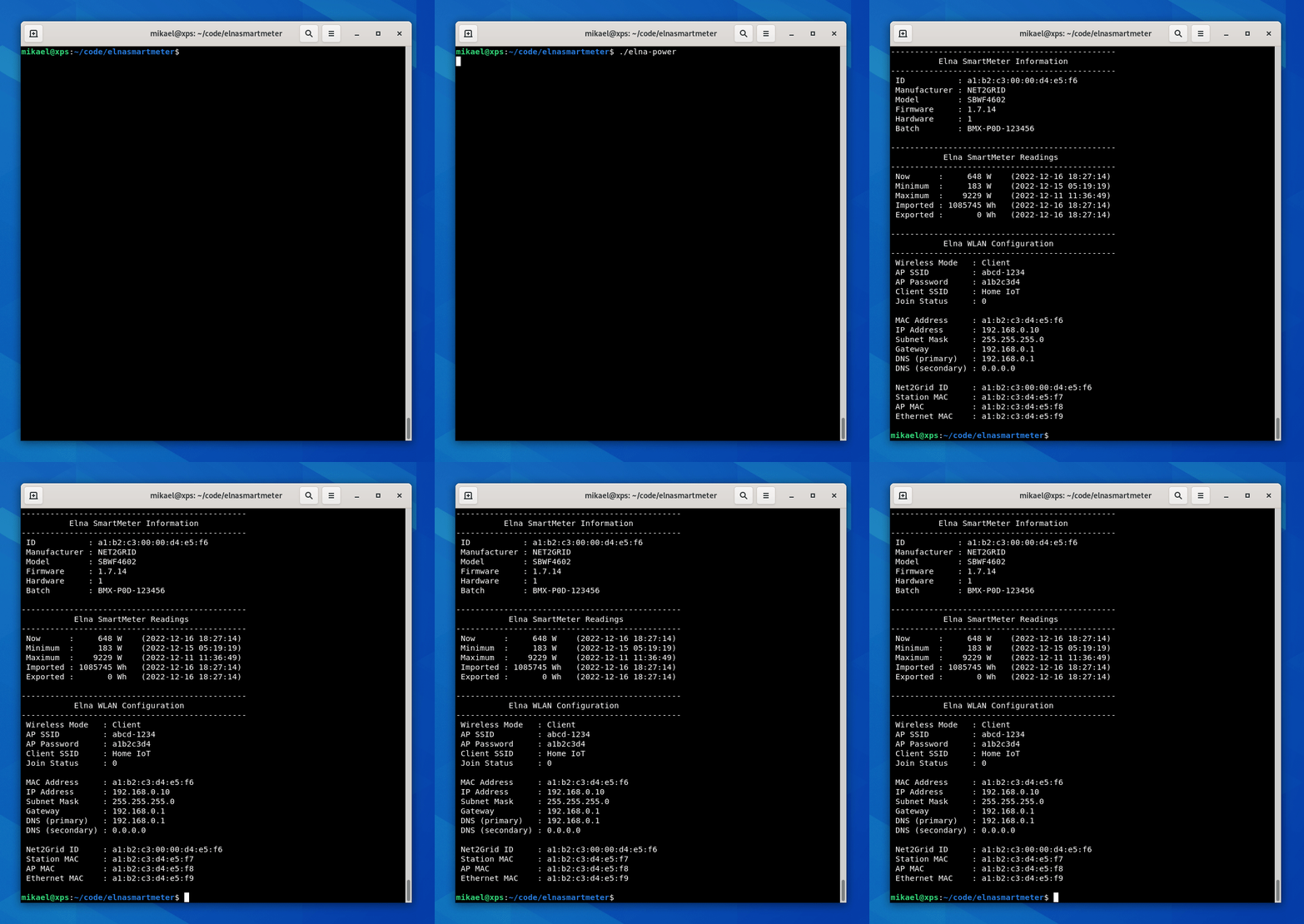
在此处查看演示的源代码:smartmeter-demo.py。
这是一个更真实的演示应用程序,与众所周知的 CLI 应用程序有很多相似之处。它将检查您的瞬时功耗(mpc)并将其输出到控制台。按下 CTRL+C 后,它会显示计算出的最小、最大和平均功耗以及发送到 Elna 的数据包的往返时间等。
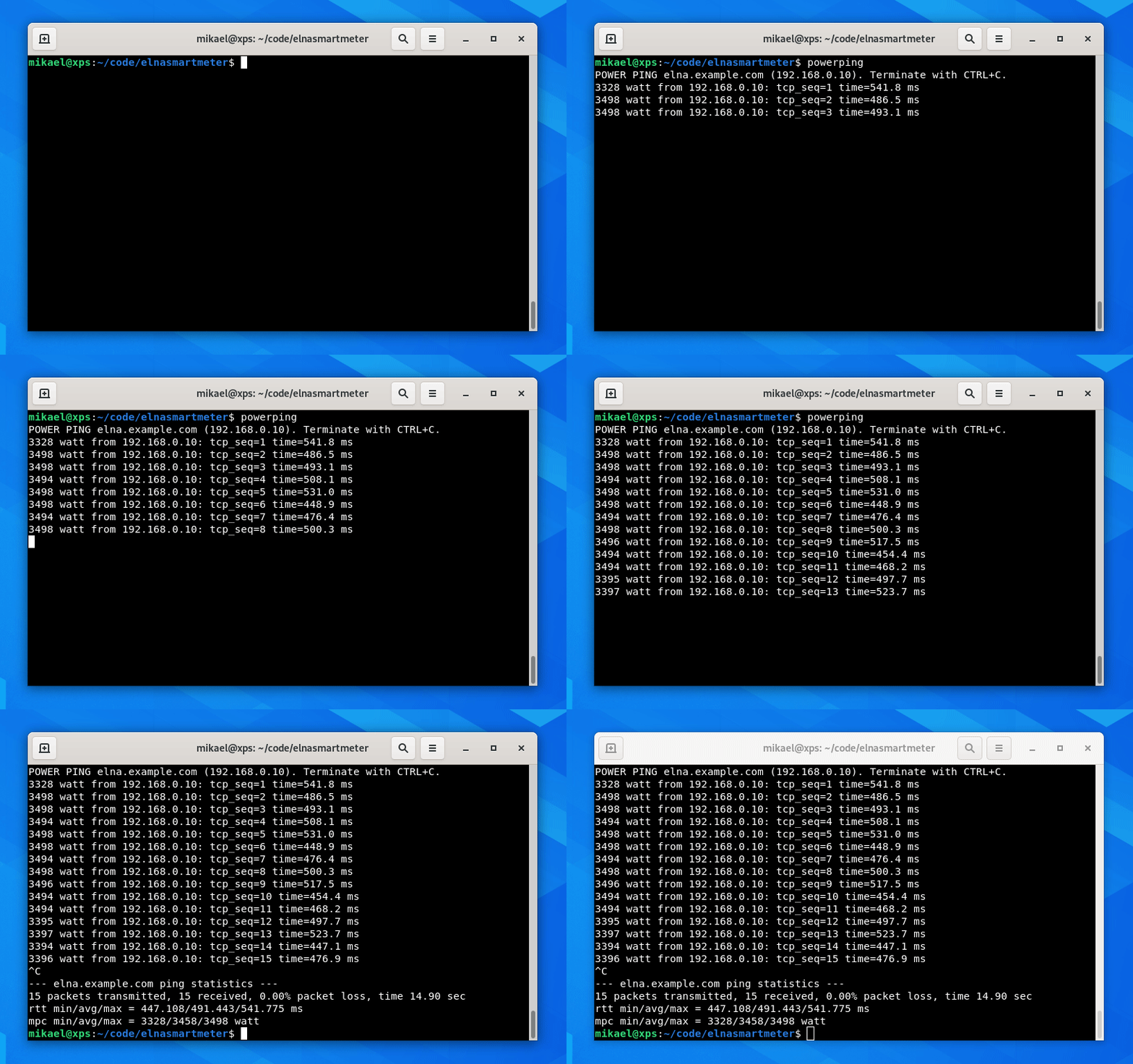
源代码可在此处获取:powerping-demo.py。
设置虚拟环境:
 virtualenv venv
source venv/bin/activate
使用pip安装最新版本:
pip install elnasmartmeter
为了使用该库,您需要知道 Elna 设备的 IP 地址。您可以在路由器的 DHCP 服务器(或运行 DHCP 服务器的任何地方)中找到它。 Elna 的 MAC 地址印在设备背面。
 from elna import smartmeter

# Connect the library to the Elna device
meter = smartmeter . Connect ( '192.168.0.10' )

# Get general information
info = meter . get_info ()

# Get power readings
electricity = meter . get_electricity ()

# Get WLAN information
wlan = meter . get_wlan_info ()获取您家庭的用电量/生产量就这么简单。稍后我们将研究如何通过info和electricity对象访问信息。
所有可从库中调用的方法都会在失败时抛出异常。可以在此处找到完整的例外列表。
 from elna import smartmeter
from elna . exceptions import *
...
try :
    info = meter . get_info ()
except NewConnectionError as e :
print ( e )可以使用print()方法输出表示库中各种实体的对象,以便于检查其属性。
例如,您可以通过将Information对象传递给print()方法来输出它的属性:
 print ( info )
# Output: <class 'elna.classes.Information'>: {'id': '01ab:0200:00cd:03ef', 'manufacturer': 'NET2GRID', 'model': 'SBWF4602', 'firmware': '1.7.14', 'hardware': 1, 'batch': 'HMX-P0D-123456'}
库中的所有类也是如此: Information 、 Electricity 、 Power和WLANInformation 。
该库可以获取两部分数据:一般设备Information和Power统计信息。
要获取一般设备信息,我们只需调用get_info()方法。
info = meter . get_info ()通过类属性访问值:
 info . id                         # Returns the device ID        : '01ab:0200:00cd:03ef'  (for example).
info . manufacturer               # Returns the manufacturer     : 'NET2GRID'
info . model                      # Returns the model            : 'SBWF4602'
info . firmware                   # Returns the firmware version : '1.7.14'
info . hardware                   # Returns the hardware version : 1
info . batch # Returns the batch number : 'HMX-P0D-123456'为了获取功率读数,我们调用get_electricity()方法。这些读数有点复杂,因为从 Elna 设备收集的信息被分为多个子类,但其实并没有那么复杂:
electricity = meter . get_electricity ()获取当前功耗:
 electricity . now . key             # Returns the string  : 'now'
electricity . now . value           # Returns the power   : 453  (for example).
electricity . now . unit            # Returns the unit    : 'W'  (as in Watt)
electricity . now . timestamp # Returns a timestamp : '2022-12-24 13:37:00' 获取该时段内的最小功耗:
 electricity . minimum . key         # Returns the string  : 'minimum'
electricity . minimum . value       # Returns the power   : 202  (for example).
electricity . minimum . unit        # Returns the unit    : 'W'  (as in Watt)
electricity . minimum . timestamp # Returns a timestamp : '2022-12-13 13:37:00' 获取该时段的最大功耗:
 electricity . maximum . key         # Returns the string  : 'maximum'
electricity . maximum . value       # Returns the power   : 14320  (for example).
electricity . maximum . unit        # Returns the unit    : 'W'  (as in Watt)
electricity . maximum . timestamp # Returns a timestamp : '2022-12-31 13:37:00'记录最小值和最大值的时间范围(周期)(对我来说)是未知的。
获取进口电源。这将是进入家庭的总电量:
 electricity . imported . key         # Returns the string  : 'imported'
electricity . imported . value       # Returns the power   : 12345678  (for example).
electricity . imported . unit        # Returns the unit    : 'Wh'  (as in Watt hours)
electricity . imported . timestamp # Returns a timestamp : '2022-12-31 13:37:00' 获取输出功率。这将是来自家庭的总功率:
 electricity . exported . key         # Returns the string  : 'exported'
electricity . exported . value       # Returns the power   : 87654321  (for example).
electricity . exported . unit        # Returns the unit    : 'Wh'  (as in Watt hours)
electricity . exported . timestamp   # Returns a timestamp : '2022-12-31 13:37:00'
查看顶部的智能电表演示来尝试一下。
我们还可以通过调用get_wlan_info()方法来获取设备的WLAN信息。该设备可以充当无线客户端(站)和接入点(AP),具体取决于它是否已连接到您的 WiFi 网络。
wlan = meter . get_wlan_info ()通过对象的类属性访问 WLAN 信息:
 wlan . mode           # Returns the current WLAN mode
wlan . ap_ssid        # Returns the Access Point SSID
wlan . ap_key         # Returns the Access Point Password
wlan . client_ssid    # Returns the SSID of the AP Elna is connected to
wlan . join_status    # Returns the number of clients joined to the Elna AP
wlan . mac            # Returns the MAC address currently in use
wlan . ip             # Returns the IP address
wlan . subnet         # Returns the Subnet mask
wlan . gateway        # Returns the Default gateway
wlan . dns            # Returns the Primary DNS server
wlan . dnsalt         # Returns the Secondary DNS server
wlan . n2g_id         # Returns the Net2Grid ID number
wlan . sta_mac        # Returns the MAC address of the WLAN Station
wlan . ap_mac         # Returns the MAC address of the Access Point
wlan . eth_mac        # Returns the Ethernet MAC address (?)
注意:上述 WLAN 属性后面的描述是估计猜测。
此存储库中的产品名称、商标和注册商标是其各自所有者的财产,作者仅将其用于识别目的。使用这些名称、商标和品牌并不意味着认可或隶属关系。





