elnasmartmeter
1.0.0

このライブラリは、ファームウェア バージョン 1.7.14 以下でのみ動作します。
新しいファームウェア バージョンでは、Eon はローカル API を無効にし、このライブラリを廃止しました。Eon に感謝します。 ?
詳しくは第 1 号をご覧ください
こんにちは、ようこそ!このライブラリを気に入って私の仕事をサポートしたい場合は、下のボタンをクリックしてください。ソフトウェア開発者としてコーヒーを大量に消費します。
言うまでもなく、これは完全に任意です。
Python 3 で書かれた E.ON Elna 組み込み API のシンプルなライブラリ。Elna は、RJ12 コネクタを使用して電力メーターの HAN (ホーム エリア ネットワーク) ポートに接続されるスマート電力測定デバイスです。
このライブラリは、Elna デバイス内の組み込み API を使用して、消費電力や生産量に関する情報をデバイス自体から直接収集します。
Elna は Net2Grid のハードウェアに基づいているため、おそらく Net2Grid ファミリのより多くのデバイスと互換性があります。フィードバックは大歓迎です。
これは、デバイスから取得できる情報を示す小さなコマンドライン デモ アプリケーションです。
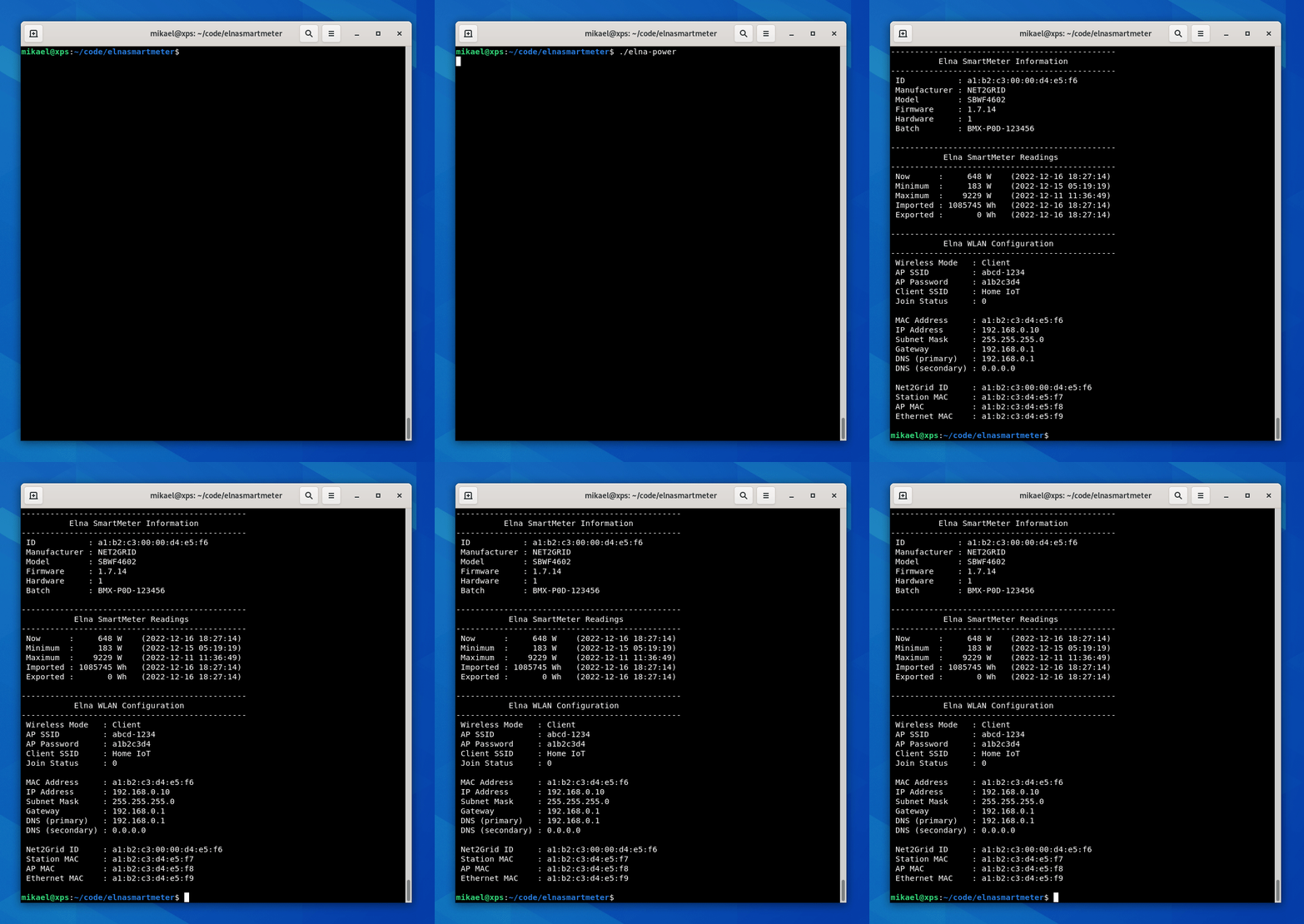
ここでデモのソース コードをチェックしてください:smartmeter-demo.py。
これは、よく知られた CLI アプリケーションとよく似た、より現実的なデモ アプリケーションです。瞬間消費電力(mpc)をチェックし、コンソールに出力します。 CTRL+C を押すと、計算された最小、最大、平均電力消費量、Elna に送信されたパケットの往復時間などが表示されます。
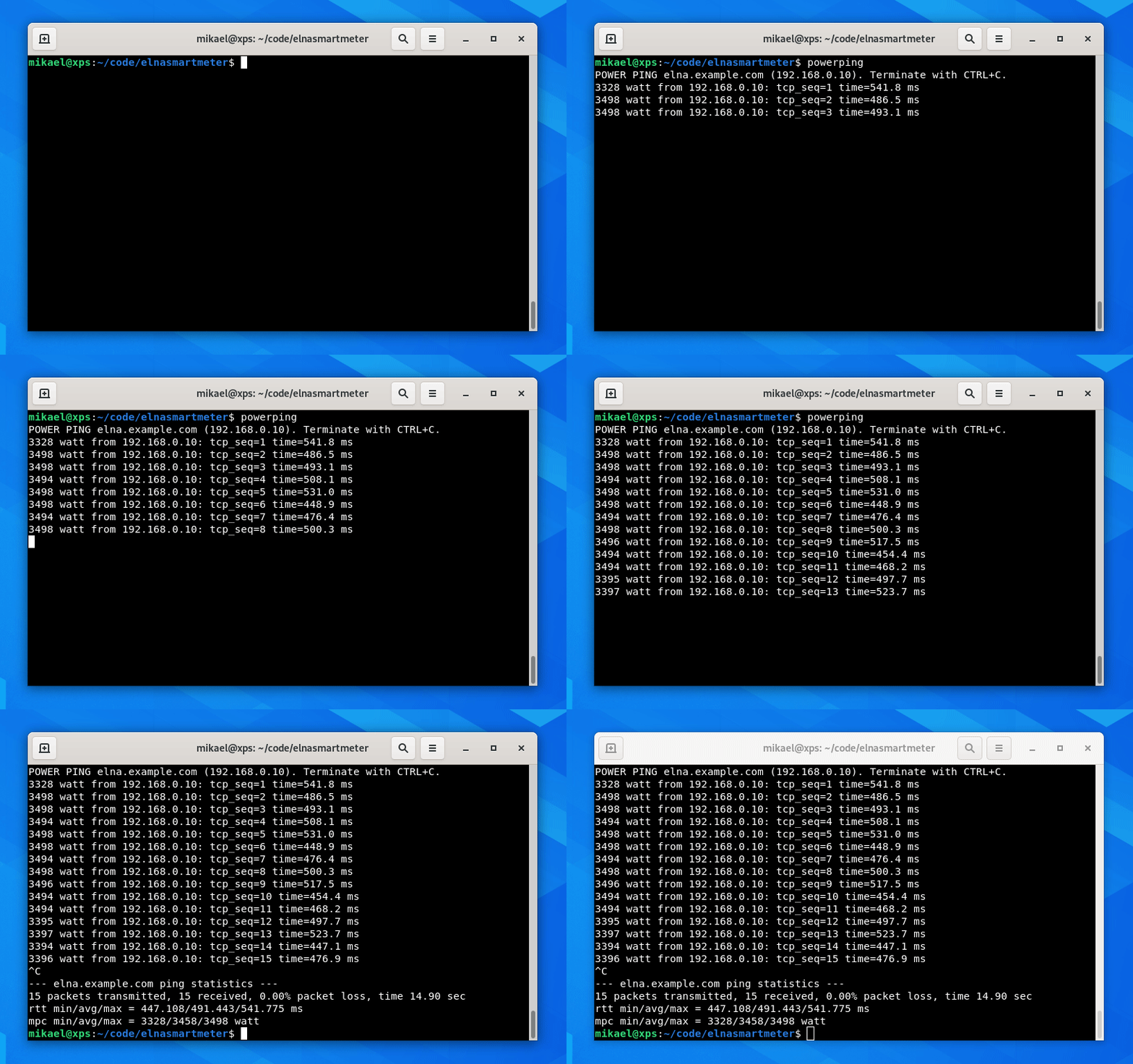
ソース コードは powerping-demo.py から入手できます。
仮想環境をセットアップします。
 virtualenv venv
source venv/bin/activate
pipを使用して最新バージョンをインストールします。
pip install elnasmartmeter
ライブラリを使用するには、Elna デバイスの IP アドレスを知る必要があります。これはルーターの DHCP サーバー (または DHCP サーバーを実行している場所) で見つかります。 Elna の MAC アドレスはデバイスの背面に印刷されています。
 from elna import smartmeter

# Connect the library to the Elna device
meter = smartmeter . Connect ( '192.168.0.10' )

# Get general information
info = meter . get_info ()

# Get power readings
electricity = meter . get_electricity ()

# Get WLAN information
wlan = meter . get_wlan_info ()
ご家庭の電力消費量/発電量を取得するのと同じくらい簡単です。すぐに、 infoとelectricityオブジェクトを介して情報にアクセスする方法を見ていきます。
ライブラリから呼び出し可能なすべてのメソッドは、失敗すると例外をスローします。例外の完全なリストはここにあります。
 from elna import smartmeter
from elna . exceptions import *
...
try :
    info = meter . get_info ()
except NewConnectionError as e :
print ( e )ライブラリ内のさまざまなエンティティを表すオブジェクトは、そのプロパティを簡単に検査できるようにprint()メソッドで出力できます。
たとえば、 Informationオブジェクトのプロパティをprint()メソッドに渡すことで出力できます。
 print ( info )
# Output: <class 'elna.classes.Information'>: {'id': '01ab:0200:00cd:03ef', 'manufacturer': 'NET2GRID', 'model': 'SBWF4602', 'firmware': '1.7.14', 'hardware': 1, 'batch': 'HMX-P0D-123456'}
ライブラリ内のすべてのクラス ( Information 、 Electricity 、 PowerおよびWLANInformationにも同じことが当てはまります。
このライブラリで取得できるデータは、一般的なデバイスInformationとPower統計の 2 つです。
一般的なデバイス情報を取得するには、 get_info()メソッドを呼び出すだけです。
info = meter . get_info ()クラスのプロパティを介して値にアクセスします。
 info . id                         # Returns the device ID        : '01ab:0200:00cd:03ef'  (for example).
info . manufacturer               # Returns the manufacturer     : 'NET2GRID'
info . model                      # Returns the model            : 'SBWF4602'
info . firmware                   # Returns the firmware version : '1.7.14'
info . hardware                   # Returns the hardware version : 1
info . batch # Returns the batch number : 'HMX-P0D-123456'電力の測定値を取得するには、 get_electricity()メソッドを呼び出します。 Elna デバイスから収集された情報はサブクラスに分割されているため、これらの読み取り値は少し複雑ですが、それほど複雑ではありません。
electricity = meter . get_electricity ()現在の消費電力を取得します。
 electricity . now . key             # Returns the string  : 'now'
electricity . now . value           # Returns the power   : 453  (for example).
electricity . now . unit            # Returns the unit    : 'W'  (as in Watt)
electricity . now . timestamp # Returns a timestamp : '2022-12-24 13:37:00' 期間内の最小消費電力を取得します。
 electricity . minimum . key         # Returns the string  : 'minimum'
electricity . minimum . value       # Returns the power   : 202  (for example).
electricity . minimum . unit        # Returns the unit    : 'W'  (as in Watt)
electricity . minimum . timestamp # Returns a timestamp : '2022-12-13 13:37:00' 期間内の最大消費電力を取得します。
 electricity . maximum . key         # Returns the string  : 'maximum'
electricity . maximum . value       # Returns the power   : 14320  (for example).
electricity . maximum . unit        # Returns the unit    : 'W'  (as in Watt)
electricity . maximum . timestamp # Returns a timestamp : '2022-12-31 13:37:00'最小値と最大値が記録された時間枠(期間)は(私には)不明です。
輸入電力を入手します。これは家庭に入ってくる総電力になります:
 electricity . imported . key         # Returns the string  : 'imported'
electricity . imported . value       # Returns the power   : 12345678  (for example).
electricity . imported . unit        # Returns the unit    : 'Wh'  (as in Watt hours)
electricity . imported . timestamp # Returns a timestamp : '2022-12-31 13:37:00' 輸出された電力を取得します。これは家庭から出てくる総電力になります:
 electricity . exported . key         # Returns the string  : 'exported'
electricity . exported . value       # Returns the power   : 87654321  (for example).
electricity . exported . unit        # Returns the unit    : 'Wh'  (as in Watt hours)
electricity . exported . timestamp   # Returns a timestamp : '2022-12-31 13:37:00'
上部にあるスマートメーターのデモをチェックして試してみてください。
get_wlan_info()メソッドを呼び出して、デバイスの WLAN 情報を取得することもできます。デバイスは、WiFi ネットワークに接続されているかどうかに応じて、ワイヤレス クライアント (ステーション) とアクセス ポイント (AP) の両方として機能します。
wlan = meter . get_wlan_info ()オブジェクトのクラス プロパティを介して WLAN 情報にアクセスします。
 wlan . mode           # Returns the current WLAN mode
wlan . ap_ssid        # Returns the Access Point SSID
wlan . ap_key         # Returns the Access Point Password
wlan . client_ssid    # Returns the SSID of the AP Elna is connected to
wlan . join_status    # Returns the number of clients joined to the Elna AP
wlan . mac            # Returns the MAC address currently in use
wlan . ip             # Returns the IP address
wlan . subnet         # Returns the Subnet mask
wlan . gateway        # Returns the Default gateway
wlan . dns            # Returns the Primary DNS server
wlan . dnsalt         # Returns the Secondary DNS server
wlan . n2g_id         # Returns the Net2Grid ID number
wlan . sta_mac        # Returns the MAC address of the WLAN Station
wlan . ap_mac         # Returns the MAC address of the Access Point
wlan . eth_mac        # Returns the Ethernet MAC address (?)
注: 上記の WLAN プロパティに続く説明は推定によるものです。
このリポジトリ内の製品名、商標、および登録商標は、それぞれの所有者の財産であり、作成者は識別目的のみに使用します。これらの名前、商標、ブランドの使用は、承認または提携を意味するものではありません。





