

Usually when we splice pictures, we usually use PS or other image processing tools to process and synthesize them. This time there is a need for image splicing, and I hope that we can directly use code to splice, so there is such a tool. Bag.
Through this plug-in, we can perform the following operations on pictures:
as follows. We have such two pictures, and now we can use this tool to splice them into one

n1.jpg

n2.jpg
const consoleInput = require('@jyeontu/img-concat');
const ImgConcatClass = new ImgConcat();
const p1 = {
    left:'.\img\n1.jpg',
    right:'.\img\n2.jpg',
    target:'.\longImg'
}
// Splice two pictures horizontally ImgConcatClass.collapseHorizontal(p1).then(res=>{
    console.log(`Splicing completed, picture path is ${res}`);
}); 
is still the two pictures above. We will splice them vertically with
const consoleInput = require('@jyeontu/img-concat');
const ImgConcatClass = new ImgConcat();
const p1 = {
    left:'.\img\n1.jpg',
    right:'.\img\n2.jpg',
    target:'.\longImg'
}
//Join two pictures vertically ImgConcatClass.collapseVertical(p1).then(res=>{
    console.log(`Splicing completed, picture path is ${res}`);
}); 
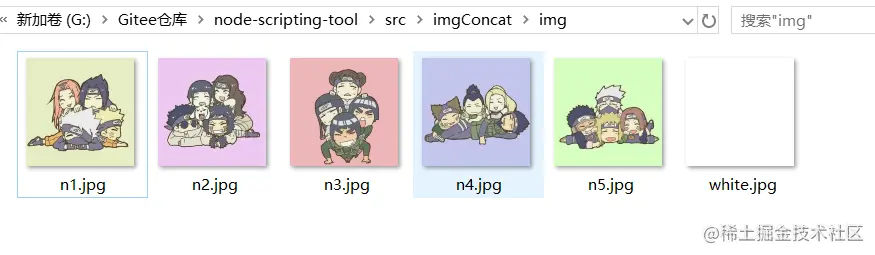
We can also directly batch splice all the pictures in a directory into a long picture, as shown below. Now we want to splice all the pictures in the directory:
const consoleInput = require('@jyeontu/img-concat');
const ImgConcatClass = new ImgConcat();
const p = {
    folderPath:'.\img', //Resource directory targetFolder:'.\longImg', //Converted image storage directory direction:'y' //Splicing direction, y is horizontal, n is vertical}
// Concatenate all images in the directory ImgConcatClass.concatAll(p).then(res=>{
    console.log(`Splicing completed, picture path is ${res}`);
}) 
const consoleInput = require('@jyeontu/img-concat');
const ImgConcatClass = new ImgConcat();
const p = {
    folderPath:'.\img', //Resource directory targetFolder:'.\longImg', //Converted image storage directory direction:'n' //Splicing direction, y is horizontal, n is vertical}
// Concatenate all images in the directory ImgConcatClass.concatAll(p).then(res=>{
    console.log(`Splicing completed, picture path is ${res}`);
}) 
We can also define the image splicing matrix ourselves. shape is a two-dimensional array and defines the images at each position. The details are as follows:
const consoleInput = require('@jyeontu/img-concat');
const ImgConcatClass = new ImgConcat();
const p = {
    shape:[['.\img\n1.jpg','.\img\white.jpg','.\img\n2.jpg'],
            ['.\img\white.jpg','.\img\n3.jpg','.\img\white.jpg'],
            ['.\img\n4.jpg','.\img\white.jpg','.\img\n5.jpg']
        ],
    target:'.\longImg'
};
//Customized matrix splicing picture ImgConcatClass.conCatByMaxit(p).then(res=>{
    console.log(`Splicing completed, picture path is ${res}`);
}); 
and uses GraphicsMagick for image splicing
const gm = require('gm');
collapse (left,right,target,flag = true) {
    return new Promise((r) => {
      gm(left).append(right,flag).write(target, err => {
            if(err) console.log(err);
            r();
      })
    })
}
Use sharp.js to get image information const gm = require('gm');
const fs = require('fs');
const path = require('path');
const progressBar = require('@jyeontu/progress-bar');
const {getFileSuffix,getMetadata,resizeImage} = require('./util');
doConcatAll = async(folderPath,targetFolder,direction) => {
let fileList = fs.readdirSync(folderPath);
fileList.sort((a, b) => {
return path.basename(a) - path.basename(b);
});
const extensionName = getFileSuffix(fileList[0], ".");
let targetFilePath = path.join(targetFolder, new Date().getTime() + '.' + extensionName);
const barConfig = {
duration: fileList.length - 1,
current: 0,
block:'█',
showNumber: true,
tip:{
0: 'Splicing...',
100:'Splicing completed'
},
color:'green'
};
let progressBarC = new progressBar(barConfig);
const imgInfo = await this.getImgInfo(path.join(folderPath, fileList[0]));
for (let index = 1; index < fileList.length; index++) {
let leftFile = path.join(folderPath, fileList[index - 1]);
let rightFile = path.join(folderPath, fileList[index]);
const leftPath = await this.resizeImage({
path:leftFile,
width:imgInfo.width,
height:imgInfo.height
});
const rightPath = await this.resizeImage({
path:rightFile,
width:imgInfo.width,
height:imgInfo.height
});
progressBarC.run(index);
await this.collapse(index == 1 ? leftPath : targetFilePath,rightPath,targetFilePath,direction);
fs.unlinkSync(leftPath);
fs.unlinkSync(rightPath);
}
console.log('');
return targetFilePath;
} const gm = require('gm');
const fs = require('fs');
const path = require('path');
const progressBar = require('@jyeontu/progress-bar');
const {getFileSuffix,getMetadata,resizeImage} = require('./util');
async conCatByMaxit(res){
const {shape} = res;
const tmpList = [];
const barConfig = {
duration: shape[0].length * shape.length,
current: 0,
block:'█',
showNumber: true,
tip:{
0: 'Splicing...',
100:'Splicing completed'
},
color:'green'
};
const progressBarC = new progressBar(barConfig);
let target = '';
let extensionName = getFileSuffix(shape[0][0], ".");
const imgInfo = await this.getImgInfo(shape[0][0]);
for(let i = 0; i < shape.length; i++){
target = res.target + '\' + `targetImg${i}.${extensionName}`;
for(let j = 1; j < shape[i].length; j++){
const leftPath = await this.resizeImage({
path:shape[i][j - 1],
width:imgInfo.width,
height:imgInfo.height
});
const rightPath = await resizeImage({
path:shape[i][j],
width:imgInfo.width,
height:imgInfo.height
});
tmpList.push(leftPath,rightPath,target);
progressBarC.run(shape[i].length * i + j);
await this.collapse(j == 1 ? leftPath : target,rightPath,target);
}
if(i>0){
await this.collapse(res.target + '\' + `targetImg${i - 1}.${extensionName}`,target,target,false);
}
}
progressBarC.run(shape[0].length * shape.length);
const newTarget = res.target + '\' + new Date().getTime() + `.${extensionName}`;
fs.renameSync(target,newTarget)
for(let i = 0; i < tmpList.length; i++){
try{
fs.unlinkSync(tmpList[i]);
}catch(err){
// console.error(err);
}
}
console.log('');
return newTarget;
} const consoleInput = require('@jyeontu/img-concat');
const ImgConcatClass = new ImgConcat(); left picture path
right picture path
Synthetic picture saving directory
const p1 = {
left:'.\img\n1.jpg',
right:'.\img\n2.jpg',
target:'.\longImg'
}
// Splice two pictures horizontally ImgConcatClass.collapseHorizontal(p1).then(res=>{
console.log(`Splicing completed, picture path is ${res}`);
}); left picture path
right picture path
synthesized picture saving
const p1 = {
left:'.\img\n1.jpg',
right:'.\img\n2.jpg',
target:'.\longImg'
}
// Splice two pictures vertically ImgConcatClass.collapseVertical(p1).then(res=>{
console.log(`Splicing completed, picture path is ${res}`);
}); resource file directory
merged image saving directory
image merging direction, y is horizontal, n is vertical
const consoleInput = require('@jyeontu/img-concat');
const ImgConcatClass = new ImgConcat();
const p = {
folderPath:'.\img', //Resource directory targetFolder:'.\longImg', //The merged image storage directory direction:'y' //Splicing direction, y is horizontal, n is vertical}
// Concatenate all images in the directory ImgConcatClass.concatAll(p).then(res=>{
console.log(`Splicing completed, picture path is ${res}`);
}) image merging matrix, pass in the image path at each location.
merged image
const p = {
    shape:[['.\img\n1.jpg','.\img\white.jpg','.\img\n2.jpg'],
            ['.\img\white.jpg','.\img\n3.jpg','.\img\white.jpg'],
            ['.\img\n4.jpg','.\img\white.jpg','.\img\n5.jpg']
        ],
    target:'.\longImg'
};
//Customized matrix splicing picture ImgConcatClass.conCatByMaxit(p).then(res=>{
    console.log(`Splicing completed, picture path is ${res}`);
}); https://gitee.com/zheng_yongtao/node-scripting-tool/tree/master/src/imgConcat