django tasks manager
v1.0.1

การรวมกันของ Django & Celery ที่เรียบง่ายสุด ๆ - ห้องสมุดนี้ได้รับการสนับสนุนอย่างแข็งขันโดย Appseed
คุณสมบัติ:
Celery TasksView LOGS และเอาต์พุตMinimal Configurationusers_in_db() - แสดงรายการผู้ใช้ที่ลงทะเบียนทั้งหมดexecute_script() - ให้ผู้ใช้ดำเนินการสคริปต์ที่กำหนดไว้ใน CELERY_SCRIPTS_DIR (พารามิเตอร์ CFG)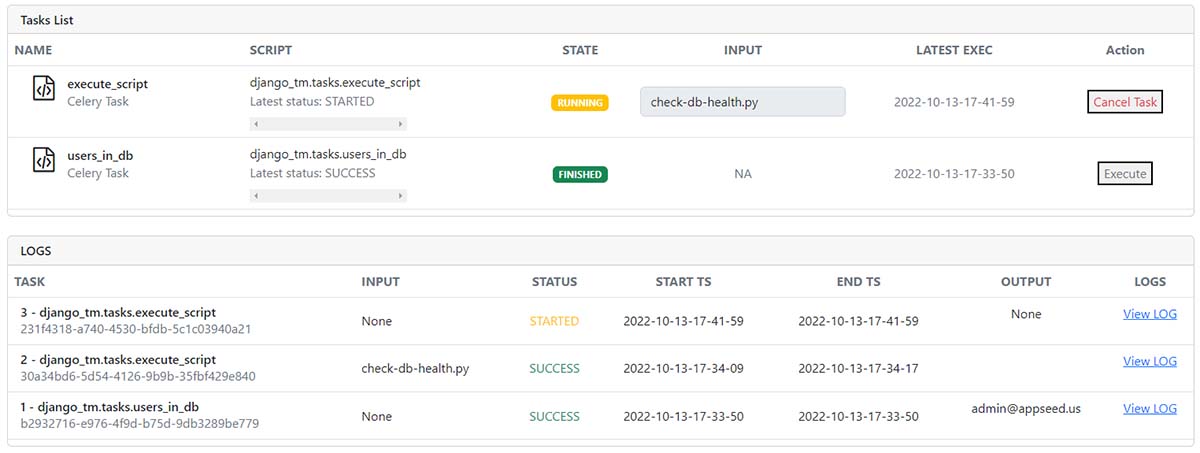
ติดตั้งแพ็คเกจ ผ่าน
PIP
$ pip install django-tasks-manager
// OR
$ pip install git+https://github.com/app-generator/django-tasks-manager.git
รวมเส้นทางใหม่
 # core/urls.py

from django . urls import path , include     # <-- UPDATE: Add 'include' HELPER

urlpatterns = [
    ...

    path ( "" , include ( "django_tm.urls" )),  # <-- New Routes

    ...
]
สร้างไดเรกทอรี Scrips & Logs - สถานที่แนะนำให้เป็นรากฐานของโครงการ:
$ mkdir celery_scripts # Used in Settings -> CELERY_SCRIPTS_DIR
$ mkdir celery_logs # Used in Settings -> CELERY_SCRIPTS_DIRอัปเดตการกำหนดค่า เพิ่มการนำเข้าวัตถุ
os
import os # <-- NEWอัปเดตการกำหนดค่า : รวมแอพใหม่
 INSTALLED_APPS = [
    ...
    'django_tm' ,              # Django Tasks Manager   # <-- NEW
    'django_celery_results' ,  # Django Celery Results  # <-- NEW
]
อัปเดตการกำหนดค่า : รวมเทมเพลตใหม่
 TEMPLATE_DIR_TASKS = os . path . join ( BASE_DIR , "django_tm/templates" )     # <-- NEW

TEMPLATES = [
    {
        'BACKEND' : 'django.template.backends.django.DjangoTemplates' ,
        'DIRS' : [ TEMPLATE_DIR_TASKS ],                                  # <-- Updated
        'APP_DIRS' : True ,
    },
]
อัปเดตการกำหนดค่า : ส่วนใหม่ CELERY_
 #############################################################
# Celery configurations
# https://docs.celeryq.dev/en/stable/django/first-steps-with-django.html

# !!!
# BASE_DIR points to the ROOT of the project
# Note: make sure you have 'os' object imported
# !!!

# !!!
# BASE_DIR = os.path.dirname(os.path.dirname(__file__))
# !!!

# Working Directories required write permission
CELERY_SCRIPTS_DIR        = os . path . join ( BASE_DIR , "celery_scripts" )
CELERY_LOGS_DIR           = os . path . join ( BASE_DIR , "celery_logs"    )

CELERY_BROKER_URL         = os . environ . get ( "CELERY_BROKER" , "redis://localhost:6379" )
CELERY_RESULT_BACKEND     = os . environ . get ( "CELERY_BROKER" , "redis://localhost:6379" )

CELERY_TASK_TRACK_STARTED = True
CELERY_TASK_TIME_LIMIT    = 30 * 60
CELERY_CACHE_BACKEND      = "django-cache"
CELERY_RESULT_BACKEND     = "django-db"
CELERY_RESULT_EXTENDED    = True
CELERY_RESULT_EXPIRES     = 60 * 60 * 24 * 30 # Results expire after 1 month
CELERY_ACCEPT_CONTENT     = [ "json" ]
CELERY_TASK_SERIALIZER    = 'json'
CELERY_RESULT_SERIALIZER  = 'json'

#############################################################
#############################################################
เริ่มแอป
$ # Set up the database
$ python manage.py makemigrations
$ python manage.py migrate
$
$ # Create the superuser
$ python manage.py createsuperuser
$
$ # Start the application (development mode)
$ python manage.py runserver # default port 8000superuserTasks : http://127.0.0.1:8000/tasksเริ่มต้น Celery Manager (ขั้วอื่น) และ สภาพแวดล้อมการอัพเดท
ส่งออก DJANGO_SETTINGS_MODULE โดยใช้ค่าที่ให้ไว้ใน manage.py
$ export DJANGO_SETTINGS_MODULE=cfg.settings ค่าการส่งออกที่ใช้ควรนำมาจาก manage.py :
 def main ():

    """Run administrative tasks."""
    os . environ . setdefault ( "DJANGO_SETTINGS_MODULE" , "cfg.settings" )  # <-- VALUE to be exported

    try :
        from django . core . management import execute_from_command_line
    except ImportError as exc :
        ...
หมายเหตุ : เซิร์ฟเวอร์ Redis คาดว่าจะอยู่ในพอร์ต 6379 (ค่าเริ่มต้น) ในกรณีที่ Redis ทำงานบน PORT อื่นโปรดอัปเดตการกำหนดค่า: CELERY_BROKER_URL และ CELERY_RESULT_BACKEND
$ celery --app=django_tm.celery.app worker --loglevel=info
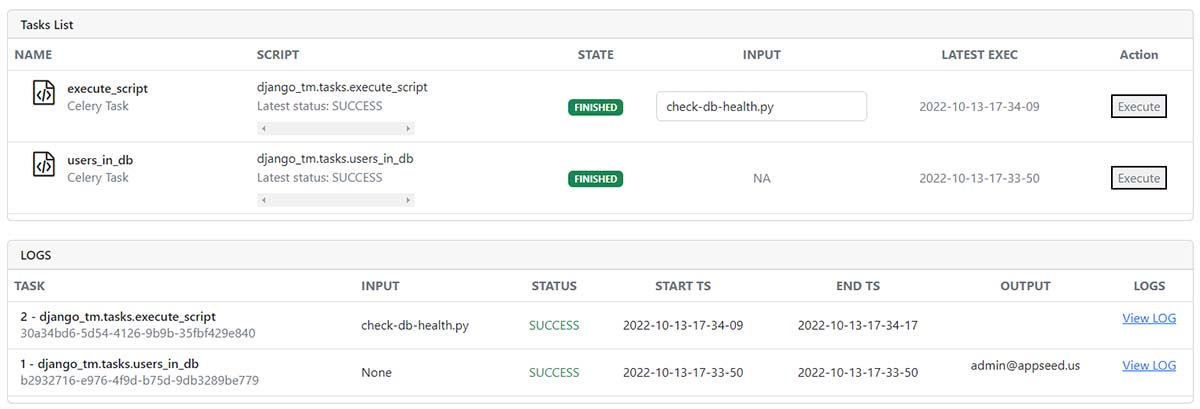
View all tasks
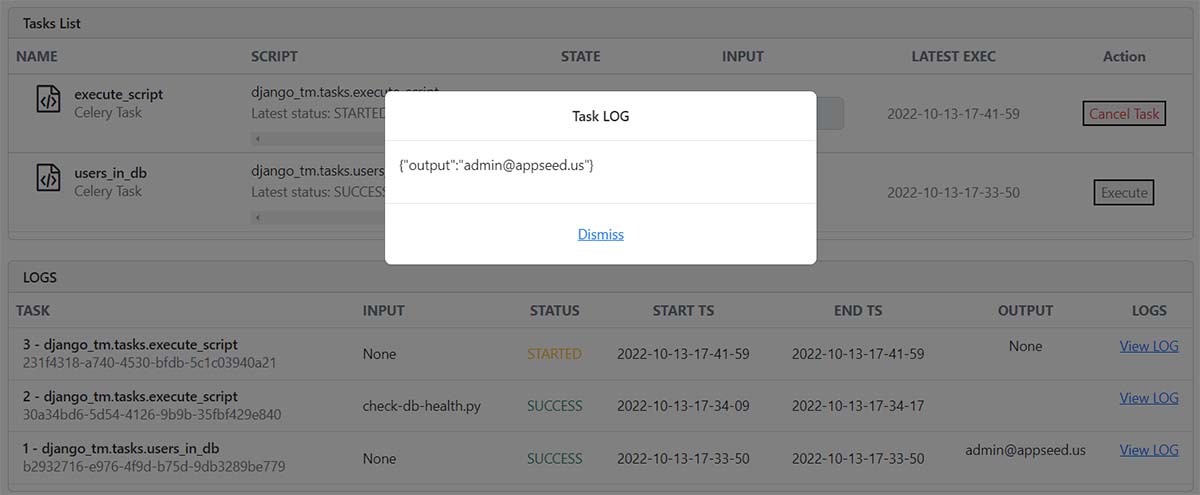
View Task LOG
free sample ที่อธิบาย:Project Creation (เพิ่มไฟล์น้อยที่สุด)Install และสร้าง Django CoreDjango-TM (แพ็คเกจนี้)Update ConfigurationStart the appTasks ManagerDjango Tasks Manager - ห้องสมุดโอเพนซอร์ซที่จัดทำโดย Appseed







