next mdx
1.0.0

NEXT-MDX จัดเตรียมชุดฟังก์ชันตัวช่วยสำหรับการดึงและแสดงไฟล์ MDX ในเครื่อง มันจัดการ ข้อมูลเชิงสัมพันธ์ รองรับ ส่วนประกอบที่กำหนดเอง TypeScript พร้อมและ เร็วจริงๆ
NEXT-MDX เหมาะสำหรับการสร้างหน้า MDX บล็อกผู้ใช้หลายคนหน้าหมวดหมู่ .. etc
https://next-mdx-example.vercel.app
เรียนรู้วิธีการทำงาน Next-MDX โดยดูตัวอย่าง
next-mdx.json เพื่อดูการกำหนดค่าตัวอย่างpages/[[...slug]].tsx เพื่อดูว่าไฟล์ MDX ถูกดึงและแสดงผลอย่างไรtypes/index.d.ts สำหรับ TypeScript คลิกเพื่อขยายตัวอย่าง
{
  "post" : {
    "contentPath" : " content/posts " ,
    "basePath" : " /blog " ,
    "sortBy" : " date " ,
    "sortOrder" : " desc "
  },
} import { useHydrate } from "next-mdx/client"
import { getMdxNode , getMdxPaths } from "next-mdx/server"
export default function PostPage ( { post } ) {
const content = useHydrate ( post )
return (
< article >
< h1 variant = "heading.title" > { post . frontMatter . title } </ h1 >
{ post . frontMatter . excerpt ? (
< p variant = "text.lead" mt = "4" >
{ post . frontMatter . excerpt }
</ p >
) : null }
< hr />
{ content }
</ article >
)
}
export async function getStaticPaths ( ) {
return {
paths : await getMdxPaths ( "post" ) ,
fallback : false ,
}
}
export async function getStaticProps ( context ) {
const post = await getMdxNode ( "post" , context )
if ( ! post ) {
return {
notFound : true ,
}
}
return {
props : {
post ,
} ,
}
}
npm i --save next-mdx
สร้างไฟล์ next-mdx.json ที่รูทของโครงการของคุณด้วยสิ่งต่อไปนี้:
{
  "post" : {
    "contentPath" : " content/posts " ,
    "basePath" : " /blog " ,
    "sortBy" : " date " ,
    "sortOrder" : " desc "
  },
  "category" : {
    "contentPath" : " content/categories "
  }
}post category และ author เป็นรหัสที่ไม่ซ้ำกันที่ใช้เป็นข้อมูลอ้างอิงสำหรับประเภท MDX ของคุณcontentPath (จำเป็น) เป็นที่ที่ไฟล์ MDX ของคุณอยู่basePath (ไม่บังคับ) เป็นเส้นทางที่ใช้ในการสร้าง URLsortBy (ไม่บังคับค่าเริ่มต้นเป็น title ) เป็นชื่อของฟิลด์ frontmatter ที่ใช้สำหรับการเรียงลำดับsortOrder (ไม่บังคับค่าเริ่มต้นเป็น asc ) เป็นลำดับการเรียงลำดับ next-mdx เปิดเผยฟังก์ชั่นผู้ช่วยหลัก 6 ฟังก์ชั่น:
getMdxPaths(sourceName: string)getNode(sourceName, context)getAllNodes(sourceName)getMdxNode(sourceName, context, params)getAllMdxNodes(sourceName, params)useHydrate(node, params) getMdxPaths(sourceName: string) ส่งคืนอาร์เรย์ของพารามิเตอร์พา ธ ซึ่งสามารถส่งผ่านไปยัง paths in getStaticPaths`
sourceName เป็นรหัสที่ไม่ซ้ำกันที่กำหนดไว้ใน next-mdx.json // pages/blog/[...slug].js
import { getMdxPaths } from "next-mdx/server"
export async function getStaticPaths ( ) {
return {
paths : await getMdxPaths ( "post" ) ,
fallback : false ,
}
} getNode(sourceName, context) ส่งคืน MDXNode ด้วยข้อมูล frontmatter และ relational แต่ ไม่มี ข้อมูล MDX นี่คือเร็วและแคชจริงๆ
ใช้สิ่งนี้แทน getMdxNode หากคุณไม่ได้แสดงเนื้อหา MDX ในหน้า
sourceName เป็นรหัสที่ไม่ซ้ำกันที่กำหนดไว้ใน next-mdx.jsoncontext คือบริบทที่ส่งไปยัง getStaticProps หรือ Slug เป็นสตริง // pages/blog/[...slug].js
import { getNode } from "next-mdx/server"
export async function getStaticProps ( context ) {
const post = await getNode ( "post" , context )
if ( ! post ) {
return {
notFound : true ,
}
}
return {
props : {
post ,
} ,
}
} getAllNodes(sourceName) ส่งคืน MdxNode ทั้งหมดของประเภท/แหล่งที่มาที่มีข้อมูล frontmatter และ relational แต่ ไม่มี ข้อมูล MDX นี่ก็เร็วและแคชจริงๆ
sourceName เป็นรหัสที่ไม่ซ้ำกันที่กำหนดไว้ใน next-mdx.json import { getAllNodes } from "next-mdx/server"
export async function getStaticProps ( ) {
return {
props : {
posts : await getAllNodes ( "post" ) ,
} ,
}
} getMdxNode(sourceName, context, params) ส่งคืน MDXNode
sourceName เป็นรหัสที่ไม่ซ้ำกันที่กำหนดไว้ใน next-mdx.jsoncontext คือบริบทที่ส่งไปยัง getStaticProps หรือ Slug เป็นสตริงparams : {
components ?: MdxRemote . Components
scope ?: Record < string , unknown >
provider ?: MdxRemote . Provider
mdxOptions ?: {
remarkPlugins ?: Pluggable [ ]
rehypePlugins ?: Pluggable [ ]
hastPlugins ?: Pluggable [ ]
compilers ?: Compiler [ ]
filepath ?: string
}
} // pages/blog/[...slug].js
import { getMdxNode } from "next-mdx/server"
export async function getStaticProps ( context ) {
const post = await getMdxNode ( "post" , context )
if ( ! post ) {
return {
notFound : true ,
}
}
return {
props : {
post ,
} ,
}
} getAllMdxNodes(sourceName, params) ส่งคืน MdxNode ทั้งหมดของประเภท/แหล่งที่มา
sourceName เป็นรหัสที่ไม่ซ้ำกันที่กำหนดไว้ใน next-mdx.jsonparams : {
components ?: { name : React . Component } ,
scope ?: { } ,
provider ?: { component : React . Component , props : Record < string , unknown > } ,
mdxOptions : {
remarkPlugins : [ ] ,
rehypePlugins : [ ] ,
hastPlugins : [ ] ,
compilers : [ ] ,
}
} import { getAllMdxNodes } from "next-mdx/server"
export async function getStaticProps ( ) {
const posts = await getAllMdxNodes ( "post" )
return {
props : {
posts : posts . filter ( ( post ) => post . frontMatter . featured ) ,
} ,
}
} useHydrate(node, params) ใช้ทางด้านไคลเอนต์เพื่อให้ความชุ่มชื้นกับเนื้อหาคงที่
node คือวัตถุ MdxNodeparams : {
components ?: { name : React . Component } ,
provider ?: { component : React . Component , props : Record < string , unknown > }
} import { useHydrate } from "next-mdx/client"
export default function PostPage ( { post } ) {
const content = useHydrate ( post )
return (
< div >
< h1 > { post . frontMatter . title } </ h1 >
{ content }
</ div >
)
} ใช้ getAllNodes เมื่อคุณต้องการโหนด โดยไม่มี เนื้อหา MDX มันได้รับการสนับสนุนโดยแคชและเร็วจริงๆ สิ่งนี้มีประโยชน์เมื่อคุณต้องการรายการโหนด (ตัวอย่างโพสต์ทีเซอร์) และคุณไม่ได้ใช้เนื้อหา MDX
ในการใช้ส่วนประกอบภายในไฟล์ MDX คุณต้องส่งส่วนประกอบไปยังทั้ง getMdxNode/getAllMdxNodes และ useHydrate
 import { getMdxNode } from "next-mdx/server"
import { useHydrate } from "next-mdx/client"

export function Alert ( { text } ) {
  return < p > { text } </ p >
}

export default function PostPage ( { post } ) {
  const content = useHydrate ( post , {
    components : {
      Alert ,
    } ,
  } )

  return (
    < div >
      < h1 > { post . frontMatter . title } </ h1 >

      { content }
    </ div >
  )
}

export async function getStaticProps ( context ) {
  const post = await getMdxNode ( "post" , context , {
    components : {
      Alert ,
    } ,
  } )

  return {
    props : {
      post ,
    } ,
  }
}
ตัวเลือก MDX สามารถส่งผ่านเป็น params ไปยังทั้ง getMdxNode(sourceName, context, params) และ getAllMdxNodes(sourceName, params) โดยที่ params ใช้รูปร่างของ:
 export interface MdxParams {
  components ?: MdxRemote . Components
  scope ?: Record < string , unknown >
  provider ?: MdxRemote . Provider
  mdxOptions ?: {
    remarkPlugins ?: Pluggable [ ]
    rehypePlugins ?: Pluggable [ ]
    hastPlugins ?: Pluggable [ ]
    compilers ?: Compiler [ ]
    filepath ?: string
  }
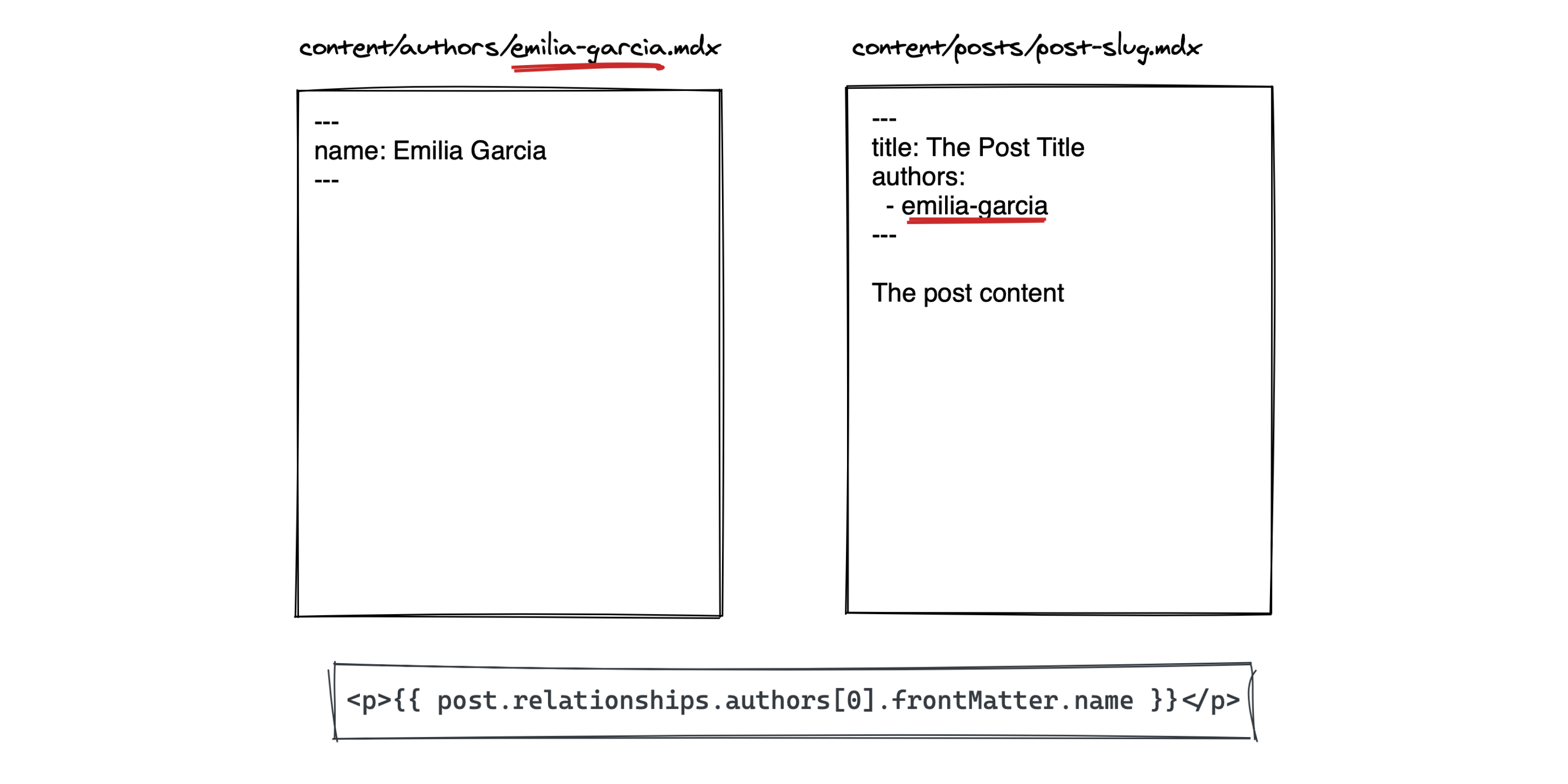
} เมื่อดึงโหนดด้วย getMdxNode หรือ getAllMdxNodes , next-mdx จะอนุมานข้อมูลเชิงสัมพันธ์จากคีย์ Frontmatter โดยอัตโนมัติ
next-mdx.jsonได้รับไฟล์ MDX ต่อไปนี้
 .
└── content
    ├── categories
    │   └── category-a.mdx
    │   └── category-b.mdx
    └── posts:
        └── example-post.mdx
ใน example-post คุณสามารถอ้างอิงหมวดหมู่ที่เกี่ยวข้องโดยใช้สิ่งต่อไปนี้:
 ---
title : Example Post
category :
  - category-a
---
จากนั้นคุณสามารถเข้าถึงหมวดหมู่ดังนี้:
 const post = getMdxNode ( "post" , context )

// post.relationships.category กำหนดประเภทโหนดของคุณดังนี้:
interface Post extends MdxNode < FrontMatterFields > { } import { MdxNode } from "next-mdx/server"
interface Category
extends MdxNode < {
name : string
} > { }
interface Post
extends MdxNode < {
title : string
excerpt ?: string
category ?: string [ ]
} > {
relationships ?: {
category : Category [ ]
}
} จากนั้นคุณสามารถใช้ Post เป็นประเภทการส่งคืนสำหรับ getNode , getAllNodes , getMdxNode และ getAllMdxNode :
 const post = await getMdxNode < Post > ( "post" , context )

const posts = await getAllNodes < Post > ( "post" ) ได้รับใบอนุญาตภายใต้ใบอนุญาต MIT







