next mdx
1.0.0

next-mdx provides a set of helper functions for fetching and rendering local MDX files. It handles relational data, supports custom components, TypeScript ready and is really fast.
next-mdx is great for building mdx-powered pages, multi-user blogs, category pages..etc.
https://next-mdx-example.vercel.app
Learn how next-mdx works by looking at examples.
next-mdx.json to see the sample configuration.pages/[[...slug]].tsx to see how MDX files are fetched and rendered.types/index.d.ts for TypeScript.Click to expand examples.
{
  "post": {
    "contentPath": "content/posts",
    "basePath": "/blog",
    "sortBy": "date",
    "sortOrder": "desc"
  },
}import { useHydrate } from "next-mdx/client"
import { getMdxNode, getMdxPaths } from "next-mdx/server"
export default function PostPage({ post }) {
const content = useHydrate(post)
return (
<article>
<h1 variant="heading.title">{post.frontMatter.title}</h1>
{post.frontMatter.excerpt ? (
<p variant="text.lead" mt="4">
{post.frontMatter.excerpt}
</p>
) : null}
<hr />
{content}
</article>
)
}
export async function getStaticPaths() {
return {
paths: await getMdxPaths("post"),
fallback: false,
}
}
export async function getStaticProps(context) {
const post = await getMdxNode("post", context)
if (!post) {
return {
notFound: true,
}
}
return {
props: {
post,
},
}
}
npm i --save next-mdx
Create a next-mdx.json file at the root of your project with the following:
{
  "post": {
    "contentPath": "content/posts",
    "basePath": "/blog",
    "sortBy": "date",
    "sortOrder": "desc"
  },
  "category": {
    "contentPath": "content/categories"
  }
}post, category and author keys are unique IDs used as references for your MDX types.contentPath (required) is where your MDX files are located.basePath (optional) is the path used for generating URLs.sortBy (optional, defaults to title) is the name of the frontMatter field used for sorting.sortOrder (optional, defaults to asc) is the sorting order.next-mdx exposes 6 main helper functions:
getMdxPaths(sourceName: string)getNode(sourceName, context)getAllNodes(sourceName)getMdxNode(sourceName, context, params)getAllMdxNodes(sourceName, params)useHydrate(node, params)getMdxPaths(sourceName: string) returns an array of path params which can be passed directly to paths in getStaticPaths`.
sourceName is the unique ID defined in next-mdx.json// pages/blog/[...slug].js
import { getMdxPaths } from "next-mdx/server"
export async function getStaticPaths() {
return {
paths: await getMdxPaths("post"),
fallback: false,
}
}getNode(sourceName, context) returns an MDXNode with frontMatter and relational data but without MDX data. This is really fast and cached.
Use this instead of getMdxNode if you are not rendering MDX content on a page.
sourceName is the unique ID defined in next-mdx.jsoncontext is the context passed to getStaticProps or the slug as a string.// pages/blog/[...slug].js
import { getNode } from "next-mdx/server"
export async function getStaticProps(context) {
const post = await getNode("post", context)
if (!post) {
return {
notFound: true,
}
}
return {
props: {
post,
},
}
}getAllNodes(sourceName) returns all MdxNode of the given type/source with frontMatter and relational data but without MDX data. This is also really fast and cached.
sourceName is the unique ID defined in next-mdx.jsonimport { getAllNodes } from "next-mdx/server"
export async function getStaticProps() {
return {
props: {
posts: await getAllNodes("post"),
},
}
}getMdxNode(sourceName, context, params) returns an MDXNode.
sourceName is the unique ID defined in next-mdx.jsoncontext is the context passed to getStaticProps or the slug as a string.params:{
components?: MdxRemote.Components
scope?: Record<string, unknown>
provider?: MdxRemote.Provider
mdxOptions?: {
remarkPlugins?: Pluggable[]
rehypePlugins?: Pluggable[]
hastPlugins?: Pluggable[]
compilers?: Compiler[]
filepath?: string
}
}// pages/blog/[...slug].js
import { getMdxNode } from "next-mdx/server"
export async function getStaticProps(context) {
const post = await getMdxNode("post", context)
if (!post) {
return {
notFound: true,
}
}
return {
props: {
post,
},
}
}getAllMdxNodes(sourceName, params) returns all MdxNode of the given type/source.
sourceName is the unique ID defined in next-mdx.jsonparams:{
components?: { name: React.Component },
scope?: {},
provider?: { component: React.Component, props: Record<string, unknown> },
mdxOptions: {
remarkPlugins: [],
rehypePlugins: [],
hastPlugins: [],
compilers: [],
}
}import { getAllMdxNodes } from "next-mdx/server"
export async function getStaticProps() {
const posts = await getAllMdxNodes("post")
return {
props: {
posts: posts.filter((post) => post.frontMatter.featured),
},
}
}useHydrate(node, params) is used on the client side for hydrating static content.
node is the MdxNode objectparams:{
components?: { name: React.Component },
provider?: { component: React.Component, props: Record<string, unknown> }
}import { useHydrate } from "next-mdx/client"
export default function PostPage({ post }) {
const content = useHydrate(post)
return (
<div>
<h1>{post.frontMatter.title}</h1>
{content}
</div>
)
}Use getAllNodes when you need nodes without the MDX content. It is backed by a cache and is really fast. This is handy when you need a list of nodes (example post teasers) and you're not using the MDX content.
To use components inside MDX files, you need to pass the components to both getMdxNode/getAllMdxNodes and useHydrate.
import { getMdxNode } from "next-mdx/server"
import { useHydrate } from "next-mdx/client"

export function Alert({ text }) {
  return <p>{text}</p>
}

export default function PostPage({ post }) {
  const content = useHydrate(post, {
    components: {
      Alert,
    },
  })

  return (
    <div>
      <h1>{post.frontMatter.title}</h1>

      {content}
    </div>
  )
}

export async function getStaticProps(context) {
  const post = await getMdxNode("post", context, {
    components: {
      Alert,
    },
  })

  return {
    props: {
      post,
    },
  }
}
MDX options can be passed as params to both getMdxNode(sourceName, context, params) and getAllMdxNodes(sourceName, params) where params takes the shape of:
export interface MdxParams {
  components?: MdxRemote.Components
  scope?: Record<string, unknown>
  provider?: MdxRemote.Provider
  mdxOptions?: {
    remarkPlugins?: Pluggable[]
    rehypePlugins?: Pluggable[]
    hastPlugins?: Pluggable[]
    compilers?: Compiler[]
    filepath?: string
  }
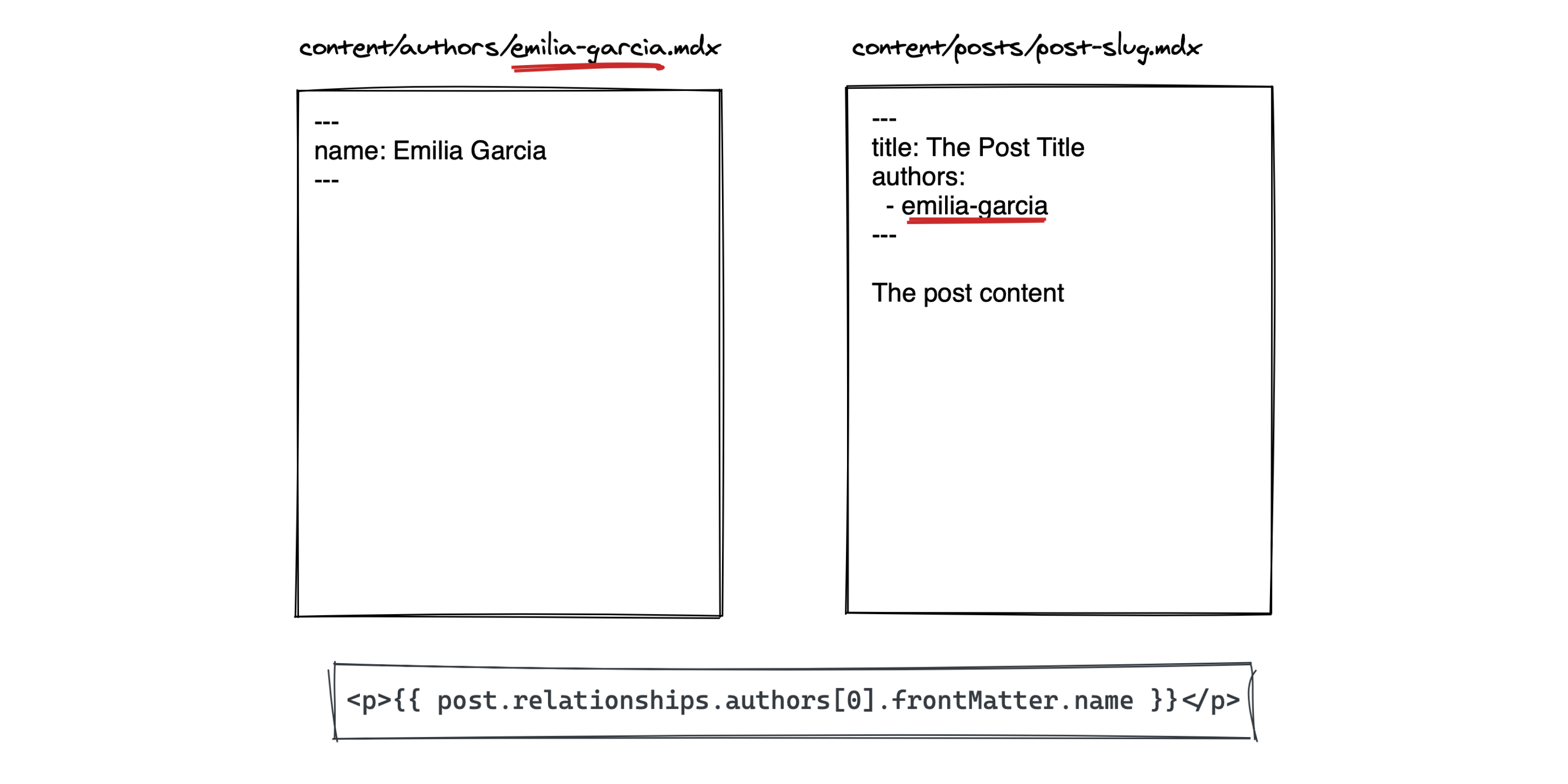
}When retrieving nodes with getMdxNode or getAllMdxNodes, next-mdx will automatically infer relational data from frontMatter keys.
next-mdx.jsonGiven the following MDX files.
.
└── content
    ├── categories
    │   └── category-a.mdx
    │   └── category-b.mdx
    └── posts:
        └── example-post.mdx
In example-post you can reference related categories using the following:
---
title: Example Post
category:
  - category-a
---
You can then access the categories as follows:
const post = getMdxNode("post", context)

// post.relationships.categoryDefine your node types as follows:
interface Post extends MdxNode<FrontMatterFields> {}import { MdxNode } from "next-mdx/server"
interface Category
extends MdxNode<{
name: string
}> {}
interface Post
extends MdxNode<{
title: string
excerpt?: string
category?: string[]
}> {
relationships?: {
category: Category[]
}
}You can then use Post as the return type for getNode, getAllNodes, getMdxNode and getAllMdxNode:
const post = await getMdxNode<Post>("post", context)

const posts = await getAllNodes<Post>("post")Licensed under the MIT license.







