tarathec tutorial backend
0.0.1

ASP.NET เป็นเฟรมเวิร์กเว็บโอเพ่นซอร์สที่สร้างโดย Microsoft สำหรับการสร้างแอปและบริการเว็บสมัยใหม่ด้วย .NET ASP.NET เป็นแพลตฟอร์มข้ามแพลตฟอร์มและทำงานบน Windows, Linux, macOS และ Docker
เพิ่มเติม : https://dotnet.microsoft.com/en-us/learn/aspnet/what-is-aspnet
สร้างโครงการโซลูชัน
dotnet new sln -n Tutorial-Apiสร้างโครงการ ASP.NET Web Api
dotnet new webapi -o Apiสร้างโครงการ XUnit
dotnet new xunit -o Xunit.Testsเพิ่มโปรเจ็กต์เพื่อแก้ไขปัญหา
 dotnet sln add .Tutorial.ApiTutorial.Api.csproj
dotnet sln add .XUnit.TestsXUnit.Tests.csproj
เพิ่มโครงการอ้างอิงในโครงการ xunit
dotnet add . /XUnit.Tests/XUnit.Tests.csproj reference .Tutorial.ApiTutorial.Api.csproj เพิ่มไดรเวอร์ MongoDB อ้างอิงลงในโปรเจ็กต์
dotnet add package MongoDB.Driver --version 2.18.0มองโกเชลล์
Install mongo-shell
https://www.mongodb.com/docs/mongodb-shell/install/

> mongod --dbpath < data_directory_path >

> show dbs

> use tutorialdb

> db.createCollection( ' tutorials ' )

> db.tutorials.insertMany([{ " title " : " Design Patterns " , " description " : " " , " published " : false}])

> db.tutorials.find().pretty ()
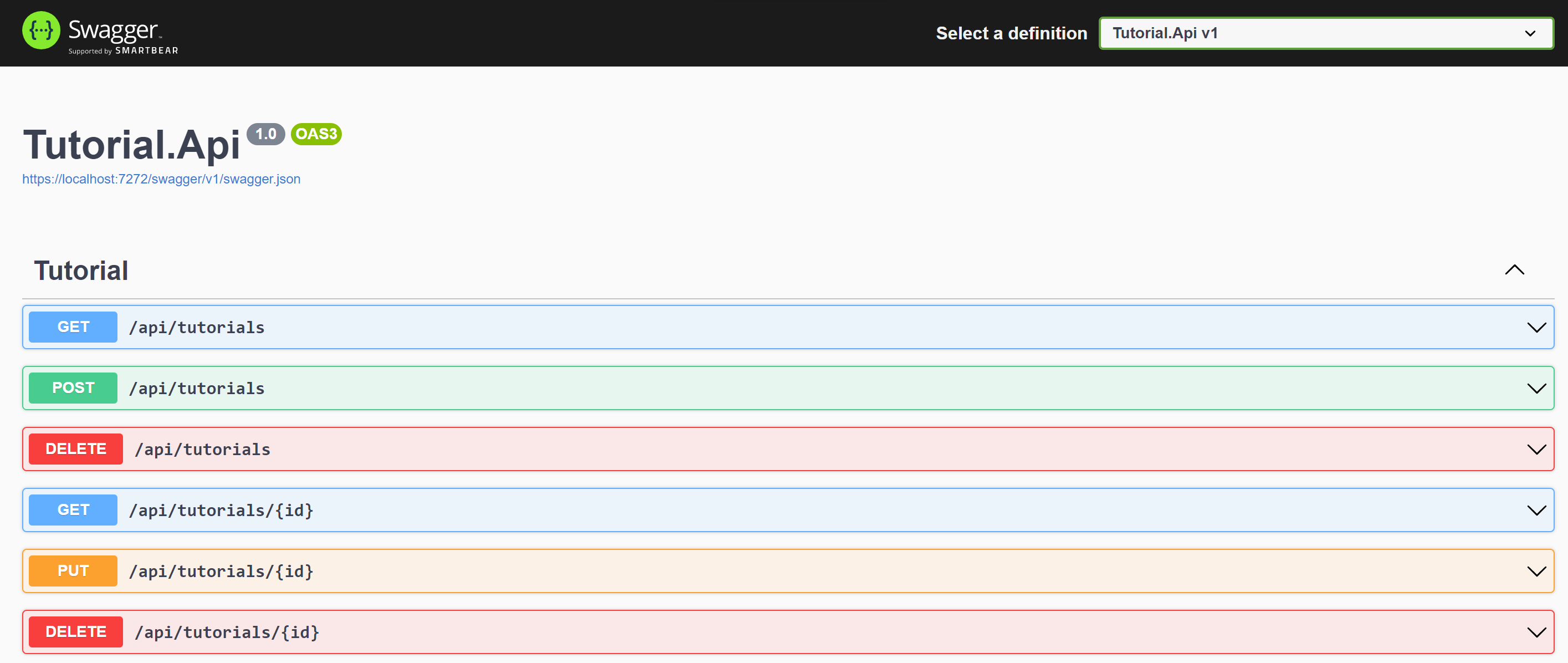
dotnet run --project . /Tutorial.Api/สแวกเกอร์ : https://localhost:7272/swagger
https://learn.microsoft.com/en-us/dotnet/core/tools/dotnet-run#examples
รับ /api/บทช่วยสอน
การตอบสนอง
[
    {
        "id" : " 63730beabd3cb05f2331be45 " ,
        "title" : " hello " ,
        "description" : " world " ,
        "published" : null ,
        "createdAt" : " 0001-01-01T00:00:00Z " ,
        "updatedAt" : " 0001-01-01T00:00:00Z "
    },
    {
        "id" : " 63732124796b18bc753e9157 " ,
        "title" : " dotnet " ,
        "description" : " microsoft " ,
        "published" : null ,
        "createdAt" : " 0001-01-01T00:00:00Z " ,
        "updatedAt" : " 0001-01-01T00:00:00Z "
    }
]
รับ /api/บทช่วยสอน/{id}
การตอบสนอง
{
    "id" : " 63730beabd3cb05f2331be45 " ,
    "title" : " hello " ,
    "description" : " world " ,
    "published" : null ,
    "createdAt" : " 0001-01-01T00:00:00Z " ,
    "updatedAt" : " 0001-01-01T00:00:00Z "
}
POST /api/บทช่วยสอน
ขอเนื้อความ
{
    "title" : " string " ,
    "description" : " string " ,
}
ร่างกายตอบสนอง
{
    "code" : " 200 " ,
    "message" : " Inserted a single document Success "
}
ลบ /api/tutorials
ร่างกายตอบสนอง
{
    "code" : " 200 " ,
    "message" : " All deleted "
}
ลบ /api/tutorials/{id}
ร่างกายตอบสนอง
{
    "code" : " 200 " ,
    "message" : " Deleted id 63730beabd3cb05f2331be45 "
}
ใส่ /api/บทช่วยสอน/{id}
ขอเนื้อความ
    {
    "id" : " 63730beabd3cb05f2331be45 " ,
    "title" : " hello " ,
    "description" : " world " ,
    "published" : true
    }
ร่างกายตอบสนอง
{
    "code" : " 200 " ,
    "message" : " Deleted id 63730beabd3cb05f2331be45 "
} dotnet buildคืนค่าเป็นเลเยอร์ที่แตกต่างกัน
dotnet restoreสร้างและเผยแพร่รุ่น
dotnet publish -c Release -o out เรียกใช้ความคุ้มครอง
dotnet test --collect:"XPlat Code Coverage"เพิ่ม ReportGenerator nuget
dotnet add package ReportGenerator --version 5.1.10เครื่องมือตั้งค่า ReportGenerator
dotnet tool install -g dotnet-reportgenerator-globaltoolเพิ่มเติม : https://www.nuget.org/packages/ReportGenerator
reportgenerator -reports:"XUnit.TestsTestResults*coverage.cobertura.xml" -targetdir:". /coveragereport" -reporttypes:Html ตัวแปรสภาพแวดล้อม
| ชื่อเอนวี | ค่า |
|---|---|
| ฐานข้อมูลบทช่วยสอน__ConnectionString | mongodb://xxxxxxxx |
| บทช่วยสอนฐานข้อมูล__ชื่อฐานข้อมูล | กวดวิชาdb |
| ฐานข้อมูลการสอน__TutorialCollectionName | บทช่วยสอน |
https://learn.microsoft.com/en-us/azure/azure-monitor/app/ilogger#aspnet-core-applications
เพิ่มแพ็คเกจ ApplicationInsights
dotnet add package Microsoft.ApplicationInsights.AspNetCore --version 2.21.0-





