reloading
v1.1.2

Утилита Python для перезагрузки корпуса петли из источника на каждой итерации без потери состояния
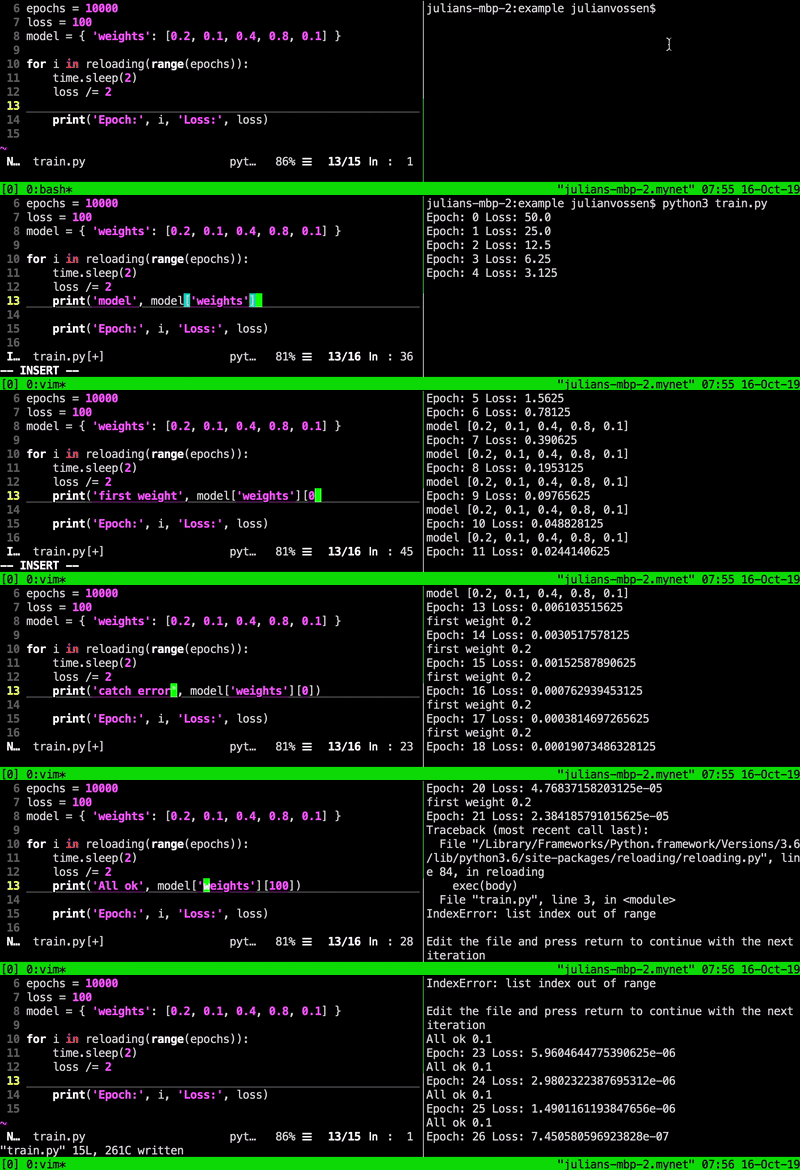
Полезно для редактирования исходного кода во время обучения моделей глубокого обучения. Это позволяет вам добавить регистрацию, печатать статистику или сохранять модель без перезапуска обучения и, следовательно, без потери прогресса обучения.
pip install reloading
Чтобы перезагрузить корпус for петли из источника перед каждой итерацией, просто оберните итератор reloading , например,
 from reloading import reloading

for i in reloading ( range ( 10 )):
    # this code will be reloaded before each iteration
    print ( i )
Чтобы перезагрузить функцию из источника перед каждым выполнением, украсьте определение функции с помощью @reloading , например,
 from reloading import reloading

@ reloading
def some_function ():
    # this code will be reloaded before each invocation
pass Передайте аргумент ключевого слова every , чтобы перезагрузить только на каждом N-Th вызова или итерации. Например
 for i in reloading ( range ( 1000 ), every = 10 ):
    # this code will only be reloaded before every 10th iteration
    # this can help to speed-up tight loops
    pass

@ reloading ( every = 10 )
def some_function ():
    # this code with only be reloaded before every 10th invocation
    pass
Пропустить forever=True а не итерабильно, чтобы создать бесконечную перезагружающую петлю, например,
 for i in reloading ( forever = True ):
    # this code will loop forever and reload from source before each iteration
pass Вот короткие фрагменты того, как использовать перезагрузку с вашей любимой библиотекой. Для получения полных примеров ознакомьтесь с папкой примеров.
 for epoch in reloading ( range ( NB_EPOCHS )):
    # the code inside this outer loop will be reloaded before each epoch

    for images , targets in dataloader :
        optimiser . zero_grad ()
        predictions = model ( images )
        loss = F . cross_entropy ( predictions , targets )
        loss . backward ()
        optimiser . step ()
Вот полный пример Pytorch.
 @ reloading
def update_learner ( learner ):
    # this function will be reloaded from source before each epoch so that you
    # can make changes to the learner while the training is running
    pass

class LearnerUpdater ( LearnerCallback ):
    def on_epoch_begin ( self , ** kwargs ):
        update_learner ( self . learn )

path = untar_data ( URLs . MNIST_SAMPLE )
data = ImageDataBunch . from_folder ( path )
learn = cnn_learner ( data , models . resnet18 , metrics = accuracy ,
                    callback_fns = [ LearnerUpdater ])
learn . fit ( 10 )
Вот полный пример FASTAI.
 @ reloading
def update_model ( model ):
    # this function will be reloaded from source before each epoch so that you
    # can make changes to the model while the training is running using
    # K.set_value()
    pass

class ModelUpdater ( Callback ):
    def on_epoch_begin ( self , epoch , logs = None ):
        update_model ( self . model )

model = Sequential ()
model . add ( Dense ( 64 , activation = 'relu' , input_dim = 20 ))
model . add ( Dense ( 10 , activation = 'softmax' ))

sgd = SGD ( lr = 0.01 , decay = 1e-6 , momentum = 0.9 , nesterov = True )
model . compile ( loss = 'categorical_crossentropy' ,
              optimizer = sgd ,
              metrics = [ 'accuracy' ])

model . fit ( x_train , y_train ,
          epochs = 200 ,
          batch_size = 128 ,
          callbacks = [ ModelUpdater ()])
Вот полный пример керас.
 for epoch in reloading ( range ( NB_EPOCHS )):
    # the code inside this outer loop will be reloaded from source
    # before each epoch so that you can change it during training

    train_loss . reset_states ()
    train_accuracy . reset_states ()
    test_loss . reset_states ()
    test_accuracy . reset_states ()

    for images , labels in tqdm ( train_ds ):
      train_step ( images , labels )

    for test_images , test_labels in tqdm ( test_ds ):
      test_step ( test_images , test_labels )
Вот полный пример Tensorflow.
Убедитесь, что на вашем пути есть python и python3 , затем запустите:
$ python3 reloading/test_reloading.py








