module simplenews
1.0.0

Magento 2 모듈 개발 또는 Magento 2 Simplenews 모듈은 본격적인 모듈을 단계별로 만듭니다. 내 코드를 따라이 모듈을 처음부터 만들 수 있습니다. 또는 압축 타르 파일을 직접 다운로드하여 설치하여 재생할 수 있습니다.
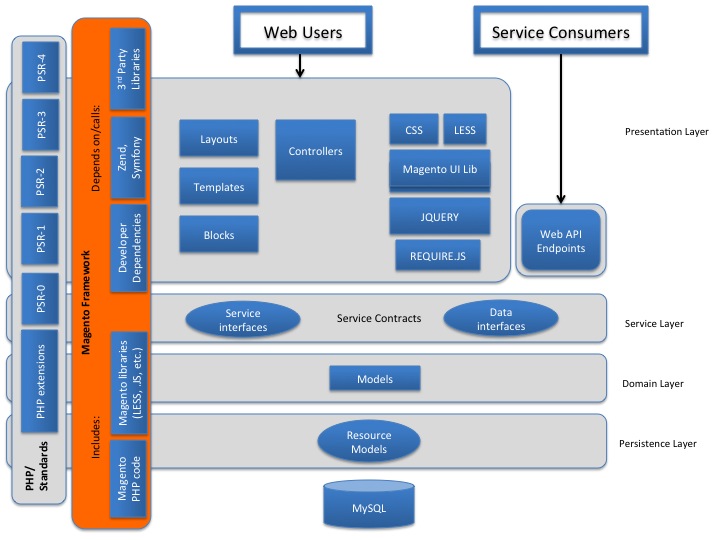
Persistence Layer : CRUD 요청을 사용하여 데이터베이스에서 데이터를 추출하고 수정하는 자원 모델을 설명합니다. 예를 들어 데이터 유효성 검사 및 데이터베이스 기능 구현과 같은 조건부 비즈니스 로직 기능도 구현됩니다.
도메인 계층 : 리소스 별 또는 데이터베이스 별 정보를 포함하지 않는 비즈니스 로직을 담당합니다. 도메인 계층도 서비스 계약을 포함 할 수 있습니다. 도메인 계층 수준의 각 데이터 모델은 데이터베이스에 액세스 할 책임이있는 리소스 모델에 따라 다릅니다.
서비스 계층 : 프리젠 테이션 계층과 도메인 계층 간의 인터레이어. PHP 인터페이스를 사용하여 정의되는 서비스 계약을 구현합니다. 서비스 계약을 통해 Di.XML (Dependency Injection File)을 사용하여 비즈니스 로직 리소스 모델을 추가하거나 변경할 수 있습니다. 서비스 계층은 API (REST /SOAP 또는 기타 모듈)에 대한 액세스 권한을 부여하는 데 사용됩니다. 서비스 계층은 모듈의 /API 네임 스페이스에 선언되어 있습니다. 데이터 (엔티티) 인터페이스는 /api /data에 선언됩니다. 데이터 엔티티는 서비스 인터페이스에 전달되고 반환되는 데이터 구조입니다.
프리젠 테이션 계층 : 상부 계층. 여기에는 모든 뷰 요소 (레이아웃, 블록, 템플릿, CSS, JS 포함) 및 컨트롤러가 포함되어 있습니다. 예측 레이어는 일반적으로 서비스 계약을 사용하여 서비스 계층을 호출합니다. 그러나 구현에 따라 비즈니스 로직과 겹칠 수 있습니다.
API 또는 API/데이터 : 서비스 계약, 서비스 인터페이스 및 데이터 인터페이스 정의
어댑터 : 클래스는 어댑터 패턴을 따르고 타사 라이브러리의 클래스를 랩핑합니다. 타사 클래스 인터페이스를 기본 코드로 예상되는 인터페이스로 변환하여 코드의 타사 라이브러리에서 기능을 사용할 수 있습니다. (모듈 검색/어댑터/).
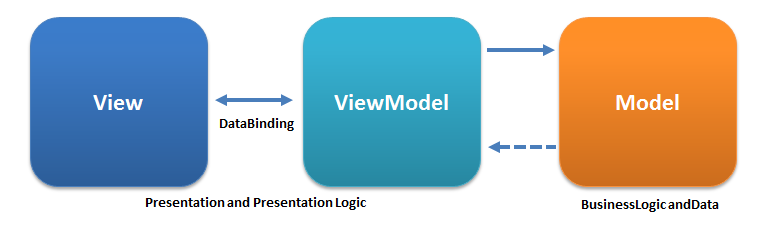
블록 : MVVM 아키텍처의 뷰 모델
수집기 : 모듈-배포/collector/collector.php
명령 : 디렉토리는 콘솔 프로그램 실행을 담당하는 PHP 파일을 저장하는 데 사용됩니다. 이 경우 콘솔/명령/imagesResizeCommand.php 프로세스 제품 이미지 크기 조정에 대한 명령.
컨트롤러 : 시스템과 상호 작용하는 동안 사용자의 흐름을 처리 할 책임이 있습니다.
config : 모듈-데그 배포/config/bundleconfig.php
CRON : 디렉토리를 사용하여 파일을 저장하는데, 나중에 CRON 출시에서 실행됩니다.
CustomerData : 디렉토리에는 섹션 정보 처리를 담당하는 PHP 파일이 포함되어 있습니다. Magento 2에는 특수 기능이있어 정보를 비동기 적으로 처리, 업데이트 및 전송할 수 있습니다.
등 : 구성 XML 파일 모듈은이 폴더 내에서 자체 및 해당 부품 (경로, 모델, 블록, 관찰자 및 CRON 작업)을 정의하지 않으며 코어 모듈이 아닌 모듈에서 코어 모듈의 기능을 무시하는 데 사용됩니다.
예외 : (모듈-판매/예외/)
파일 : 샘플 파일 (Module-Inventory-Import-Export/Files/)
비품 : 샘플 데이터 모듈 (Module-Sales-Sample-Data/Fixtures/Orders.csv)
게이트웨이 : (Module-PayPal/Gateway)
도우미 : 하나 이상의 응용 프로그램 계층에 사용 된 코드를 보유하는 클래스. 예를 들어 CMS 모듈에서 도우미 클래스는 브라우저에 대한 HTML을 준비 할 책임이 있습니다.
I18N : 번역에 사용되는 국제화 CSV 파일을 보유합니다
인덱서 : Indexhandler (Module-Inventory-Indexer/Indexer)
모델 : 모델 및 리소스메이드 용
관찰자 : 옵저버 또는 시스템 이벤트를 "관찰"하는 모델을 보유합니다. 일반적으로 그러한 이벤트가 발사되면 관찰자는 그러한 이벤트에 필요한 비즈니스 논리를 처리하기 위해 모델을 인스턴스화합니다.
패키지 : 모듈 배포/패키지
가격 : 최종 가격 모델 (모듈 MSRP 그룹 제품/가격)
프로세스 : 모듈 배포/프로세스
플러그인 : 디렉토리는 플러그인 파일로 구성된 구성 파일에 설명 된 경우 특정 모듈 기능을 수정할 수 있습니다 : 공급 업체/Magento/Module-Catalog/etc/di.xml
SearchAdapter : Module-Elasticsearch/SearchAdapter
ReportXML : 공급 업체/Magento/Module-Analytics/ReportXML
설정 : 스키마 및 데이터 생성을 담당하는 마이그레이션 클래스
서비스 : [Exam] (모듈-메디아-스토리지/서비스/imagerize.php, 모듈-배포/또는 모듈-카탈로그 -url-lewrite/service/v1/storeviewservice.php)
SRC : 공급 업체/Magento/Magento2- 기능 테스트 프레임 워크/SRC/Magento/
전략 : 모듈 배포/전략
출처 : 모듈 배포/소스
테스트 : 단위 테스트
UI : 관리 응용 프로그램에 사용되는 그리드 및 양식과 같은 요소
보기-레이아웃 (XML) 파일 및 템플릿 (PHTML) 프런트 엔드 및 관리자 응용 프로그램에는 템플릿 파일, CSS 및 JS 파일, 모듈 미디어 파일이 포함되어 있습니다. 이 파일은 사용 영역 (adminhtml, frontend 또는 base) (사이트의 관리 및 정면 부분의 공통 파일)에 따라 서브 폴더에 있습니다. 정적보기 파일, 디자인 템플릿, 이메일 템플릿 및 레이아웃 파일을 포함한 이러한 하위 디렉토리는 다음과 같습니다.
ViewModel : (Module-Sales/ViewModel)
이 모듈에서는 공급 업체 이름에 BDCrops 사용하고 ModulEname의 경우 SimpleNews . 따라서이 폴더를 만들어야합니다 : app/code/BDC/SimpleNews
Magento 2는 해당 모듈의 ETC 디렉토리에서 각 모듈에 대한 구성 정보를 찾습니다. 폴더 등을 생성하고 module.xml을 추가해야합니다.
ETC/MODULE.XML 및이 파일의 내용을 작성하십시오.
 ```
<?xml version="1.0"?>
<config xmlns:xsi="http://www.w3.org/2001/XMLSchema-instance" xsi:noNamespaceSchemaLocation="urn:magento:framework:Module/etc/module.xsd">
    <module name="BDC_SimpleNews" setup_version="1.0.0" />
</config>
```
이 파일에서는 BDC_SimpleNews 이름이있는 모듈을 등록하고 버전은 1.0.0 입니다.
모든 Magento 2 모듈은 Magento ComponentRegistrar 클래스를 통해 Magento 시스템에 등록해야합니다. 이 파일은 모듈 루트 디렉토리에 배치됩니다. 이 단계에서는이 파일을 만들어야합니다.
registration.php를 만들고 다음 코드를 삽입하십시오.
 MagentoFrameworkComponentComponentRegistrar::register(
    MagentoFrameworkComponentComponentRegistrar::MODULE,
    'BDC_SimpleNews', __DIR__
);
공급 업체 폴더의 모듈은 작곡가를 사용하여 업데이트되며 앱/코드의 모든 모듈은 작곡가를 통해 업데이트되지 않으므로 앱/코드에 추가 된 모듈을 재정의 해야하는 이유입니다.
composer.json을 만들고 다음 코드를 다음에 삽입하십시오.
 ```
{
  "name": "bdc/module-simplenews",
  "description": "BDCrops SimpleNews module for Magento 2 extensions.",
  "type": "magento2-module",
  "version": "1.0.3",
  "license": [
      "OSL-3.0",
      "AFL-3.0"
  ],
"authors": [{
          "name": "Abdul Matin",
          "email": "[email protected]",
		      "company": "BDCrops Inc"
      }
  ],
"homepage": "https://www.bdcrops.com",
  "autoload": {
      "files": [
          "registration.php"
      ],
      "psr-4": {
          "BDC\SimpleNews\": ""
      }
  }
}

```
etc/db_schema.xml을 만들고 다음 코드를 다음에 삽입하십시오.
 ```
<?xml version="1.0"?>
<schema xmlns:xsi="http://www.w3.org/2001/XMLSchema-instance" xsi:noNamespaceSchemaLocation="urn:magento:framework:Setup/Declaration/Schema/etc/schema.xsd">

<table name="bdc_simplenews" resource="default" engine="innodb" comment="SimpleNews Table">
  <column xsi:type="smallint" name="id" padding="6" unsigned="false" nullable="false" identity="true" comment="ID"/>
  <column xsi:type="varchar" name="title" nullable="false" length="255" comment="Title"/>
  <column xsi:type="varchar" name="summary" nullable="false" length="255" comment="Summary"/>
  <column xsi:type="varchar" name="description" nullable="false" length="255" comment="Descrition"/>
  <column xsi:type="timestamp" name="created_at" nullable="false" default="CURRENT_TIMESTAMP" on_update="false" comment="Created Datetime"/>
  <column xsi:type="timestamp" name="updated_at" nullable="false" default="CURRENT_TIMESTAMP" on_update="true" comment="Updated Datetime"/>
  <column xsi:type="smallint" name="status"  padding="2" unsigned="false" nullable="false" comment="Status"/>
  <constraint xsi:type="primary" referenceId="PRIMARY">   <column name="id"/> </constraint>
</table>
</schema>
```
Tutarials 모듈 대표
스키마 화이트리스트를 만들지 않고 선언 모드를 실행할 수 없습니다. 참고 : 이중 확인 목적으로 모든 릴리스에 대한 새로운 화이트리스트를 생성하는 것이 좋습니다. 업그레이드 명령을 실행하기 전에 다음 명령을 실행하여 DB_WHITELIST_SCHEMA.JSON 파일에 스키마를 추가해야합니다. 이를 위해서는 선언적 스키마와 함께 추가 된 모든 컨텐츠를 저장할 /etc/db_schema_whitelist.json 파일이 필요합니다. 이 파일을 생성하려면 실행하십시오.

 php bin/magento setup:db-declaration:generate-whitelist [options]
php bin/magento setup:db-declaration:generate-whitelist --module-name=vendor_module
php bin/magento setup:db-declaration:generate-whitelist --module-name=BDC_SimpleNews
이제 DB_WHITELIST_SCHEMA.JSON 파일이/벤더/모듈/etc 폴더에 생성됩니다. 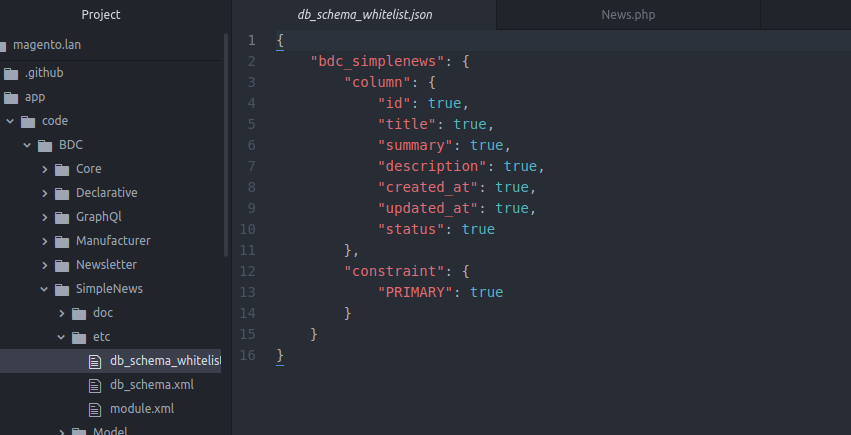
위의 단계를 마감하면 빈 모듈을 만들었습니다. 이제 Magento Environment에서 활성화 할 것입니다. 모듈을 활성화하기 전에 Magento가 명령 줄에서 다음을 입력하여 Magento가 모듈을 인식했는지 확인해야합니다.
php bin/magento module:status
위의 단계를 따르면 결과에 이것을 볼 수 있습니다.
 List of disabled modules:
BDC_SimpleNews
이는 모듈이 시스템에 의해 인식되었지만 여전히 비활성화되어 있음을 의미합니다. 이 명령을 실행하여 활성화하십시오.
php bin/magento module:enable BDC_SimpleNews
이 결과를 본 경우 모듈이 성공적으로 활성화되었습니다.
 The following modules has been enabled:
- BDC_SimpleNews
이 모듈을 활성화하여 Magento가 모듈 데이터베이스를 확인하고 업그레이드 해야하는 것은 이번이 처음입니다. 우리는이 의견을 실행해야합니다.
php bin/magento setup:upgrade
이제 Stores -> Configuration -> Advanced -> Advanced 에서 모듈이 있는지 확인할 수 있습니다.
또한 phpmyadmin 또는 좋아하는 도구에서 데이터베이스 테이블을 확인할 수 있습니다.
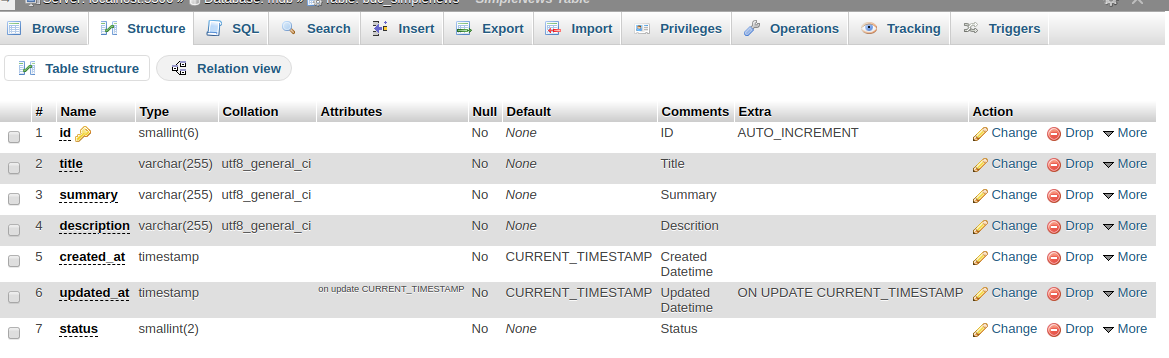
기존 메소드에서 테이블이 만들어 졌을 때 설치 스키마 또는 업그레이드 스키마에 스크립트를 작성했지만 이제 새 버전에서는 패치 시스템을 통해 수행됩니다. 데이터 패치는 데이터 수정 지침이 포함 된 클래스입니다. a/<module_name> /setup/patch/data/<patch_name>.php 파일 및 emptements magento setup model patch datapatchatchinterface에 정의됩니다. 스키마 패치에는 사용자 정의 스키마 수정 지침이 포함되어 있습니다. 이러한 수정은 복잡 할 수 있습니다. a/<module_name>/setup/patch/schema/<patch_name> .php 파일 및 구현 magento setup model patch schemapatchinterface에 정의됩니다. 따라서 BDC_SIMPLENEWS 테이블에 데이터를 추가하려면 폴더 내부 BDC/Simplenews/Setup/Patch/Data 내에서 addData.php 파일을 작성하고 다음 코드를 작성하십시오.
Setup/Patch/Data/AddData.php를 만듭니다
 ```
<?php

namespace BDCSimpleNewsSetupPatchData;

use MagentoFrameworkSetupPatchDataPatchInterface;
use MagentoFrameworkSetupPatchPatchVersionInterface;
use MagentoFrameworkModuleSetupMigration;
use MagentoFrameworkSetupModuleDataSetupInterface;

class AddData implements DataPatchInterface, PatchVersionInterface {
    private $news;
    public function __construct( BDCSimpleNewsModelNews $news ) {
        $this->news = $news;
    }
    public function apply(){
    	$newsData = [];
    	$newsData['title'] = "BDC News Head1";
    	$newsData['summary'] = "BDC News Summary";
    	$newsData['description'] = "BDCrops Inc description evulation of bangladesh";
    	//$newsData['status'] = 1;

    	$this->news->addData($newsData);
    	$this->news->getResource()->save($this->news);

    }
    public static function getDependencies() {   return []; }
    public static function getVersion() { return '2.0.0'; }
    public function getAliases() {   return []; }

}

```
데이터베이스에서 데이터를 삽입, 업데이트, 삭제 및 가져 오려면 이러한 파일을 작성해야합니다.
모델 파일 생성 : Model/News.php :
 ```
<?php
// These files to insert, update, delete and get data in the database.
namespace BDCSimpleNewsModel;
use MagentoFrameworkModelAbstractModel;

class News extends AbstractModel{
    /**
     * News constructor.
     * @param MagentoFrameworkModelContext $context
     * @param MagentoFrameworkRegistry $registry
     * @param MagentoFrameworkModelResourceModelAbstractResource|null $resource
     * @param MagentoFrameworkDataCollectionAbstractDb|null $resourceCollection
     * @param array $data
     */
    public function __construct(
        MagentoFrameworkModelContext $context,
        MagentoFrameworkRegistry $registry,
        MagentoFrameworkModelResourceModelAbstractResource $resource = null,
        MagentoFrameworkDataCollectionAbstractDb $resourceCollection = null,
        array $data = [] ) {
        parent::__construct($context, $registry, $resource, $resourceCollection, $data);
    }

   /**
    * (non-PHPdoc)
    * @see MagentoFrameworkModelAbstractModel::_construct()
    */
    public function _construct(){
        $this->_init('BDCSimpleNewsModelResourceNews');
    }

    /**
     * Loading news data
     *
     * @param   mixed $key
     * @param   string $field
     * @return  $this
     */
    public function load($key, $field = null) {
      if ($field === null) {
        $this->_getResource()->load($this, $key, 'id');
        return $this;
      }
      $this->_getResource()->load($this, $key, $field);
      return $this;
    }
}

```
Magento 2의 CRUD 모델은 데이터베이스의 데이터를 쉽게 관리 할 수 있으므로 CRUD를 생성하기 위해 많은 코드를 작성할 필요가 없습니다. CRUD는 생성, 읽기, 업데이트 및 삭제를 의미합니다. Magento ORM은 Magento 2 서비스 계약의 일부인 저장소 구현에 의해 사용됩니다. 모듈은 더 이상 특정 ORM을 사용하여 다른 모듈에 의존하지 않아야하고 엔티티 리포지토리 만 사용하기 때문에 Magento 1의 중요한 변형입니다. 서비스 계약은 기사의 두 번째 부분에 자세히 설명되어 있습니다. Magento ORM은 모델, 리소스 모델 및 리소스 컬렉션을 중심으로 구축됩니다. Magento Orm 요소는 다음과 같습니다.
ORM은 데이터베이스에서 데이터를 작성,로드, 업데이트 및 삭제할 수 있습니다. Magento의 컬렉션은 ITERATORAGGREGATE 및 COUNTABLE PHP5 SPL 인터페이스를 모두 구현하는 클래스입니다. 컬렉션은 마젠토에서 특정 유형의 일련의 객체를 저장하는 데 널리 사용됩니다.
모델은 리소스 모델 위에 추상화 계층을 제공하는 블랙 박스와 같습니다. 데이터의 가져 오기, 추출 및 조작은 모델을 통해 발생합니다. 경험상, 우리가 만든 모든 엔티티 (즉, 데이터베이스에서 만든 모든 테이블)에는 고유 한 모델 클래스가 있어야합니다. 모든 모델은 magento framework dataObjectClass를 상속하는 Magento Framework Model AbstractModelClass를 확장하므로 모델의 SetDataand getData 함수를 호출하여 모델의 데이터를 각각 얻거나 설정할 수 있습니다. 클래스는 _ init () 메소드를 호출 할 때 하나의 메소드 _ construct () 만 있습니다.
리소스 모델 모델/리소스/News.php 작성 :
 ```
<?php

namespace BDCSimpleNewsModelResource;

use MagentoFrameworkModelResourceModelDbAbstractDb;

class News extends AbstractDb {
    /**
     * Define main table
     */
    protected function _construct() { $this->_init('bdc_simplenews', 'id'); }
}

```
모든 실제 데이터베이스 작업은 리소스 모델에 의해 실행됩니다. 리소스 모델의 모든 방법은 모델을 첫 번째 매개 변수로 기대하기 때문에 모든 모델에는 리소스 모델이 있어야합니다. 모든 리소스 모델은 Magento Framework Model ResourcEmodel db AbstractDBClass를 확장해야합니다. 여기에는 <_ initmethod>를 호출하고 두 개의 매개 변수를 전달하는 하나의 방법 인 <__ construct>도 있습니다. 데이터베이스의 테이블 이름과 해당 테이블의 기본 열의 이름입니다. 리소스 모델. Magento 2에서 모델 클래스는 최종 사용자 프로그램이 모델의 데이터와 상호 작용하는 데 사용할 방법을 정의합니다. 리소스 모델 클래스에는 실제로 데이터베이스에서 정보를 가져 오는 메소드가 포함되어 있습니다. Magento 2의 각 CRUD 모델에는 해당 리소스 모델 클래스가 있습니다.
모든 CRUD 리소스 모델 클래스는 Magento Framework Model ResourcEmodel DB AbstractDB 클래스를 확장합니다. 이 기본 클래스에는 단일 데이터베이스 테이블에서 정보를 가져 오는 기본 논리가 포함되어 있습니다. 우리와 같은 기본 모델의 경우 리소스 모델이해야 할 유일한 일은 _ 구성에서 _ init 메소드를 호출하는 것입니다. 리소스 모델의 _ init 메소드는 두 가지 인수를 받아들입니다. 첫 번째는 데이터베이스 테이블 (bdc_simplenews)의 이름이고, 두 번째는 모델 (ID)의 ID 열입니다. 이 기사의 범위를 벗어나지 만 Magento 2의 Active Record 구현에는 기본 키를 통해 테이블을 연결하는 방법이 없습니다. 여러 데이터베이스 테이블을 사용하는 방법은 각 개별 모듈 개발자에 달려 있으며 자원 모델에는 일반적으로 관련 테이블에서 정보를 가져 오는 데 필요한 SQL 생성 방법이 포함됩니다.
수집 모델/리소스/뉴스/collection.php 만들기 :
 ```
<?php
namespace BDCSimpleNewsModelResourceNews;

use MagentoFrameworkModelResourceModelDbCollectionAbstractCollection;
class Collection extends AbstractCollection {
    /**
     * Define model & resource model
     */
    protected function _construct(){
        $this->_init('BDCSimpleNewsModelNews', 'BDCSimpleNewsModelResourceNews');
    }
}

```
컬렉션은 테이블에서 여러 행을 가져 오려면 사용됩니다. 의미 수집
모델 및 리소스 모델을 사용하면 개별 모델을 데이터베이스에 가져오고 저장하는 데 필요한 모든 것이 있습니다. 그러나 특정 유형의 여러 모델을 가져 오려는 시간이 있습니다. 이 문제를 해결하기 위해 Magento 2의 모든 CRUD 모델에는 해당 리소스 모델 컬렉션이 있습니다. 컬렉션은 개별 모델을 수집합니다. 데이터베이스 테이블에서 정보를 가져 오는 데 필요한 SQL 코드를 빌드하기 때문에 리소스 모델로 간주됩니다. Magento 2의 모든 컬렉션은 Base Magento Framework Model ResourcEmodel DB Collection AbstractCollection Collection 클래스를 확장합니다. 모델 및 리소스 모델과 마찬가지로 컬렉션 리소스 모델은 _ init 메소드를 호출해야합니다. 컬렉션 리소스 모델의 _ init 메소드는 두 가지 인수를 수락합니다. 첫 번째는이 컬렉션이 수집하는 모델입니다. 두 번째는 수집 된 모델의 리소스 모델입니다. 우리는 새로운 magento 2 블록을 만듭니다. magento catalog model resourcemodel product collectionFactory 클래스를 만듭니다. 이것은 공장에서 컬렉션을 얻는 데 필요합니다. GetProductCollection은 신제품 컬렉션을 반환합니다. 이 방법은 다음을 수행합니다.
프론트 엔드 경로, 관리자 경로 및 경로를 사용하여 컨트롤러를 다시 작성하는 방법을 찾을 수 있습니다.
 <!--Use router 'standard' for frontend route-->
    <router id="standard">
        <!--Define a custom route with id and frontName-->
        <route frontName="samplenews" id="samplenews">
            <!--The module which this route match to-->
            <module name="BDC_SampleNews"/>
        </route>
    </router>
코드를 살펴보십시오. 경로를 등록하는 것이 매우 간단하다는 것을 알 수 있습니다. 프론트 엔드에는 표준 라우터를 사용해야합니다. 이 경로는 모듈을 정의하는 어린이와 2 가지 속성을 정의합니다.
ID 속성은이 경로를 식별하는 고유 한 문자열입니다. 이 문자열을 사용 하여이 모듈의 동작에 대한 레이아웃 핸들을 선언합니다. FrontName 속성은 URL 요청에 표시되는 고유 한 문자열이기도합니다. 예를 들어, 다음과 같은 경로를 선언하는 경우 :이 모듈의 URL은 다음과 같습니다.
http://example.com/index.php/samplenews/controller/Action 및이 작업의 레이아웃 핸들은 다음과 같습니다. SampleNews_Controller_Action.xml이 예제 경로에서는이 폴더에서 액션 클래스를 작성해야합니다.
 {namespace}/{module}/Controller/{Controller}/{Action}.php

http://example.com/<router_name>/<controller_name>/<action_name>
라우터는 해당 컨트롤러 및 작업에 URL을 할당하는 데 사용됩니다. 이 모듈에서는 프론트 엔드 영역을위한 경로를 만들어야합니다. 따라서이 파일을 추가해야합니다.
etc/frontend/lours.xml 생성 :
 ~~~
<?xml version="1.0"?>
<config xmlns:xsi="http://www.w3.org/2001/XMLSchema-instance"
xsi:noNamespaceSchemaLocation="../../../../../../lib/internal/Magento/Framework/
App/etc/routes.xsd">
    <router id="standard">
        <route id="news" frontName="news">
            <module name="BDC_SimpleNews" />
        </route>
    </router>
</config>
~~~
경로를 정의하면 모듈의 URL 경로는 다음과 같습니다. http://example.com/news/
라우터 : URL에서 사용할 수있는 모듈의 이름을 정의하여 모듈을 찾고 컨트롤러 동작을 실행하십시오.
컨트롤러 : Magento 2의 컨트롤러는 MVC 응용 프로그램의 일반적인 컨트롤러와 다릅니다. Magento 2 컨트롤러는 하나의 특정 URL에만 책임이 있으며 하나의 실행 메소드 만 포함합니다. 이 방법은 결과 객체를 반환하고 가끔 입력 포스트 데이터의 처리를 담당합니다. 모든 컨트롤러는 magento framework app action action 클래스를 상속합니다. 필수 컨트롤러는 기본 라우터에서 검색 한 다음 전면 컨트롤러에서 호출됩니다.
응답 : Magento 2의 컨트롤러는 목적 및 필요한 결과에 따라 여러 응답 유형을 반환 할 수 있습니다.
프론트 엔드 루트 : 코드를 살펴보십시오. 경로를 등록하는 것이 매우 간단하다는 것을 알 수 있습니다. 프론트 엔드에는 표준 라우터를 사용해야합니다. 이 경로는 모듈을 정의하는 어린이와 2 가지 속성을 정의합니다.
이 부분에서는 모델의 팩토리 객체에 대해 이야기 할 것입니다. OOP에서 알 수 있듯이 공장 방법은 객체를 인스턴스화하는 데 사용됩니다. Magento에서는 공장 물체도 똑같은 일을합니다.
공장 클래스 이름은 모델 클래스의 이름이며 '공장'단어와 함께 추가됩니다. 따라서 우리의 예를 들어, 우리는 뉴스로 된 수업을 가질 것입니다. 이 클래스를 만들어서는 안됩니다. 마젠토가 당신을 위해 그것을 만들 것입니다. Magento의 객체 관리자가 'Factory'라는 단어로 끝나는 클래스 이름을 만나면 클래스가 아직 존재하지 않으면 Var/Generation 폴더에서 공장 클래스를 자동으로 생성합니다. 공장 수업을 볼 수 있습니다.
 use BDCSimpleNewsModelNewsFactory;
var/generation/<vendor_name>/<module_name>/Model/ClassFactory.php
var/generation/BDC/SimpleNew/Model/NewsFactory.php
모델 객체를 인스턴스화하기 위해 자동 생성자 종속성 주입을 사용하여 공장 객체를 주입 한 다음 공장 객체를 사용하여 모델 객체를 인스턴스화합니다.
Magento 2는 정적 레지스트리 방법을 지원하는 글로벌 변수를 등록 할 수 있습니다. Magento 1과 Magento 2는 정적 레지스트리 방법을 지원하는 글로벌 변수를 등록 할 수 있습니다. 이를 구현하기 위해 Magento 1의 Mage :: Register () 및 Mage :: Registry ()에서 작업했지만 이제는 Magento 2 플랫폼에서는 레지스트리 실행에 차이가 있습니다. 복원 된 데이터의 설정과 레지스트리를 수락하는 magento framework registry를 적용해야합니다. 그러나 우선, 고유 한 사용자 정의 레지스트리를 만들거나 사용하는 방법을 배우고 현재 제품, 카테고리, CMS 페이지, CMS 블록 등과 같은 글로벌 Magento 2 레지스트리 객체를 검색하는 방법을 보여 주어야하며 여기에 모두 참조되므로 운이 좋았습니다. 오늘날 주제는 Magento 2 레지스트리 객체에 익숙해지는 데 도움이 될 것입니다.
 /**
  * @var MagentoFrameworkRegistry
  */

 protected $_registry;
 /**
 * ...
 * ...
 * @param MagentoFrameworkRegistry $registry,
 */
public function __construct(
    ...,
    ...,
    MagentoFrameworkRegistry $registry,
    ...) {
    $this->_registry = $registry;
    ...
    ...
}

 /**
 * Setting custom variable in registry to be used
 *
 */
public function setCustomVariable() {
     $this->registry->register('custom_var', 'Added Value');
}

/**
 * Retrieving custom variable from registry
 * @return string
 */
public function getCustomVariable() {
     return $this->registry->registry('custom_var');
}
컨트롤러 컨트롤러/index.php 만들기 :
  <?php

  namespace BDCSimpleNewsControllerIndex;

  use MagentoFrameworkAppActionAction;
  use MagentoFrameworkAppActionContext;
  use BDCSimpleNewsModelNewsFactory;

  class Index extends Action {
      /**
       * @var BDCSimpleNewsModelNewsFactory
       */
      protected $_modelNewsFactory;
      /**
       * @param Context $context
       * @param NewsFactory $modelNewsFactory
       */
      public function __construct(
          Context $context,
          NewsFactory $modelNewsFactory ) {
          parent::__construct($context);
          $this->_modelNewsFactory = $modelNewsFactory;
      }
      public function execute(){
          /**
           * When Magento get your model, it will generate a Factory class
           * for your model at var/generaton folder and we can get your
           * model by this way
           */
          $newsModel = $this->_modelNewsFactory->create();

          // Load the item with ID is 1
          $item = $newsModel->load(1);
          var_dump($item->getData());

          // Get news collection
          $newsCollection = $newsModel->getCollection();
          // Load all data of collection
          var_dump($newsCollection->getData());
      }
  }

  ```
</details>
컨트롤러를 정의한 후 모듈의 URL 경로는 다음과 같습니다. http://example.com/news/ 아래 데이터

$this->_forward('action', 'controller', 'Other_Module')
 public function __construct(
   $pageFactory MagentoFrameworkViewResultPageFactory
) {
   $this->pageResultFactory = $pageFactory
}
public function execute()
{
   return $this->pageResultFactory->create();
}
 public function __construct(
   MagentoFrameworkControllerResultRaw $rawResultFactory ,
) {
   $this->rawResultFactory = $rawResultFactory;
}
public function execute()
{
   $result = $this->rawResultFactory->create();
   $result->setHeader('Content-Type', 'text/xml');
   $result->setContents('<root><block></block></root>);
   return $result;
}
 public function __construct(
   MagentoFrameworkControllerResultForwardFactory $resultForwardFactory
) {
   $this->resultForwardFactory = $resultForwardFactory;
}
public function execute()
{
   $result = $this->resultForwardFactory->create();
   $result->forward('noroute');
   return $result;
}
 public function __construct(
   MagentoFrameworkControllerResultRedirectFactory $resultRedirectFactory
) {
   $this->resultRedirectFactory = $resultRedirectFactory;
}
public function execute()
{
   $result = $this->resultRedirectFactory->create();
   $result->setPath('*/*/index');
   return $result;
}
Magento 설치에 웹 사이트, 상점 또는보기의 계층 구조가있는 경우 설치의 특정 부분에 적용하도록 구성 설정의 컨텍스트 또는 "범위"를 설정할 수 있습니다. 많은 데이터베이스 엔티티의 컨텍스트에는 특정 스코프가 할당되어 상점 계층 구조에서 사용 방법을 결정할 수도 있습니다. 자세한 내용은 제품 범위 및 가격 범위를 참조하십시오.
우편 번호와 같은 일부 구성 설정에는 시스템 전체에 동일한 값이 사용되므로 [글로벌] 범위가 있습니다. [웹 사이트] 범위는 모든 상점과 그 견해를 포함하여 계층 구조에서 해당 레벨 이하의 모든 상점에 적용됩니다. [Store View]의 범위가있는 모든 항목은 각 매장보기마다 다르게 설정할 수 있으며 일반적으로 여러 언어를 지원하는 데 사용됩니다.
매장이 단일 상점 모드로 실행되지 않는 한 각 구성 설정의 범위는 필드 레이블 아래의 작은 텍스트로 나타납니다. If your installation includes multiple websites, stores or views, you should always choose the Store View where the settings apply before making any changes.
An important, but less good documented feature of Magento 2 is how to write and get config values by scope. You will find tons of code samples on how do this globally. Sometime you need to do different settings for different stores programmatically. So here is how this works.
Magento saves all adminhtml settings in core_config table in your Magento database. There you can get values by its path, a string which indicates path to and a variable name. With this path, you can get or set values by Magento 2 core methods. For this you need to use:
The following sample code shows how to write store config values by scope:
 class WriteConfig {
    protected $_logger;
    protected $_storeManager;
    protected $_configWriter;

    public function __construct(
        PsrLogLoggerInterface $logger,
        MagentoFrameworkAppConfigStorageWriterInterface $configWriter,
        MagentoStoreModelStoreManagerInterface $storeManager ){
        $this->_logger = $logger;
        $this->_configWriter = $configWriter;
        $this->_storeManager = $storeManager;
    }

    public function setConfig($value) {
        //for all websites
        $websites = $this->_storeManager->getWebsites();
        $scope = "websites";
        foreach($websites as $website) {
            echo $website->getId().":n";

            $this->_configWriter->save('my_section/something/configvaluename', $value, $scope, $website->getId());
        }

        return $this;
    }
}
You just need to call setConfig() method with a given value. This method stores this value into a defined path for all websites. So it generates a new setting (line in core_config table) for each defined website. This is done by using third and fourth param on save method. You use a unique path, a value, a scope and the id of this scope. If you do not use scope, you will wirte the value to default (store id 0). You can store values to scopes “website” or “store“.
Now it is time to read the data by store. You can do this with the following sample code:
 class ReadConfig
{
    protected $_scopeConfig;

    public function __construct(
        MagentoFrameworkAppHelperContext $context,
        MagentoFrameworkAppConfigScopeConfigInterface $scopeConfig
    ){
        $this->_scopeConfig = $scopeConfig;
        parent::__construct($context);
    }

    public function getConfig() {
        return $this->_scopeConfig->getValue("my_section/something/configvaluename", "websites");
    }
}
It is quite easy, you only need to use getValue() method and add a second param with scope (here we use website scope). This will return the stored value for the current website.
There are 2 main places for storing configuration values In Magento 2: database (the core_config_data table) and XML files. The configurations, stored in the database can be changed via the administrator panel, while the data, located in the XML files are of a technical nature and can be changed only by a developer.
It's easy to use configuration files in Magento 2. Configuration files include:
Magento/Framework/Config provides the following interfaces for developers:
Magento 2 provides two types of validation for XML configuration files: validation before a merging and validation after a merging. It can be either the same or different schemes. To create a custom configuration file, you need to create the following elements:
product_types.xml module of Magento_Catalog as an example of a custom configuration file. Each module can add its own product type using the product_types.xml file and these files will be validated and merged.
The system.xml is a configuration file which is used to create configuration fields in Magento 2 System Configuration. You will need this if your module has some settings which the admin needs to set. You can go to Store -> Setting -> Configuration to check how it look like.The magento 2 system configuration page is divided logically in few parts: Tabs, Sections, Groups, Fields.
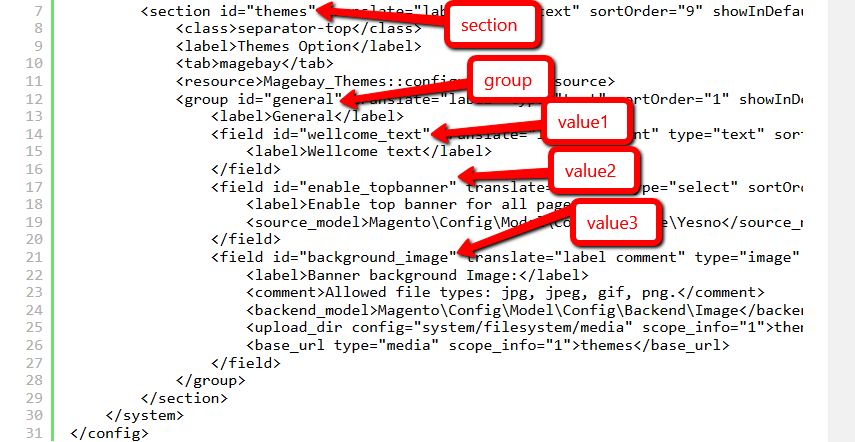
Each field in system.xml after create will not have any value. When you call them, you will receive 'null' result. So for the module, we will need to set the default value for the field and you will call the value without go to config, set value and save it. This default value will be saved in config.xml which is located in etc folder. Let's create it for this simple configuration: etc/config.xml
 <default>
    <section>
        <group>
            <field>{value}</field>
        </group>
    </section>
</default>
First all of let's save value and flush cache, then you can get saved value from database. In the system.xml, we have added 2 fields: enable and display_text. So the path should be: samplenews/general/enable samplenews/general/display_text Simple calling:ex
 $this->scopeConfig->getValue('samplenews/general/enable', MagentoStoreModelScopeInterface::SCOPE_STORE);
$this->scopeConfig->getValue('samplenews/general/display_text', MagentoStoreModelScopeInterface::SCOPE_STORE);
Create fileetc/adminhtml/system.xml Purpose: This file will declare your configurations in Stores > Settings > Configuration section) and insert this following code into it:
 ```
<?xml version="1.0"?>
<config xmlns:xsi="http://www.w3.org/2001/XMLSchema-instance" xsi:noNamespaceSchemaLocation="../../../Backend/etc/system_file.xsd">
    <system>
        <tab id="bdc" translate="label" sortOrder="1">
            <label>BDC</label>
        </tab>
        <section id="simplenews" translate="label" sortOrder="1" showInDefault="1" showInWebsite="1" showInStore="1">
            <label>Simple News</label>
            <tab>bdc</tab>
            <resource>BDC_SimpleNews::system_config</resource>
            <group id="general" translate="label" type="text" sortOrder="1" showInDefault="1" showInWebsite="1" showInStore="1">
                <label>General Settings</label>
                <field id="enable_in_frontend" translate="label" type="select" sortOrder="1" showInDefault="1" showInWebsite="1" showInStore="1">
                    <label>Enable in frontend</label>
                    <source_model>MagentoConfigModelConfigSourceYesno</source_model>
                </field>
                <field id="head_title" translate="label comment" type="text" sortOrder="2" showInDefault="1" showInWebsite="1" showInStore="1">
                    <label>Head title</label>
                    <comment>Fill head title of news list page at here</comment>
                    <validate>required-entry</validate>
                </field>
                <field id="lastest_news_block_position" translate="label" type="select" sortOrder="3" showInDefault="1" showInWebsite="1" showInStore="1">
                    <label>Lastest news block position</label>
                    <source_model>BDCSimpleNewsModelSystemConfigLastestNewsPosition</source_model>
                </field>
            </group>
        </section>
    </system>
</config>
```
System configuration values in Magento 2 are stored in the core_config_data database table, which is exactly the same as in Magento 1. But the xml config files differ. The system.xml is a configuration file which is used to create configuration fields in Magento 2 System Configuration. the system config file is at etc/adminhtml/system.xml
The system.xml is a configuration file which is used to create configuration fields in Magento 2 System Configuration. You will need this if your module has some settings which the admin needs to set. You can go to Store -> Setting -> Configuration to check how it look like.
Create file Model/System/Config/LastestNews/Position.php:
 ```
<?php
namespace BDCSimpleNewsModelSystemConfigLastestNews;
use MagentoFrameworkOptionArrayInterface;
class Position implements ArrayInterface{
    const LEFT      = 1;
    const RIGHT     = 2;
    const DISABLED  = 0;

    /**
     * Get positions of lastest news block
     *
     * @return array
     */
    public function toOptionArray(){
        return [
            self::LEFT => __('Left'),
            self::RIGHT => __('Right'),
            self::DISABLED => __('Disabled')
        ];
    }
}

```
Create file etc/acl.xml (Purpose: This file will create a role for your configuration section) and insert this following code into it:
 ```
<?xml version="1.0"?>
<config xmlns:xsi="http://www.w3.org/2001/XMLSchema-instance"
xsi:noNamespaceSchemaLocation="../../../../../lib/internal/Magento/Framework/Acl/etc/acl.xsd">
    <acl>
        <resources>
            <resource id="Magento_Backend::admin">
                <resource id="Magento_Backend::stores">
                    <resource id="Magento_Backend::stores_settings">
                        <resource id="Magento_Config::config">
                            <resource id="BDC_SimpleNews::system_config" title="Simple News Section" />
                        </resource>
                    </resource>
                </resource>
            </resource>
        </resources>
    </acl>
</config>
```
Create file etc/config.xml and insert this following code into it:
 ```
<?xml version="1.0"?>
<config xmlns:xsi="http://www.w3.org/2001/XMLSchema-instance"
xsi:noNamespaceSchemaLocation="../../Core/etc/config.xsd">
    <default>
        <simplenews>
            <general>
                <enable_in_frontend>1</enable_in_frontend>
                <head_title>BDC - Simple News</head_title>
                <lastest_news_position>1</lastest_news_position>
            </general>
        </simplenews>
    </default>
</config>

```
Magento 2, the Helper can be called in controllers, models, views and even in other helpers. Helpers can be considered as global and always available elements. They can even be created as single objects' instances. Besides, they can be called everywhere once you inject them in the class. Helpers are mainly created to offer methods for the most common functionalities. For instance, you can use helpers to build logs in the application of Magento. Magento 2 Helper Class includes various functions and methods which are used commonly throughout the application. All the methods which have been declared as Helpers can be called anywhere including file, model, block, controller class or from another helper in Magento 2.
In the early version of Magento 2, a Helper Factory is available, which enables developers to instantiate helper methods. Besides, you can use the below code to use ObjectManager to instantiate the Helper Factory.
 $object_manager = MagentoCoreModelObjectManager::getInstance();
$helper_factory = $object_manager->get('MagentoCoreModelFactoryHelper');
$helper = $helper_factory->get('MagentoCoreHelperData');
However, this code still exist some problems. Luckly, a better concept has been introducted which is Dependency Injection in Magento 2.
Using this concept, the environment will create and provide you an object instead of instantiating it. For instance, if a class is written like the following:
 class Helper{
   public function __contruct(Helper $xyz){
       $this->xyz= $xyz;
   }
}
In the Helper class constructor, an object of Helper class is auto-created and assigned the reference, $xyz. This is Dependency Injection.
Via this concept, high-value loose coupling modules together concept is provided by Magento 2. If you want to inject it into a specific class, just add an object to the constructor of it. However, you need to remember that you cannot inject one dependency twice.
Create file: Helper/Data.php and insert this following code into it:
 <?php

namespace BDCSimpleNewsHelper;

use MagentoFrameworkAppHelperAbstractHelper;
use MagentoFrameworkAppConfigScopeConfigInterface;
use MagentoFrameworkAppHelperContext;
use MagentoStoreModelScopeInterface;

class Data extends AbstractHelper {
 const XML_PATH_ENABLED      = 'simplenews/general/enable_in_frontend';
 const XML_PATH_HEAD_TITLE   = 'simplenews/general/head_title';
 const XML_PATH_LASTEST_NEWS = 'simplenews/general/lastest_news_block_position';

 /**
   * @var MagentoFrameworkAppConfigScopeConfigInterface
   */
  protected $_scopeConfig;

  /**
   * @param Context $context
   * @param ScopeConfigInterface $scopeConfig
   */
  public function __construct(
     Context $context,
     ScopeConfigInterface $scopeConfig ) {
     parent::__construct($context);
     $this->_scopeConfig = $scopeConfig;
  }

 /**
   * Check for module is enabled in frontend
   *
   * @return bool
   */
 public function isEnabledInFrontend($store = null){
    return $this->_scopeConfig->getValue(
       self::XML_PATH_ENABLED,
       ScopeInterface::SCOPE_STORE
    );
 }

 /**
   * Get head title for news list page
   *
   * @return string
   */
 public function getHeadTitle() {
    return $this->_scopeConfig->getValue(
       self::XML_PATH_HEAD_TITLE,
       ScopeInterface::SCOPE_STORE
    );
 }

 /**
   * Get lastest news block position (Left, Right, Disabled)
   *
   * @return int
   */
 public function getLastestNewsBlockPosition() {
    return $this->_scopeConfig->getValue(
       self::XML_PATH_LASTEST_NEWS,
       ScopeInterface::SCOPE_STORE
    );
 }
}
<add id="BDC_SimpleNews::news" title="Manage News" module="BDC_SimpleNews" sortOrder="10" action="bdc_simplenews/news" resource="BDC_SimpleNews::news" parent="BDC_SimpleNews::samplenews"/>
id attribute is the identifier for this note. It's a unique string and should follow the format: {Vendor_ModuleName}::{menu_description}.
title attribute is the text which will be shown on the menu bar.
module attribute is defined the module which this menu is belong to.
sortOrder attribute is defined the position of the menu. Lower value will display on top of menu.
parent attribute is an Id of other menu node. It will tell Magento that this menu is a child of another menu. In this example, we have parent=”BDC_SampleNews::samplenews”, so we - know this menu “Manage News” is a child of “Hello World” menu and it will show inside of Hello World menu.
action attribute will define the url of the page which this menu link to. As we talk above, the url will be followed this format {router_name}{controller_folder}{action_name}. - In this example, this menu will link to the module SampleNews, controller News and action Index
resource attribute is used to defined the ACL rule which the admin user must have in order to see and access this menu. We will find more detail about ACL in other topic.
Create file: etc/adminhtml/menu.xml (Purpose: The menu item of your module will be declared here) and insert this following code into it:
 ```
<?xml version="1.0"?>
<config xmlns:xsi="http://www.w3.org/2001/XMLSchema-instance"
xsi:noNamespaceSchemaLocation="../../../Backend/etc/menu.xsd">
<menu>
    <add id="BDC_SimpleNews::main_menu" title="Simple News"
        module="BDC_SimpleNews" sortOrder="20"
        resource="BDC_SimpleNews::simplenews" />
    <add id="BDC_SimpleNews::add_news" title="Add News"
        module="BDC_SimpleNews" sortOrder="1" parent="BDC_SimpleNews::main_menu"
        action="simplenews/news/new" resource="BDC_SimpleNews::manage_news" />
    <add id="BDC_SimpleNews::manage_news" title="Manage News"
        module="BDC_SimpleNews" sortOrder="2" parent="BDC_SimpleNews::main_menu"
        action="simplenews/news/index" resource="BDC_SimpleNews::manage_news" />
    <add id="BDC_SimpleNews::configuration" title="Configurations"
        module="BDC_SimpleNews" sortOrder="3" parent="BDC_SimpleNews::main_menu"
        action="adminhtml/system_config/edit/section/simplenews"
        resource="BDC_SimpleNews::configuration" />
</menu>
</config>
```
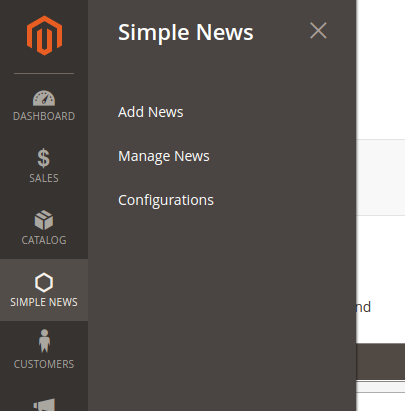
This route will be same as the frontend route but you must declare it in adminhtml folder with router id is admin. File: app/code/BDC/SampleNews/etc/adminhtml/routes.xml
The url of the admin page is the same structure with frontend page, but the admin_area name will be added before route_frontName to recognize this is a admin router. For example, the url of admin cms page:
http://example.com/index.php/admin/bdc_samplenews/controller/action The controller action for admin page will be added inside of the folder Controller/Adminhtml. For example for above url:
 {namespace}/{module}/Controller/Adminhtml/{Controller}/{Action}.php

<!--Use router 'admin' for admin route -->
    <router id="admin">
        <!--Define a custom route with id and frontName -->
        <route id="bdc_samplenews" frontName="bdc_samplenews">
            <!--The module which this route match to-->
            <module name="BDC_SampleNews"/>
        </route>
    </router>
Create file etc/adminhtml/routes.xml Purpose: The router of your module for backend will be declared here insert this following code into it:
 ```
<?xml version="1.0"?>

<config xmlns:xsi="http://www.w3.org/2001/XMLSchema-instance"
xsi:noNamespaceSchemaLocation="../../../../../../lib/internal/Magento/
Framework/App/etc/routes.xsd">
    <router id="admin">
        <route id="simplenews" frontName="simplenews">
            <module name="BDC_SimpleNews" />
        </route>
    </router>
</config>

```
http://example.com/index.php/admin/simplenews/controller/action {namespace}/{module}/Controller/Adminhtml/{Controller}/{Action}.php
As in the Admin Menu and System Configuration article, you saw that we alway have a resource attribute when create it. Now we will register that resources to the system, so Magento can realize and let us set a role for them. To register the resource, we use the acl.xml file which located in
app/code/{namespace}/{module}/etc/acl.xml
As a module developer, ACL rules present a few interesting challenges. First, there are several places that you, as a module developer, are expected to add ACL rule checks to your module. A few examples
Every URL endpoint/controller in the admin application must implement an _ isAllowed method that determines if a user can access the URL endpoint.
Every Menu Item in the left hand navigation also has a specific ACL rule that controls whether or not the menu displays for the logged in user. This is often the same rule from _ isAllowed)
Every configuration field in System -> Configuration has a specific ACL rule that controls whether or not the menu displays
Despite being required fields, there are no hard and fast rules as to how a module developer should setup and structure their own rules. Also, a module developer will likely want additional rules that are specific to their module. This article can't answer these hard questions for you, but we will show you how to check the current user against a specific ACL rule, look up ID values for existing rules, and how to create your own tree of ACL rules.
Magento_Backend::admin: Our resource will be placed as child of Magento_Backend::admin. Each resource will have an Id, title and sortOrder attribute:
Id: attribute is the identify of this resource. You can use this when define resource in Admin menu, configuration and limit access to your module controller. This is a unique string and should be in this format: Vendor_ModuleName::resource_name.
Title: attribute is the label of this resource when showing in resource tree.
sortOrder: attribute define the position of this resource in tree.
Open this file etc/acl.xml and modify the source code into here like this:
 ```
<?xml version="1.0"?>

<config xmlns:xsi="http://www.w3.org/2001/XMLSchema-instance" xsi:noNamespaceSchemaLocation="../../../../../lib/internal/Magento/
Framework/Acl/etc/acl.xsd">
  <acl>
      <resources>
          <resource id="Magento_Backend::admin">
              <resource id="BDC_SimpleNews::simplenews" title="Simple News" sortOrder="100">
                  <resource id="BDC_SimpleNews::add_news" title="Add News" sortOrder="1" />
                  <resource id="BDC_SimpleNews::manage_news" title="Manage News" sortOrder="2" />
                  <resource id="BDC_SimpleNews::configuration" title="Configurations" sortOrder="3" />
              </resource>
              <resource id="Magento_Backend::stores">
                  <resource id="Magento_Backend::stores_settings">
                      <resource id="Magento_Config::config">
                          <resource id="BDC_SimpleNews::system_config" title="Simple News Section" />
                      </resource>
                  </resource>
              </resource>
          </resource>
      </resources>
  </acl>
</config>

```
Create file: view/adminhtml/layout/simplenews_news_index.xml (Purpose: This file is used to declare grid container block) and insert this following code into it:
 <?xml version="1.0"?>

<page xmlns:xsi="http://www.w3.org/2001/XMLSchema-instance" xsi:noNamespaceSchemaLocation="../../../../../../../lib/internal/Magento/Framework/View/Layout/etc/page_configuration.xsd">
 <update handle="formkey"/>
 <update handle="simplenews_news_grid_block"/>
 <body>
     <referenceContainer name="content">
         <block class="BDCSimpleNewsBlockAdminhtmlNews"
             name="bdc_simplenews_news.grid.container" />
     </referenceContainer>
 </body>
</page>
Create file: app/code/BDC/SimpleNews/view/adminhtml/layout/simplenews_news_grid_block.xml (Purpose: This file is used to declare the content of grid block) and insert this following code into it:
 ```
<?xml version="1.0"?>

<page xmlns:xsi="http://www.w3.org/2001/XMLSchema-instance" xsi:noNamespaceSchemaLocation="../../../../../../../lib/internal/Magento/Framework/View/Layout/etc/page_configuration.xsd">
    <body>
      <referenceBlock name="bdc_simplenews_news.grid.container">
         <block class="MagentoBackendBlockWidgetGrid" name="bdc_simplenews_news.grid"
             as="grid">
             <arguments>
                 <argument name="id" xsi:type="string">newsGrid</argument>
                 <argument name="dataSource" xsi:type="object">BDCSimpleNewsModelResourceNewsCollection</argument>
                 <argument name="default_sort" xsi:type="string">id</argument>
                 <argument name="default_dir" xsi:type="string">desc</argument>
                 <argument name="save_parameters_in_session" xsi:type="boolean">true</argument>
                 <argument name="use_ajax" xsi:type="boolean">true</argument>
                 <argument name="grid_url" xsi:type="url" path="*/*/grid">
                     <param name="_current">1</param>
                 </argument>
             </arguments>
                <block class="MagentoBackendBlockWidgetGridMassaction"
                    name="bdc_simplenews_news.grid.massaction" as="grid.massaction">
                    <arguments>
                        <argument name="massaction_id_field" xsi:type="string">id</argument>
                        <argument name="form_field_name" xsi:type="string">news</argument>
                        <argument name="options" xsi:type="array">
                            <item name="delete" xsi:type="array">
                                <item name="label" xsi:type="string" translate="true">Delete</item>
                                <item name="url" xsi:type="string">*/*/massDelete</item>
                                <item name="confirm" xsi:type="string" translate="true">Are you sure you want to delete?</item>
                            </item>
                        </argument>
                    </arguments>
                </block>
                <block class="MagentoBackendBlockWidgetGridColumnSet"
                    name="bdc_simplenews_news.grid.columnSet" as="grid.columnSet">
                    <arguments>
                        <argument name="rowUrl" xsi:type="array">
                            <item name="path" xsi:type="string">*/*/edit</item>
                            <item name="extraParamsTemplate" xsi:type="array">
                                <item name="id" xsi:type="string">getId</item>
                            </item>
                        </argument>
                    </arguments>
                    <block class="MagentoBackendBlockWidgetGridColumn" as="id">
                        <arguments>
                            <argument name="header" xsi:type="string" translate="true">ID</argument>
                            <argument name="type" xsi:type="string">number</argument>
                            <argument name="id" xsi:type="string">id</argument>
                            <argument name="index" xsi:type="string">id</argument>
                        </arguments>
                    </block>
                    <block class="MagentoBackendBlockWidgetGridColumn" as="title">
                        <arguments>
                            <argument name="header" xsi:type="string" translate="true">Title</argument>
                            <argument name="index" xsi:type="string">title</argument>
                        </arguments>
                    </block>
                    <block class="MagentoBackendBlockWidgetGridColumn" as="summary">
                        <arguments>
                            <argument name="header" xsi:type="string" translate="true">Summary</argument>
                            <argument name="index" xsi:type="string">summary</argument>
                        </arguments>
                    </block>
                    <block class="MagentoBackendBlockWidgetGridColumn" as="status">
                        <arguments>
                            <argument name="header" xsi:type="string" translate="true">Status</argument>
                            <argument name="index" xsi:type="string">status</argument>
                            <argument name="type" xsi:type="string">options</argument>
                            <argument name="options" xsi:type="options" model="BDCSimpleNewsModelSystemConfigStatus"/>
                        </arguments>
                    </block>
                    <block class="MagentoBackendBlockWidgetGridColumn" as="action" acl="BDC_SimpleNews::manage_news">
                        <arguments>
                            <argument name="id" xsi:type="string">action</argument>
                            <argument name="header" xsi:type="string" translate="true">Action</argument>
                            <argument name="type" xsi:type="string">action</argument>
                            <argument name="getter" xsi:type="string">getId</argument>
                            <argument name="filter" xsi:type="boolean">false</argument>
                            <argument name="sortable" xsi:type="boolean">false</argument>
                            <argument name="index" xsi:type="string">stores</argument>
                            <argument name="is_system" xsi:type="boolean">true</argument>
                            <argument name="actions" xsi:type="array">
                                <item name="view_action" xsi:type="array">
                                    <item name="caption" xsi:type="string" translate="true">Edit</item>
                                    <item name="url" xsi:type="array">
                                        <item name="base" xsi:type="string">*/*/edit</item>
                                    </item>
                                    <item name="field" xsi:type="string">id</item>
                                </item>
                            </argument>
                            <argument name="header_css_class" xsi:type="string">col-actions</argument>
                            <argument name="column_css_class" xsi:type="string">col-actions</argument>
                        </arguments>
                    </block>
                </block>
         </block>
      </referenceBlock>
    </body>
</page>

```
Create file: app/code/BDC/SimpleNews/view/adminhtml/layout/simplenews_news_grid.xml (Purpose: This file is used to declare the content of grid when you use ajax to reload the grid) and insert this following code into it:
 <?xml version="1.0"?>
<page xmlns:xsi="http://www.w3.org/2001/XMLSchema-instance" xsi:noNamespaceSchemaLocation="../../../../../../../lib/internal/Magento/Framework/View/Layout/etc/layout_generic.xsd">
    <update handle="formkey" />
    <update handle="simplenews_news_grid_block" />
    <container name="root">
        <block class="MagentoBackendBlockWidgetGridContainer" name="bdc_simplenews_news.grid.container" template="Magento_Backend::widget/grid/container/empty.phtml"/>
    </container>
</page>
Create file: app/code/BDC/SimpleNews/Model/System/Config/Status.php (Purpose: This file is used to get News status options) and insert this following code into it:
 ```
<?php

namespace BDCSimpleNewsModelSystemConfig;

use MagentoFrameworkOptionArrayInterface;

class Status implements ArrayInterface {
    const ENABLED  = 1;
    const DISABLED = 0;
    /**
     * @return array
     */
    public function toOptionArray(){
        $options = [
            self::ENABLED => __('Enabled'),
            self::DISABLED => __('Disabled')
        ];

        return $options;
    }
}

```
Create file: app/code/BDC/SimpleNews/Block/Adminhtml/News.php (Purpose: This is the block file of grid container) and insert this following code into it:
 ```
<?php
namespace BDCSimpleNewsModelSystemConfig;
use MagentoFrameworkOptionArrayInterface;
class Status implements ArrayInterface {
    const ENABLED  = 1;
    const DISABLED = 0;
    /**
     * @return array
     */
    public function toOptionArray(){
        $options = [
            self::ENABLED => __('Enabled'),
            self::DISABLED => __('Disabled')
        ];

        return $options;
    }
}

```
Create file: app/code/BDC/SimpleNews/Model/System/Config/Status.php (Purpose: check) and insert this following code into it:
 ```
<?php

namespace BDCSimpleNewsModelSystemConfig;

use MagentoFrameworkOptionArrayInterface;

class Status implements ArrayInterface {
    const ENABLED  = 1;
    const DISABLED = 0;
    /**
     * @return array
     */
    public function toOptionArray(){
        $options = [
            self::ENABLED => __('Enabled'),
            self::DISABLED => __('Disabled')
        ];

        return $options;
    }
}

```
Create file: app/code/BDC/SimpleNews/Controller/Adminhtml/News.php (Purpose: I use this file as a root controller and the action classes will be extended this controller) and insert this following code into it:
 ```
<?php
namespace BDCSimpleNewsBlockAdminhtml;
use MagentoBackendBlockWidgetGridContainer;

class News extends Container{
   /**
     * Constructor
     *
     * @return void
     */
   protected function _construct(){
        $this->_controller = 'adminhtml_news';
        $this->_blockGroup = 'BDC_SimpleNews';
        $this->_headerText = __('Manage News');
        $this->_addButtonLabel = __('Add News');
        parent::_construct();
    }
}

```
Create file: app/code/BDC/SimpleNews/Controller/Adminhtml/News/Index.php (Purpose: This is the index action) and insert this following code into it:
 ```
<?php

namespace BDCSimpleNewsControllerAdminhtmlNews;

use BDCSimpleNewsControllerAdminhtmlNews;

class Index extends News{
    /**
     * @return void
     */
   public function execute(){
      if ($this->getRequest()->getQuery('ajax')) {
            $this->_forward('grid');
            return;
        }
        /** @var MagentoBackendModelViewResultPage $resultPage */
        $resultPage = $this->_resultPageFactory->create();
        $resultPage->setActiveMenu('BDC_SimpleNews::main_menu');
        $resultPage->getConfig()->getTitle()->prepend(__('Simple News'));

        return $resultPage;
   }
}

```
Create file: app/code/BDC/SimpleNews/Controller/Adminhtml/News/Grid.php (Purpose: This is the grid action which is used for loading grid by ajax) and insert this following code into it:
 ```
<?php

namespace BDCSimpleNewsControllerAdminhtmlNews;

use BDCSimpleNewsControllerAdminhtmlNews;

class Grid extends News {
   /**
     * @return void
     */
   public function execute() {
      return $this->_resultPageFactory->create();
   }
}

```
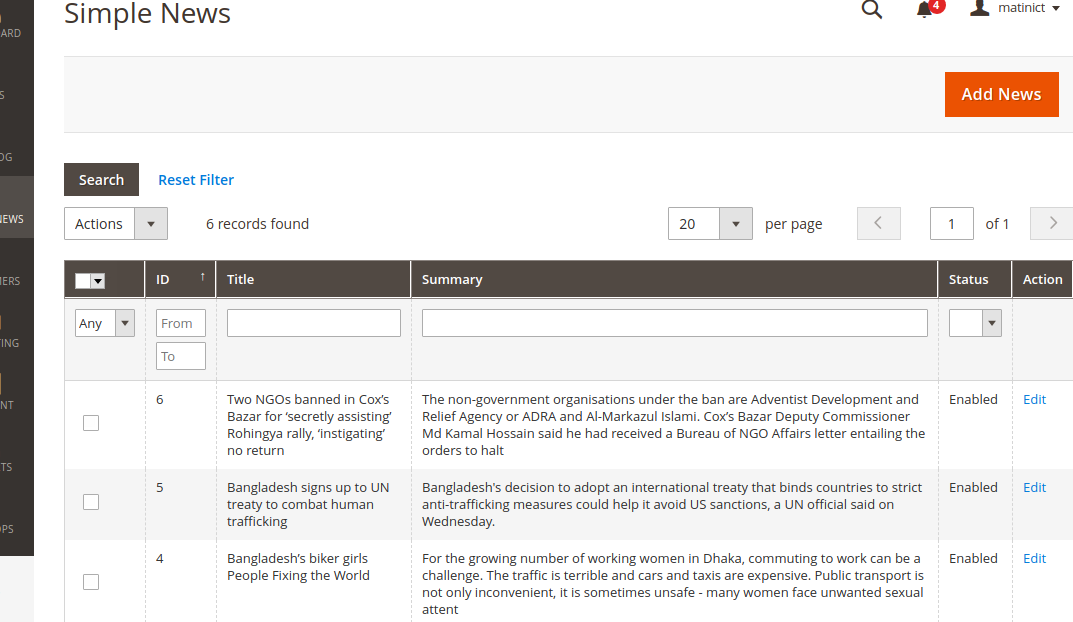
Create file: app/code/BDC/SimpleNews/view/adminhtml/layout/simplenews_news_edit.xml (Purpose: This file is used to declare blocks which used on editing page) and insert this following code into it:
 <?xml version="1.0"?>
<page xmlns:xsi="http://www.w3.org/2001/XMLSchema-instance"
layout="admin-2columns-left" xsi:noNamespaceSchemaLocation="../../../../../../../lib/internal/Magento/Framework/View/Layout/etc/page_configuration.xsd">
    <body>
        <referenceContainer name="left">
            <block class="BDCSimpleNewsBlockAdminhtmlNewsEditTabs"  name="bdc_simplenews_news.edit.tabs"/>
        </referenceContainer>
        <referenceContainer name="content">
            <block class="BDCSimpleNewsBlockAdminhtmlNewsEdit"
                name="bdc_simplenews_news.edit"/>
        </referenceContainer>
    </body>
</page>
Create file: app/code/BDC/SimpleNews/view/adminhtml/layout/simplenews_news_create.xml and insert this following code into it:
 ```
<?xml version="1.0"?>

<layout xmlns:xsi="http://www.w3.org/2001/XMLSchema-instance"
xsi:noNamespaceSchemaLocation="../../../../../Magento/Core/etc/layout_single.xsd">
    <update handle="simplenews_news_edit"/>
</layout>

```
Create file: app/code/BDC/SimpleNews/Block/Adminhtml/News/Edit.php (Purpose: This is the block file of form container) and insert this following code into it:
 ```
<?php

namespace BDCSimpleNewsBlockAdminhtmlNews;

use MagentoBackendBlockWidgetFormContainer;
use MagentoBackendBlockWidgetContext;
use MagentoFrameworkRegistry;

class Edit extends Container
{
 /**
   * Core registry
   *
   * @var MagentoFrameworkRegistry
   */
  protected $_coreRegistry = null;

  /**
   * @param Context $context
   * @param Registry $registry
   * @param array $data
   */
  public function __construct(
      Context $context,
      Registry $registry,
      array $data = []
  ) {
      $this->_coreRegistry = $registry;
      parent::__construct($context, $data);
  }

  /**
   * Class constructor
   *
   * @return void
   */
  protected function _construct()
  {
      $this->_objectId = 'id';
      $this->_controller = 'adminhtml_news';
      $this->_blockGroup = 'BDC_SimpleNews';

      parent::_construct();

      $this->buttonList->update('save', 'label', __('Save'));
      $this->buttonList->add(
          'saveandcontinue',
          [
              'label' => __('Save and Continue Edit'),
              'class' => 'save',
              'data_attribute' => [
                  'mage-init' => [
                      'button' => [
                          'event' => 'saveAndContinueEdit',
                          'target' => '#edit_form'
                      ]
                  ]
              ]
          ],
          -100
      );
      $this->buttonList->update('delete', 'label', __('Delete'));
  }

  /**
   * Retrieve text for header element depending on loaded news
   *
   * @return string
   */
  public function getHeaderText()
  {
      $newsRegistry = $this->_coreRegistry->registry('simplenews_news');
      if ($newsRegistry->getId()) {
          $newsTitle = $this->escapeHtml($newsRegistry->getTitle());
          return __("Edit News '%1'", $newsTitle);
      } else {
          return __('Add News');
      }
  }

  /**
   * Prepare layout
   *
   * @return MagentoFrameworkViewElementAbstractBlock
   */
  protected function _prepareLayout()
  {
      $this->_formScripts[] = "
          function toggleEditor() {
              if (tinyMCE.getInstanceById('news_content') == null) {
                  tinyMCE.execCommand('mceAddControl', false, 'news_content');
              } else {
                  tinyMCE.execCommand('mceRemoveControl', false, 'news_content');
              }
          };
      ";

      return parent::_prepareLayout();
  }
}

```
Create file: app/code/BDC/SimpleNews/Block/Adminhtml/News/Edit/Tabs.php (Purpose: This file will declare tabs at left column of the editing page) and insert this following code into it:
 ```
<?php

namespace BDCSimpleNewsBlockAdminhtmlNews;

use MagentoBackendBlockWidgetFormContainer;
use MagentoBackendBlockWidgetContext;
use MagentoFrameworkRegistry;

class Edit extends Container
{
   /**
     * Core registry
     *
     * @var MagentoFrameworkRegistry
     */
    protected $_coreRegistry = null;

    /**
     * @param Context $context
     * @param Registry $registry
     * @param array $data
     */
    public function __construct(
        Context $context,
        Registry $registry,
        array $data = []
    ) {
        $this->_coreRegistry = $registry;
        parent::__construct($context, $data);
    }

    /**
     * Class constructor
     *
     * @return void
     */
    protected function _construct()
    {
        $this->_objectId = 'id';
        $this->_controller = 'adminhtml_news';
        $this->_blockGroup = 'BDC_SimpleNews';

        parent::_construct();

        $this->buttonList->update('save', 'label', __('Save'));
        $this->buttonList->add(
            'saveandcontinue',
            [
                'label' => __('Save and Continue Edit'),
                'class' => 'save',
                'data_attribute' => [
                    'mage-init' => [
                        'button' => [
                            'event' => 'saveAndContinueEdit',
                            'target' => '#edit_form'
                        ]
                    ]
                ]
            ],
            -100
        );
        $this->buttonList->update('delete', 'label', __('Delete'));
    }

    /**
     * Retrieve text for header element depending on loaded news
     *
     * @return string
     */
    public function getHeaderText()
    {
        $newsRegistry = $this->_coreRegistry->registry('simplenews_news');
        if ($newsRegistry->getId()) {
            $newsTitle = $this->escapeHtml($newsRegistry->getTitle());
            return __("Edit News '%1'", $newsTitle);
        } else {
            return __('Add News');
        }
    }

    /**
     * Prepare layout
     *
     * @return MagentoFrameworkViewElementAbstractBlock
     */
    protected function _prepareLayout()
    {
        $this->_formScripts[] = "
            function toggleEditor() {
                if (tinyMCE.getInstanceById('news_content') == null) {
                    tinyMCE.execCommand('mceAddControl', false, 'news_content');
                } else {
                    tinyMCE.execCommand('mceRemoveControl', false, 'news_content');
                }
            };
        ";

        return parent::_prepareLayout();
    }
}

```
Create file: app/code/BDC/SimpleNews/Block/Adminhtml/News/Edit/Form.php (Purpose: This file will declare form information) and insert this following code into it:
 ```
<?php

namespace BDCSimpleNewsBlockAdminhtmlNews;

use MagentoBackendBlockWidgetFormContainer;
use MagentoBackendBlockWidgetContext;
use MagentoFrameworkRegistry;

class Edit extends Container
{
   /**
     * Core registry
     *
     * @var MagentoFrameworkRegistry
     */
    protected $_coreRegistry = null;

    /**
     * @param Context $context
     * @param Registry $registry
     * @param array $data
     */
    public function __construct(
        Context $context,
        Registry $registry,
        array $data = []
    ) {
        $this->_coreRegistry = $registry;
        parent::__construct($context, $data);
    }

    /**
     * Class constructor
     *
     * @return void
     */
    protected function _construct()
    {
        $this->_objectId = 'id';
        $this->_controller = 'adminhtml_news';
        $this->_blockGroup = 'BDC_SimpleNews';

        parent::_construct();

        $this->buttonList->update('save', 'label', __('Save'));
        $this->buttonList->add(
            'saveandcontinue',
            [
                'label' => __('Save and Continue Edit'),
                'class' => 'save',
                'data_attribute' => [
                    'mage-init' => [
                        'button' => [
                            'event' => 'saveAndContinueEdit',
                            'target' => '#edit_form'
                        ]
                    ]
                ]
            ],
            -100
        );
        $this->buttonList->update('delete', 'label', __('Delete'));
    }

    /**
     * Retrieve text for header element depending on loaded news
     *
     * @return string
     */
    public function getHeaderText()
    {
        $newsRegistry = $this->_coreRegistry->registry('simplenews_news');
        if ($newsRegistry->getId()) {
            $newsTitle = $this->escapeHtml($newsRegistry->getTitle());
            return __("Edit News '%1'", $newsTitle);
        } else {
            return __('Add News');
        }
    }

    /**
     * Prepare layout
     *
     * @return MagentoFrameworkViewElementAbstractBlock
     */
    protected function _prepareLayout()
    {
        $this->_formScripts[] = "
            function toggleEditor() {
                if (tinyMCE.getInstanceById('news_content') == null) {
                    tinyMCE.execCommand('mceAddControl', false, 'news_content');
                } else {
                    tinyMCE.execCommand('mceRemoveControl', false, 'news_content');
                }
            };
        ";

        return parent::_prepareLayout();
    }
}

```
Create file: app/code/BDC/SimpleNews/Block/Adminhtml/News/Edit/Tab/Info.php (Purpose: This file will declare fields in form) and insert this following code into it:
 ```
<?php

namespace BDCSimpleNewsBlockAdminhtmlNews;

use MagentoBackendBlockWidgetFormContainer;
use MagentoBackendBlockWidgetContext;
use MagentoFrameworkRegistry;

class Edit extends Container
{
 /**
   * Core registry
   *
   * @var MagentoFrameworkRegistry
   */
  protected $_coreRegistry = null;

  /**
   * @param Context $context
   * @param Registry $registry
   * @param array $data
   */
  public function __construct(
      Context $context,
      Registry $registry,
      array $data = []
  ) {
      $this->_coreRegistry = $registry;
      parent::__construct($context, $data);
  }

  /**
   * Class constructor
   *
   * @return void
   */
  protected function _construct()
  {
      $this->_objectId = 'id';
      $this->_controller = 'adminhtml_news';
      $this->_blockGroup = 'BDC_SimpleNews';

      parent::_construct();

      $this->buttonList->update('save', 'label', __('Save'));
      $this->buttonList->add(
          'saveandcontinue',
          [
              'label' => __('Save and Continue Edit'),
              'class' => 'save',
              'data_attribute' => [
                  'mage-init' => [
                      'button' => [
                          'event' => 'saveAndContinueEdit',
                          'target' => '#edit_form'
                      ]
                  ]
              ]
          ],
          -100
      );
      $this->buttonList->update('delete', 'label', __('Delete'));
  }

  /**
   * Retrieve text for header element depending on loaded news
   *
   * @return string
   */
  public function getHeaderText()
  {
      $newsRegistry = $this->_coreRegistry->registry('simplenews_news');
      if ($newsRegistry->getId()) {
          $newsTitle = $this->escapeHtml($newsRegistry->getTitle());
          return __("Edit News '%1'", $newsTitle);
      } else {
          return __('Add News');
      }
  }

  /**
   * Prepare layout
   *
   * @return MagentoFrameworkViewElementAbstractBlock
   */
  protected function _prepareLayout()
  {
      $this->_formScripts[] = "
          function toggleEditor() {
              if (tinyMCE.getInstanceById('news_content') == null) {
                  tinyMCE.execCommand('mceAddControl', false, 'news_content');
              } else {
                  tinyMCE.execCommand('mceRemoveControl', false, 'news_content');
              }
          };
      ";

      return parent::_prepareLayout();
  }
}

```
Create file: app/code/BDC/SimpleNews/Controller/Adminhtml/News/NewAction.php (Purpose: This is the new action) and insert this following code into it:
 ```
<?php

namespace BDCSimpleNewsControllerAdminhtmlNews;

use BDCSimpleNewsControllerAdminhtmlNews;

class NewAction extends News
{
   /**
     * Create new news action
     *
     * @return void
     */
   public function execute()
   {
      $this->_forward('edit');
   }
}

```
Create file: app/code/BDC/SimpleNews/Controller/Adminhtml/News/Edit.php (Purpose: This is the edit action for editing news page) and insert this following code into it:
  ```
  <?php

  namespace BDCSimpleNewsControllerAdminhtmlNews;

  use BDCSimpleNewsControllerAdminhtmlNews;

  class Edit extends News
  {
     /**
       * @return void
       */
     public function execute()
     {
        $newsId = $this->getRequest()->getParam('id');
          /** @var BDCSimpleNewsModelNews $model */
          $model = $this->_newsFactory->create();

          if ($newsId) {
              $model->load($newsId);
              if (!$model->getId()) {
                  $this->messageManager->addError(__('This news no longer exists.'));
                  $this->_redirect('*/*/');
                  return;
              }
          }

          // Restore previously entered form data from session
          $data = $this->_session->getNewsData(true);
          if (!empty($data)) {
              $model->setData($data);
          }
          $this->_coreRegistry->register('simplenews_news', $model);

          /** @var MagentoBackendModelViewResultPage $resultPage */
          $resultPage = $this->_resultPageFactory->create();
          $resultPage->setActiveMenu('BDC_SimpleNews::main_menu');
          $resultPage->getConfig()->getTitle()->prepend(__('Simple News'));

          return $resultPage;
     }
  }

  ```
Create file: app/code/BDC/SimpleNews/Controller/Adminhtml/News/Save.php (Purpose: This is the save action) and insert this following code into it:
 ```
<?php

namespace BDCSimpleNewsControllerAdminhtmlNews;

use BDCSimpleNewsControllerAdminhtmlNews;

class Edit extends News
{
 /**
   * @return void
   */
 public function execute()
 {
    $newsId = $this->getRequest()->getParam('id');
      /** @var BDCSimpleNewsModelNews $model */
      $model = $this->_newsFactory->create();

      if ($newsId) {
          $model->load($newsId);
          if (!$model->getId()) {
              $this->messageManager->addError(__('This news no longer exists.'));
              $this->_redirect('*/*/');
              return;
          }
      }

      // Restore previously entered form data from session
      $data = $this->_session->getNewsData(true);
      if (!empty($data)) {
          $model->setData($data);
      }
      $this->_coreRegistry->register('simplenews_news', $model);

      /** @var MagentoBackendModelViewResultPage $resultPage */
      $resultPage = $this->_resultPageFactory->create();
      $resultPage->setActiveMenu('BDC_SimpleNews::main_menu');
      $resultPage->getConfig()->getTitle()->prepend(__('Simple News'));

      return $resultPage;
 }
}

```
Create file: app/code/BDC/SimpleNews/Controller/Adminhtml/News/Delete.php (Purpose: This is the delete action) and insert this following code into it:
 ```
<?php

namespace BDCSimpleNewsControllerAdminhtmlNews;

use BDCSimpleNewsControllerAdminhtmlNews;

class Delete extends News
{
 /**
  * @return void
  */
 public function execute()
 {
    $newsId = (int) $this->getRequest()->getParam('id');

    if ($newsId) {
       /** @var $newsModel MageworldSimpleNewsModelNews */
       $newsModel = $this->_newsFactory->create();
       $newsModel->load($newsId);

       // Check this news exists or not
       if (!$newsModel->getId()) {
          $this->messageManager->addError(__('This news no longer exists.'));
       } else {
             try {
                // Delete news
                $newsModel->delete();
                $this->messageManager->addSuccess(__('The news has been deleted.'));

                // Redirect to grid page
                $this->_redirect('*/*/');
                return;
             } catch (Exception $e) {
                 $this->messageManager->addError($e->getMessage());
                 $this->_redirect('*/*/edit', ['id' => $newsModel->getId()]);
             }
          }
    }
 }
}

```
Create file: app/code/BDC/SimpleNews/Controller/Adminhtml/News/MassDelete.php (Purpose: This file is used for deleting multi items on grid) and insert this following code into it:
 ```
<?php
namespace BDCSimpleNewsControllerAdminhtmlNews;
use BDCSimpleNewsControllerAdminhtmlNews;

class MassDelete extends News {
 /**
  * @return void
  */
 public function execute()
 {
    // Get IDs of the selected news
    $newsIds = $this->getRequest()->getParam('news');

      foreach ($newsIds as $newsId) {
          try {
             /** @var $newsModel MageworldSimpleNewsModelNews */
              $newsModel = $this->_newsFactory->create();
              $newsModel->load($newsId)->delete();
          } catch (Exception $e) {
              $this->messageManager->addError($e->getMessage());
          }
      }

      if (count($newsIds)) {
          $this->messageManager->addSuccess(
              __('A total of %1 record(s) were deleted.', count($newsIds))
          );
      }

      $this->_redirect('*/*/index');
 }
}

```
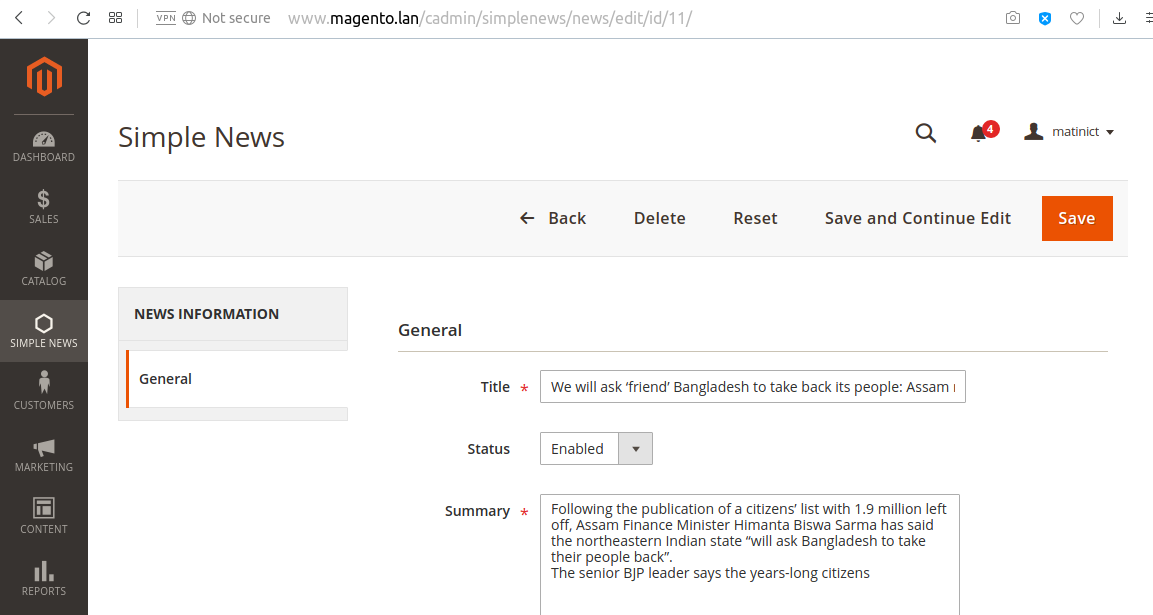
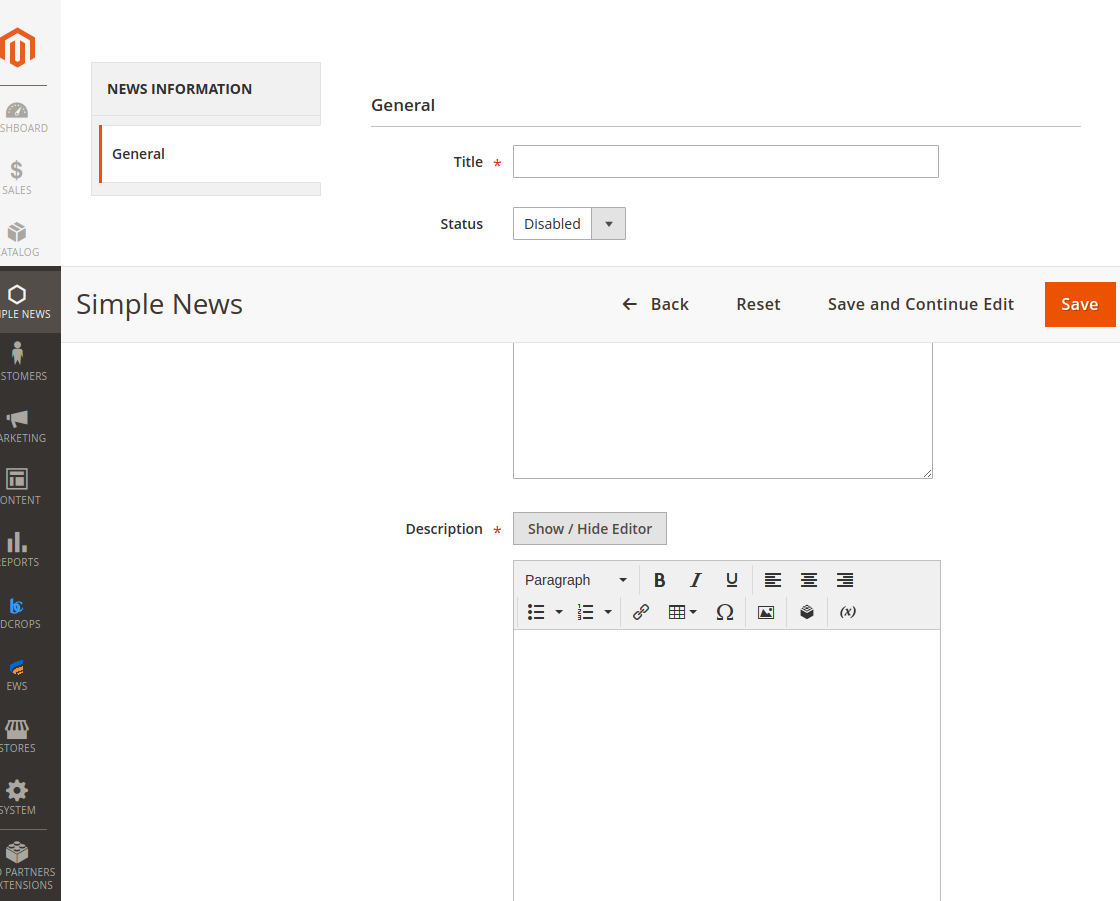
 <?xml version="1.0" encoding="UTF-8"?>

<page xmlns:xsi="http://www.w3.org/2001/XMLSchema-instance" layout="3columns"
xsi:noNamespaceSchemaLocation="../../../../../../../lib/internal/Magento/Framework/View/Layout/etc/page_configuration.xsd">
   <head>
      <css src="BDC_SimpleNews::css/style.css" />
   </head>
    <body>
       <referenceContainer name="sidebar.main">
         <block class="BDCSimpleNewsBlockLastestLeft" name="lestest.news.left"
             before="-" />
       </referenceContainer>

       <referenceContainer name="sidebar.additional">
         <block class="BDCSimpleNewsBlockLastestRight" name="lestest.news.right"
             before="-" />
       </referenceContainer>
    </body>
</page>
 <?xml version="1.0"?>
<page xmlns:xsi="http://www.w3.org/2001/XMLSchema-instance" layout="3columns" xsi:noNamespaceSchemaLocation="urn:magento:framework:View/Layout/etc/page_configuration.xsd">
    <update handle="news_news" />
    <body>
        <referenceBlock name="content">
            <block template="BDC_SimpleNews::list.phtml" class="BDCSimpleNewsBlockNewsList" name="bdc_simplenews_block_news_list"/>
        </referenceBlock>
    </body>
</page>
 <?php

namespace BDCSimpleNewsBlock;

use MagentoFrameworkViewElementTemplate;
use BDCSimpleNewsModelNewsFactory;

class NewsList extends Template
{
   /**
    * @var BDCSimpleNewsModelNewsFactory
    */
   protected $_newsFactory;

   /**
    * @param TemplateContext $context
    * @param NewsFactory $newsFactory
    * @param array $data
    */
   public function __construct(
      TemplateContext $context,
      NewsFactory $newsFactory,
      array $data = []
   ) {
        $this->_newsFactory = $newsFactory;
        parent::__construct($context, $data);
   }

   /**
     * Set news collection
     */
    protected  function _construct()
    {
        parent::_construct();
        $collection = $this->_newsFactory->create()->getCollection()
            ->setOrder('id', 'DESC');
        $this->setCollection($collection);
    }

   /**
     * @return $this
     */
    protected function _prepareLayout()
    {
        parent::_prepareLayout();
        /** @var MagentoThemeBlockHtmlPager */
        $pager = $this->getLayout()->createBlock(
           'MagentoThemeBlockHtmlPager','simplenews.news.list.pager'
        );
        $pager->setLimit(5)
            ->setShowAmounts(false)
            ->setCollection($this->getCollection());
        $this->setChild('pager', $pager);
        $this->getCollection()->load();

        return $this;
    }

   /**
     * @return string
     */
    public function getPagerHtml()
    {
        return $this->getChildHtml('pager');
    }
}
 <div class="simplenews">
   <?php
      $newsCollection = $block->getCollection();
      if ($newsCollection->getSize() > 0) :
   ?>
      <div class="toolbar top">
         <?php echo $block->getPagerHtml(); ?>
      </div>

      <ul>
         <?php foreach ($newsCollection as $news) : ?>
            <li>
               <div class="simplenews-list">
                  <a class="news-title" href="<?php echo $this->getUrl('news/index/view',
 ['id' => $news->getId()]) ?>"><?php echo $news->getTitle() ?></a>
                  <div class="simplenews-list-content">
                     <?php echo $news->getSummary() ?>
                  </div>
               </div>
            </li>
         <?php endforeach; ?>
      </ul>

      <div style="clear: both"></div>

      <div class="toolbar-bottom">
         <div class="toolbar bottom">
            <?php echo $block->getPagerHtml(); ?>
         </div>
      </div>
   <?php else : ?>
      <p><?php echo __('Have no article!') ?></p>
   <?php endif; ?>
</div>
 <div class="simplenews">
   <?php
      $newsCollection = $block->getCollection();
      if ($newsCollection->getSize() > 0) :
   ?>
      <div class="toolbar top">
         <?php echo $block->getPagerHtml(); ?>
      </div>

      <ul>
         <?php foreach ($newsCollection as $news) : ?>
            <li>
               <div class="simplenews-list">
                  <a class="news-title" href="<?php echo $this->getUrl('news/index/view',
 ['id' => $news->getId()]) ?>"><?php echo $news->getTitle() ?></a>
                  <div class="simplenews-list-content">
                     <?php echo $news->getSummary() ?>
                  </div>
               </div>
            </li>
         <?php endforeach; ?>
      </ul>

      <div style="clear: both"></div>

      <div class="toolbar-bottom">
         <div class="toolbar bottom">
            <?php echo $block->getPagerHtml(); ?>
         </div>
      </div>
   <?php else : ?>
      <p><?php echo __('Have no article!') ?></p>
   <?php endif; ?>
</div>
 <?php

namespace BDCSimpleNewsControllerIndex;

use BDCSimpleNewsControllerNews;

class Index extends News
{

    public function execute()
    {
        $pageFactory = $this->_pageFactory->create();

        $pageFactory->getConfig()->getTitle()->set($this->_dataHelper->getHeadTitle());

        //Add breadcrumb
        $breadcrumbs = $pageFactory->getLayout()->getBlock('breadcrumbs');
        $breadcrumbs->addCrumb('home', ['label'=>__('Home'), 'title'=>__('Home'), 'link'=>$this->_url->getUrl('')]);
        $breadcrumbs->addCrumb('simplenews', ['label'=>__('Simple News'), 'title'=>__('Simple News')]);

        return $pageFactory;
    }
}
 .simplenews > ul {
   list-style: none;
   padding: 0;
}
.simplenews > ul li {
   padding: 10px 5px;
   margin: 0;
   background-color: #fff;
   border-bottom: 1px #c4c1bc solid;
   display: inline-block;
   width: 100%;
}
.simplenews > ul li:last-child {
   border-bottom: none;
}
.simplenews-list {
   float: left;
   position: relative;
   margin-left: 10px;
   width: 100%;
}
.simplenews-list a.news-title {
   font-weight: bold;
}
.simplenews-list a.news-title:hover {
   text-decoration: none;
}
.block-simplenews .block-title {
   margin: 0px 0px 20px;
}
.block-simplenews-heading {
   font-size: 18px;
   font-weight: 300;
}
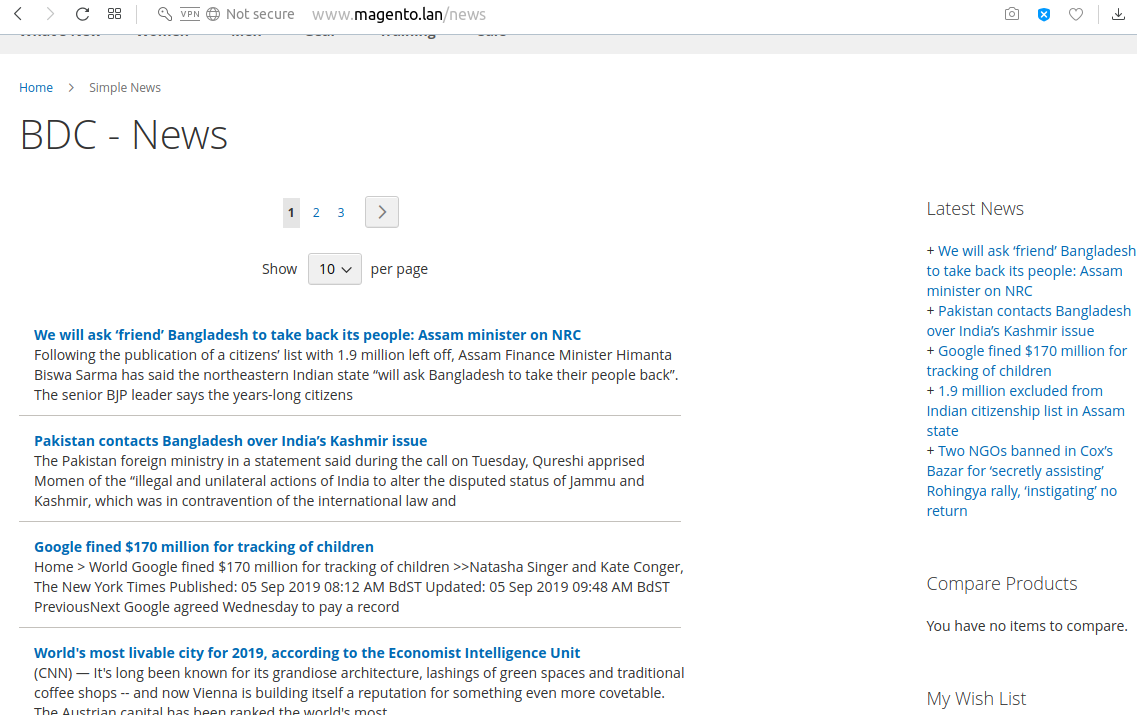
 <?xml version="1.0" encoding="UTF-8"?>

<page xmlns:xsi="http://www.w3.org/2001/XMLSchema-instance" layout="3columns"
xsi:noNamespaceSchemaLocation="../../../../../../../lib/internal/Magento/Framework/View/Layout/etc/page_configuration.xsd">
    <update handle="news_news" />
    <body>
        <referenceContainer name="content">
            <block class="BDCSimpleNewsBlockView" name="bdc_simplenews_news_view"
                template="BDC_SimpleNews::view.phtml" />
        </referenceContainer>
    </body>
</page>
 <?php

namespace BDCSimpleNewsControllerIndex;

use BDCSimpleNewsControllerNews;

class View extends News
{
    public function execute()
    {
	// Get news ID
        $newsId = $this->getRequest()->getParam('id');
	// Get news data
        $news = $this->_newsFactory->create()->load($newsId);
	// Save news data into the registry
        $this->_objectManager->get('MagentoFrameworkRegistry')
            ->register('newsData', $news);

        $pageFactory = $this->_pageFactory->create();

        // Add title
        $pageFactory->getConfig()->getTitle()->set($news->getTitle());

        // Add breadcrumb
        /** @var MagentoThemeBlockHtmlBreadcrumbs */
        $breadcrumbs = $pageFactory->getLayout()->getBlock('breadcrumbs');
        $breadcrumbs->addCrumb('home',
            [
                'label' => __('Home'),
                'title' => __('Home'),
                'link' => $this->_url->getUrl('')
            ]
        );
        $breadcrumbs->addCrumb('simplenews',
            [
                'label' => __('Simple News'),
                'title' => __('Simple News'),
                'link' => $this->_url->getUrl('news')
            ]
        );
        $breadcrumbs->addCrumb('news',
            [
                'label' => $news->getTitle(),
                'title' => $news->getTitle()
            ]
        );

        return $pageFactory;
    }
}
 <?php

namespace BDCSimpleNewsControllerIndex;

use BDCSimpleNewsControllerNews;

class View extends News
{
    public function execute()
    {
	// Get news ID
        $newsId = $this->getRequest()->getParam('id');
	// Get news data
        $news = $this->_newsFactory->create()->load($newsId);
	// Save news data into the registry
        $this->_objectManager->get('MagentoFrameworkRegistry')
            ->register('newsData', $news);

        $pageFactory = $this->_pageFactory->create();

        // Add title
        $pageFactory->getConfig()->getTitle()->set($news->getTitle());

        // Add breadcrumb
        /** @var MagentoThemeBlockHtmlBreadcrumbs */
        $breadcrumbs = $pageFactory->getLayout()->getBlock('breadcrumbs');
        $breadcrumbs->addCrumb('home',
            [
                'label' => __('Home'),
                'title' => __('Home'),
                'link' => $this->_url->getUrl('')
            ]
        );
        $breadcrumbs->addCrumb('simplenews',
            [
                'label' => __('Simple News'),
                'title' => __('Simple News'),
                'link' => $this->_url->getUrl('news')
            ]
        );
        $breadcrumbs->addCrumb('news',
            [
                'label' => $news->getTitle(),
                'title' => $news->getTitle()
            ]
        );

        return $pageFactory;
    }
}
 <?php
   $news = $block->getNewsInformation();
?>
<div class="mw-simplenews">
   <?php echo $news->getDescription() ?>
</div>
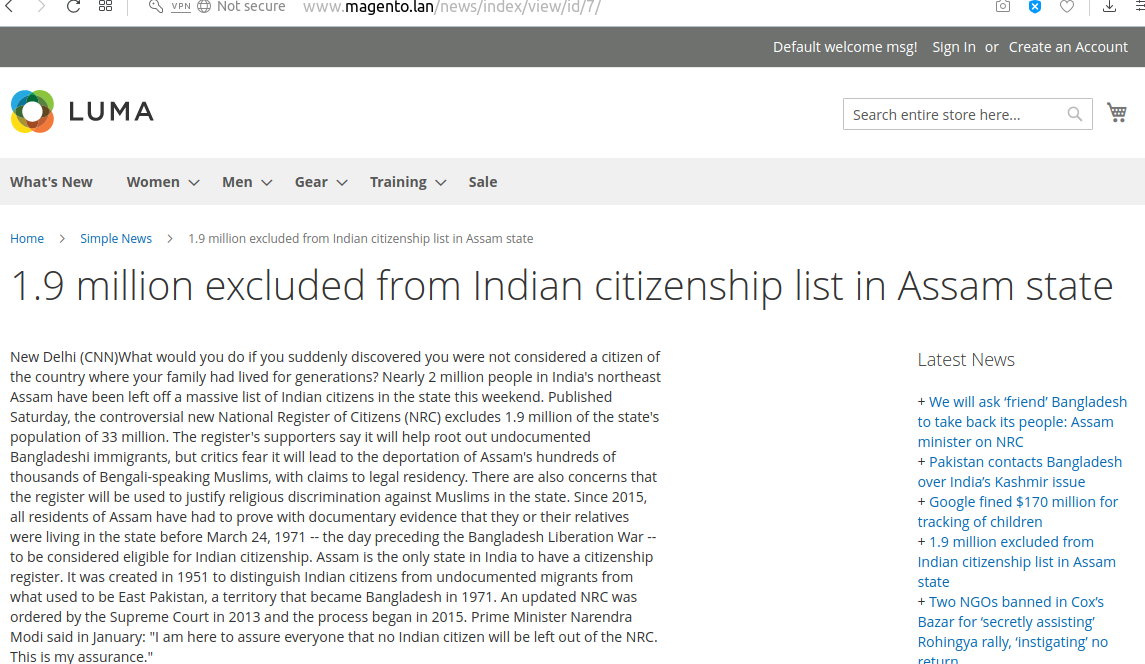
 <?xml version="1.0" encoding="UTF-8"?>

<page xmlns:xsi="http://www.w3.org/2001/XMLSchema-instance" layout="3columns"
xsi:noNamespaceSchemaLocation="../../../../../../../lib/internal/Magento/Framework/View/Layout/etc/page_configuration.xsd">
   <head>
      <css src="BDC_SimpleNews::css/style.css" />
   </head>
    <body>
       <referenceContainer name="sidebar.main">
         <block class="BDCSimpleNewsBlockLastestLeft" name="lestest.news.left"
             before="-" />
       </referenceContainer>

       <referenceContainer name="sidebar.additional">
         <block class="BDCSimpleNewsBlockLastestRight" name="lestest.news.right"
             before="-" />
       </referenceContainer>
    </body>
</page>
 <?php

namespace BDCSimpleNewsBlock;

use MagentoFrameworkViewElementTemplate;
use BDCSimpleNewsHelperData;
use BDCSimpleNewsModelNewsFactory;
use BDCSimpleNewsModelSystemConfigStatus;

class Lastest extends Template
{
   /**
    * @var BDCSimpleNewsHelperData
    */
   protected $_dataHelper;

   /**
    * @var BDCSimpleNewsModelNewsFactory
    */
   protected $_newsFactory;

   /**
    * @param TemplateContext $context
    * @param Data $dataHelper
    * @param NewsFactory $newsFactory
    */
   public function __construct(
      TemplateContext $context,
      Data $dataHelper,
      NewsFactory $newsFactory
   ) {
      $this->_dataHelper = $dataHelper;
      $this->_newsFactory = $newsFactory;
      parent::__construct($context);
   }

   /**
    * Get five latest news
    *
    * @return BDCSimpleNewsModelResourceNewsCollection
    */
   public function getLatestNews()
   {
      // Get news collection
      $collection = $this->_newsFactory->create()->getCollection();
      $collection->addFieldToFilter(
         'status',
         ['eq' => Status::ENABLED]
      );
      $collection->getSelect()
         ->order('id DESC')
         ->limit(5);

      return $collection;
   }
}
 <?php

namespace BDCSimpleNewsBlockLastest;

use BDCSimpleNewsBlockLastest;
use BDCSimpleNewsModelSystemConfigLastestNewsPosition;

class Left extends Lastest
{
   public function _construct()
   {
      $position = $this->_dataHelper->getLastestNewsBlockPosition();
      // Check this position is applied or not
      if ($position == Position::LEFT) {
         $this->setTemplate('BDC_SimpleNews::lastest.phtml');
      }
   }
}
 <?php

namespace BDCSimpleNewsBlockLastest;

use BDCSimpleNewsBlockLastest;
use BDCSimpleNewsModelSystemConfigLastestNewsPosition;

class Right extends Lastest
{
   public function _construct()
   {
      $position = $this->_dataHelper->getLastestNewsBlockPosition();
      // Check this position is applied or not
      if ($position == Position::RIGHT) {
         $this->setTemplate('BDC_SimpleNews::lastest.phtml');
      }
   }
}
 <?php
   $latestNews = $block->getLatestNews();
   if ($latestNews->getSize() > 0) :
?>
   <div class="block block-simplenews">
      <div class="block-title">
         <strong class="block-simplenews-heading"><?php echo __('Latest News') ?></strong>
      </div>

      <div class="block-content">
         <?php foreach ($latestNews as $news) : ?>
            <div>
               <span>+ </span>
               <a href="<?php echo $this->getUrl('news/index/view', ['id' => $news->getId()])
?>">
                  <span><?php echo $news->getTitle() ?></span>
               </a>
            </div>
         <?php endforeach; ?>
      </div>
   </div>
<?php endif; ?>
Adding a new command to CLI is based on passing on the argument from the XML level to the class MagentoFrameworkConsoleCommandList. Dependency Injection comes in handy here. 하자
Edit/Create etc/di.xml:
 <?xml version="1.0"?>
<config xmlns:xsi="http://www.w3.org/2001/XMLSchema-instance" xsi:noNamespaceSchemaLocation="urn:magento:framework:ObjectManager/etc/config.xsd">
   <type name="MagentoFrameworkConsoleCommandList">
       <arguments>
           <argument name="commands" xsi:type="array">
             <item name="bdc_simplenews_create" xsi:type="object">BDCSimpleNewsConsoleCommandNewsCreate</item>
           </argument>
       </arguments>
   </type>
</config>
We add the object responsible for executing the script to the class MagentoFrameworkConsoleCommandList. The constructor of this class is simply an array where class objects are passed on in a similar manner as in the above example.
Let's proceed to the next step – creating a class for our new command and a helper responsible for adding a new user:
Create Console/Command/NewsCreate.php:
 <?php
namespace BDCSimpleNewsConsoleCommand;

use SymfonyComponentConsoleCommandCommand;
use SymfonyComponentConsoleInputInputOption;
use SymfonyComponentConsoleInputInputInterface;
use SymfonyComponentConsoleOutputOutputInterface;
use BDCSimpleNewsHelperNews;

class NewsCreate extends Command {
    protected $newsHelper;

    public function __construct(News $newsHelper)
    {
        $this->newsHelper = $newsHelper;
        parent::__construct();
    }

    protected function configure()
    {
        $this->setName('bdcrops:news:create')
            ->setDescription('Create New News')
            ->setDefinition($this->getOptionsList());
    }

    protected function execute(InputInterface $input, OutputInterface $output)
    {
        $output->writeln('<info>Creating new news...</info>');
        $this->newsHelper->setData($input);
        $this->newsHelper->execute();

        $output->writeln('');
        $output->writeln('<info>News created with the following data:</info>');
        $output->writeln('<comment>News ID: ' . $this->newsHelper->getNewsId());
        $output->writeln('<comment>Title: ' . $input->getOption(News::KEY_TITLE));
        $output->writeln('<comment>Summary: ' . $input->getOption(News::KEY_SUMMARY));
        $output->writeln('<comment>Description: ' . $input->getOption(News::KEY_DESC));

       }

    protected function getOptionsList(){
        return [
            new InputOption(News::KEY_TITLE, null, InputOption::VALUE_REQUIRED, '(Required) News Title'),
            new InputOption(News::KEY_SUMMARY, null, InputOption::VALUE_REQUIRED, '(Required) News Summary'),
            new InputOption(News::KEY_DESC, null, InputOption::VALUE_REQUIRED, '(Required) News Description'),

            ];
    }
}
Create Helper/News.php:
 ```
<?php
namespace BDCSimpleNewsHelper;

use MagentoFrameworkAppHelperContext;
use MagentoStoreModelStoreManagerInterface;
use MagentoFrameworkAppState;
use BDCSimpleNewsModelNewsFactory;
use SymfonyComponentConsoleInputInput;
use MagentoFrameworkAppHelperAbstractHelper;

class News extends AbstractHelper {
    const KEY_TITLE = 'news-title';
    const KEY_SUMMARY = 'news-summary';
    const KEY_DESC = 'news-description';
    protected $storeManager;
    protected $state;
    protected $newsFactory;
    protected $data;
    protected $newsId;

    public function __construct(
        Context $context,
        StoreManagerInterface $storeManager,
        State $state,
        NewsFactory $newsFactory ) {
        $this->storeManager = $storeManager;
        $this->state = $state;
        $this->newsFactory = $newsFactory;

        parent::__construct($context);
    }

    public function setData(Input $input) {
        $this->data = $input;
        return $this;
    }

    public function execute() {
        $this->state->setAreaCode('frontend');
        $news = $this->newsFactory->create();
        $news
            ->setTitle($this->data->getOption(self::KEY_TITLE))
            ->setSummary($this->data->getOption(self::KEY_SUMMARY))
            ->setDescription($this->data->getOption(self::KEY_DESC))

            ;
        $news->save();

        $this->newsId = $news->getId();

        // if($this->data->getOption(self::KEY_SENDEMAIL)) {
        //     $news->sendNewAccountEmail();
        // }
    }

    public function getNewsId() {
        return (int)$this->newsId;
    }
}
```
The execute() method adds a new user. If any data is incorrect at this stage (ie too short password), the script will stop and the console will show an Exception.
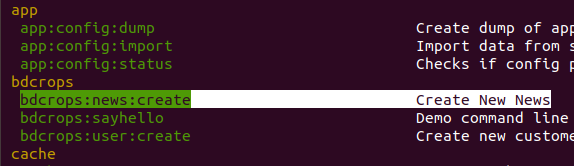
php bin/magento bdcrops:news:create --news-title="Matin Cli News" --news-summary="summary 1" --news-description="News Description 1"

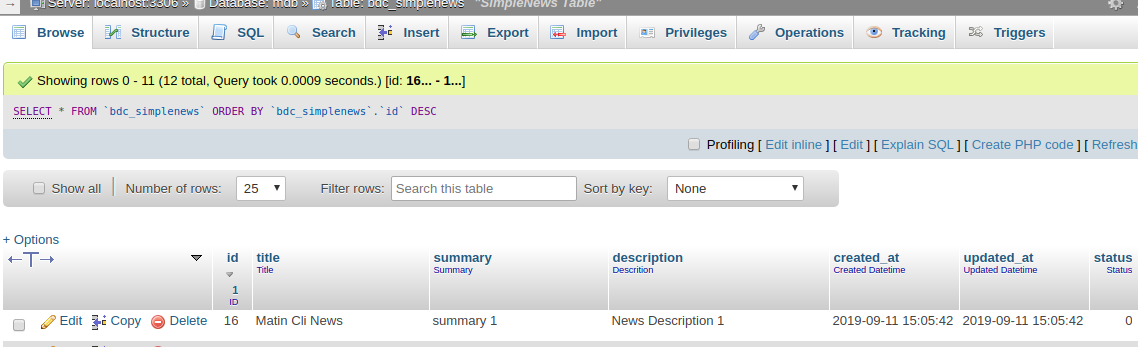
Create a crontab.xml file in the following file path and set a time schedule to run the custom cron code which is defined default.
Create etc/crontab.xml:
 ```
<?xml version="1.0"?>
<config xmlns:xsi="http://www.w3.org/2001/XMLSchema-instance" xsi:noNamespaceSchemaLocation="urn:magento:module:Magento_Cron:etc/crontab.xsd">
    <group id="bdc_crongroup">
        <job name="bdcAddNews" instance="BDCSimpleNewsCronAddNews" method="execute">
            <!-- <config_path>bdc/general/cron_expression</config_path> -->
            <schedule>* * * * *</schedule>
        </job>
    </group>
</config>

```
Here when defining the crontab for the module we need to define the group name too. Here group_name is the name of the cron group. The group name doesn't have to be unique and we can run the cron for one group at a time.
여기,
group id: is a cron group name. job name: is a Unique ID for this cron job. instance: is a class to be instantiated (classpath). method: is a method in job instance to call. schedule: is a schedule in cron format.
 * * * * * command to be executed
| | | | |
| | | | +----- Day of week (0 - 7) (Sunday=0 or 7)
| | | +------- Month (1 - 12)
| | +--------- Day of month (1 - 31)
| +----------- Hour (0 - 23)
+------------- Minute (0 - 59)
This file contains the custom cron code and which will be executed while the cron runs in Magento 2.
Create Cron/AddNews.php:
 ```
<?php
namespace BDCSimpleNewsCron;

use BDCSimpleNewsModelNewsFactory;
//use BDCSimpleNewsModelConfig;
class AddNews {
    private $newsFactory;
    public function __construct(NewsFactory $newsFactory) {
        $this->newsFactory = $newsFactory;
    }
    public function execute(){
        $this->newsFactory->create()
            ->setTitle('Scheduled News')
            ->setSummary('Scheduled News setSummary ' . date('Ymd'))
            ->setDescription('Scheduled News setDescription ' . date('Ymd'))
            ->save();
    }
}

```
After completing the above steps run the below SSH command in your Magento 2 installed root directory to run the Magento 2 cron jobs
 php bin/magento cache:flush
php bin/magento cron:run
To check whether the cron is working properly, go to db
 SELECT * FROM `cron_schedule`
SELECT * FROM `cron_schedule` where `job_code` LIKE "%bdc%"
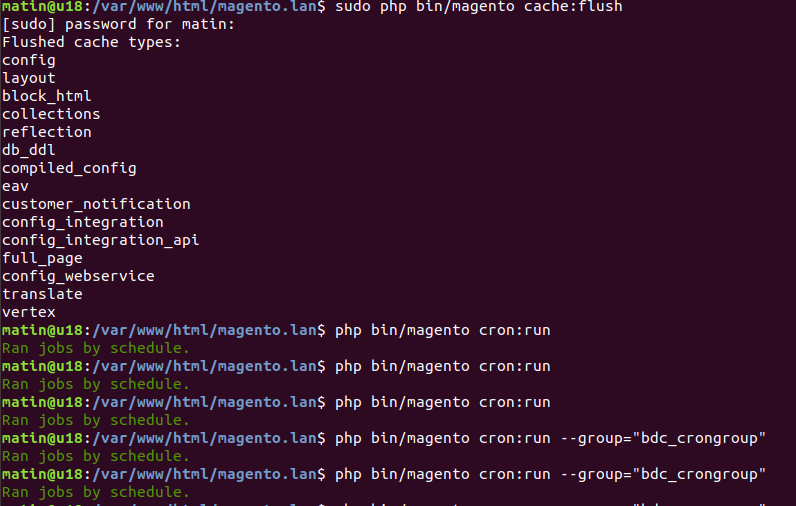
Declare a new group and specify its configuration options (all of which run in the store's view scope) through the cron_groups.xml file, located at: //module-/etc/cron_groups.xml
Create etc/cron_groups.xml:
 ```
<?xml version="1.0"?>
<config xmlns:xsi="http://www.w3.org/2001/XMLSchema-instance" xsi:noNamespaceSchemaLocation="urn:magento:module:BlogTreat_CustomCron:etc/cron_groups.xsd">
    <group id="bdc_crongroup">
        <schedule_generate_every>1</schedule_generate_every>
        <schedule_ahead_for>4</schedule_ahead_for>
        <schedule_lifetime>2</schedule_lifetime>
        <history_cleanup_every>10</history_cleanup_every>
        <history_success_lifetime>60</history_success_lifetime>
        <history_failure_lifetime>600</history_failure_lifetime>
    </group>
</config>

```
어디:
You can check your new cron group in admin panel at: Stores -> Configuration -> Advanced -> System -> Cron (Scheduled Tasks)
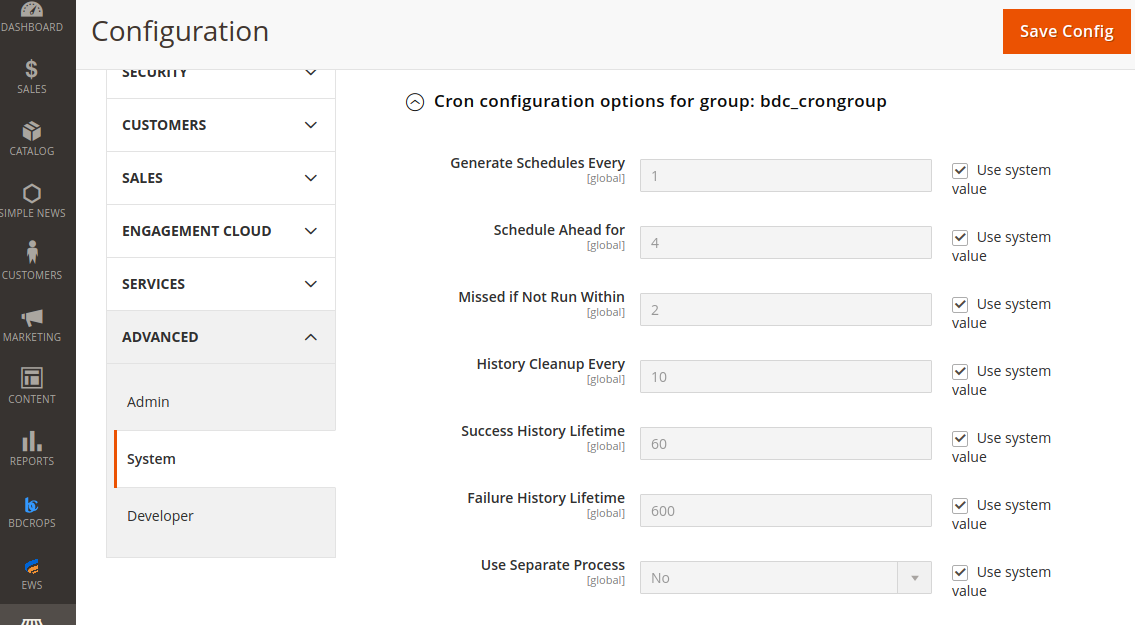
After completing the above steps run the below SSH command in your Magento 2 installed root directory to run the Magento 2 specific group of cron jobs only.
php bin/magento cron:run --group="bdc_crongroup"
To check whether the cron is working properly, go to Database & run below query.
 SELECT * FROM `cron_schedule` where `job_code` LIKE "%bdc%"

SELECT * FROM `bdc_simplenews` ORDER BY `id` DESC
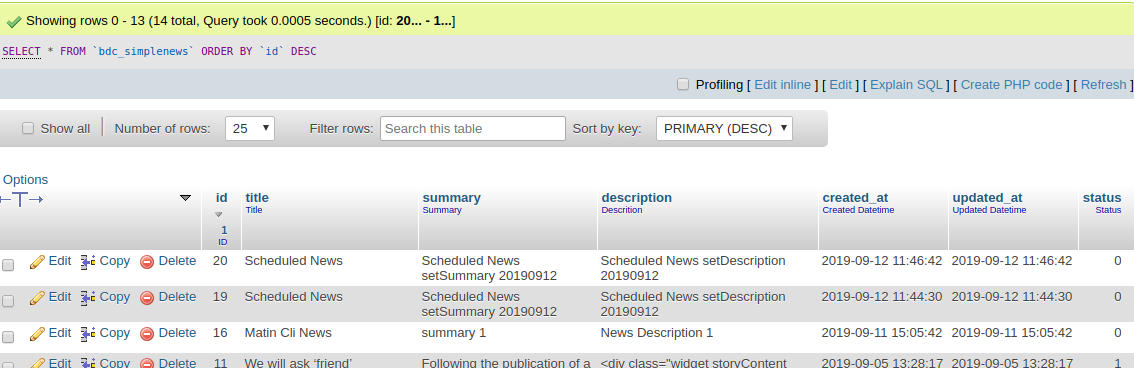
Cron job is a great feature which is used to do the specific task automatically in exact time and date without manual working. The cron job is the perfect choice to do the repeated action every date or every week.Magento 2 uses cron jobs for,
<schedule>* * * * * </schedule> ?Schedule is the time the cron will run. In this example, it run in each minute.
 * * * * * *
| | | | | |
| | | | | +-- Year              (range: 1900-3000)
| | | | +---- Day of the Week   (range: 1-7, 1 standing for Monday)
| | | +------ Month of the Year (range: 1-12)
| | +-------- Day of the Month  (range: 1-31)
| +---------- Hour              (range: 0-23)
+------------ Minute            (range: 0-59)
Magento 2 API framework allows developers to create new services for communicating with Magento 2 stores. It supports REST and SOAP web services and is based on CRUD operations (Create, Read, Update, Delete) and a Search Model.
At the moment, Magento 2 uses the following three authentication methods as is described in Magento 2 REST API documentation.
According to the Magento 2 API documentation, these authentication methods can only access the resources assigned to them. Magento 2 API framework first checks whether the call has appropriate authorization to perform the request. The API framework also supports field filtering of API responses to preserve cellular bandwidth. Developers use Magento 2 APIs for a wide range of tasks. For instance, you can create a shopping app and integrate it with your Magento 2 store. You can also build a web app which your employee could use to help customers make purchases. With the help of APIs, you can integrate your Magento 2 store with CRMs, ERPs or POS systems.
Using REST API in Magento 2 is a piece of cake. But for that, you need to understand the flow to call APIs in PHP. If you want to use token-based Magento 2 REST API, first you will need to authenticate and get the token from Magento 2. Then, you will have to pass it in the header of every request you perform. To get started with the REST API in Magento 2 using token-based authentication, you will need to create a web service User Role and register that role to a new Magento 2 Admin User. Keep in mind that creating a new role and user is necessary because it's not a good practice to use Magento Owner User in a web service.
When it comes to e-Commerce websites, APIs play the big role of reading and writing information from and to the server. Be it a customer's name or his already saved credit card details, every piece of information shown to the end user has to either read from or written to the web server. This is taken care by REST and SOAP APIs. REST and SOAP are models for web services, however, one that's most recommend for eCommerce websites. Though REST is fast, efficient and simple, SOAP is standardized, secure and apt for payments.
To create a web service role in Magento 2, follow these steps:
Now, create a new user for the newly created role through these steps:
As I mentioned earlier, I will authenticate REST API through Token authentication. This means that I will pass a username and password in the initial connection and receive the token . This token will be saved in a variable, which will be passed in the header for further calls.
You can fetch almost everything using Magento 2 REST API. The List of REST APIs for Magento EE and CE is a good guide on this topic.To demonstrate the API, I am going to get all the installed modules on a Magento 2 store. Here is the script:
  ```
  <?php
  //API URL for authentication
  $apiURL="http://www.magento.lan/rest/V1/news/admin/token";
  //parameters passing with URL
  $data = array("username" => "apiaccess", "password" => "api@123");
  $data_string = json_encode($data);
  $ch = curl_init($apiURL);
  curl_setopt($ch, CURLOPT_CUSTOMREQUEST, "POST");
  curl_setopt($ch, CURLOPT_POSTFIELDS, $data_string);
  curl_setopt($ch, CURLOPT_RETURNTRANSFER, true);
  curl_setopt($ch, CURLOPT_HTTPHEADER, array("Content-Type: application/json","Content-Length: ".strlen($data_string)));
  $token = curl_exec($ch);
  //decoding generated token and saving it in a variable
  $token=  json_decode($token);
  //******************************************//
  //Using above token into header
  $headers = array("Authorization: Bearer ".$token);
  //API URL to get all Magento 2 modules
  $requestUrl='http://www.magento.lan/rest/V1/news';
  $ch = curl_init($requestUrl);
  curl_setopt($ch, CURLOPT_HTTPHEADER, $headers);
  curl_setopt($ch, CURLOPT_RETURNTRANSFER, true);
  $result = curl_exec($ch);
  //decoding result
  $result=  json_decode($result);
  //printing result
  print_r($result);

  ```
A Web API is an application programming interface for either a web server or a web browser. It is a web development concept, usually limited to a web application's client-side (including any web frameworks being used), and thus usually does not include web server or browser implementation details such as SAPIs or APIs unless publicly accessible by a remote web application.
Supports developers to use web services that communicate with the Magento system. For instance, a developer can create a customer account, product record through web service. 주요 기능은 다음과 같습니다.
APIs can be used to perform a wide array of tasks ex:
Register web service on Magento Admin following general steps to set up to enable web services.
routes are defined in etc/webapi.xml within a module, and although the structure of the definition xml is directed by the requirements of the REST API, the SOAP API uses the same definitions.
The following shows the route configuration for fetching a CMS block, as defined in BDC_SimpleNews::etc/webapi.xml:
 <routes> <route url="/V1/news" method="GET">
        <service class="BDCSimpleNewsApiNewsRepositoryInterface" method="getList"/>
        <resources> <resource ref="anonymous"/> </resources>
    </route>
</routes>
Create app/code/BDC/SimpleNews/etc/webapi.xml
 ```
<?xml version="1.0"?>
<routes>
    <route url="/V1/news" method="GET">
        <service class="BDCSimpleNewsApiNewsRepositoryInterface" method="getList"/>
        <resources> <resource ref="anonymous"/> </resources>
    </route>
</routes>
```
In the route tag the url attribute defines the route as /V1/cmsBlock/:blockId where the :blockId part represents an id parameter to be supplied. The method attribute defines the HTTP verb the route uses as 'GET' (other available verbs are PUT, POST and DELETE).
In the service tag the class attribute associates the service contract MagentoCmsApiBlockRepositoryInterface with the route, and the method attribute defines the method to call upon the object provided by the service contract.
Repositories give service requestors the ability to perform create, read, update, and delete (CRUD) operations on entities or a list of entities. A repository is an example of a service contract, and its implementation is part of the domain layer.
Repositories are service contracts which are interface classes & helps to hide business logic from controller,model & helper, defined repository file which is an interface class & model file in which define methods declared in repository class.To create module's repository, firstly have to define it in di.xml file at path: app/code/BDC/SimpleNews/etc/di.xml
 <preference type="BDCSimpleNewsModelNews" for="BDCSimpleNewsApiDataNewsInterface"/>
<preference type="BDCSimpleNewsModelNewsRepository" for="BDCSimpleNewsApiNewsRepositoryInterface"/>
Final file look like as below:
 ```
<?xml version="1.0"?>
<config xmlns:xsi="http://www.w3.org/2001/XMLSchema-instance" xsi:noNamespaceSchemaLocation="urn:magento:framework:ObjectManager/etc/config.xsd">
   <type name="MagentoFrameworkConsoleCommandList">
       <arguments>
           <argument name="commands" xsi:type="array">
             <item name="bdc_simplenews_create" xsi:type="object">BDCSimpleNewsConsoleCommandNewsCreate</item>
           </argument>
       </arguments>
   </type>
  <preference type="BDCSimpleNewsModelNews" for="BDCSimpleNewsApiDataNewsInterface"/>
  <preference type="BDCSimpleNewsModelNewsRepository" for="BDCSimpleNewsApiNewsRepositoryInterface"/>

</config>

```
An interface defines the repository with all logical read and write operations for a specific entity. You can see an example of such a repository interface in the diagram. The interface gets implemented by one or more classes that provide data store specific implementations of each interface method Now, we need to create an interface and model, please note that you need to take care of the comments as well.
Repositories are service contracts which are interface classes & helps to hide your business logic from controller,model and helper.
A service contract must define data interfaces, which preserve data integrity, and service interfaces, which hide business logic from service requestors.
Data interfaces: define functions that return information about data entities, return search results, and set validation rules and return validation results. You must define the data interfaces for a service contract in the Api/Data subdirectory for a module.
Service interfaces: include management, repository, and metadata interfaces. You must define the service interfaces for a service contract in the Api subdirectory for a module.
Create Api/NewsRepositoryInterface.php
 <?php

namespace BDCSimpleNewsApi;

interface NewsRepositoryInterface {
    /**
     * @return BDCSimpleNewsApiDataNewsInterface[]
     */
    public function getList();
}
An interface allows unrelated classes to implement the same set of methods, regardless of their positions in the class inheritance hierarchy. An interface enables you to model multiple inheritance because a class can implement more than one interface whereas it can extend only one class.
Define data interfaces in the Api/Data subdirectory for a module.Ex. data interfaces for the Customer module are in the /app/code/Magento/Customer/Api/Data subdirectory.
Now, we need to create an interface and model, please note that you need to take care of the comments as well.
Create app/code/BDC/SimpleNews/Api/Data/NewsInterface.php & insert this following code into it:
 ```
<?php

namespace BDCSimpleNewsApiData;

interface NewsInterface {
  /**
   * @return string
   */
  public function getTitle();

  /**
   * @return string|null
   */
  public function getSummary();

  /**
   * @return string|null
   */
  public function getDescription();
}

```
Get Collection in means showing the items in your store when run the command. With the code snippet in this topic, request the specific number of the news as you need. Let's start calling the news in Magento 2 now!
Create app/code/BDC/SimpleNews/Model/NewsRepository.php & insert this following code into it:
 ```
<?php
namespace BDCSimpleNewsModel;

use BDCSimpleNewsApiNewsRepositoryInterface;
use BDCSimpleNewsModelResourceNewsCollectionFactory;

class NewsRepository implements NewsRepositoryInterface {
  private $collectionFactory;
  public function __construct(CollectionFactory $collectionFactory){
      $this->collectionFactory = $collectionFactory;
  }
  public function getList() {
      return $this->collectionFactory->create()->getItems();
  }
}

```
As mentioned above, the configuration is conveniently used by both the REST and SOAP APIs. However, the means of accessing resources differs quite a lot.The full REST resource URL is the easiest to determine as it just needs prefixing with 'http://www.yourdomain.com/rest/', so in the example above, assuming the news needed has an entity id of 1, the resource url would be 'http://www.yourdomain.com/rest/V1/news/1'.
Testing as guest: To test REST you can go to http://{domain_name}/rest/V1/{method}/{attribute}/{value}.
Example: http://magento2.loc/rest/V1/hello/name/Matin.
This is how response should look like for this example:
http://www.magento.lan/rest/V1/news
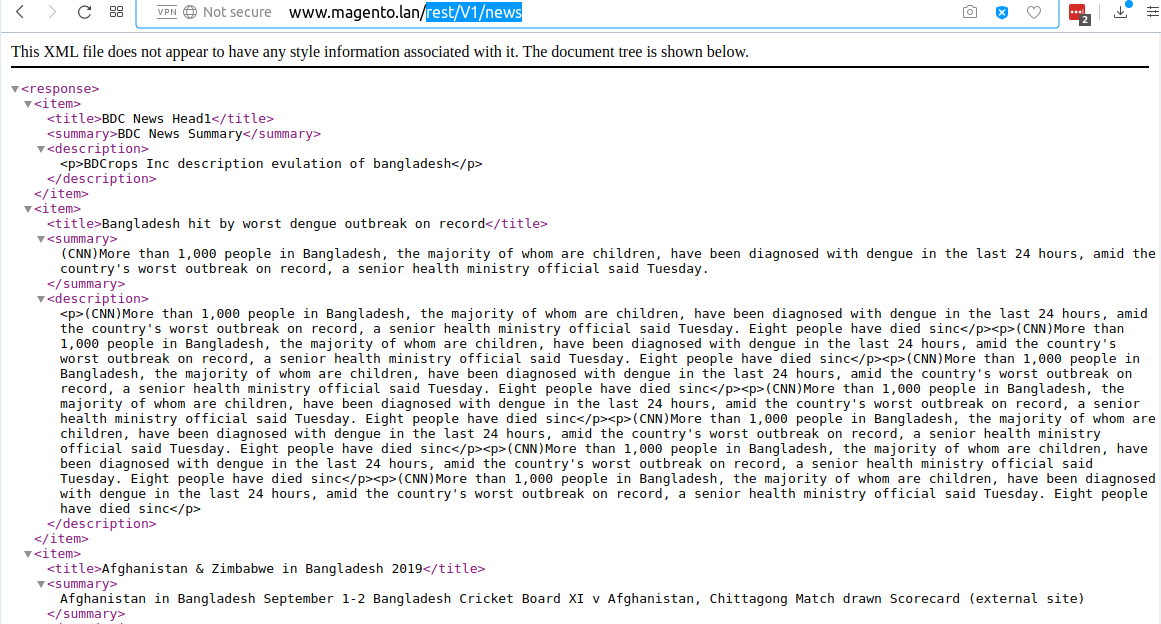
Here is small code that will test same API call but with SOAP(Not implements):
 <?php
$proxy = new SoapClient('http://www.magento.lan/index.php/soap/default?wsdl&services=/V1/news');
$result = $proxy->bdcSimpleNewsV1();
var_dump($result);
Response for SOAP
 object(stdClass)#2 (1) {
  ["result"]=>
  string(10) "..."
}
If we don't set anonymous in resource of webapi.xml, we need to set existing Magento resource or create our own. We can do that by adding acl.xml to etc.
ACL – etc/acl.xml
 <resource id="Magento_Backend::admin">
 <resource id="BDC_SimpleNews::news" title="News API" translate="title" sortOrder="110" />
</resource>
In this case we need to add BDC_SimpleNews::news to webapi.xml resource instead anonymous.
Magento 2 Dependency injection is used to replace the Magento 1.x Mage class when you convert to work with Magento 2. The Dependency injection design pattern creates an external environment where you can inject dependencies into an object. Thanks to that, there is no longer to create the objects manually. Namely, as when object A calls object or value B, this means B is a dependency of A
If you are working with Magento 2 Dependency Injection, you should take look at Magento 2 Dependency Inversion Principle because this principle will restrict the direct working between the high level and low level classes. At that time, the interaction will implement via an interface of the low level classes as an abstract layer.
Specifically, the di.xml file takes responsibility for mapping an interface dependency to a preferred implementation class. It can be said that with Magento 2 Dependency Inversion Principle, the dependency of the coding will be reduced significantly due to the abstract layer.
Object manager - Dependency Injection Container Object Manager is called as Dependency Injection Container, Magento 2 service class which contains and handle the dependencies between the objects. During the class construction, the object manager injects the appropriate dependency as defined in the di.xml file.
Constructor signature dependencies In Magento 2, the class definition use constructor signature to get information (type and number of dependencies).
Compiling dependencies All information related to Magento 2 Dependency Injection are collected in a class and saved in files by a code complier tool. And then the ObjectManager will get this information to generate concrete objects in the application.
Magento 2 Dependency Injection includes two types: Constructor Injection and Method Injection. You can see the following code snippet to learn more about both of them.
Constructor injection As the above example, $menuItemFactory and $menu are the dependencies that will be added to an object's class through the constructor injection. Besides, remember that the constructor injection is required to declare all optional and required of an object.
Method injection About Method Injection, you will use it when an object makes clear a dependency in one of its methods. As if tracking in the referred instance, $command is the dependency passed into the class through the processCommand method.
Groups of Object In Magento 2, the object is divided into two groups: injectable and non-injectable (newable) objects. What are they?
Injectable Objects About the injectable Objects, you can call as services or objects which will show the dependencies in their constructors and are created by the object manager via the configuration in the di.xml file. And you can use these injectable objects to request other injectable services in the constructors.
Non-injectable Objects Non-injectable (Newable) Objects are a bit similar to the injectable objects when they also expose the dependencies in their constructors, however, the newables are allowed to request other newables objects like Entities, Value Objects. In addition, you cannot demand the newable objects for keeping a reference to an injectable object.
This is the detialed information related to Magento 2 Dependency Injection design pattern. Wish you have a great time with it!
By default, there are three different ways to override core functionalities.
We write log after news item save .
Edit Helper/News.php look like:
 ```
<?php
namespace BDCSimpleNewsHelper;

use MagentoFrameworkAppHelperContext;
use MagentoStoreModelStoreManagerInterface;
use MagentoFrameworkAppState;
use BDCSimpleNewsModelNewsFactory;
use SymfonyComponentConsoleInputInput;
use PsrLogLoggerInterface;


class News extends MagentoFrameworkAppHelperAbstractHelper {
    const KEY_TITLE = 'news-title';
    const KEY_SUMMARY = 'news-summary';
    const KEY_DESC = 'news-description';

    protected $storeManager;
    protected $state;
    protected $newsFactory;
    protected $data;
    protected $newsId;
    protected $logger;


    public function __construct(
        Context $context,
        StoreManagerInterface $storeManager,
        State $state,
        NewsFactory $newsFactory,
        LoggerInterface $logger ) {
            $this->storeManager = $storeManager;
            $this->state = $state;
            $this->logger = $logger;

            $this->newsFactory = $newsFactory;

        parent::__construct($context);
    }

    public function setData(Input $input){
        $this->data = $input;
        return $this;
    }

    public function execute() {
        $this->state->setAreaCode('frontend');
        $news = $this->newsFactory->create();
        $news->setTitle($this->data->getOption(self::KEY_TITLE))
            ->setSummary($this->data->getOption(self::KEY_SUMMARY))
            ->setDescription($this->data->getOption(self::KEY_DESC));
        $news->save();
        $this->logger->debug('DI: '.$news->getTitle());

    }

    public function getNewsId(){
        return (int)$this->newsId;
    }
}

```
Create Helper/BdcDebug.php Insert :
 ```
<?php
namespace BDCSimpleNewsHelper;

use MonologLogger;
use MagentoFrameworkLoggerHandlerBase;

class BdcDebug extends Base{
    /**
     * @var string
     */
    protected $fileName = '/var/log/bdc_debug.log';

    /**
     * @var int
     */
    protected $loggerType = Logger::DEBUG;
}

```
Although both of them are used for overriding the core modules, the way to use them is completely different.
With Preference, it must extend a core class. Preference can rewrite function. When you declare a Preference, your new class is expected to be a complete implementation of the class you want to override.
While a plugin allows you to execute your functions before, after or around (before & after) the core function is executed. It's NOT really rewritten function like Preference.
Since your plugin class doesn't replace the core class, in case there are many plugins hooked onto a target class, Magento 2 just executes them sequentially based on the sortOrder parameter in your file di.xml.
Class preferences basically do the same thing in Magento 2 that rewrites did in Magento 1. It states a preference for one class over another, which allows you to specify which class/type is selected by Magento's object manager. This means that you can override which method you want from the class, along with the methods that this class extends.
 - Model class
- Block Class
- Controller Class
app/code/BDC/SimpleNews/etc/di.xml add below code :
<preference type="BDCSimpleNewsHelperBdcDebug" for="MagentoFrameworkLoggerHandlerDebug"/>
Argument types:object Node Formats: {typeName}
{typeName}
 <type name="MagentoFrameworkLoggerMonolog">
    <arguments>
        <argument name="handlers"  xsi:type="array">
            <item name="debug" xsi:type="object">BDCSimpleNewsHelperBdcDebug</item>
        </argument>
    </arguments>
</type>
Within Magento 2, classes can depend on each other using constructor-based Dependency Injection. And instead of only allowing static dependencies (class A injects class B), Magento offers a configuration system that allows one dependency to be replaced with another (class B is swapped out for class C). One of these configurations is Virtual Types.
Virtual Types are defined in a file di.xml which might be located in numerous places - for instance, the etc/ folder of your own module. Virtual Types are in essence new PHP classes (but actually they are not, they are just links), that extend upon their original class while overriding the original class its constructor arguments by adding those in the di.xml file.
Within Magento 2, classes can depend on each other using constructor-based Dependency Injection. And instead of only allowing static dependencies (class A injects class B), Magento offers a configuration system that allows one dependency to be replaced with another (class B is swapped out for class C). One of these configurations is Virtual Types.
Virtual Types are defined in a file di.xml which might be located in numerous places - for instance, the etc/ folder of your own module. Virtual Types are in essence new PHP classes (but actually they are not, they are just links), that extend upon their original class while overriding the original class its constructor arguments by adding those in the di.xml file.
Once you realize that a Virtual Types is nothing more than a new PHP child object (as if there was an actual class generating it), it makes you wonder why you should do this through XML. Maybe it is easier to simply create a new PHP class in your module and modify things there? The end result is the same: There is a new object of a new type. (Note that this new class still needs to be used somewhere else to become useful. Typically this is done by using an XML Type to modify the constructor arguments of yet another class and inject this new virtual class in it.)
I personally favour new PHP classes over new Virtual Types. However, once the original class has a lengthy constructor, a new PHP class would require you to duplicate all parent dependencies in its own constructor and pass them on to its parent - and perhaps all of that trouble is only needed for replacing one of those dependencies. A Virtual Type is quicker: It requires some XML, yes, but it allows you to single out only that dependency that you actually need to be replaced. The more complex the original constructor, the better it is to use a Virtual Type. (That being said, the more complex the original constructor, the more this original constructor needs to be cleaned up - with references to SOLID.)
Now let's go to the main point of this blog: Virtual Types are identical to PHP classes created on the fly by the Object Manager. And just like all PHP classes, we have specific rules to stick to and namespacing is one of them. So why not use namespaces?
Let's take a dummy example without namespaces:
 <virtualType name="bdcVirtualSomeClass" type="BDCExampleSomeClass">
</virtualType>
And now let's see a namespaced version:
 <virtualType name="BDCExampleSomeClassVirtual" type="BDCExampleSomeClass">
</virtualType>
To me, the namespaced version looks a lot cleaner. Remember that defining this Virtual Type is only half of the story - if you don't intend to use it elsewhere, it just as well can be removed again. It only becomes useful once it is applied elsewhere, for instance using a Type:
 <type name="MagentoFrameworkSomeExistingClass">
    <arguments>
        <argument name="someDep" xsi:type="object">BDCExampleSomeClassVirtual</argument>
    </arguments>
</type>
Once others start debugging the class MagentoFrameworkSomeExistingClass, they might bump into the someDep argument and now, thanks to namespaces, the name of this Virtual Type identifies exactly who put that dependency there. This is why we have namespaces.
However, this might also become confusing if the Virtual Type actually looks too similar to a PHP class. I always tend to click through my PhpStorm environment with the generated/ folder excluded from my project. Once in a while, I bump into a class that is not there. And if Magento does not die at that moment, I assume it is something that is generated. Once the class has the word Factory or Proxy in it, this confirms my assumption. Wouldn't it make sense to also include the word Virtual in the namespaced name of a Virtual Type?
This leads to the following classes that would suggest that the PHP class actually is a VirtualType:
 BDCExampleSomeClassVirtual
BDCExampleVirtualSomeClass
BDCExampleSomeClassVirtual
BDCExampleVirtualTypeSomeClass
BDCExampleSomeClassVirtualType
Obviously, there are many more variations. But just make sure to add the word Virtual in there.
 <virtualType name="bdcLogger" type="MagentoFrameworkLoggerMonolog">
    <arguments>
        <argument name="handlers"  xsi:type="array">
            <item name="debug" xsi:type="object">BDCSimpleNewsHelperBdcDebug</item>
        </argument>
    </arguments>
</virtualType>
<type name="BDCSimpleNewsHelperNews">
     <arguments>  <argument name="logger" xsi:type="object">bdcLogger</argument> </arguments>
 </type>
Finaly etc/di.xml look like ;
 ```
<?xml version="1.0"?>
<config xmlns:xsi="http://www.w3.org/2001/XMLSchema-instance" xsi:noNamespaceSchemaLocation="urn:magento:framework:ObjectManager/etc/config.xsd">
   <type name="MagentoFrameworkConsoleCommandList">
       <arguments>
           <argument name="commands" xsi:type="array">
             <item name="bdc_simplenews_create" xsi:type="object">BDCSimpleNewsConsoleCommandNewsCreate</item>
           </argument>
       </arguments>
   </type>
  <preference type="BDCSimpleNewsModelNews" for="BDCSimpleNewsApiDataNewsInterface"/>
  <preference type="BDCSimpleNewsModelNewsRepository" for="BDCSimpleNewsApiNewsRepositoryInterface"/>
  <!-- <preference type="BDCSimpleNewsHelperBdcDebug" for="MagentoFrameworkLoggerHandlerDebug"/> -->

  <!-- <type name="MagentoFrameworkLoggerMonolog">
      <arguments>
          <argument name="handlers"  xsi:type="array">
              <item name="debug" xsi:type="object">BDCSimpleNewsHelperBdcDebug</item>
          </argument>
      </arguments>
  </type> -->

  <virtualType name="bdcLogger" type="MagentoFrameworkLoggerMonolog">
      <arguments>
          <argument name="handlers"  xsi:type="array">
              <item name="debug" xsi:type="object">BDCSimpleNewsHelperBdcDebug</item>
          </argument>
      </arguments>
  </virtualType>
  <type name="BDCSimpleNewsHelperNews">
       <arguments>  <argument name="logger" xsi:type="object">bdcLogger</argument> </arguments>
   </type>
</config>
```
달리다
 php bin/magento cache:flush
php bin/magento bdcrops:news:create --news-title="News preference" --news-summary="summary preference 1" --news-description="News preference Description 1"
Now check var/log/bdc_debug.log all log are write there
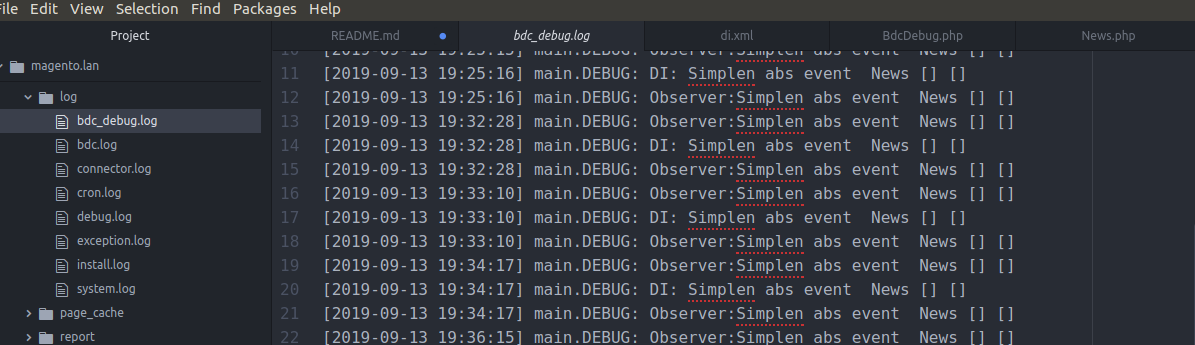
devdocs
Events are dispatched by Magento modules on the trigger of a specific action. Not only that, Magento also allows you to also create your own custom event that can be dispatched in your code. When the action is triggered, it will pass data to the relevant observer configured for the dispatched event. Magento 2 events can be dispatched using MagentoFrameworkEventManager class and it can be obtained through the dependency injection by defining the dependency in your constructor.
Observers are used to catch the action which was triggered from events. In observers, you can set the required functionality or logic that is to be executed in response.
Magento 2 observers can be created by lacing your class file under the Module-Root/Observer directory. Your observer class should implement the following;
MagentoFrameworkEventObserverInterface and define its execution function.
Now let's start with the execution!
Let's assume that you want to change the background color of your store if the customer is not logged in.
Working with Magento 2 observers is one of many different ways of extending the core functionality of a Magento 2 powered eCommerce store. Thanks to Observers, you can run your custom codes in response to a specific Magento event or even with a custom event. You can choose other options such as extending and overriding the core modules, copying the core class to the local directory and put it in the same directory path it was in core directory and modify the core class directly. However, creating an observer is the number one choice
Observers are used for catching the action which was triggered before or after events. In observers, you can set the required functionality or logic that is to be executed in response.
Magento 2 observers can be created by lacing your class file under the Module-Root/Observer directory. Your observer class should implement the following: MagentoFrameworkEventObserverInterface and define its execution function.
Make sure you have registered the new module to test it before, we will practice on this module. I will use my module SampleEvent. And then, I will use an observer to customize the product name on the product view page.
Make your observer efficient: You should try to keep your observer small and efficient by avoiding complex computations if you can. Because having complex computations in your observer can slow down application processes.
Don't include business logic: Your observer should not contain logic other than what is needed for it to run. Business logic should be encapsulated in other classes that your observer uses.
Declare observer in the appropriate scope:
For the frontend events, declare observers in etc/frontend/events.xml, this event will be only used in the frontend. You can't use this event in the backend.
For the backend events, declare observers in etc/adminhtml/events.xml, this event will be only used in the backend. This event can't be used in the frontend.
Use the global etc/events.xml file only when an event can occur on both the frontend and the backend.
You can put events.xml in etc > webapi_rest > events.xml while handling Rest API request.
You can put events.xml in etc > webapi_soap > events.xml while handling Soap API request.
You can put events.xml in etc > crontab > events.xml while handling scheduled jobs only.
You can put events.xml in etc > setup > events.xml while Magento or extensions are being installed or upgraded.
controller_action_predispatch - executes before each controller dispatching.
controller_action_newsdispatch_{full_action_name} - executes after a controller with specific {full_action_name}.
controller_action_newsdispatch_{route_name} - executes after each controller with specific {route_name}.
controller_action_newsdispatch - executes after each controller dispatching.
Edit Helper/News.php:
 <?php
namespace BDCSimpleNewsHelper;

use MagentoFrameworkAppHelperContext;
use MagentoStoreModelStoreManagerInterface;
use MagentoFrameworkAppState;
use BDCSimpleNewsModelNewsFactory;
use SymfonyComponentConsoleInputInput;
use PsrLogLoggerInterface;
use MagentoFrameworkEventManagerInterface;

class News extends MagentoFrameworkAppHelperAbstractHelper {
    const KEY_TITLE = 'news-title';
    const KEY_SUMMARY = 'news-summary';
    const KEY_DESC = 'news-description';

    protected $storeManager;
    protected $state;
    protected $newsFactory;
    protected $data;
    protected $newsId;
    protected $logger;
    protected $eventManager;
    // $eventManager


    public function __construct(
        Context $context,
        StoreManagerInterface $storeManager,
        State $state,
        NewsFactory $newsFactory,
        LoggerInterface $logger,
        ManagerInterface $eventManager) {
            $this->storeManager = $storeManager;
            $this->state = $state;
            $this->logger = $logger;
            $this->eventManager = $eventManager;
            $this->newsFactory = $newsFactory;

        parent::__construct($context);
    }

    public function setData(Input $input){
        $this->data = $input;
        return $this;
    }

    public function execute() {
        $this->state->setAreaCode('frontend');
        $news = $this->newsFactory->create();
        $news->setTitle($this->data->getOption(self::KEY_TITLE))
            ->setSummary($this->data->getOption(self::KEY_SUMMARY))
            ->setDescription($this->data->getOption(self::KEY_DESC));
        $news->save();
        $this->logger->debug('DI: '.$news->getTitle());
        // EventCode...
        $this->eventManager->dispatch('bdc_simplenews_save_after', ['object' => $news]);
        $this->newsId = $news->getId();

        // if($this->data->getOption(self::KEY_SENDEMAIL)) {
        //     $news->sendNewAccountEmail();
        // }
    }

    public function getNewsId(){
        return (int)$this->newsId;
    }
}
Usually, models extend the MagentoFrameworkModelAbstractModel class. It gives an ability to observe a predefined set of model events. And the model should have AbstractModel::_ eventPrefix attribute specified for observing events of a specific model. The attribute's value equals to "core_abstract" by default.
Also, in models we have AbstractModel::_ eventObject attribute that gives an ability to specify a name of the current model's instance for different model-specific events.
A list of the global models events:
model_load_before - executes before each model is loader. Here we can get an access to the following event's data.
$observer->getField() - gets currently processed model's field name.
$observer->getValue() - gets currently processed model's field value.
model_load_after - executes after each model loading.
model_save_after - executes after each model saving.
model_save_before - executes before each model saving.
clean_cache_by_tags - executes after model related cache tags are cleaned.
model_delete_before - executes before model is deleted.
model_delete_after - executes after model is deleted.
model_save_commit_after - executes after the models saving transaction is committed.
model_delete_commit_after - executes after the models saving transaction commit is deleted.
In this mentioned events, we can get an access to the following data:
$observer->getObject()
List model-specific events:
{event_prefix}_load_before – executes before model with {event_prefix} is loaded.
{event_prefix}_load_after – executes after model with {event_prefix} is loaded.
{event_prefix}_save_before – executes before model with {event_prefix} is saved.
{event_prefix}_save_after – executes after model with {event_prefix} is saved.
{event_prefix}_delete_before – executes before model with {event_prefix} is deleted.
{event_prefix}_delete_after – executes after model with {event_prefix} is deleted.
{event_prefix}_save_commit_after – executes after model's data with {event_prefix} is committed.
{event_prefix}_delete_commit_after – executes after model's data commit with {event_prefix} is deleted.
{event_prefix}_clear – executes when a model object is being prepared for correct deleting by the garbage collector.
Furthermore, we can get an access to the following event data from each of them:
$observer->getDataObject() – gets the current model reference.
$observer->get{event_object} – gets an event object for the current model.
If you want to find an event in code, you can do this.
Example: You need an event save_before or save after.
Create an event observer to hook in the event [model prefix]_ save_before. In here we will have observer variable, this variable could get the Model of model which we need to save data on it.
And then we can use setData('column_name',[new value]) to adjust the data of a column before saving to the database.
So why can we do that?
What is Model Prefix: in object Model, we have a property, this is protected $_ eventPrefix; (You can see in the model, if you don't have it, you can create it). It's is a string type. Getting the value and join it with _ save_before, we will have an event name.
EG: protected $ _ eventPrefix = 'abc'; => Event Observer = 'abc_save_before'.
You can declare another event:
[prefix]_ load_before
[prefix]_ save_after
[prefix]_ load_after
These events are default and always available with a model, If you want to use a custom event, you can use eventManager->dispatch('event_name',$data);
OR Model/News.php just add protected $_ eventPrefix = 'bdc_simplenews'; This event eventPrefix is used by abstract model to generate events automatically.Finaly script look like below:
 ```
<?php

// These files to insert, update, delete and get data in the database.

namespace BDCSimpleNewsModel;

use MagentoFrameworkModelAbstractModel;

class News extends AbstractModel{
  protected $_eventPrefix = 'bdc_simplenews';
    /**
     * News constructor.
     * @param MagentoFrameworkModelContext $context
     * @param MagentoFrameworkRegistry $registry
     * @param MagentoFrameworkModelResourceModelAbstractResource|null $resource
     * @param MagentoFrameworkDataCollectionAbstractDb|null $resourceCollection
     * @param array $data
     */
    public function __construct(
        MagentoFrameworkModelContext $context,
        MagentoFrameworkRegistry $registry,
        MagentoFrameworkModelResourceModelAbstractResource $resource = null,
        MagentoFrameworkDataCollectionAbstractDb $resourceCollection = null,
        array $data = []
    ) {
        parent::__construct($context, $registry, $resource, $resourceCollection, $data);
    }

   /**
    * (non-PHPdoc)
    * @see MagentoFrameworkModelAbstractModel::_construct()
    */
    public function _construct() {
        $this->_init('BDCSimpleNewsModelResourceNews');
    }

    /**
     * Loading news data
     *
     * @param   mixed $key
     * @param   string $field
     * @return  $this
     */
    public function load($key, $field = null) {
    	if ($field === null) {
    		$this->_getResource()->load($this, $key, 'id');
    		return $this;
    	}
    	$this->_getResource()->load($this, $key, $field);
    	return $this;
    }
}
```
Create Observer/Logger.php
 <?php

namespace BDCSimpleNewsObserver;

use MagentoFrameworkEventObserver;
use MagentoFrameworkEventObserverInterface;
use PsrLogLoggerInterface;

class Logger implements ObserverInterface {
    private $logger;

    public function __construct(LoggerInterface $logger){
        $this->logger = $logger;
    }
    public function execute(Observer $observer){
        $this->logger->debug("Observer:".
            $observer->getEvent()->getObject()->getTitle()
        );
    }
}
create etc/events.xml
 <?xml version="1.0"?>
<config xmlns:xsi="http://www.w3.org/2001/XMLSchema-instance" xsi:noNamespaceSchemaLocation="urn:magento:framework:Event/etc/events.xsd">
    <event name="bdc_simplenews_save_after">
        <observer name="bdcLogger" instance="BDCSimpleNewsObserverLogger" />
    </event>
</config>
 - name – the observer registration name (it is important that the names do not coincide);
- instance – the class, which method will be executed when a specific even occurs;
- method – the method being executed.
add etc/di.xml
 <type name="BDCSimpleNewsObserverLogger">
     <arguments>  <argument name="logger" xsi:type="object">bdcLogger</argument> </arguments>
 </type>
Finally etc/di.xml look like:
 <?xml version="1.0"?>
<config xmlns:xsi="http://www.w3.org/2001/XMLSchema-instance" xsi:noNamespaceSchemaLocation="urn:magento:framework:ObjectManager/etc/config.xsd">
   <type name="MagentoFrameworkConsoleCommandList">
       <arguments>
           <argument name="commands" xsi:type="array">
             <item name="bdc_simplenews_create" xsi:type="object">BDCSimpleNewsConsoleCommandNewsCreate</item>
           </argument>
       </arguments>
   </type>
  <preference type="BDCSimpleNewsModelNews" for="BDCSimpleNewsApiDataNewsInterface"/>
  <preference type="BDCSimpleNewsModelNewsRepository" for="BDCSimpleNewsApiNewsRepositoryInterface"/>
  <!-- <preference type="BDCSimpleNewsHelperBdcDebug" for="MagentoFrameworkLoggerHandlerDebug"/> -->

  <!-- <type name="MagentoFrameworkLoggerMonolog">
      <arguments>
          <argument name="handlers"  xsi:type="array">
              <item name="debug" xsi:type="object">BDCSimpleNewsHelperBdcDebug</item>
          </argument>
      </arguments>
  </type> -->

  <virtualType name="bdcLogger" type="MagentoFrameworkLoggerMonolog">
      <arguments>
          <argument name="handlers"  xsi:type="array">
              <item name="debug" xsi:type="object">BDCSimpleNewsHelperBdcDebug</item>
          </argument>
      </arguments>
  </virtualType>
  <type name="BDCSimpleNewsHelperNews">
       <arguments>  <argument name="logger" xsi:type="object">bdcLogger</argument> </arguments>
   </type>

   <type name="BDCSimpleNewsObserverLogger">
        <arguments>  <argument name="logger" xsi:type="object">bdcLogger</argument> </arguments>
    </type>

</config>
달리다
 php bin/magento cache:flush
php bin/magento bdcrops:news:create --news-title="News Observer" --news-summary="summary Observer 1" --news-description="News Observer Description 1"
Now check var/log/bdc_debug.log all log are write there
A plugin is a great way to expand or edit a public method's behavior by using code before, after or around method. First of all, please get an object that provides permission to all public methods of the observed method's class. Interception is a software design pattern that is used when we want to insert code dynamically without necessarily changing the original class behavior. The interception pattern in Magento 2 is implemented via plugins. Plugins are an amazing tool in Magento 2. They allow you to change the behavior of methods for classes without having to rewrite the classes as we did above. There are 3 different ways to use a plugin to change method behavior. You may have heard them on Sesame Street: - Before - After - Around
For a module developer as you, Magento 2 Interception plugin allows:
di.xml file in your module declares a plugin for a class object:
 <config>
    <type name="{ObservedType}">
      <plugin name="{pluginName}" type="{PluginClassName}" sortOrder="1" disabled="false" />
    </type>
</config>
More Details :
name – Using this attribute, you can provide a unique and recognizable name value that is specific to the plugin.
sortOrder – This attribute determines the order of execution when multiple plugins are observing the same method.
disabled – The default value of this attribute is set to false, but if it is set to true, it will disable the current plugin, and it will not get executed.
type – This attribute points to the class that we will be using to implement the before, after or around the listener.
Assuming we are writing a plugin for a specific method, let's choose a random method under Customer.php class, the getName() method. We define the before, after and around listeners for the getName() method by writing the naming conventions as follows.
 Before + getName() => beforeGetName();
After + getName()  => afterGetName();
Around + getName() => aroundGetName();
create Plugin/Logger.php
 ```
<?php
namespace BDCSimpleNewsPlugin;
use BDCSimpleNewsConsoleCommandNewsCreate;
use SymfonyComponentConsoleInputInputInterface;
use SymfonyComponentConsoleOutputOutputInterface;

class Logger{
    /**
     * @var OutputInterface
     */
    private $output;
    public function beforeRun(
        NewsCreate $command,
        InputInterface $input,
        OutputInterface $output) {
            $output->writeln('beforeExecute');
    }
    public function aroundRun(
        NewsCreate $command,
        Closure $proceed,
        InputInterface $input,
        OutputInterface $output) {
            $output->writeln('aroundExecute before call');
            $proceed->call($command, $input, $output);
            $output->writeln('aroundExecute after call');
            $this->output = $output;
    }

    //public function afterRun(NewsCreate $command){
        //$this->output->writeln('afterExecute');
    //}
}
```
add code app/code/BDC/SimpleNews/etc/di.xml
 <type name="BDCSimpleNewsConsoleCommandNewsCreate">
        <plugin name="bdcLoggerp" type="BDCSimpleNewsPluginLogger"/>
    </type>
Finally etc/di.xml look like:
 ```
<?xml version="1.0"?>
<config xmlns:xsi="http://www.w3.org/2001/XMLSchema-instance" xsi:noNamespaceSchemaLocation="urn:magento:framework:ObjectManager/etc/config.xsd">
   <type name="MagentoFrameworkConsoleCommandList">
       <arguments>
           <argument name="commands" xsi:type="array">
             <item name="bdc_simplenews_create" xsi:type="object">BDCSimpleNewsConsoleCommandNewsCreate</item>
           </argument>
       </arguments>
   </type>
  <preference type="BDCSimpleNewsModelNews" for="BDCSimpleNewsApiDataNewsInterface"/>
  <preference type="BDCSimpleNewsModelNewsRepository" for="BDCSimpleNewsApiNewsRepositoryInterface"/>
  <!-- <preference type="BDCSimpleNewsHelperBdcDebug" for="MagentoFrameworkLoggerHandlerDebug"/> -->

  <!-- <type name="MagentoFrameworkLoggerMonolog">
      <arguments>
          <argument name="handlers"  xsi:type="array">
              <item name="debug" xsi:type="object">BDCSimpleNewsHelperBdcDebug</item>
          </argument>
      </arguments>
  </type> -->

  <virtualType name="bdcLogger" type="MagentoFrameworkLoggerMonolog">
      <arguments>
          <argument name="handlers"  xsi:type="array">
              <item name="debug" xsi:type="object">BDCSimpleNewsHelperBdcDebug</item>
          </argument>
      </arguments>
  </virtualType>
  <type name="BDCSimpleNewsHelperNews">
       <arguments>  <argument name="logger" xsi:type="object">bdcLogger</argument> </arguments>
   </type>

   <type name="BDCSimpleNewsObserverLogger">
        <arguments>  <argument name="logger" xsi:type="object">bdcLogger</argument> </arguments>
    </type>

    <type name="BDCSimpleNewsConsoleCommandNewsCreate">
            <plugin name="bdcLoggerp" type="BDCSimpleNewsPluginLogger"/>
        </type>

</config>
```
달리다
 php bin/magento cache:flush
php bin/magento bdcrops:news:create --news-title="News Plugin" --news-summary="summary Plugin 1" --news-description="News Plugin Description 1"
Now check var/log/bdc_debug.log all log are write there
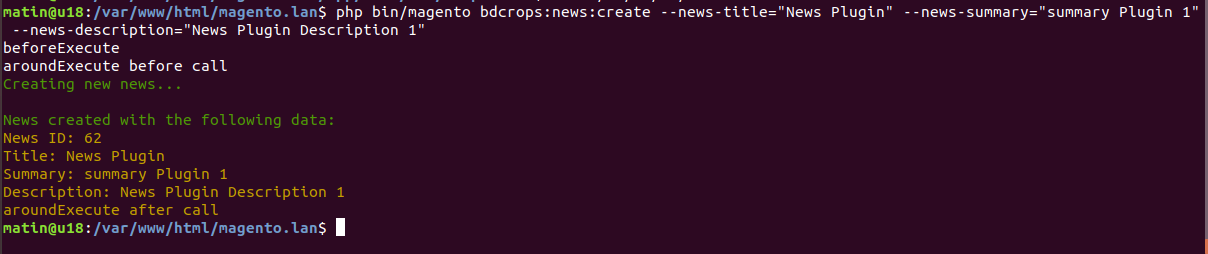
<block template="BDC_SimpleNews::list.phtml" class="BDCSimpleNewsBlockNewsList" name="bdc_simplenews_block_news_list"/>
Change as below:
 <block template="BDC_SimpleNews::list.phtml" class="BDCSimpleNewsBlockNewsList" name="bdc_simplenews_block_news_list">
  <arguments>
      <argument name="label" xsi:type="string">Head Line: </argument>
  </arguments>
</block>
<?php echo $block->getLabel(); ?>
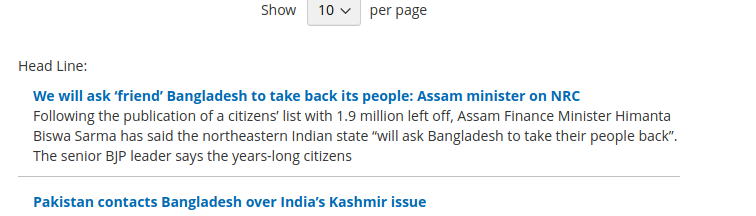
RequireJS is a javascript module system. It implements the Asynchronous Module Definition (AMD) standard for javascript modules. In the terms of AMD, a javascript module provides a way to Run a javascript program that doesn't default to the global namespace Share javascript code and data between named modules and programs That's all RequireJS does. You may use a RequireJS module that implements some special bit of functionality, but its not RequireJS that provides that functionality. RequireJS is the pneumatic tube that ensures the functionality is delivered to you.
 var config = {
  "map": {
    "*": { "<default_component>": "<custom_component>" }
  }
};
 var config = {
     "shim": {
     "3-rd-party-plugin": ["jquery"]
     }
 };
 var config = {
    "deps": [
        "jquery"
    ]
};
Here, It loads the [jquery] as soon as the require define()'d is called.
 var config = {
	"baseUrl": "bdcrops/test"
};

require( ["sample/sample1", "https://code.jquery.com/jquery-3.1.1.min.js", "sample2.js"],
    function(samplemodule) {
    }
);
Here, samplemodule is reffered to bdcrops/test/sample/sample1.js, “https://code.jquery.com/jquery-3.1.1.min.js” is loaded from the url which is specified and sample2.js is loaded from the same directory.
 var config = {
	"baseUrl": "bdcrops/test",
	"paths": {
        "sample": "web/js"
    },
};

require( ["sample/sample1"],
    function(samplemodule) {
    }
);
Now, samplemodule is reffered to the file at path “bdcrops/test/web/js/sample1.js”
 var config = {
    "map": {
        '*': {
			'sample': 'sample1.js'
		}
    }
    config: {
        "testData":{
            "color":'red'
        }
    }
};
Now in your js file you can access this value by using :console.log(require.s.contexts._ .config.testData.color);It will gives you the “red” in output.
A Magento 2 RequireJS “mixin” allows you to programmatically listen for the initial instantiation of any RequireJS module and manipulate that module before returning it.
requireJS configuration create app/code/BDC/SimpleNews/view/frontend/requirejs-config.js
copy validation lib to mododule lib/web/mage/validation.js ==>app/code/BDC/SimpleNews/view/frontend/web/js/validation.js Change massages about 1684 line as
 $.validator.messages = $.extend($.validator.messages, {
    required: $.mage.__('This is a required field Custome.'),
 var config = {
    'map': {
        '*': {
            'mage/validation': 'BDC_SimpleNews/js/validation'
        }
    }
};


 var config = {
    'map': {
        '*': {
            'mage/validation': 'BDC_SimpleNews/js/validation'
        }
    },
    config: {
        mixins: {
            'BDC_SimpleNews/js/validation': {
                'BDC_SimpleNews/js/validation-mixin': true
            }
        }
    }
};
 define(function () {
    'use strict';

    var extension = {
        isValid: function () {
            return true;
        }
    };

    return function (target) {
        return target.extend(extension);
    };
});
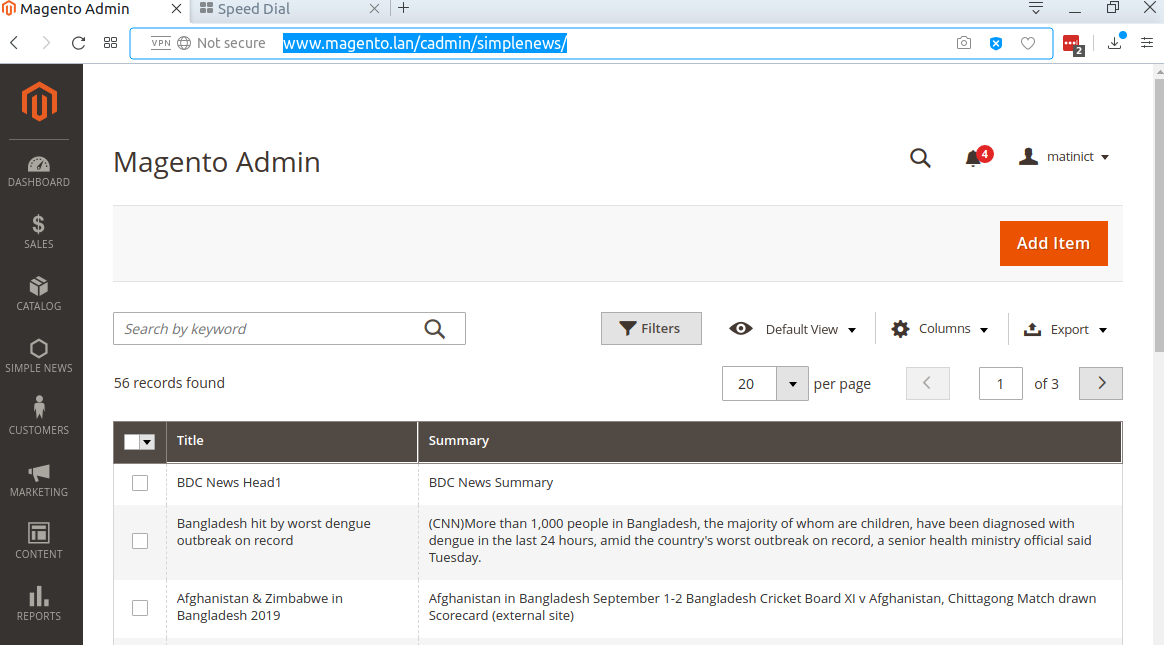
As you know, Magento 2 Grid is a kind of table which listing the items in your database table and provide you some features like: sort, filter, delete, update item, etc. The samplenews for this is the grid of products, grid of customer.Magento 2 provide two ways to create Admin Grid:
Declare resource in dependency injection file Now we will create di.xml file which will connect to the Model to get the data for our grid. File: app/code/BDC/SampleNews/etc/di.xml
Create layout file For the action bdc_simplenews/news/index, we will create a layout file name bdc_samplenews_news_index.xml
Create component layout file As declaration in layout file, we will create a component file bdc_samplenews_news_listing.xml
You have just find how to add a Magento 2 Grid by using Component. Now we will see how to do it by using normal layout/block file.
Create block for this grid File: app/code/BDC/SampleNews/Block/Adminhtml/News.php
Create layout file Now we will need a layout file to connect with Grid Block and render the grid. Let's create this file:app/code/BDC/SampleNews/view/adminhtml/layout/bdc_samplenews_news_index.xml
Create layout file Now we will need a layout file to connect with Grid Block and render the grid. Let's create this file: app/code/BDC/SampleNews/view/adminhtml/layout/bdc_samplenews_news_index.xml
-Argument: data_sources to use (which makes the links between your grid and the database) with the tag js_config. We also declare the spinner, that is the name of the tag "columns" that will be used in our grid. We then declare our buttons in the buttons tag with a name, a label, a class and a target url.
dataSource: dataProvider (the object that will fetch our data in database). With a "class" tag to define the name of the object to be used. This object will be defined later in the di.xml (dependency node file). We give a name to our dataSource via the "name" attribute and then we give it the field to use as the id for the grid in the database ("primaryFieldName") and for the request ("requestFieldName"). We then define in "config" the component to use (here "Magento_Ui/js/grid/provider") and the identifier in our bdd "indexField" which here has the value "pfay_contacts_id".
columns: It was defined above in the "spinner" section of the "argument" section, here it is named listing_columns. This area will allow us to define our columns with the identifier to be used to find oneself, the type of fields and filters to use for the grid, the type of sorting that will be used and a label.
The bookmarks allows you to save the state of the listing which you modified with the element "columns_control" previously created. Here is how to integrate the "bookmark" in the "container" :
 <bookmark name="bookmarks">
    <argument name="data" xsi:type="array">
        <item name="config" xsi:type="array">
            <item name="component" xsi:type="string">Magento_Ui/js/grid/controls/bookmarks/bookmarks</item>
            <item name="displayArea" xsi:type="string">dataGridActions</item>
            <item name="storageConfig" xsi:type="array">
                <item name="saveUrl" xsi:type="url" path="*/*/save"/>
                <item name="deleteUrl" xsi:type="url" path="*/*/delete"/>
                <item name="namespace" xsi:type="string">contact_test_listing</item>
            </item>
        </item>
    </argument>
</bookmark>
The pagination of the grid under magento2 is super well done and very easy to integrate, it is enough just to pay attention to the 2 paths "provider" and "selectProvider". Here is the code to insert:
 <paging name="listing_paging">
    <argument name="data" xsi:type="array">
        <item name="config" xsi:type="array">
            <item name="storageConfig" xsi:type="array">
                <!-- we put here the path to the bookmarks element -->
                <item name="provider" xsi:type="string">contacts_test_listing.contacts_test_listing.listing_top.bookmarks</item>
                <item name="namespace" xsi:type="string">current.paging</item>
            </item>
            <!-- we put here the path to the element pfay_contact_ids of contacts_test_columns  element -->
            <item name="selectProvider" xsi:type="string">contacts_test_listing.contacts_test_listing.contacts_test_columns.pfay_contacts_id</item>
            <item name="displayArea" xsi:type="string">bottom</item>
        </item>
    </argument>
</paging>
To be able to filter the table can sometimes be practical, for that a "filter" element can be added to the magento grid. 다음은 다음과 같은 방법입니다.
 <filters name="listing_filters">
    <argument name="data" xsi:type="array">
        <item name="config" xsi:type="array">
            <item name="storageConfig" xsi:type="array">
                <item name="provider" xsi:type="string">contacts_test_listing.contacts_test_listing.listing_top.bookmarks</item>
                <item name="namespace" xsi:type="string">curren.filters</item>
            </item>
            <item name="childDefaults" xsi:type="array">
                <item name="provider" xsi:type="string">contacts_test_listing.contacts_test_listing.listing_top.listing_filters</item>
                <item name="imports" xsi:type="array">
                    <item name="visible" xsi:type="string">contacts_test_listing.contacts_test_listing.listing_top.bookmarks:current.columns.${ $.index }.visible</item>
                </item>
            </item>
        </item>
    </argument>
</filters>
By default, it takes all the fields available on the grid, it knows how to filter with the "filter" item of your "columns" like these:
ici type text : text
ici type textRange : textRange
You want to be able to select several lines of your grid to delete them all at once or do another specific processing on all the lines selected at the same time? The Mass Actions are made for this. First of all it will be necessary to add the inputs on the edge of our grid to be able to select the lines, so in "columns" add this before the "column":
 <selectionsColumn name="ids">
    <argument name="data" xsi:type="array">
        <item name="config" xsi:type="array">
            <!-- define which field will be used as ID -->
            <item name="indexField" xsi:type="string">pfay_contacts_id</item>
        </item>
    </argument>
</selectionsColumn>
You now see the checkboxes on the side that allow you to select multiple lines. Here is how to integrate the selectbox which allows to select the action to be performed once we have selected our lines:
 <massaction name="listing_massaction">
  <argument name="data" xsi:type="array">
      <item name="config" xsi:type="array">
          <!-- we put here the path to the element pfay_contact_ids of contacts_test_columns  element -->
          <item name="selectProvider" xsi:type="string">contacts_test_listing.contacts_test_listing.contacts_test_columns.ids</item>
          <item name="displayArea" xsi:type="string">bottom</item>
          <item name="indexField" xsi:type="string">pfay_contacts_id</item>
      </item>
  </argument>
  <action name="delete">
      <argument name="data" xsi:type="array">
          <item name="config" xsi:type="array">
              <item name="type" xsi:type="string">delete</item>
              <item name="label" xsi:type="string" translate="true">Delete Selected</item>
              <item name="url" xsi:type="url" path="*/*/massDelete"/>
              <item name="confirm" xsi:type="array">
                  <item name="title" xsi:type="string" translate="true">Delete all selected contacts</item>
                  <item name="message" xsi:type="string" translate="true">Do you want to delete all the selected contacts?</item>
              </item>
          </item>
      </argument>
  </action>
</massaction>
Here it is the same, we have to be careful on what we enter as a path for the "selectProvider" and we add the actions following each other. In order to prepare the next tutorial, we will create the MassDelete controller. This is where we will be redirected when we select our action ( / /massDelete).
To create a search field on the magento admin, you must add an optional element in the container that will be called "filterSearch" like this: In
 <!-- Filter Search -->
<filterSearch name="fulltext">
  <argument name="data" xsi:type="array">
      <item name="config" xsi:type="array">
          <item name="provider" xsi:type="string">contacts_test_listing.contacts_test_listing_data_source</item>
          <item name="chipsProvider" xsi:type="string">contacts_test_listing.contacts_test_listing.listing_top.listing_filters_chips</item>
          <item name="storageConfig" xsi:type="array">
              <item name="provider" xsi:type="string">contacts_test_listing.contacts_test_listing.listing_top.bookmarks</item>
              <item name="namespace" xsi:type="string">current.search</item>
          </item>
      </item>
  </argument>
</filterSearch>
For the searchbar to work you have to update your table to add the index.
1.grid collections
2.listing component configuration
Create Controller/Adminhtml/Index/Index.php
 <?php

namespace BDCSimpleNewsControllerAdminhtmlIndex;

use MagentoFrameworkControllerResultFactory;

class Index extends MagentoBackendAppAction {
    public function execute() {
        return $this->resultFactory->create(ResultFactory::TYPE_PAGE);
    }
}
Create Model/Resource/News/Grid/Collection.php
 ```
<?php
namespace BDCSimpleNewsModelResourceNewsGrid;

use MagentoFrameworkDataCollectionDbFetchStrategyInterface as FetchStrategy;
use MagentoFrameworkDataCollectionEntityFactoryInterface as EntityFactory;
use MagentoFrameworkEventManagerInterface as EventManager;
use PsrLogLoggerInterface as Logger;
use  MagentoFrameworkViewElementUiComponentDataProviderSearchResult;

class Collection extends SearchResult {
    public function __construct(
        EntityFactory $entityFactory,
        Logger $logger,
        FetchStrategy $fetchStrategy,
        EventManager $eventManager,
        $mainTable = 'bdc_simplenews',
        $resourceModel = 'BDCSimpleNewsModelResourceNews' ) {
        parent::__construct(
            $entityFactory,
            $logger,
            $fetchStrategy,
            $eventManager,
            $mainTable,
            $resourceModel
        );
    }
}

```
Edit etc/di.xml
 <type name="MagentoFrameworkViewElementUiComponentDataProviderCollectionFactory">
    <arguments>
        <argument name="collections" xsi:type="array">
            <item name="bdc_news_grid_data_source" xsi:type="string">BDCSimpleNewsModelResourceNewsGridCollection</item>
        </argument>
    </arguments>
</type>
Create view/adminhtml/layout/simplenews_index_index.xml
 <?xml version="1.0"?>
<page xmlns:xsi="http://www.w3.org/2001/XMLSchema-instance" xsi:noNamespaceSchemaLocation="urn:magento:framework:View/Layout/etc/page_configuration.xsd">
    <body>
        <referenceContainer name="content">
            <uiComponent name="bdc_news_grid"/>
        </referenceContainer>
    </body>
</page>
Create view/adminhtml/ui_component/bdc_news_grid.xml
 ```
<?xml version="1.0" encoding="UTF-8"?>
<listing xmlns:xsi="http://www.w3.org/2001/XMLSchema-instance" xsi:noNamespaceSchemaLocation="urn:magento:module:Magento_Ui:etc/ui_configuration.xsd">
    <argument name="data" xsi:type="array">
        <item name="js_config" xsi:type="array">
            <item name="provider" xsi:type="string">bdc_news_grid.bdc_news_grid_data_source</item>
            <item name="deps" xsi:type="string">bdc_news_grid.bdc_news_grid_data_source</item>
        </item>
        <item name="spinner" xsi:type="string">bdc_news_columns</item>
        <item name="buttons" xsi:type="array">
            <item name="add" xsi:type="array">
                <item name="name" xsi:type="string">add</item>
                <item name="label" xsi:type="string" translate="true">Add News</item>
                <item name="class" xsi:type="string">primary</item>
                <item name="url" xsi:type="string">*/news/new</item>
            </item>
        </item>
    </argument>
    <dataSource name="bdc_news_grid_data_source">
        <argument name="dataProvider" xsi:type="configurableObject">
            <argument name="class" xsi:type="string">MagentoFrameworkViewElementUiComponentDataProviderDataProvider</argument>
            <argument name="name" xsi:type="string">bdc_news_grid_data_source</argument>
            <argument name="primaryFieldName" xsi:type="string">id</argument>
            <argument name="requestFieldName" xsi:type="string">id</argument>
            <argument name="data" xsi:type="array">
                <item name="config" xsi:type="array">
                    <item name="update_url" xsi:type="url" path="mui/index/render"/>
                    <item name="component" xsi:type="string">Magento_Ui/js/grid/provider</item>
                </item>
            </argument>
        </argument>
    </dataSource>
    <listingToolbar name="listing_top">
        <bookmark name="bookmarks"/>
        <columnsControls name="columns_controls"/>
        <exportButton name="export_button"/>
        <filterSearch name="fulltext"/>
        <filters name="listing_filters"/>
        <paging name="listing_paging"/>
        <!-- <frontendLink name="frontend_link"/> -->
    </listingToolbar>
    <columns name="bdc_news_columns">
        <argument name="data" xsi:type="array">
            <item name="config" xsi:type="array">
                <item name="childDefaults" xsi:type="array">
                    <item name="fieldAction" xsi:type="array">
                        <item name="provider" xsi:type="string">bdc_news_grid.bdc_news_grid.bdc_news_columns.actions</item>
                        <item name="target" xsi:type="string">applyAction</item>
                        <item name="params" xsi:type="array">
                            <item name="0" xsi:type="string">view</item>
                            <item name="1" xsi:type="string">${ $.$data.rowIndex }</item>
                        </item>
                    </item>
                </item>
            </item>
        </argument>
        <selectionsColumn name="ids">
            <argument name="data" xsi:type="array">
                <item name="config" xsi:type="array">
                    <item name="indexField" xsi:type="string">id</item>
                </item>
            </argument>
        </selectionsColumn>
        <column name="title">
            <argument name="data" xsi:type="array">
                <item name="config" xsi:type="array">
                    <item name="filter" xsi:type="string">text</item>
                    <item name="label" xsi:type="string" translate="true">Title</item>
                </item>
            </argument>
        </column>
        <column name="summary">
            <argument name="data" xsi:type="array">
                <item name="config" xsi:type="array">
                    <item name="filter" xsi:type="string">text</item>
                    <item name="label" xsi:type="string" translate="true">Summary</item>
                </item>
            </argument>
        </column>
    </columns>
</listing>

```
Clean Cache & Run
http://www.magento.lan/cadmin/simplenews/
New & save controllers
UI data provider form
Form ui component configuration
Create Ui/DataProvider.php
 ```
<?php

namespace BDCSimpleNewsUi;

use MagentoUiDataProviderAbstractDataProvider;

class DataProvider extends AbstractDataProvider{
    protected $collection;
    public function __construct(
        $name,
        $primaryFieldName,
        $requestFieldName,
        $collectionFactory,
        array $meta = [],
        array $data = [] ) {
        parent::__construct($name, $primaryFieldName, $requestFieldName, $meta, $data);
        $this->collection = $collectionFactory->create();
    }

    public function getData() {
        $result = [];
        foreach ($this->collection->getItems() as $item) {
            $result[$item->getId()]['general'] = $item->getData();
        }
        return $result;
    }
}

```
Create Controller/Adminhtml/Index/Index.php
 ```
<?php

namespace BDCSimpleNewsControllerAdminhtmlIndex;

use MagentoFrameworkControllerResultFactory;

class Index extends MagentoBackendAppAction {
    public function execute() {
        return $this->resultFactory->create(ResultFactory::TYPE_PAGE);
    }
}

```
Create Controller/Adminhtml/Index/NewAction.php
 ```
<?php

namespace BDCSimpleNewsControllerAdminhtmlIndex;

use MagentoFrameworkControllerResultFactory;

class NewAction extends MagentoBackendAppAction{
    public function execute() {
        return $this->resultFactory->create(ResultFactory::TYPE_PAGE);
    }
}

```
Create Controller/Adminhtml/Index/Save.php
 ```
<?php

namespace BDCSimpleNewsControllerAdminhtmlIndex;

use BDCSimpleNewsModelNewsFactory;

class Save extends MagentoBackendAppAction {
    private $newsFactory;

    public function __construct(
        MagentoBackendAppActionContext $context,
        NewsFactory $newsFactory
    ) {
        $this->newsFactory = $newsFactory;
        parent::__construct($context);
    }

    public function execute(){
        $this->newsFactory->create()
            ->setData($this->getRequest()->getNewsValue()['general'])->save();
        return $this->resultRedirectFactory->create()->setPath('simplenews/index/index');
    }
}

```
create view/adminhtml/layout/simplenews_index_index.xml
 ```
<?xml version="1.0"?>
<page xmlns:xsi="http://www.w3.org/2001/XMLSchema-instance" xsi:noNamespaceSchemaLocation="urn:magento:framework:View/Layout/etc/page_configuration.xsd">
    <body>
        <referenceContainer name="content">
            <uiComponent name="bdc_news_grid"/>
        </referenceContainer>
    </body>
</page>
```
create view/adminhtml/ui_component/bdc_news_grid.xml
```
check admin panel as 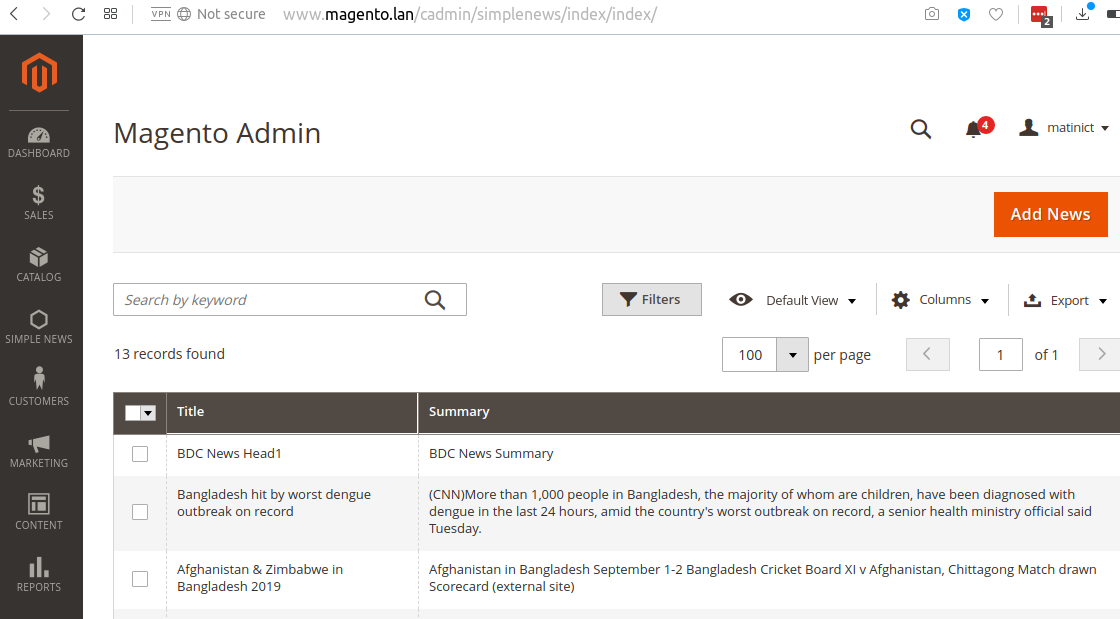
create view/adminhtml/layout/simplenews_index_new.xml
 ```
<?xml version="1.0"?>
<page layout="admin-2columns-left" xmlns:xsi="http://www.w3.org/2001/XMLSchema-instance" xsi:noNamespaceSchemaLocation="urn:magento:framework:View/Layout/etc/page_configuration.xsd">
    <body>
        <referenceContainer name="content">
            <uiComponent name="bdc_news_form"/>
        </referenceContainer>
    </body>
</page>
```
create view/adminhtml/ui_component/bdc_news_form.xml
 ```
<?xml version="1.0" encoding="UTF-8"?>
<form xmlns:xsi="http://www.w3.org/2001/XMLSchema-instance" xsi:noNamespaceSchemaLocation="urn:magento:module:Magento_Ui:etc/ui_configuration.xsd">
    <argument name="data" xsi:type="array">
        <item name="js_config" xsi:type="array">
            <item name="provider" xsi:type="string">bdc_news_form.bdc_news_form_data_source</item>
            <item name="deps" xsi:type="string">bdc_news_form.bdc_news_form_data_source</item>
        </item>
        <item name="label" xsi:type="string" translate="true">General</item>
        <item name="layout" xsi:type="array">
            <item name="type" xsi:type="string">tabs</item>
            <item name="navContainerName" xsi:type="string">left</item>
        </item>
        <item name="buttons" xsi:type="array">
            <item name="save" xsi:type="array">
                <item name="name" xsi:type="string">save</item>
                <item name="label" xsi:type="string" translate="true">Save</item>
                <item name="class" xsi:type="string">primary</item>
                <item name="url" xsi:type="string">*/*/save</item>
            </item>
        </item>
    </argument>
    <dataSource name="bdc_news_form_data_source">
        <argument name="dataProvider" xsi:type="configurableObject">
            <argument name="class" xsi:type="string">BDCSimpleNewsUiDataProvider</argument>
            <argument name="name" xsi:type="string">bdc_news_form_data_source</argument>
            <argument name="primaryFieldName" xsi:type="string">id</argument>
            <argument name="requestFieldName" xsi:type="string">id</argument>
            <argument name="collectionFactory" xsi:type="object">BDCSimpleNewsModelResourceNewsCollectionFactory</argument>
            <argument name="data" xsi:type="array">
                <item name="config" xsi:type="array">
                    <item name="submit_url" xsi:type="url" path="simplenews/index/save"/>
                </item>
            </argument>
        </argument>
        <argument name="data" xsi:type="array">
            <item name="js_config" xsi:type="array">
                <item name="component" xsi:type="string">Magento_Ui/js/form/provider</item>
            </item>
        </argument>
    </dataSource>
    <fieldset name="general">
        <argument name="data" xsi:type="array">
            <item name="config" xsi:type="array">
                <item name="label" xsi:type="string" translate="true">General</item>
            </item>
        </argument>
        <field name="title">
            <argument name="data" xsi:type="array">
                <item name="config" xsi:type="array">
                    <item name="label" xsi:type="string" translate="true">Title</item>
                    <item name="dataType" xsi:type="string">text</item>
                    <item name="formElement" xsi:type="string">input</item>
                    <item name="validation" xsi:type="array">
                        <item name="required-entry" xsi:type="boolean">true</item>
                    </item>
                </item>
            </argument>
        </field>
        <field name="summary">
            <argument name="data" xsi:type="array">
                <item name="config" xsi:type="array">
                    <item name="label" xsi:type="string" translate="true">Summary</item>
                    <item name="dataType" xsi:type="string">text</item>
                    <item name="formElement" xsi:type="string">input</item>
                </item>
            </argument>
        </field>
    </fieldset>
</form>

```
edit etc/adminhtml/menu.xml add below code
 <add id="BDC_SimpleNews::manage_newsui" title="Manage News UI Grid"
    module="BDC_SimpleNews" sortOrder="3" parent="BDC_SimpleNews::main_menu"
    action="simplenews" resource="BDC_SimpleNews::manage_newsui" />
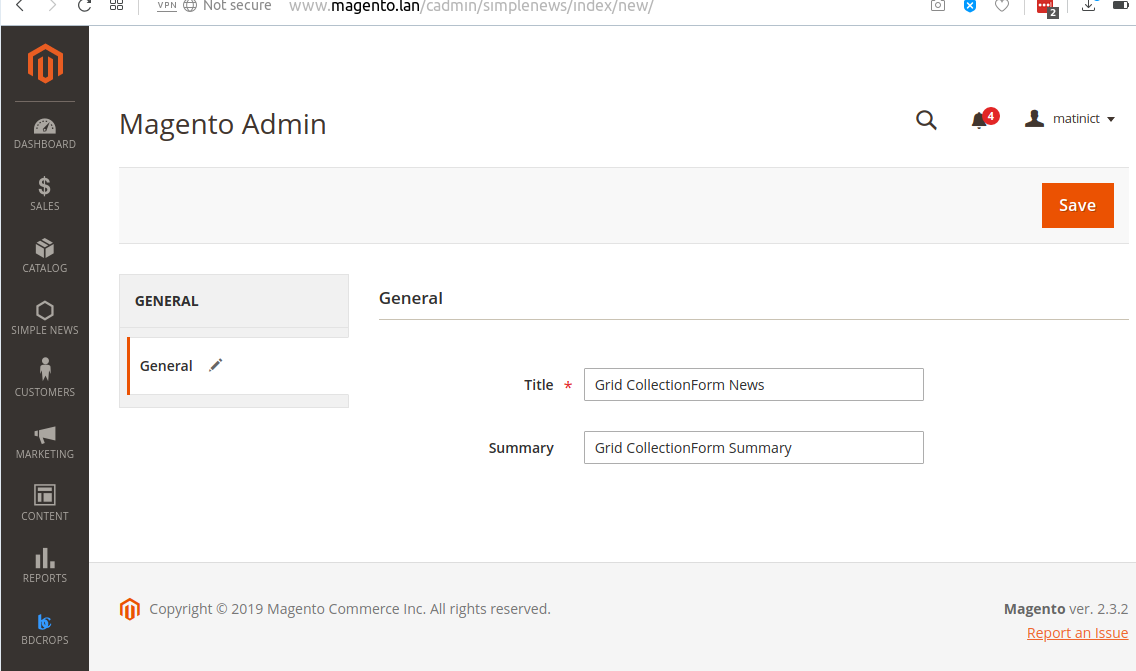
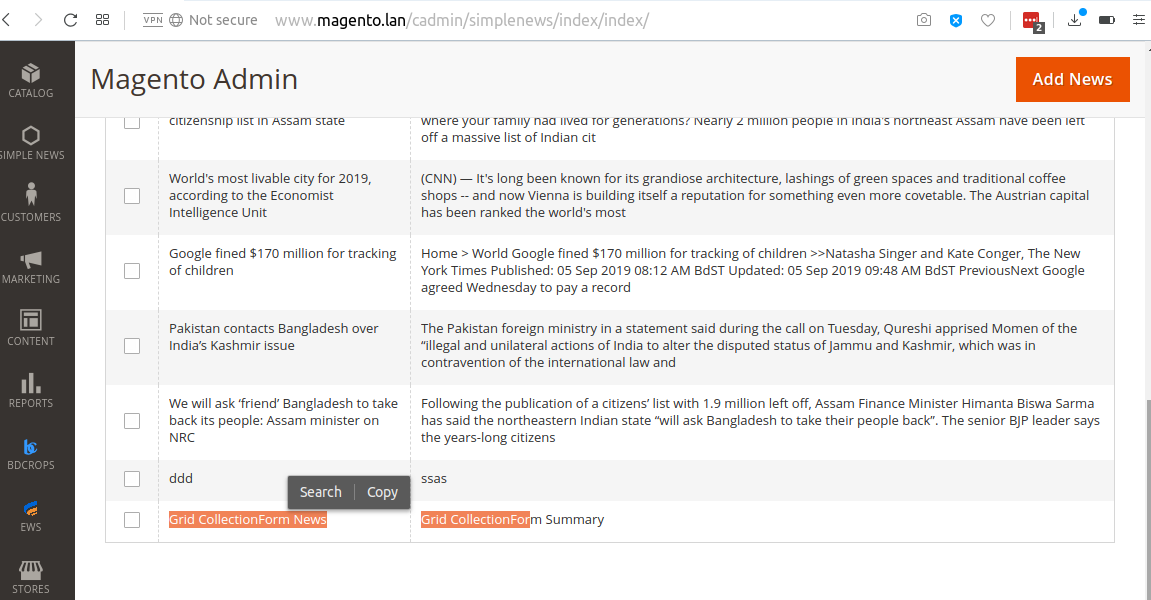
Copy To app/code/BDC/SimpleNews/view/adminhtml/layout/sales_order_index.xml <==vendor/magento/module-sales/view/adminhtml/layout/sales_order_grid.xml
Create view/adminhtml/ui_component/sales_order_grid.xml
 ```
<?xml version="1.0" encoding="UTF-8"?>
<listing xmlns:xsi="http://www.w3.org/2001/XMLSchema-instance" xsi:noNamespaceSchemaLocation="urn:magento:module:Magento_Ui:etc/ui_configuration.xsd">
    <columns name="sales_order_columns">
        <column name="created_at">
            <argument name="data" xsi:type="array">
                <item name="config" xsi:type="array">
                    <item name="dateFormat" xsi:type="string">MMM dd, YYYY</item>
                </item>
            </argument>
        </column>
        <!-- <column name="base_tax_amount" class="MagentoSalesUiComponentListingColumnPrice">
            <argument name="data" xsi:type="array">
                <item name="config" xsi:type="array">
                    <item name="filter" xsi:type="string">textRange</item>
                    <item name="label" xsi:type="string" translate="true">Base Tax Amount</item>
                </item>
            </argument>
        </column> -->
    </columns>
</listing>

```
Edit etc/di.xml
 <virtualType name="MagentoSalesModelResourceModelOrderGrid">
    <arguments>
        <argument name="columns" xsi:type="array">
            <item name="base_tax_amount" xsi:type="string">sales_order.base_tax_amount</item>
        </argument>
    </arguments>
</virtualType>
Add new field 'base_tax_amount' on table sales_order_grid(add filed PhpMyAdmin)
Magento transforms data such as products, categories, and so on, to improve the performance of your storefront. As data changes, the transformed data must be updated—or reindexed. Magento has a very sophisticated architecture that stores lots of merchant data (including catalog data, prices, users, stores, and so on) in many database tables. To optimize storefront performance, Magento accumulates data into special tables using indexers.
For example, suppose you change the price of an item from $8.99 to $6.99. Magento must reindex the price change to display it on your storefront.
Without indexing, Magento would have to calculate the price of every product on the fly—taking into account shopping cart price rules, bundle pricing, discounts, tier pricing, and so on. Loading the price for a product would take a long time, possibly resulting in cart abandonment.
php bin/magento indexer:reindex
https://devdocs.magento.com/guides/v2.3/extension-dev-guide/declarative-schema/
https://onilab.com/blog/declarative-schema-magento-2-3-and-higherProducts
https://www.mage-world.com/blog/create-a-module-with-custom-database-table-in-magento-2.html
http://techjeffyu.com/blog/magento-2-a-full-magento-2-module
https://github.com/codingarrow/M2/tree/master/BDC/SimpleNews








