Keras4Delphi
1.0.0

Keras4delphi는 Python 바인딩이있는 Pascal (Delphi Rio 10.3)으로 작성되고 Tensorflow, CNTK 또는 Theano 위에서 실행할 수있는 고급 신경 네트워크 API입니다. Keras.net 및 Keras를 기반으로합니다
딥 러닝 라이브러리가 필요한 경우 keras를 사용하십시오.
쉽고 빠른 프로토 타이핑을 허용합니다 (사용자 친선 성, 모듈성 및 확장 성을 통해). Convolutional Network와 Reburrent Network와 두 가지 조합을 지원합니다. CPU 및 GPU에서 완벽하게 실행됩니다.
 // Load train data
var x : TNDarray := TNumPy.npArray<Double>( [ [ 0 , 0 ], [ 0 , 1 ], [ 1 , 0 ], [ 1 , 1 ] ] );
var y : TNDarray := TNumPy.npArray<Double>( [ 0 , 1 , 1 , 0 ] );

// Build functional model
var input  : TKInput := TKInput.Create(tnp_shape.Create([ 2 ]));
var hidden1: TBaseLayer  := TDense.Create( 32 , ' relu ' ).& Set ([input]);
var hidden2: TBaseLayer  := TDense.Create( 64 , ' relu ' ).& Set ([hidden1]);
var output : TBaseLayer  := TDense.Create( 1 ,  ' sigmoid ' ).& Set ([hidden2]);

var model : TModel := TModel.Create ( [ input ] , [ output ]);

// Compile and train
model.Compile(TStringOrInstance.Create( TAdam.Create ), ' binary_crossentropy ' ,[ ' accuracy ' ]);

var batch_size : Integer := 2 ;
var history: THistory := model.Fit(x, y, @batch_size, 10 , 1 );

model.Summary;

var logs := history.HistoryLogs;

// Save model and weights
var json : string := model.ToJson;
TFile.WriteAllText( ' model.json ' , json);
model.SaveWeight( ' model.h5 ' );

// Load model and weight
var loaded_model : TBaseModel := TSequential.ModelFromJson(TFile.ReadAllText( ' model.json ' ));
loaded_model.LoadWeight( ' model.h5 ' );
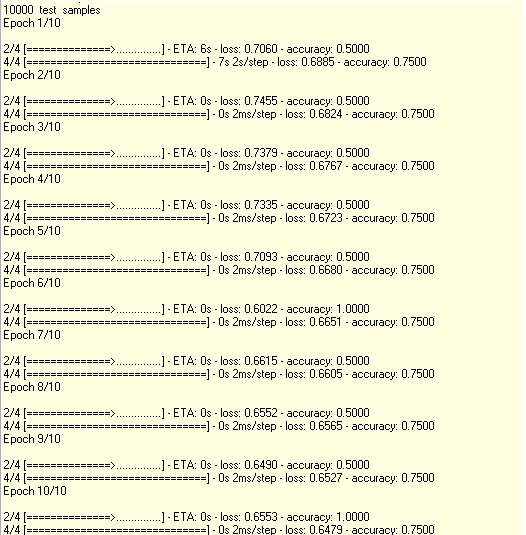
산출:
Python 예제 : https://keras.io/examples/mnist_cnn/
 var
  res      : TArray<TNDArray>;
begin
    var batch_size : Integer := 128 ; // Training batch size
    var num_classes: Integer := 10 ;  // No. of classes
    var epochs     : Integer := 12 ;  // No. of epoches we will train

    // input image dimensions
    var img_rows: Integer := 28 ;
    var img_cols: Integer := 28 ;

    // Declare the input shape for the network
    var input_shape : Tnp_shape := default(Tnp_shape);

    // Load the MNIST dataset into Numpy array
    res := TMNIST.load_data;
    var x_train, y_train ,x_test, y_test : TNDArray;

    x_train := res[ 0 ];
    y_train := res[ 1 ];
    x_test  := res[ 2 ];
    y_test  := res[ 3 ];

    // Check if its channel fist or last and rearrange the dataset accordingly
    var K: TBackend := TBackend.Create;
    if (K.ImageDataFormat = ' channels_first ' ) then
    begin
        x_train := x_train.reshape([x_train.shape[ 0 ], 1 , img_rows, img_cols]);
        x_test  := x_test.reshape ([x_test.shape[ 0 ] , 1 , img_rows, img_cols]);
        input_shape := Tnp_shape.Create([ 1 , img_rows, img_cols]);
    end else
    begin
        x_train := x_train.reshape([x_train.shape[ 0 ], img_rows, img_cols, 1 ]);
        x_test  := x_test.reshape ([x_test.shape[ 0 ] , img_rows, img_cols, 1 ]);
        input_shape := Tnp_shape.Create([img_rows, img_cols, 1 ]);
    end ;

    // Normalize the input data
    x_train := x_train.astype(vNumpy.float32_);
    x_test  := x_test.astype(vNumpy.float32_);
    x_train := TNDArray.opDiv(x_train, 255 );
    x_test  := TNDArray.opDiv(x_test, 255 );

    redtOutput.Lines.Add( ' x_train shape: ' + x_train.shape.ToString);
    redtOutput.Lines.Add( IntToStr(x_train.shape[ 0 ]) + ' train samples ' );
    redtOutput.Lines.Add( IntToStr(x_test.shape[ 0 ]) + '  test  samples ' );

    // Convert class vectors to binary class matrices
    var Util : TUtil := TUtil.Create;
    y_train := Util.ToCategorical(y_train, @num_classes);
    y_test  := Util.ToCategorical(y_test, @num_classes);

    // Build CNN model
    var model : TSequential := TSequential.Create;

    model.Add( TConv2D.Create( 32 , [ 3 , 3 ], ' relu ' , @input_shape) );
    model.Add( TConv2D.Create( 64 , [ 3 , 3 ], ' relu ' ));
    model.Add( TMaxPooling2D.Create([ 2 , 2 ]));
    model.Add( TDropout.Create( 0.25 ));
    model.Add( TFlatten.Create);
    model.Add( TDense.Create( 128 , ' relu ' ));
    model.Add( TDropout.Create( 0.5 ));
    model.Add( TDense.Create(num_classes, ' softmax ' ));

    // Compile with loss, metrics and optimizer
    model.Compile(TStringOrInstance.Create(TAdadelta.Create), ' categorical_crossentropy ' , [ ' accuracy ' ]);

    // Train the model
    model.Fit(x_train, y_train, @batch_size, epochs, 1 , nil , 0 ,[ x_test, y_test ]);

    // Score the model for performance
    var score : TArray<Double> := model.Evaluate(x_test, y_test, nil , 0 );

    redtOutput.Lines.Add( ' Test loss: '   + FloatToStr(score[ 0 ]));
    redtOutput.Lines.Add( ' Test accuracy: ' + FloatToStr(score[ 1 ]));

    // Save the model to HDF5 format which can be loaded later or ported to other application
    model.Save( ' model.h5 ' );
    // Save it to Tensorflow JS format and we will test it in browser.
    model.SaveTensorflowJSFormat( ' ./ ' );
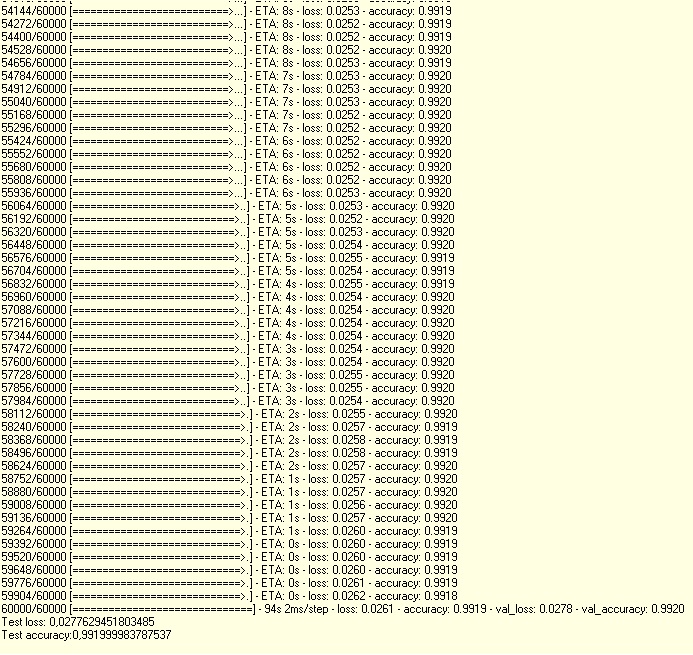
산출
3 개의 에포크 내에서 98% 정확도에 도달했습니다.
python 예제 : //https://keras.io/examples/imdb_lstm/
 var
  res      : TArray<TNDArray>;
begin
    var max_features: Integer := 20000 ;
    // cut texts after this number of words (among top max_features most common words)
    var maxlen     : Integer := 80 ;
    var batch_size : Integer := 32 ;

    redtOutput.Lines.Add( ' Loading data... ' );
    res := TIMDB.load_data(@max_features);
    var x_train, y_train ,x_test, y_test,X,Y,tmp : TNDArray;

    x_train := res[ 0 ];
    y_train := res[ 1 ];
    x_test  := res[ 2 ];
    y_test  := res[ 3 ];

    redtOutput.Lines.Add( ' train sequences: ' + x_train.shape.ToString);
    redtOutput.Lines.Add( ' test sequences: '  + x_test.shape.ToString);

    redtOutput.Lines.Add( ' Pad sequences (samples x time) ' );
    var tseq : TSequenceUtil := TSequenceUtil.Create;
    x_train := tseq.PadSequences(x_train, @maxlen);
    x_test  := tseq.PadSequences(x_test,  @maxlen);
    redtOutput.Lines.Add( ' x_train shape: ' + x_train.shape.ToString);
    redtOutput.Lines.Add( ' x_test shape: '  + x_test.shape.ToString);

    redtOutput.Lines.Add( ' Build model... ' );
    var model : TSequential := TSequential.Create;
    model.Add( TEmbedding.Create(max_features, 128 ));
    model.Add( TLSTM.Create( 128 , 0.2 , 0.2 ));
    model.Add( TDense.Create( 1 , ' sigmoid ' ));

    // try using different optimizers and different optimizer configs
    model.Compile(TStringOrInstance.Create( ' adam ' ), ' binary_crossentropy ' , [ ' accuracy ' ]);
    model.Summary;

    redtOutput.Lines.Add( ' Train... ' );
    model.Fit(x_train, y_train, @batch_size, 15 , 1 ,[ x_test, y_test ]);

    // Score the model for performance
    var score : TArray<Double> := model.Evaluate(x_test, y_test, @batch_size);

    redtOutput.Lines.Add( ' Test score: '   + FloatToStr(score[ 0 ]));
    redtOutput.Lines.Add( ' Test accuracy: ' + FloatToStr(score[ 1 ]));

    // Save the model to HDF5 format which can be loaded later or ported to other application
model.Save( ' model.h5 ' );공동 작업 테스트 및 소스 코드 개선을 환영합니다. 나는 자유 시간이 거의 없습니다







