SUPIR
1.0.0

[종이] [프로젝트 페이지] [온라인 앱]
Fanghua, Yu, Jinjin Gu, Zheyuan Li, Jinfan Hu, Xiangtao Kong, Xintao Wang, Jingwen He, Yu Qiao, Chao Dong
Shenzhen Institute of Advanced Technology; 상하이 AI 실험실; 시드니 대학교; 홍콩 폴리 테크닉 대학교; 아크 실험실, Tencent PCG; 중국 홍콩 대학교
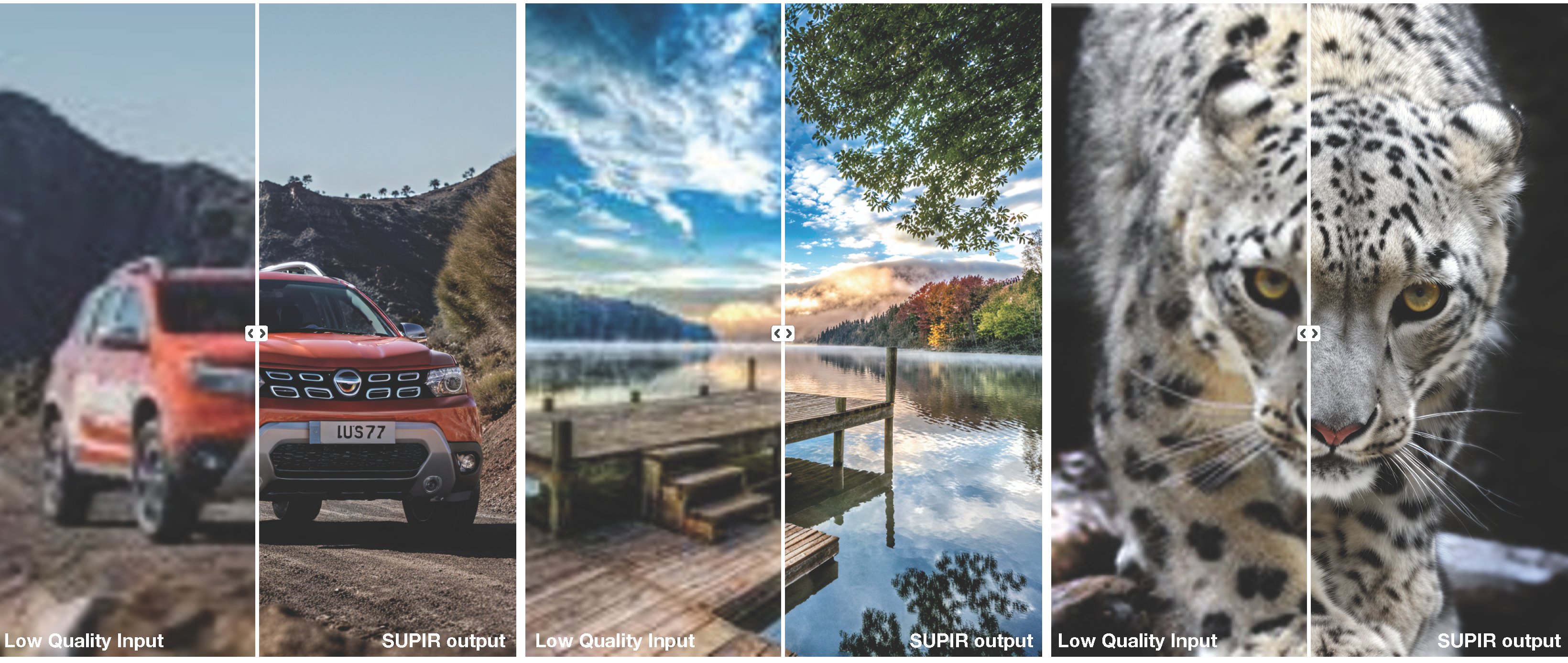
복제 레포
git clone https://github.com/Fanghua-Yu/SUPIR.git
cd SUPIR
종속 패키지를 설치하십시오
conda create -n SUPIR python=3.8 -y
conda activate SUPIR
pip install --upgrade pip
pip install -r requirements.txt
체크 포인트를 다운로드하십시오
LLAVA_CLIP_PATH, SDXL_CLIP1_PATH, SDXL_CLIP2_CKPT_PTH CKPT_PTH.py None 이 클립은 자동으로 다운로드됩니다.
SDXL base 1.0_0.9vae 교체SUPIR_v0_Juggernautv9_lightning.yaml 에 사용되는 증류 모델 SUPIR-v0Q : Baidu NetDisk, Google 드라이브
종이가있는 기본 교육 설정. 대부분의 경우 높은 일반화와 높은 이미지 품질.
SUPIR-v0F : Baidu NetDisk, Google 드라이브
가벼운 저하 설정으로 훈련. SUPIR-v0F 의 Stage1 인코더는 광 분해에 직면 할 때 더 자세한 내용을 유지합니다.
 * [CKPT_PTH.py] --> LLAVA_CLIP_PATH, LLAVA_MODEL_PATH, SDXL_CLIP1_PATH, SDXL_CLIP2_CACHE_DIR
* [options/SUPIR_v0.yaml] --> SDXL_CKPT, SUPIR_CKPT_Q, SUPIR_CKPT_F
RealPhoto60 : Baidu NetDisk, Google 드라이브
Usage:
-- python test.py [options]
-- python gradio_demo.py [interactive options]

--img_dir                Input folder.
--save_dir               Output folder.
--upscale                Upsampling ratio of given inputs. Default: 1
--SUPIR_sign             Model selection. Default: ' Q ' ; Options: [ ' F ' , ' Q ' ]
--seed                   Random seed. Default: 1234
--min_size               Minimum resolution of output images. Default: 1024
--edm_steps              Numb of steps for EDM Sampling Scheduler. Default: 50
--s_stage1               Control Strength of Stage1. Default: -1 (negative means invalid)
--s_churn                Original hy-param of EDM. Default: 5
--s_noise                Original hy-param of EDM. Default: 1.003
--s_cfg                  Classifier-free guidance scale for prompts. Default: 7.5
--s_stage2               Control Strength of Stage2. Default: 1.0
--num_samples            Number of samples for each input. Default: 1
--a_prompt               Additive positive prompt for all inputs.
    Default: ' Cinematic, High Contrast, highly detailed, taken using a Canon EOS R camera,
    hyper detailed photo - realistic maximum detail, 32k, Color Grading, ultra HD, extreme
     meticulous detailing, skin pore detailing, hyper sharpness, perfect without deformations. '
--n_prompt               Fixed negative prompt for all inputs.
    Default: ' painting, oil painting, illustration, drawing, art, sketch, oil painting,
    cartoon, CG Style, 3D render, unreal engine, blurring, dirty, messy, worst quality,
    low quality, frames, watermark, signature, jpeg artifacts, deformed, lowres, over-smooth '
--color_fix_type         Color Fixing Type. Default: ' Wavelet ' ; Options: [ ' None ' , ' AdaIn ' , ' Wavelet ' ]
--linear_CFG             Linearly (with sigma) increase CFG from ' spt_linear_CFG ' to s_cfg. Default: False
--linear_s_stage2        Linearly (with sigma) increase s_stage2 from ' spt_linear_s_stage2 ' to s_stage2. Default: False
--spt_linear_CFG         Start point of linearly increasing CFG. Default: 1.0
--spt_linear_s_stage2    Start point of linearly increasing s_stage2. Default: 0.0
--ae_dtype               Inference data type of AutoEncoder. Default: ' bf16 ' ; Options: [ ' fp32 ' , ' bf16 ' ]
--diff_dtype Inference data type of Diffusion. Default: ' fp16 ' ; Options: [ ' fp32 ' , ' fp16 ' , ' bf16 ' ] # Seek for best quality for most cases
CUDA_VISIBLE_DEVICES=0,1 python test.py --img_dir ' /opt/data/private/LV_Dataset/DiffGLV-Test-All/RealPhoto60/LQ ' --save_dir ./results-Q --SUPIR_sign Q --upscale 2
# for light degradation and high fidelity
CUDA_VISIBLE_DEVICES=0,1 python test.py --img_dir ' /opt/data/private/LV_Dataset/DiffGLV-Test-All/RealPhoto60/LQ ' --save_dir ./results-F --SUPIR_sign F --upscale 2 --s_cfg 4.0 --linear_CFGCUDA_VISIBLE_DEVICES=0,1 python gradio_demo.py --ip 0.0.0.0 --port 6688 --use_image_slider --log_history
# Juggernaut_RunDiffusionPhoto2_Lightning_4Steps and DPM++ M2 SDE Karras for fast sampling
CUDA_VISIBLE_DEVICES=0,1 python gradio_demo.py --ip 0.0.0.0 --port 6688 --use_image_slider --log_history --opt options/SUPIR_v0_Juggernautv9_lightning.yaml
# less VRAM & slower (12G for Diffusion, 16G for LLaVA)
CUDA_VISIBLE_DEVICES=0,1 python gradio_demo.py --ip 0.0.0.0 --port 6688 --use_image_slider --log_history --loading_half_params --use_tile_vae --load_8bit_llava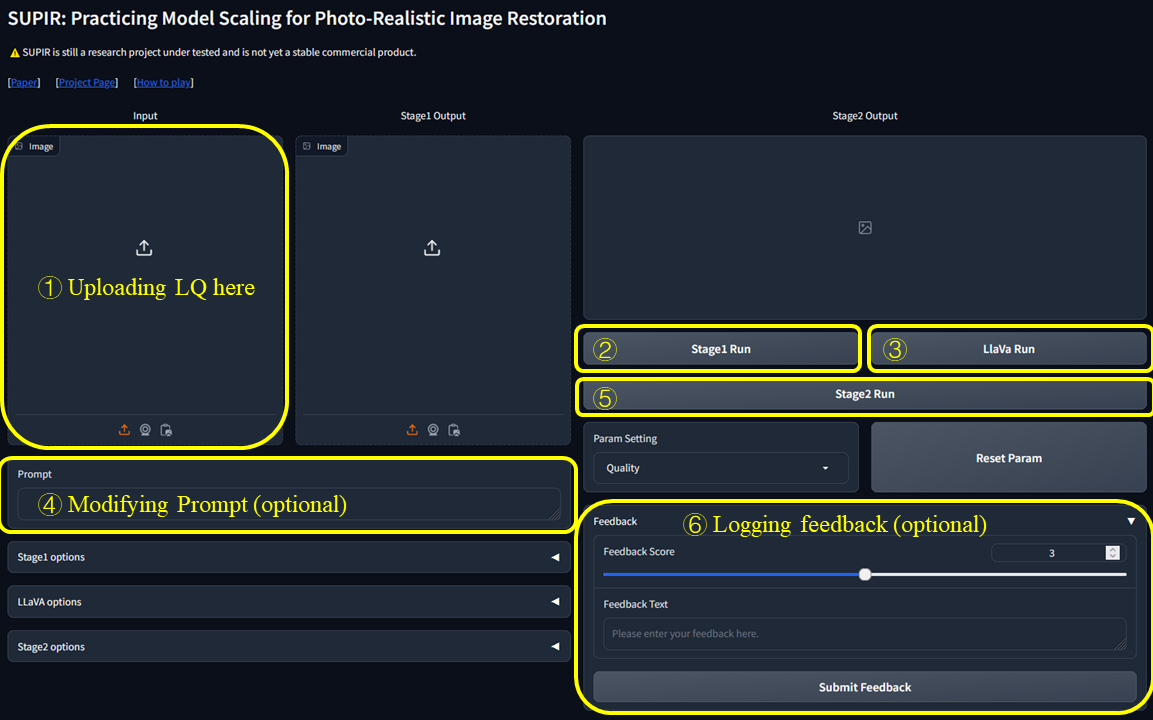
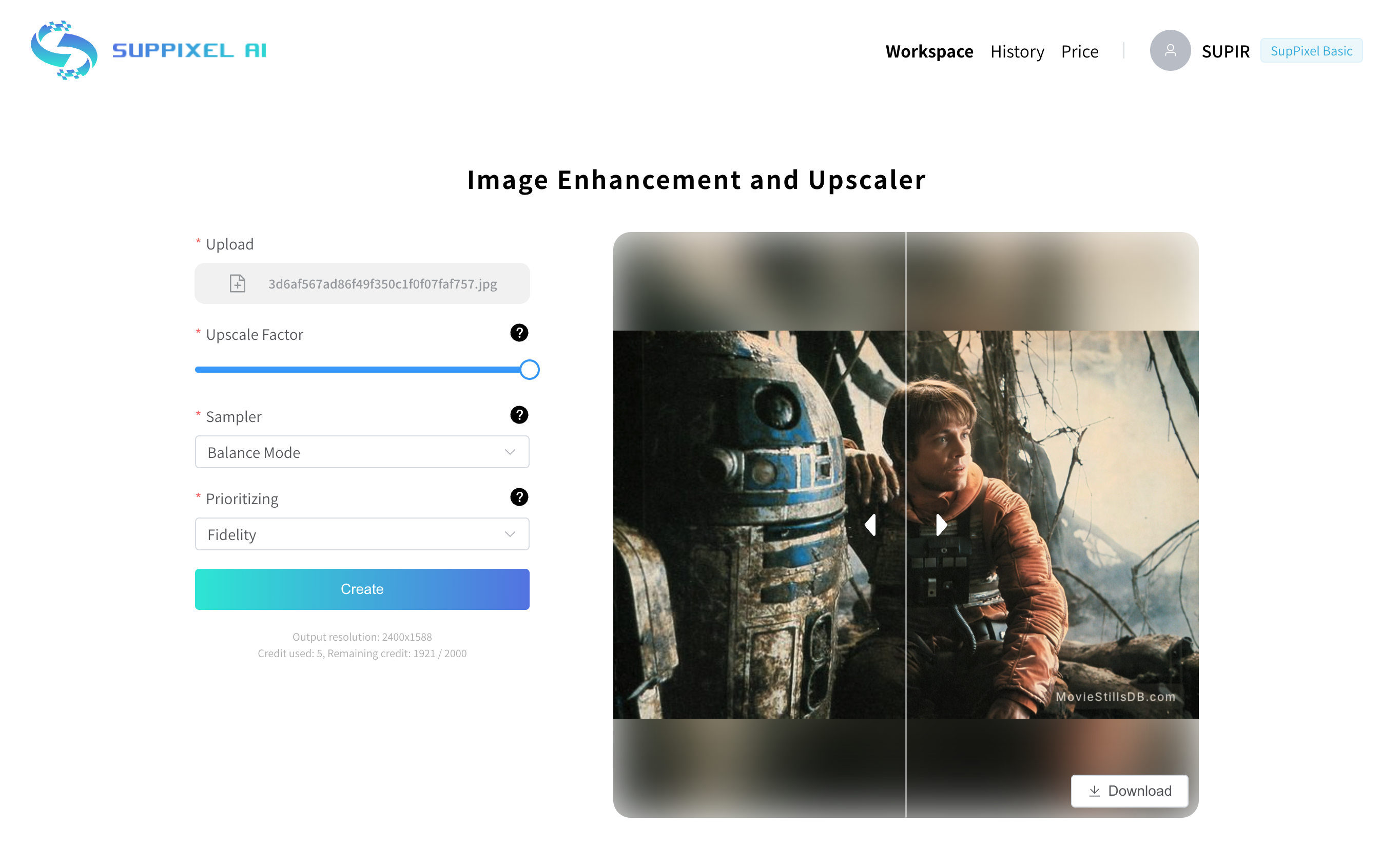
우리는 고품질 이미지 처리 및 업 스케일링에 도움이되도록 설계된 사용하기 쉬운 도구 인 Suppixel AI를 방금 시작했습니다. 그것은 supir를 기반으로합니다. 당신이 사진, 디지털 아트에 있든, 그냥 이미지 향상을 좋아하는 것을 좋아하든, 우리는 당신이 그것을 확인하고 싶습니다. ~.
 @misc{yu2024scaling,
  title={Scaling Up to Excellence: Practicing Model Scaling for Photo-Realistic Image Restoration In the Wild},
  author={Fanghua Yu and Jinjin Gu and Zheyuan Li and Jinfan Hu and Xiangtao Kong and Xintao Wang and Jingwen He and Yu Qiao and Chao Dong},
  year={2024},
  eprint={2401.13627},
  archivePrefix={arXiv},
  primaryClass={cs.CV}
}
질문이 있으시면 [email protected] 또는 [email protected] 로 이메일을 보내주십시오.
SUPIR ( "소프트웨어")은 비상업적 목적으로 엄격하게 사용, 재생산 및 배포 할 수 있습니다. 이 선언의 목적 상, "비상업적"은 주로 상업적 이점 또는 금전적 보상을위한 것이 아니거나 지시되지 않은 것으로 정의됩니다.
소프트웨어를 사용, 재생산 또는 배포함으로써 귀하는이 제한을 준수하고 Jinjin Gu 박사로부터 사전 서면 허가를받지 않고 상업적 목적으로 소프트웨어를 사용하지 않기로 동의합니다.
이 선언은 소프트웨어에 적용될 수있는 오픈 소스 라이센스에 따른 권리를 어떤 식 으로든 제한하지 않습니다. 소프트웨어가 상업적 목적으로 사용되지 않는 조건 만 추가합니다.
어떠한 경우에도 저자 또는 저작권 보유자는 계약, 불법 행위 또는 기타, 소프트웨어 또는 소프트웨어의 사용 또는 기타 거래에서 발생하는 계약, 불법 행위 또는 기타의 행동에 관계없이 청구, 손해 또는 기타 책임에 대해 책임을지지 않습니다.
문의하거나 상업적 용도로 허가를 받으려면 Dr. Jinjin Gu ([email protected])에게 문의하십시오.








