Ultra Fast Lane Detection
1.0.0

Pytorch는 논문의 구현 "매우 빠른 구조 인식 깊은 차선 탐지".
[2022 년 7 월 18 일] 업데이트 : 우리 방법의 새 버전은 TPAMI 2022에 의해 수락되었습니다. 코드는 여기에서 확인할 수 있습니다 .
[2021 년 6 월 28 일] 업데이트 : ECCV 버전과 비교하여 RESNET-18 백본으로 Culane에서 6.3 포인트의 F1 포인트를 향상시키는 확장 버전을 출시 할 예정입니다.
업데이트 : 우리의 논문은 ECCV2020에 의해 받아 들여졌습니다.
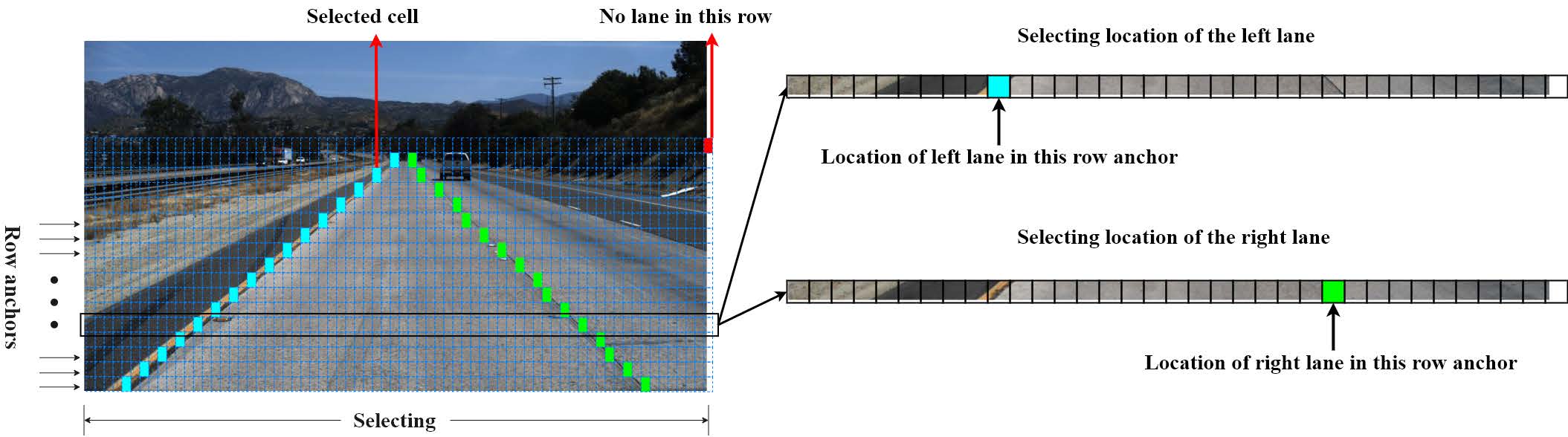
평가 코드는 SCNN 및 Tusimple Benchmark에서 수정됩니다.
카페 모델과 프로토 텍스트는 여기에서 찾을 수 있습니다.
install.md를 참조하십시오
우선, configs/culane.py 또는 configs/tusimple.py config에서 data_root 및 log_path 수정하십시오.
data_root 는 Culane 데이터 세트 또는 Tusimple 데이터 세트의 경로입니다.log_path 는 Tensorboard 로그, 훈련 된 모델 및 코드 백업이 저장되는 곳입니다. 이 프로젝트 외부에 배치해야합니다.단일 GPU 교육의 경우 실행하십시오
python train.py configs/path_to_your_config멀티 GPU 교육의 경우 실행하십시오
sh launch_training.sh또는
python -m torch.distributed.launch --nproc_per_node= $NGPUS train.py configs/path_to_your_config사전에 사기가없는 Torchvision 모델이 없으면 멀티 GPU 교육으로 여러 다운로드가 발생할 수 있습니다. 먼저 해당 모델을 수동으로 다운로드 한 다음 멀티 GPU 교육을 다시 시작할 수 있습니다.
코드에는 Gitignore에 따라 모든 코드를 log_path 에 복사하는 자동 백업 기능이 있으므로 Gitignore가 필터링하지 않으면 추가 온도 파일이 복사 될 수 있으며, 이는 임시 파일이 큰 경우 실행을 차단할 수 있습니다. 따라서 작업 디렉토리를 깨끗하게 유지해야합니다.
구성 스타일 설정 외에도 명령 줄 스타일 ONE도 지원합니다. 같은 설정을 무시할 수 있습니다
python train.py configs/path_to_your_config --batch_size 8 batch_size 는 훈련 중에 8로 설정됩니다.
Tensorboard로 로그를 시각화하려면 실행하십시오
tensorboard --logdir log_path --bind_all우리는 Culane과 Tusimple에 두 개의 훈련 된 RES-18 모델을 제공합니다.
| 데이터 세트 | 메트릭 용지 | 이 repo | GTX 1080TI의 AVG FPS | 모델 |
|---|---|---|---|---|
| 엄니 | 95.87 | 95.82 | 306 | googledrive/baidudrive (코드 : bghd) |
| CULANE | 68.4 | 69.7 | 324 | Googledrive/Baidudrive (코드 : W9TW) |
평가를 위해 실행하십시오
mkdir tmp
# This a bad example, you should put the temp files outside the project.

python test.py configs/culane.py --test_model path_to_culane_18.pth --test_work_dir ./tmp

python test.py configs/tusimple.py --test_model path_to_tusimple_18.pth --test_work_dir ./tmp
교육과 동일하게 멀티 GPU 평가도 지원됩니다.
탐지 결과를 시각화하기위한 스크립트를 제공합니다. Culane과 Tusimple의 테스트 세트에서 시각화하려면 다음 명령을 실행하십시오.
python demo.py configs/culane.py --test_model path_to_culane_18.pth
# or
python demo.py configs/tusimple.py --test_model path_to_tusimple_18.pth
가슴의 테스트 세트가 주문되지 않기 때문에 시각화 된 비디오는 나빠 보일 수 있으며이를 수행 하지 않는 것이 좋습니다 .
런타임을 테스트하려면 실행하십시오
python speed_simple.py
# this will test the speed with a simple protocol and requires no additional dependencies

python speed_real.py
# this will test the speed with real video or camera input
100 회 반복되고 환경에서 평균 런타임과 FPS를 계산합니다.
 @InProceedings { qin2020ultra ,
author = { Qin, Zequn and Wang, Huanyu and Li, Xi } ,
title = { Ultra Fast Structure-aware Deep Lane Detection } ,
booktitle = { The European Conference on Computer Vision (ECCV) } ,
year = { 2020 }
}

@ARTICLE { qin2022ultrav2 ,
  author = { Qin, Zequn and Zhang, Pengyi and Li, Xi } ,
  journal = { IEEE Transactions on Pattern Analysis and Machine Intelligence } ,
  title = { Ultra Fast Deep Lane Detection With Hybrid Anchor Driven Ordinal Classification } ,
  year = { 2022 } ,
  volume = { } ,
  number = { } ,
  pages = { 1-14 } ,
  doi = { 10.1109/TPAMI.2022.3182097 }
}속도 테스트에 기여하기 위해 Culane, Kopisoftware의 컴파일 도구에 기여한 Zchrissirhcz, Windows 플랫폼에서의 USTCLBH에 감사드립니다.








