Ultra Fast Lane Detection
1.0.0

ペーパー「超高速構造認識ディープレーン検出」のPytorchの実装。
[2022年7月18日]更新:TPAMI 2022によって、この方法の新しいバージョンが受け入れられました。コードはこちらから入手できます。
[2021年6月28日]更新:拡張バージョンをリリースします。これにより、ECCVバージョンと比較してResNet-18バックボーンを使用してCulaneでF1の6.3ポイントを改善します。
更新:私たちの論文はECCV2020によって受け入れられました。
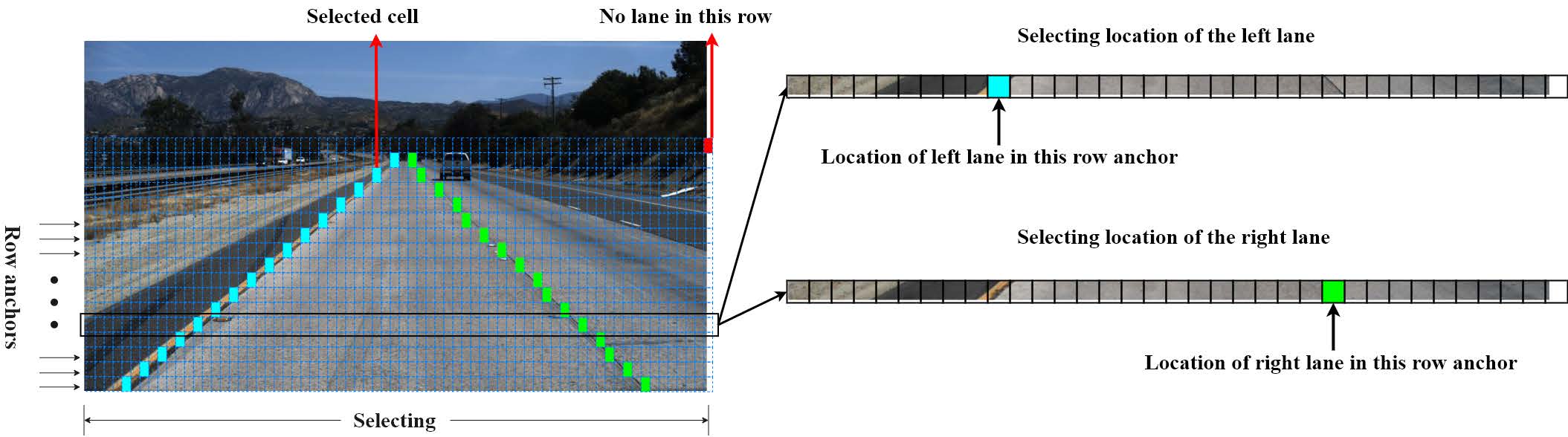
評価コードは、SCNNおよびTusimpleベンチマークから変更されます。
CaffeモデルとPrototxtはここにあります。
install.mdを参照してください
まず第一に、環境に応じてconfigs/culane.pyまたはconfigs/tusimple.pyのdata_rootとlog_path変更してください。
data_root 、CulaneデータセットまたはTusimpleデータセットのパスです。log_pathは、テンソルボードログ、トレーニングモデル、コードバックアップが保存される場所です。このプロジェクトの外に配置する必要があります。単一のGPUトレーニングについては、実行します
python train.py configs/path_to_your_configマルチGPUトレーニングについては、実行します
sh launch_training.shまたは
python -m torch.distributed.launch --nproc_per_node= $NGPUS train.py configs/path_to_your_config事前に守られたトーチビジョンモデルがない場合、マルチGPUトレーニングにより複数のダウンロードが発生する可能性があります。最初に対応するモデルを手動でダウンロードしてから、マルチGPUトレーニングを再起動できます。
私たちのコードには、Gitignoreに従ってすべてのコードをlog_pathにコピーする自動バックアップ機能があるため、Gitignoreによってフィルタリングされていない場合は追加のTempファイルもコピーされる場合があります。したがって、作業ディレクトリをきれいに保つ必要があります。
構成スタイルの設定に加えて、コマンドラインスタイルの設定もサポートしています。次のような設定をオーバーライドできます
python train.py configs/path_to_your_config --batch_size 8 batch_size 、トレーニング中に8に設定されます。
テンソルボードでログを視覚化するには、実行します
tensorboard --logdir log_path --bind_allCulaneとTusimpleで2つの訓練されたRES-18モデルを提供しています。
| データセット | メトリックペーパー | このレポジトリのメトリック | GTX 1080TIのAVG FPS | モデル |
|---|---|---|---|---|
| tusimple | 95.87 | 95.82 | 306 | googledrive/baidudrive(code:bghd) |
| culane | 68.4 | 69.7 | 324 | googledrive/baidudrive(code:w9tw) |
評価のために、実行します
mkdir tmp
# This a bad example, you should put the temp files outside the project.

python test.py configs/culane.py --test_model path_to_culane_18.pth --test_work_dir ./tmp

python test.py configs/tusimple.py --test_model path_to_tusimple_18.pth --test_work_dir ./tmp
トレーニングと同じように、マルチGPU評価もサポートされています。
検出結果を視覚化するスクリプトを提供します。次のコマンドを実行して、CulaneとTusimpleのテストセットを視覚化します。
python demo.py configs/culane.py --test_model path_to_culane_18.pth
# or
python demo.py configs/tusimple.py --test_model path_to_tusimple_18.pthTusimpleのテストセットは注文されていないため、視覚化されたビデオが悪く見える可能性があり、これを行うことはお勧めしません。
ランタイムをテストするには、実行してください
python speed_simple.py
# this will test the speed with a simple protocol and requires no additional dependencies

python speed_real.py
# this will test the speed with real video or camera input
100回ループし、環境で平均ランタイムとFPSを計算します。
 @InProceedings { qin2020ultra ,
author = { Qin, Zequn and Wang, Huanyu and Li, Xi } ,
title = { Ultra Fast Structure-aware Deep Lane Detection } ,
booktitle = { The European Conference on Computer Vision (ECCV) } ,
year = { 2020 }
}

@ARTICLE { qin2022ultrav2 ,
  author = { Qin, Zequn and Zhang, Pengyi and Li, Xi } ,
  journal = { IEEE Transactions on Pattern Analysis and Machine Intelligence } ,
  title = { Ultra Fast Deep Lane Detection With Hybrid Anchor Driven Ordinal Classification } ,
  year = { 2022 } ,
  volume = { } ,
  number = { } ,
  pages = { 1-14 } ,
  doi = { 10.1109/TPAMI.2022.3182097 }
}Zchrissirhczは、速度テストに貢献するためのCulaneのコンパイルツール、Kopisoftware、およびWindowsプラットフォームでのテストのためのUSTCLBHに貢献してくれたことに感謝します。








