HtmlNative
1.0.0

영어
HTML을 사용하여 Android 인터페이스의 동적 인터페이스 체계를 렌더링하십시오.
WebView와 달리 HTMLNATIVE는 HTML 및 CSS를 기본 컨트롤로 직접 변환합니다. 이 작업의 이점은 다음과 같습니다.
<script> 태그에 포함 된 LUA 스크립트를 통해 전체 동적 제어의 일부 동작을 제어 할 수 있습니다. 일부 API는 HNLUA API를 형성하기 위해 통합됩니다.비전은 V8 엔진을 통해 JavaScript를 통합하여 전체 H5 기술 스택의 시뮬레이션을 완료하는 것입니다.
 < a > , < p > , < h1 > , < h2 > , < h3 > , < h4 > , < h5 > , < h6 > , < input > , < img > , < div > , < br > , < iframe >

属性:style, onclick(需要再lua脚本中定义onclick事件,后续完善相关文档), id, class, href(for < a > ), src(for < img > ) <head> 의 <style> 태그에 대한 인라인 스타일 속성 및 내장 된 CSS를 지원합니다. 링크 양식의 CSS 스타일 파일은 지원되지 않습니다.
너비, 높이, 배경, 배경색, 배경 위치, 배경 크기, 패딩, 패딩 왼쪽, 패딩 오른쪽, 패딩 탑, 패딩 바닥, 마진, 마진 탑, 여백 왼쪽, 마진 오른쪽, 마진 바닥, 가시성
글꼴 크기, 색상, 라인 높이, 글꼴 스타일, 글꼴 체중, 텍스트 정렬, 단어 스펙팅, 텍스트 오버 플로우, 텍스트 변환
또한 HTML에서 색상과 드로블을 얻는 것이 지원되며 @를 사용하여 시작하십시오.
 background : url ( @pic );
color : @colorPrimary ;유형 선택기
 p {}
div {}

id选择器
# id1 {}

class选择器
. class1 {}

组
# id1 , # id2 {}

子孙选择器
div p{}

子选择器
div > p{}

全部选择器
* {}
p * {}htmlnative를 통해 렌더링 한 후 결과 :
비디오 다운로드
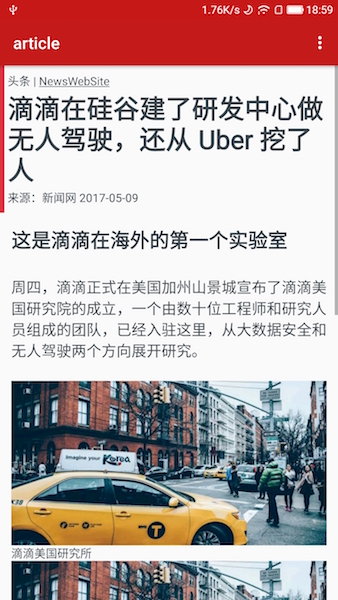
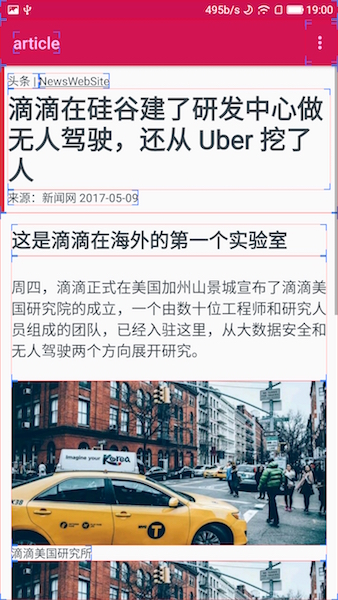

HTML :
 < html >
< head >
    < meta http-equiv =" Content-type " content =" text/html; charset=utf-8 " />
    < meta name =" viewport "
          content =" user-scalable=no, initial-scale=1, maximum-scale=1, minimum-scale=1 " />
    < style >
	html{
		font-size: 62.5%;

	}

	body{
		margin: 0;
		padding: 0;
		color: #3f484f;
	}

	.header{
	    color:#3f484f;
		padding: 2em;
		background: #db3541;
		-hn-background-color-size: 1.2em 100%;

	}

	.article{
	    padding: 3em
	 }

	 p{
	    padding: 5em 0;
	    font-size: 4em;
	    line-height: 120%
	  }
    </ style >
    < title > article </ title >
</ head >
< body >
< div class =" header " >
    < span >头条 | </ span >
    < a href =" http://www.sina.com.cn/ " > NewsWebSite </ a >
    < h1 >滴滴在硅谷建了研发中心做无人驾驶,还从 Uber 挖了人</ h1 >
    < span >来源:新闻网 2017-05-09 </ span >
</ div >

< div class =" article " >
    < h2 >这是滴滴在海外的第一个实验室</ h2 >
    < p >周四,滴滴正式在美国加州山景城宣布了滴滴美国研究院的成立,一个由数十位工程师和研究人员组成的团队,已经入驻这里,从大数据安全和无人驾驶两个方向展开研究。 </ p >

    < div >
        < img src =" http://www.abc.com/pic.jpg " alt ="新闻说明" />
        < span >滴滴美国研究所</ span >
    </ div >

    < img src =" http://www.abc.com/pic.jpg " />

    < p >美国研究院由滴滴研究院副院长弓峰敏带领。弓峰敏是去年 9 月加入滴滴,担任滴滴信息安全战略副总裁和滴滴研究院副院长,并开始组建美国研究院。加盟滴滴之前,他是安全公司 Palo Alto
        Networks 的联合创始人。 </ p >

    < p >这一次,滴滴还从Uber挖来了查理·米勒(Charlie Miller)。米勒被誉为全球顶级安全专家,曾是一名黑客,从事苹果越狱和安全研究,在加入 Uber
        之前,米勒受雇于苹果。2015 年,米勒完成了对一辆吉普切诺基的远程控制实验。2015 年 9 月,他加入Uber担任汽车安全工程师。 </ p >

    < p >在Twitter上,米勒表示他的工作是帮助滴滴研发和使用的自动驾驶系统抵抗来自外部的攻击和威胁。在宣布加入滴滴美国研究院的消息之后,他又发布推文表示实验室正在招人。 </ p >
</ div >

< div >
    < img src =" coop/banner.png " />
</ div >
</ body >
</ html > InputStream htmlSource = ...;
// 在需要加载view的时候加载
HNativeEngine . getInstance (). loadView ( mActivity , htmlSource , new
HNativeEngine . OnHNViewLoaded () {
@ Override
public void onViewLoaded ( View v ) {
if ( mActivity != null && ! mActivity . isDestroyed ()) {
mActivity . setContentView ( v );
}
}
@ Override
public void onError ( Exception e ) {
}
@ Override
public void onHead ( HNHead head ) {
}
});HNLUA API는 htmlnative 프레임 워크 하에서 정의 된 간소화 된 API 세트입니다. 이 API를 통해 인터페이스를 유연하게 제어하고 스타일을 조정하고 URL을 점프하며 액세스가 제한된 기본 Android 기능에 액세스 할 수 있습니다.
 < html >
    < head >
        < title > iframe </ title >
        < meta name =" nihao " content =" world " />
        < style >
            #text1{
                background:red;
                color:green;
                margin: 3em 3em;
                padding: 2em;
            }

            button{
                color:yellow
            }

            #parent{
                color: red;
             }

        </ style >
    </ head >

    < body >
        < text id =" text1 " > This is an demo of iframe < br /> nihao
        </ text >
        < button onclick =" changeText1 " > click me </ button >
    < div id =" parent " class =" claz1 claz2 claz3 " > </ div >
    </ body >

    < script type =" text/lua " >
        toast ( "hello world" )

        b = false

        local vv = document . createView ( "p" , "" )
        vv . setAttribute ( "text:helloworld" ) ;

        local parent = getElementById ( "parent" )

        parent . appendChild ( vv )

        console . log ( vv . toString ( ) )
        console . log ( vv . getAttribute ( "background" ) ) ;

        function changeText1 ( )
            local v = getElementById ( "text1" )
            console . log ( v . id ( ) )
            if ( b ) then
                v . setAttribute ( "background:red;color:#fff" )
            else
                v . setAttribute ( "background:blue;color:red" )
            end
            b = not ( b )

            document . jump ( "http://www.baidu.com" )

        end
    </ script >
</ html >
위의 예에서는 hnluaapi를 사용하여 <p> 동적으로 추가하고 text 속성을 설정하고 마지막으로 id=parent 사용하여 <div> 에 추가하십시오.
또한 html <button onclick="changeText1">click me</button> <button> 컨트롤을 클릭하는 단락이 있습니다. 이벤트의 동작은 아래에 changeText1() 함수에 의해 아래에 정의되어 있습니다. 변수 b의 값을 통해 배경색과 텍스트 색상을 동적으로 변경합니다. 그리고 링크로 점프하십시오.
현재 지원되는 hnluaapi (지속적으로 개선) :
 -- log相关,会以HNConsole的标签出现在Android Logcat中
console . log ( msg )
console . error ( msg )
console . info ( msg )
console . warn ( msg )

--全局操作
document . version ()	--获取当前HNLuaApi版本号
document . jump ( url ) 	--跳转至url,具体处理方式,客户端可复写HrefLinkHandler,并在HNativeEngine中注册
doucment . createView ( tag , style ) --以tag方式创建一个标签,并附加上style属性。例如local v = document.createElement("p", "color:red"),该函数返回一个lview对象

--查找view
local lview = document . getElementById ( id ) --通过id查找view

-- lview对象
lview . toString ()	--转换成stirng
lview . setAttribute ( style )	--设置样式,例如lview.setAttribute("color:red")
lview . id ()	--获取该标签的id
lview . className ()	--获取该标签的class,返回为一个LuaTable类型对象
lview . appendChild ( lviewChild )	--往该lview中添加一个子view到末尾
lview . insertBefore ( lviewChild )	--往该lview中添加一个子view到最前面
lview . removeChild ( lviewChild )	--删除view
lview . childNodes ()	--返回该view的所有子view
lview . getAttribute ( stylename )	--返回某个属性名为stylename的属性值
lview . tagName ()	--返回该view的tag标签名称
lview . hasChildNode () --检验该lview是否含有子view
lview . setText ( textString ) --设置文本

-- toast
toast ( " helloworld " )	--显示一个toast提示(android only)

--网络操作

local callback = {}        --定义一个回调函数
function l . onResponse ( res ) --定义其onResponse方法
    toast ( res . body ())      --在其中发起一个toast,并显示response的body中的内容。res有body(), header()及status()方法,可分别访问其HTTP BODY,RESPONSE HEADER及状态码
end

http . get ( " http://www.abc.com " , callback )
http . post ( " http://www.abc.com " , postParams , callback )Copyright 2016 hsllany. 모든 권리 보유.
 Licensed under the Apache License, Version 2.0 (the "License");
you may not use this file except in compliance with the License.
You may obtain a copy of the License at

    http://www.apache.org/licenses/LICENSE-2.0

Unless required by applicable law or agreed to in writing, software
distributed under the License is distributed on an "AS IS" BASIS,
WITHOUT WARRANTIES OR CONDITIONS OF ANY KIND, either express or implied.
See the License for the specific language governing permissions and
limitations under the License.







