공격적인 파이프 라인
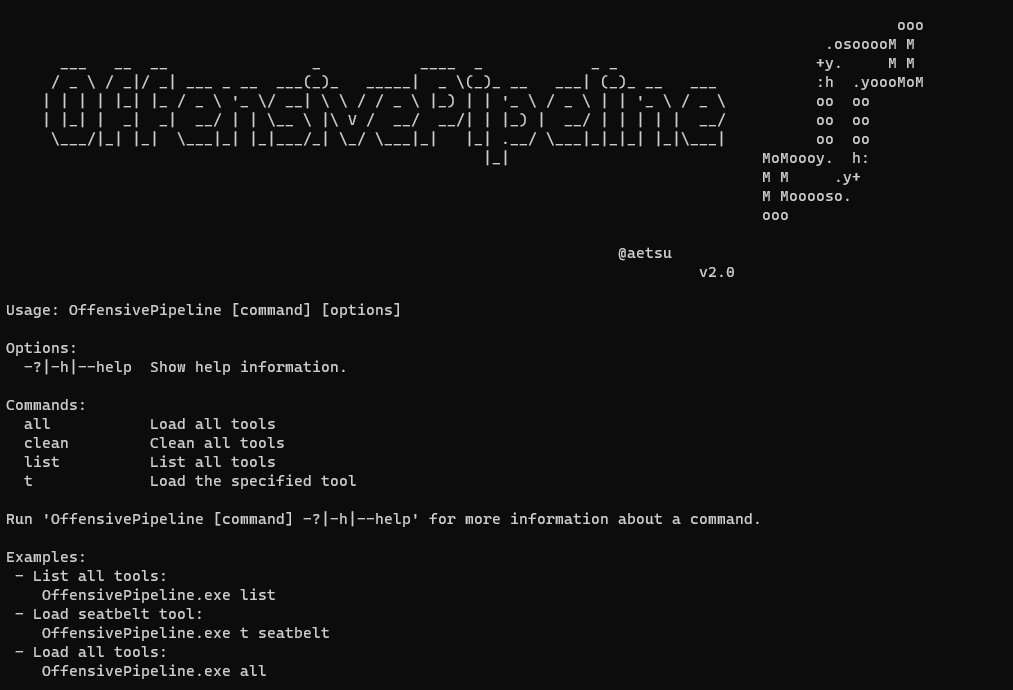
OffensivePipeline을 사용하면 C# 도구를 다운로드하여 구축 할 수 있으며, 레드 팀 운동에 대한 회피를 개선하기 위해 특정 수정을 적용 할 수 있습니다.
FormensivePipeline의 일반적인 사용은 GIT 저장소에서 도구를 다운로드하고 프로젝트의 특정 값을 무작위로 만들고, 구축하고, 결과 바이너리를 난독 화하고 쉘 코드를 생성하는 것입니다.
특징
- 현재 C# (.NET Framework) 프로젝트 만 지원합니다
- 공개 및 개인 복제 허용 (자격 증명이 필요합니다 : D) Git 리포지토리
- 로컬 폴더로 작업 할 수 있습니다
- 프로젝트 안내서를 무작위 화합니다
- AssemblyInfo에 포함 된 응용 프로그램 정보를 무작위화합니다
- C# 프로젝트를 구축합니다
- 난독 화 된 바이너리
- 바이너리에서 쉘 코드를 생성합니다
- YML 템플릿에는 79 개의 도구가 매개 변수화되어 있습니다 (모두 작동하는 것은 아닙니다 : D)
- YML 템플릿을 사용하여 새로운 도구를 추가 할 수 있습니다
- 새 플러그인을 추가하기가 쉽습니다 ...
버전 2.0의 새로운 기능
- 거의 완전한 코드 재 작성 (새로운 버그?)
- 개인 저장소에서 클로닝 가능 (GitHub Authtoken을 통한 인증)
- 원격 저장소에서 클로닝하는 대신 로컬 폴더를 복사 할 가능성
- 도넛으로 쉘 코드를 생성하는 새로운 모듈
- 응용 프로그램의 안내를 무작위 화하는 새로운 모듈
- 새로운 모듈 각 응용 프로그램의 어셈블리 인포를 무작위 화하는 모듈
- 60 개의 새로운 도구가 추가되었습니다
예
OffensivePipeline.exe list
OffensivePipeline.exe all
OffensivePipeline.exe t toolName
출력 예제
 PS C:OffensivePipeline> .OffensivePipeline.exe t rubeus

                                                                                                   ooo
                                                                                           .osooooM M
      ___   __  __                _           ____  _            _ _                      +y.     M M
     / _  / _|/ _| ___ _ __  ___(_)_   _____|  _ (_)_ __   ___| (_)_ __   ___           :h  .yoooMoM
    | | | | |_| |_ / _  '_ / __|   / / _  |_) | | '_  / _  | | '_  / _           oo  oo
    | |_| |  _|  _|  __/ | | __  | V /  __/  __/| | |_) |  __/ | | | | |  __/          oo  oo
     ___/|_| |_|  ___|_| |_|___/_| _/ ___|_|   |_| .__/ ___|_|_|_| |_|___|          oo  oo
                                                     |_|                            MoMoooy.  h:
                                                                                    M M     .y+
                                                                                    M Mooooso.
                                                                                    ooo

                                                                    @aetsu
                                                                                v2.0.0


[+] Loading tool: Rubeus
    Clonnig repository: Rubeus into C:OffensivePipelineGitRubeus
                 Repository Rubeus cloned into C:OffensivePipelineGitRubeus

    [+] Load RandomGuid module
        Searching GUIDs...
                > C:OffensivePipelineGitRubeusRubeus.sln
                > C:OffensivePipelineGitRubeusRubeusRubeus.csproj
                > C:OffensivePipelineGitRubeusRubeusPropertiesAssemblyInfo.cs
        Replacing GUIDs...
                File C:OffensivePipelineGitRubeusRubeus.sln:
                        > Replacing GUID 658C8B7F-3664-4A95-9572-A3E5871DFC06 with 3bd82351-ac9a-4403-b1e7-9660e698d286
                        > Replacing GUID FAE04EC0-301F-11D3-BF4B-00C04F79EFBC with 619876c2-5a8b-4c48-93c3-f87ca520ac5e
                        > Replacing GUID 658c8b7f-3664-4a95-9572-a3e5871dfc06 with 11e0084e-937f-46d7-83b5-38a496bf278a
                [+] No errors!
                File C:OffensivePipelineGitRubeusRubeusRubeus.csproj:
                        > Replacing GUID 658C8B7F-3664-4A95-9572-A3E5871DFC06 with 3bd82351-ac9a-4403-b1e7-9660e698d286
                        > Replacing GUID FAE04EC0-301F-11D3-BF4B-00C04F79EFBC with 619876c2-5a8b-4c48-93c3-f87ca520ac5e
                        > Replacing GUID 658c8b7f-3664-4a95-9572-a3e5871dfc06 with 11e0084e-937f-46d7-83b5-38a496bf278a
                [+] No errors!
                File C:OffensivePipelineGitRubeusRubeusPropertiesAssemblyInfo.cs:
                        > Replacing GUID 658C8B7F-3664-4A95-9572-A3E5871DFC06 with 3bd82351-ac9a-4403-b1e7-9660e698d286
                        > Replacing GUID FAE04EC0-301F-11D3-BF4B-00C04F79EFBC with 619876c2-5a8b-4c48-93c3-f87ca520ac5e
                        > Replacing GUID 658c8b7f-3664-4a95-9572-a3e5871dfc06 with 11e0084e-937f-46d7-83b5-38a496bf278a
                [+] No errors!


    [+] Load RandomAssemblyInfo module
        Replacing strings in C:OffensivePipelineGitRubeusRubeusPropertiesAssemblyInfo.cs
                [assembly: AssemblyTitle("Rubeus")] -> [assembly: AssemblyTitle("g4ef3fvphre")]
                [assembly: AssemblyDescription("")] -> [assembly: AssemblyDescription("")]
                [assembly: AssemblyConfiguration("")] -> [assembly: AssemblyConfiguration("")]
                [assembly: AssemblyCompany("")] -> [assembly: AssemblyCompany("")]
                [assembly: AssemblyProduct("Rubeus")] -> [assembly: AssemblyProduct("g4ef3fvphre")]
                [assembly: AssemblyCopyright("Copyright ©  2018")] -> [assembly: AssemblyCopyright("Copyright ©  2018")]
                [assembly: AssemblyTrademark("")] -> [assembly: AssemblyTrademark("")]
                [assembly: AssemblyCulture("")] -> [assembly: AssemblyCulture("")]


    [+] Load BuildCsharp module
        [+] Checking requirements...
        [*] Downloading nuget.exe from https://dist.nuget.org/win-x86-commandline/latest/nuget.exe
                [+] Download OK - nuget.exe
                [+] Path found - C:Program Files (x86)Microsoft Visual Studio2022BuildToolsCommon7ToolsVsDevCmd.bat
        Solving dependences with nuget...
        Building solution...
                [+] No errors!
                [+] Output folder: C:OffensivePipelineOutputRubeus_vh00nc50xud


    [+] Load ConfuserEx module
        [+] Checking requirements...
        [+] Downloading ConfuserEx from https://github.com/mkaring/ConfuserEx/releases/download/v1.6.0/ConfuserEx-CLI.zip
                [+] Download OK - ConfuserEx
        Confusing...
                [+] No errors!


    [+] Load Donut module
        Generating shellcode...

Payload options:
        Domain: RMM6XFC3
        Runtime:v4.0.30319

Raw Payload: C:OffensivePipelineOutputRubeus_vh00nc50xudConfuserExDonutRubeus.bin
B64 Payload: C:OffensivePipelineOutputRubeus_vh00nc50xudConfuserExDonutRubeus.bin.b64

                [+] No errors!


    [+] Generating Sha256 hashes
                Output file: C:OffensivePipelineOutputRubeus_vh00nc50xud


-----------------------------------------------------------------
                SUMMARY

 - Rubeus
         - RandomGuid: OK
         - RandomAssemblyInfo: OK
         - BuildCsharp: OK
         - ConfuserEx: OK
         - Donut: OK

-----------------------------------------------------------------
플러그인
- randomguid : randomise the guid in .sln , .csproj 및 assemblyinfo.cs 파일
- RandomAsemblyInfo : randomise randomise astemblyinfo.cs 에 정의 된 값
- BuildCsharp : 빌드 C# 프로젝트
- confuserex : offuscate c# 도구
- 도넛 : 도넛을 사용하여 쉘 코드를 생성하십시오. 생성 된 쉘 코드에는 매개 변수가 없으며 향후 릴리스에서 변경 될 수 있습니다.
원격 git에서 도구를 추가하십시오
도구를 다운로드하기위한 스크립트는 도구 폴더에 YML 형식으로 이루어집니다. 다음 형식의 새로운 YML 파일을 만들어 새로운 도구를 추가 할 수 있습니다.
 tool :
  - name : Rubeus
    description : Rubeus is a C# toolset for raw Kerberos interaction and abuses
    gitLink : https://github.com/GhostPack/Rubeus
    solutionPath : RubeusRubeus.sln
    language : c #
    plugins : RandomGuid, RandomAssemblyInfo, BuildCsharp, ConfuserEx, Donut
    authUser :
    authToken :
    toolArguments :
어디:
- 이름 : 도구 이름
- 설명 : 도구 설명
- gitlink : git에서 클론에 링크
- 솔루션 경로 : 솔루션 ( SLN 파일) 경로
- 언어 : 사용 된 언어 (현재 C# 만 지원됩니다)
- 플러그인 :이 도구 빌드 프로세스에서 사용할 플러그인
- Authuser : Github의 사용자 이름 (공개 리포지토리에 사용되지 않음)
- Authtoken : Github의 Auth Token (공개 리포지토리에 사용되지 않음)
개인 git의 도구를 추가하십시오
 tool :
  - name : SharpHound3-Custom
    description : C # Rewrite of the BloodHound Ingestor
    gitLink : https://github.com/aaaaaaa/SharpHound3-Custom
    solutionPath : SharpHound3-CustomSharpHound3.sln
    language : c #
    plugins : RandomGuid, RandomAssemblyInfo, BuildCsharp, ConfuserEx, Donut
    authUser : aaaaaaa
    authToken : abcdefghijklmnopqrsthtnf
    toolArguments : " -c All,GPOLocalGroup -d whatever.youlike.local "
어디:
- 이름 : 도구 이름
- 설명 : 도구 설명
- gitlink : git에서 클론에 링크
- 솔루션 경로 : 솔루션 ( SLN 파일) 경로
- 언어 : 사용 된 언어 (현재 C# 만 지원됩니다)
- 플러그인 :이 도구 빌드 프로세스에서 사용자에게 플러그인
- Authuser : Github의 사용자 이름
- Authtoken : Github의 Auth Token (Github에서 문서화 : 개인 액세스 토큰 생성)
- 도구 : 도넛 쉘 코드에 포함되는 인수
로컬 git 폴더에서 도구를 추가하십시오
 tool :
  - name : SeatbeltLocal
    description : Seatbelt is a C# project that performs a number of security oriented host-survey "safety checks" relevant from both offensive and defensive security perspectives.
    gitLink : C:UsersalphaDesktopSeatbeltLocal
    solutionPath : SeatbeltLocalSeatbelt.sln
    language : c #
    plugins : RandomGuid, RandomAssemblyInfo, BuildCsharp, ConfuserEx, Donut
    authUser :
    authToken :
    toolArguments :
어디:
- 이름 : 도구 이름
- 설명 : 도구 설명
- gitlink : 도구가있는 경로
- 솔루션 경로 : 솔루션 ( SLN 파일) 경로
- 언어 : 사용 된 언어 (현재 C# 만 지원됩니다)
- 플러그인 :이 도구 빌드 프로세스에서 사용자에게 플러그인
- Authuser : Github의 사용자 이름 (로컬 리포지토리에 사용되지 않음)
- Authtoken : Github의 인증 토큰 (로컬 리포지토리에 사용되지 않음)
- 도구 : 도넛 쉘 코드에 포함되는 인수
릴리스 버전에 대한 요구 사항 (Visual Studio 2019/2022가 필요하지 않음)
- Microsoft .net 프레임 워크 3.5 서비스 팩 1 (일부 도구의 경우) : https://www.microsoft.com/en-us/download/details.aspx?id=22
- Visual Studio를위한 도구 2022 : https://aka.ms/vs/17/release/vs_buildtools.exe
- .NET 데스크탑 빌드 도구를 설치하십시오
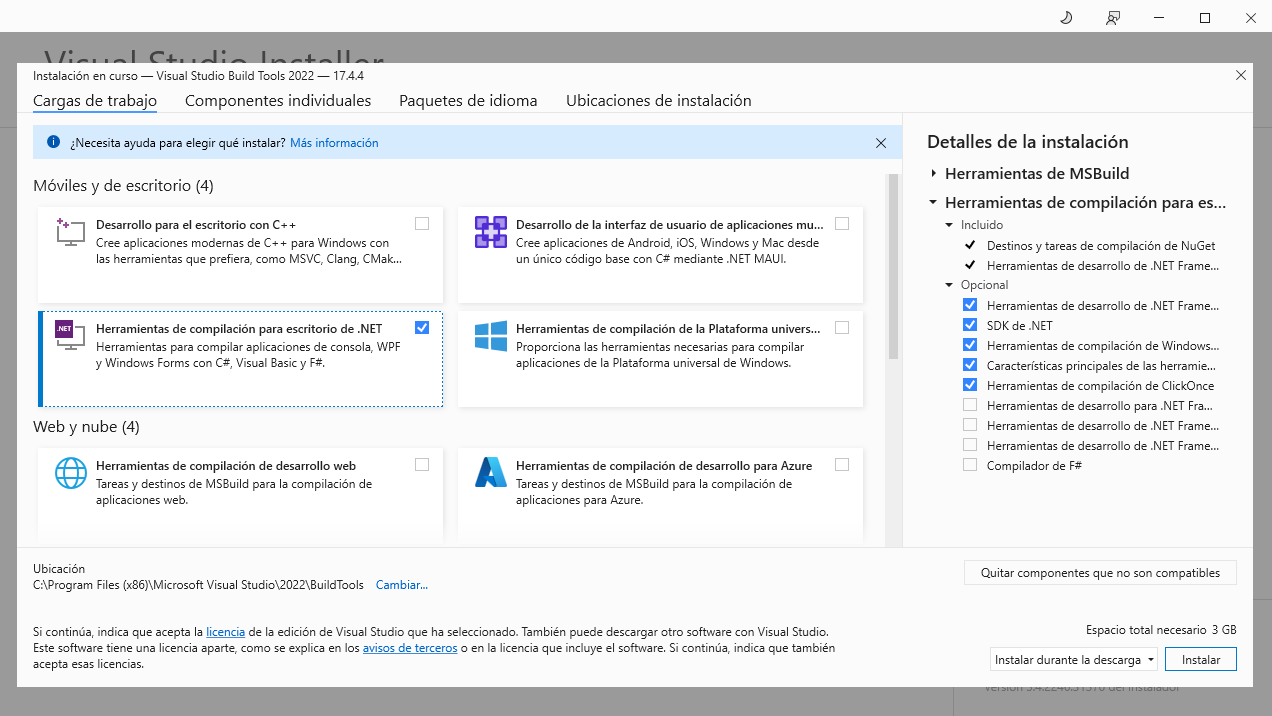
- (대안) Visual Studio 2019를위한 도구 빌드 : https://aka.ms/vs/16/release/vs_buildtools.exe
- 바이러스 백신을 비활성화합니다 : d
- Windows 10 Pro에서 테스트 - 버전 20H2- 빌드 19045.2486
OffensivePipeline.dll.config 파일에서 사용 된 빌드 도구의 버전을 변경할 수 있습니다.
< add key = " BuildCSharpTools " value = " C:Program Files (x86)Microsoft Visual Studio2019BuildToolsCommon7ToolsVsDevCmd.bat " />
< add key = " BuildCSharpTools " value = " C:Program Files (x86)Microsoft Visual Studio2022BuildToolsCommon7ToolsVsDevCmd.bat " />
빌드 요구 사항
- Net Framework 3.5.1 (일부 도구의 경우) : https://www.microsoft.com/en-us/download/details.aspx?id=22
- Visual Studio 2022-> https://visualstudio.microsoft.com/thank-you-doyloading-visual-studio/?sku=community&rel=17
- 도넛 너겟을 수동으로 추가하십시오. (Nugget의 @n1xbyte ( Donutcore.1.0.1.nupkg )에 감사드립니다)
크레딧
- confuserex 프로젝트 : https://github.com/mkaring/confuserex
- 도넛 프로젝트 : https://github.com/thewover/donut
- 도넛 C# 생성기 : https://github.com/n1xbyte/donutcs
- SharpCollection : https://github.com/flangvik/sharpcollection
지원되는 도구
- adcollector :
- 설명 : AdCollector는 가능한 공격 벡터를 식별하기 위해 Active Directory 환경을 열거하는 가벼운 도구입니다.
- 링크 : https://github.com/dev-2-2-null/adcollector
- adcspwn :
- 설명 : PETITPOTAM (Petitpotam)에서 인증을 강요하고 인증서 서비스로 릴레이하여 Active Directory 네트워크에서 권한을 에스컬레이션하는 도구.
- 링크 : https://github.com/bats3c/adcspwn
- adfsdump :
- 설명 : AD FS에서 모든 종류의 케이크를 덤프하는 AC# 도구
- 링크 : https://github.com/mandiant/adfsdump
- AdSearch :
- 설명 : Cobalt-Strike의 Execute-Asse-Assembly 명령을 위해 작성된 도구.
- 링크 : https://github.com/tomcarver16/adsearch
- Bettersafetykatz :
- 설명 : SafetyKatz 의이 수정 된 포크는 Gentilkiwi Github Repo에서 직접 Mimikatz의 최신 사전 컴파일 릴리스를 동적으로 가져오고 감지 된 서명에서 런타임 패치를 사용하고 SharpSploit Dinvoke를 사용하여 메모리를 얻습니다.
- 링크 : https://github.com/flangvik/bettersafetykatz
- 인증 :
- 설명 : 인증은 Active Directory 인증 서비스 (AD CS)의 오해를 열거하고 남용하는 C# 도구입니다.
- 링크 : https://github.com/ghostpack/certify
- DeployPrinternightmare :
- 설명 : C# 공유 네트워크 프린터를 설치하기위한 도구는 다른 네트워크 머신의 쉬운 privesc를 허용하기 위해 Printernightmare 버그를 남용합니다!
- 링크 : https://github.com/flangvik/deployprinternightmare
- edd :
- 설명 : 열거 도메인 데이터는 PowerView와 유사하지만 .NET에서 유사하게 설계되었습니다. PowerView는 본질적으로 궁극적 인 도메인 열거 도구이며, 우리는 우리 자신에게 작업 한 .NET 구현을 원했습니다. 이 도구는 광범위한 기존 프로젝트에서 다양한 기능의 구현을보고 EDD로 결합하여 주로 구성되었습니다.
- 링크 : https://github.com/fortynorthsecurity/edd
- FORECERT :
- 설명 : C# AD 그룹 정책에서 취약점을 찾는 도구이지만 GROUPER2보다 더 잘 수행합니다.
- 링크 : https://github.com/ghostpack/forgecert
- Group3R :
- 설명 : Rubeus는 RAW Kerberos 상호 작용 및 남용을위한 C# 도구 세트입니다.
- 링크 : https://github.com/group3r/group3r
- Krbrelay :
- 설명 : Kerberos 릴레이를위한 C# 프레임 워크
- 링크 : https://github.com/cube0x0/krbrelay
- Krbrelayup :
- 설명 : Rubeus와 Krbrelay의 특징 중 일부 주변의 간단한 포장지
- 링크 : https://github.com/dec0ne/krbrelayup
- Lockless :
- 설명 : Lockless는 열린 파일 핸들을 열거하고 잠긴 파일을 복사 할 수있는 C# 도구입니다.
- 링크 : https://github.com/ghostpack/lockless
- PassTheCert :
- 설명 : 다른 공격 조치를 수행하기 위해 인증서를 사용하여 LDAP/S 서버에 대해 인증 할 수있는 작은 개념 증명 도구
- 링크 : https://github.com/almondoffsec/passthecert
- Purplesharp :
- 설명 : Purplesharp
- 링크 : https://github.com/mvelazc0/purplesharp
- 루베우스 :
- 설명 : Rubeus는 RAW Kerberos 상호 작용 및 남용을위한 C# 도구 세트입니다.
- 링크 : https://github.com/ghostpack/rubeus
- SafetyKatz :
- 설명 : SafetyKatz는 @gentilkiwi의 Mimikatz 프로젝트와 @subtee의 .NET PE 로더의 약간 수정 된 버전의 조합입니다.
- 링크 : https://github.com/ghostpack/safetykatz
- Sauroneye :
- 설명 : Sauroneye는 Red Team이 특정 키워드가 포함 된 파일을 찾는 데 도움이되는 검색 도구입니다.
- 링크 : https://github.com/vivami/sauroneye
- SearchOutLook :
- 설명 : AC# 키워드에 대한 Outlook의 실행중인 인스턴스를 통해 검색하는 도구
- 링크 : https://github.com/redlectroid/searchoutlook
- 안전 벨트 :
- 설명 : 안전 벨트는 공격적인 보안 및 방어 보안 관점과 관련된 많은 보안 지향적 호스트 서브 "안전 점검"을 수행하는 C# 프로젝트입니다.
- 링크 : https://github.com/ghostpack/seatbelt
- Sharp- smbexec :
- 설명 : Kevin Robertsons의 기본 C# 변환 SMBEXEC PowerShell 스크립트
- 링크 : https://github.com/checkymander/sharp-smbexec
- SharpApplocker :
- 설명 : 확장 된 기능을 갖춘 Get-ApplockerPolicy PowerShell Cmdlet의 C# 포트.
- 링크 : https://github.com/flangvik/sharpapplocker
- Sharpbypassuac :
- 설명 : UAC 바이 패스 용 C# 도구
- 링크 : https://github.com/fatrodzianko/sharpbypassuac
- Sharpchisel :
- 설명 : c# https://github.com/jpillora/chisel에서 Chisel의 래퍼
- 링크 : https://github.com/shantanu561993/sharpchisel
- Sharpchromium :
- 설명 : SharpChromium은 Google Chrome, Microsoft Edge 및 Microsoft Edge Beta의 데이터를 검색하는 .NET 4.0+ CLR 프로젝트입니다. 현재 추출 할 수 있습니다
- 링크 : https://github.com/djhohnstein/sharpchromium
- SharpCloud :
- 설명 : SharpCloud는 Amazon Web Services, Microsoft Azure 및 Google Compute와 관련된 자격 증명 파일의 존재를 확인하기위한 간단한 C# 유틸리티입니다.
- 링크 : https://github.com/chrismaddalena/sharpcloud
- Sharpcom :
- 설명 : Sharpcom은 ac# port of invoke-dcom입니다
- 링크 : https://github.com/rvrsh3ll/sharpcom
- SharpCookieMonster :
- 설명 : 이것은 @defaultnamehere의 쿠키 범죄 모듈의 날카로운 포트입니다 - 멋진 작품에 대한 전체 크레딧!
- 링크 : https://github.com/m0rv4i/sharpcookiemonster
- SharpCrasheventLog :
- 설명 : OpeneventLoga/ElfCleareventLogFilew를 사용하여 Windows EventLog 서비스를 로컬 또는 원격으로 충돌합니다.
- 링크 : https://github.com/slyd0g/sharpcrasheventlog
- Sharpdir :
- 설명 : Sharpdir는 TCP 포트 445를 사용하는 DIR.EXE와 동일한 SMB 프로세스를 사용하는 파일의 로컬 및 원격 파일 시스템을 모두 검색하도록 설정된 간단한 코드입니다.
- 링크 : https://github.com/jnqpblc/sharpdir
- SharpdPapi :
- 설명 : SharpDPapi는 @gentilkiwi의 Mimikatz 프로젝트의 일부 dpapi 기능의 C# 포트입니다.
- 링크 : https://github.com/ghostpack/sharpdpapi
- SharpDump :
- 설명 : Sharpdump는 Powersploit의 Out-Minidump.ps1 기능의 C# 포트입니다.
- 링크 : https://github.com/ghostpack/sharpdump
- sharpedrchecker :
- 설명 : 실행 프로세스, 프로세스 메타 데이터, 현재 프로세스에로드 된 DLL 및 각 DLLS 메타 데이터, 공통 설치 디렉토리, 설치된 서비스 및 각 서비스 바이너리 메타 데이터, 설치된 드라이버 및 각 드라이버 메타 데이터를 확인합니다.
- 링크 : https://github.com/pwndexter/sharpedrchecker
- Sharpersist :
- 설명 : C#로 작성된 Windows Persistence Toolkit
- 링크 : https://github.com/mandiant/sharpersist
- SharpExec :
- 설명 : SharpExec은 측면 이동을 돕기 위해 설계된 공격 보안 C# 도구입니다.
- 링크 : https://github.com/anthemtotheego/sharpexec
- Sharpgpoabuse :
- 설명 : SharpGPoabuse는 C#로 작성된 .NET 응용 프로그램으로, 해당 GPO가 제어하는 객체를 손상시키기 위해 GPO (Group Policy Object)에서 사용자의 편집 권한을 활용하는 데 사용할 수 있습니다.
- 링크 : https://github.com/fsecurelabs/sharpgpoabuse
- Sharphandler :
- 설명 :이 프로젝트는 LSASS에 대한 오픈 핸들을 Parse 또는 Minidump LSASS로 재사용하므로 자신의 LSASS 핸들을 사용하여 상호 작용할 필요가 없습니다. (Dinvoke-Version)
- 링크 : https://github.com/jfmaes/sharphandler
- Sharphose :
- 설명 : Sharphose는 코발트 스트라이크의 실행 조립보다 빠르고 안전하며 사용할 수 있도록 설계된 C# 비밀번호 스프레이 도구입니다.
- 링크 : https://github.com/ustayready/sharphose
- Sharphound3 :
- 설명 : C# 혈액 사냥 섭취기의 재 작성
- 링크 : https://github.com/bloodhoundad/sharphound3
- Sharpkatz :
- 설명 : mimikatz sekurlsa :: logonpasswords, sekurlsa :: ekeys 및 lsadump :: dcsync 명령의 포팅
- 링크 : https://github.com/b4rtik/sharpkatz
- SharPlaps :
- 설명 :이 실행 파일은 Execute-Assembly를 사용하여 Cobalt Strike 세션 내에서 실행됩니다. Active Directory에서 랩 비밀번호를 검색합니다.
- 링크 : https://github.com/swisskyrepo/sharplaps
- Sharpmapexec :
- 설명 : CrackMapeXec의 버전을 선명하게합니다
- 링크 : https://github.com/cube0x0/sharpmapexec
- SharpMinidump :
- 설명 : 메모리 (Windows 10 -Windows Server 2016)에서 LSASS 프로세스의 미니 덤프를 만듭니다. 전체 프로세스는 동적 API 호출, 직접 SYSCALL 및 기본 API를 사용하여 AV / EDR 감지를 피합니다.
- 링크 : https://github.com/b4rtik/sharpminidump
- Sharpmove :
- 설명 : 원격 호스트의 .NET 인증 실행
- 링크 : https://github.com/0xthirteen/sharpmove
- SharpNamedPipePth :
- 설명 :이 프로젝트는 사용자 사망자를위한 로컬 명명 파이프에서 인증을 위해 패스 하쉬를 사용하는 C# 도구입니다. 이를 사용하려면 현지 관리자 또는 Seimponate 권리가 필요합니다.
- 링크 : https://github.com/s3cur3th1ssh1t/sharpnamedpippth
- SharpNopSexec :
- 설명 : 측면 이동에 대한 명령 실행이 적습니다.
- 링크 : https://github.com/juliourena/sharpnopsexec
- SharpPrinter :
- 설명 : 프린터는 수정 된 콘솔 버전입니다.
- 링크 : https://github.com/rvrsh3ll/sharpprinter
- sharprdp :
- 설명 : 인증 명령 실행을위한 원격 데스크탑 프로토콜 콘솔 응용 프로그램
- 링크 : https://github.com/0xthirteen/sharprdp
- Sharpreg :
- 설명 : Sharpreg는 TCP 포트 445를 사용하는 reg.exe와 동일한 SMB 프로세스를 사용하여 원격 레지스트리 서비스 API와 상호 작용하도록 설정된 간단한 코드입니다.
- 링크 : https://github.com/jnqpblc/sharpreg
- sharpsccm :
- 설명 : SharPSCCM은 SCCM 관리 콘솔 GUI에 액세스 할 필요없이 측면 이동 및 자격 증명 수집을 위해 Microsoft Endpoint Configuration Manager (일명 Configmgr, 이전 SCCM)를 활용하도록 설계된 사후 공개 도구입니다.
- 링크 : https://github.com/mayyhem/sharpsccm
- sharpscribble :
- 설명 : Windows Sticky Notes 데이터베이스에서 데이터를 추출합니다. Windows 10 빌드 1607 이상에서 작동합니다. 이것
- 링크 : https://github.com/v1v1/sharpscribbles
- SharpSearch :
- 설명 : 원하는 정보에 대한 대상 파일에 대한 파일 공유를 신속하게 필터링하는 프로젝트.
- 링크 : https://github.com/djhohnstein/sharpsearch
- SharpSecDump :
- 설명 : 원격 SAM + LSA 비밀의 .NET 포트 IMPACKET의 SECRETSDUMP.PY의 덤핑 기능
- 링크 : https://github.com/g0ldengunsec/sharpsecdump
- 샤프 쇼어 :
- 설명 : 현재 도메인의 모든 시스템에서 네트워크를 공유하는 빠르고 더러운 이진을 읽을 수 있습니다.
- 링크 : https://github.com/djhohnstein/sharpshares
- SharpSniper :
- 설명 : SharpsNiper는 상자를 타겟팅 할 수 있도록 이러한 사용자의 IP 주소를 찾는 간단한 도구입니다.
- 링크 : https://github.com/hunniccyber/sharpsniper
- Sharpsphere :
- 설명 : Sharpsphere는 Red Teamers에게 vCenter가 관리하는 가상 기계의 게스트 운영 체제와 쉽게 상호 작용할 수있는 기능을 제공합니다.
- 링크 : https://github.com/jamescooteuk/sharpsphere
- SharpSpray :
- 설명 : SharpSpray LDAP를 사용하여 도메인의 모든 사용자에 대한 비밀번호 스프레이 공격을 수행하기 위해 간단한 코드가 세트되며 코발트 스트라이크와 호환됩니다.
- 링크 : https://github.com/jnqpblc/sharpspray
- sharpsqlpwn :
- 설명 : C# Active Directory 환경에서 MSSQL 인스턴스로 약점을 식별하고 이용하는 도구
- 링크 : https://github.com/lefayjey/sharpsqlpwn
- 샤프 스테이 :
- 설명 : .NET 지속성
- 링크 : https://github.com/0xthirteen/sharpstay
- sharpsvc :
- 설명 : SharPSVC는 SC.EXE와 동일한 DCERPC 프로세스를 사용하여 SC 관리자 API와 상호 작용하도록 설정된 간단한 코드입니다.
- 링크 : https://github.com/jnqpblc/sharpsvc
- Sharptask :
- 설명 : Sharptask는 Schtasks.exe와 동일한 DCERPC 프로세스를 사용하여 작업 스케줄러 서비스 API와 상호 작용하도록 설정된 간단한 코드입니다. 이는 TCP 포트 135와 함께 열리고 임시 TCP 포트를 사용합니다.
- 링크 : https://github.com/jnqpblc/sharptask
- Sharpup :
- 설명 : Sharpup은 다양한 파워 업 기능의 C# 포트입니다.
- 링크 : https://github.com/ghostpack/sharpup
- SharpView :
- 설명 : .NET POWERVIEW 포트
- 링크 : https://github.com/tevora-threat/sharpview
- Sharpwebserver :
- 설명 : Red Team 지향 간단한 HTTP & WebDav 서버는 C#으로 작성하여 Net-NTLM 해시를 캡처하는 기능이 있습니다.
- 링크 : https://github.com/mgeeky/sharpwebserver
- Sharpwifigrabber :
- 설명 : 워크 스테이션에 저장된 모든 WLAN 프로파일의 Wi-Fi 암호를 CLEAT 텍스트로 검색합니다.
- 링크 : https://github.com/r3nhat/sharpwifigrabber
- Sharpwmi :
- 설명 : SharpWMI는 다양한 WMI 기능의 C# 구현입니다.
- 링크 : https://github.com/ghostpack/sharpwmi
- Sharpzerologon :
- 설명 : CVE-2020-1472, 일명 Zerologon에 대한 악용. 이 도구는 Netlogon의 암호화 취약성을 악용하여 인증 우회를 달성합니다.
- 링크 : https://github.com/nccgroup/nccfsas
- Shhmon :
- 설명 : Sysmon의 드라이버는 설치시 이름을 바꿀 수 있지만 항상 고도 385201에로드됩니다.이 도구의 목표는 방어 도구가 항상 이벤트를 수집하고 있다는 가정에 도전하는 것입니다.
- 링크 : https://github.com/matterpreter/shhhmon
- Snaffler :
- 설명 : Snaffler는 Pentesters와 Red Teamers가 끔찍한 지루한 건초 더미 (거대한 Windows/Ad 환경)에서 맛있는 사탕 바늘 (주로 크레딧이지만 유연합니다)을 찾는 데 도움이되는 도구입니다.
- 링크 : https://github.com/snaffcon/snaffler
- sqlclient :
- 설명 : Beacon을 통해 데이터베이스 데이터에 액세스하기위한 C# .NET MSSQL 클라이언트.
- 링크 : https://github.com/fortynorthsecurity/sqlclient
- Standin :
- 설명 : Standin은 소규모 광고 포스트 프로모스 툴킷입니다
- 링크 : https://github.com/fuzzysecurity/standin
- Sweetpotato :
- 설명 : 서비스 계정에서 시스템에 이르기까지 다양한 기본 Windows 권한 에스컬레이션 기술 모음
- 링크 : https://github.com/ccob/sweetpotato
- 위협 검사 :
- 설명 : MatterPreter의 DefenderCheck의 수정 된 버전
- 링크 : https://github.com/rasta-mouse/threatcheck
- Tokenstomp :
- 설명 : 토큰 권한 제거 결함에 대한 C# POC
- 링크 : https://github.com/martiningesen/tokenstomp
- Trufflesnout :
- 설명 : 공격적인 운영자를위한 반복 광고 발견 툴킷
- 링크 : https://github.com/dsnezhkov/trufflesnout
- 왓슨 :
- 설명 : Watson은 누락 된 KB를 열거하고 권한 에스컬레이션 취약점을위한 익스플로잇을 제안하도록 설계된 .NET 도구입니다.
- 링크 : https://github.com/rasta-mouse/watson
- 수염 :
- 설명 : Whisker는 MSDS-KeyCredentialLink 속성을 조작하여 Active Directory 사용자 및 컴퓨터 계정을 인수하여 대상 계정에 "Shadow Credentials"를 효과적으로 추가하기위한 C# 도구입니다.
- 링크 : https://github.com/eladshamir/whisker
- Winpeas :
- 설명 : 권한 에스컬레이션 멋진 스크립트 스위트
- 링크 : https://github.com/carlospolop/privilege-escalation-awesome-scripts-suite
- wmireg :
- 설명 : Whisker는 MSDS-KeyCredentialLink 속성을 조작하여 Active Directory 사용자 및 컴퓨터 계정을 인수하기위한 C# 도구입니다.
- 링크 : https://github.com/airzero24/wmireg






