XCube
1.0.0

XCUBE : 스파 스 복셀 계층을 사용한 대규모 3D 생성 모델링
Xuanchi Ren, Jiahui Huang, Xiaohui Zeng, Ken Museth, Sanja Fidler, Francis Williams
종이, 프로젝트 페이지
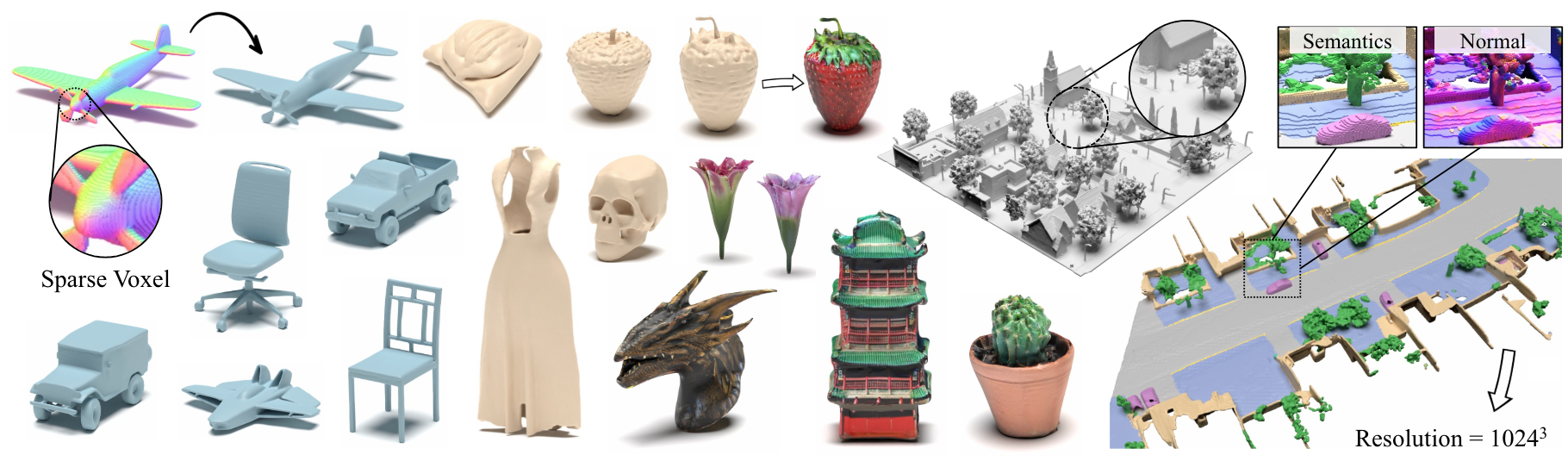
초록 : 우리는 Xcube ( x 3 으로 약칭)를 제시합니다. 우리의 모델은 시간이 많이 걸리는 테스트 시간 최적화없이 피드 포워드 방식으로 최대 1024 3 의 최고의 효과적인 해상도로 수백만 개의 복셀을 생성 할 수 있습니다. 이를 달성하기 위해, 우리는 높은 효율적인 VDB 데이터 구조를 기반으로 구축 된 사용자 정의 프레임 워크를 사용하여 거친 방식으로 점진적으로 높은 해상도 그리드를 생성하는 계층 적 복셀 잠재 확산 모델을 사용합니다. 고해상도 객체를 생성하는 것 외에도, 우리는 100m x 100m의 스케일에서 10cm의 작은 야외 장면에서 XCUBE의 효과를 보여줍니다. 우리는 과거의 접근 방식에 대한 명확한 질적 및 정량적 개선을 관찰합니다. 무조건 생성 외에도 모델이 사용자 유도 편집, 단일 스캔의 장면 완료 및 텍스트-3D와 같은 다양한 작업을 해결하는 데 사용될 수 있음을 보여줍니다.
비즈니스 문의는 당사 웹 사이트를 방문하여 다음 양식을 제출하십시오 : NVIDIA Research Licensing. 모델과 관련된 다른 질문은 Xuanchi 또는 Jiahui에 문의하십시오.
우리는 현재 Linux 만 지원합니다. 우리는 다른 플랫폼에 대한 지원을 환영합니다.
(선택 사항) Conda를 사용할 때 Libmamba를 엄청나게 개선하기 위해 Libmamba를 설치하십시오.
 conda update -n base conda
conda install -n base conda-libmamba-solver
conda config --set solver libmamba
 # Clone the repository
git clone [email protected]:nv-tlabs/XCube.git
cd XCube

# Create conda environment
conda env create -f environment.yml
conda activate xcube

# Install fVDB (3D learning framework; require GPU later than Ampere)
git clone https://github.com/AcademySoftwareFoundation/openvdb.git
cd openvdb
git fetch origin pull/1808/head:feature/fvdb
git checkout feature/fvdb
rm fvdb/setup.py && cp ../assets/setup.py fvdb/
cd fvdb && pip install .
cd ../..

# Mesh extraction
cd ext/nksr-cuda
python setup.py develop
cd ../..
Docker 사용자의 경우 여기에서 기본 이미지를 사용하고 위의 Conda 설정을 적용하는 것이 좋습니다.
Google 드라이브에서 사전 체크 포인트를 다운로드하여 checkpoints 에 넣습니다. 또는 당사는 귀하를 위해 모든 것을 자동으로 다운로드 할 수있는 스크립트를 제공합니다 (임시로 사용할 수 없음).
python inference/download_pretrain.py
Shapenet 추론 :
 # Chair
python inference/sample_shapenet.py none --category chair --total_len 20 --batch_len 4 --ema --use_ddim --ddim_step 100 --extract_mesh

# Car
python inference/sample_shapenet.py none --category car --total_len 20 --batch_len 4 --ema --use_ddim --ddim_step 100 --extract_mesh

# Plane
python inference/sample_shapenet.py none --category plane --total_len 20 --batch_len 4 --ema --use_ddim --ddim_step 100 --extract_mesh

# Visualize
python visualize_object.py -p results/{YOUR_PATH} -i {YOUR_ID}
Waymo 추론 :
 # Unconditional sampling
python inference/sample_waymo.py none --total_len 20 --batch_len 4 --ema --use_ddim --ddim_step 100 --extract_mesh

# Single-scan condition (coming soon)

# Visualize
python visualize_scene.py -p results/{YOUR_PATH} -i {YOUR_ID}
objaverse 추론 :
 # Text to 3D
python inference/sample_objaverse.py none --batch_len 4 --ema --use_ddim --ddim_step 100 --extract_mesh

# Visualize
python visualize_object.py -p results/{YOUR_PATH} -i {YOUR_ID}
릴리스 된 코드는 논문에 설명 된 버전과 약간의 차이점이 있습니다.
- 정제 네트워크는 클리너 코드에 대해 생략되어 결과에 약간의 변화가 발생할 수 있지만 이러한 차이는 중요하지 않습니다.
- 메쉬 추출 공정은 VAE에서 후 처리로 이동되었습니다.
우리는 Xcube Misc의 데이터 준비 및 유용한 트릭에 대한 자세한 지침을 준비했습니다.
데이터 다운로드 링크 :
../data/shapenet 로 배치하십시오. 또는 구성에서 _shapenet_path 변경할 수 있습니다.교육 자동 코더 모델 교육 :
 # ShapeNet chair
python train.py ./configs/shapenet/chair/train_vae_16x16x16_dense.yaml --wname 16x16x16-kld-0.03_dim-16 --max_epochs 100 --cut_ratio 16 --gpus 8 --batch_size 32

# ShapeNet car
python train.py ./configs/shapenet/car/train_vae_16x16x16_dense.yaml --wname 16x16x16-kld-0.03_dim-16 --max_epochs 100 --cut_ratio 16 --gpus 8 --batch_size 32

# ShapeNet plane
python train.py ./configs/shapenet/plane/train_vae_16x16x16_dense.yaml --wname 16x16x16-kld-0.03_dim-16 --max_epochs 100 --cut_ratio 16 --gpus 8 --batch_size 32

# Waymo uncond
python train.py ./configs/waymo/train_vae_32x32x32_dense.yaml --wname 32x32x32-kld-0.03_dim-8 --max_epochs 50 --gpus 8 --batch_size 32 --eval_interval 1
훈련 잠재 확산 모델 :
 # ShapeNet chair
python train.py ./configs/shapenet/chair/train_diffusion_16x16x16_dense.yaml --wname 16x16x16_kld-0.03 --eval_interval 5 --gpus 8 --batch_size 8 --accumulate_grad_batches 4

# ShapeNet car
python train.py ./configs/shapenet/car/train_diffusion_16x16x16_dense.yaml --wname 16x16x16_kld-0.03 --eval_interval 5 --gpus 8 --batch_size 8 --accumulate_grad_batches 4

# ShapeNet plane
python train.py ./configs/shapenet/plane/train_diffusion_16x16x16_dense.yaml --wname 16x16x16_kld-0.03 --eval_interval 5 --gpus 8 --batch_size 8 --accumulate_grad_batches 4

# Waymo uncond
python train_auto.py ./configs/waymo/train_diffusion_32x32x32_dense.yaml --wname 32x32x32_kld-0.03 --eval_interval 1 --gpus 8 --batch_size 16 --accumulate_grad_batches 4 --save_topk 2
교육 자동 코더 모델 교육 :
 # ShapeNet chair
python train.py ./configs/shapenet/chair/train_vae_128x128x128_sparse.yaml --wname 512_to_128-kld-1.0 --max_epochs 100 --gpus 8 --batch_size 8 --accumulate_grad_batches 2

# ShapeNet car
python train.py ./configs/shapenet/car/train_vae_128x128x128_sparse.yaml --wname 512_to_128-kld-1.0 --max_epochs 100 --gpus 8 --batch_size 8 --accumulate_grad_batches 2

# ShapeNet plane
python train.py ./configs/shapenet/plane/train_vae_128x128x128_sparse.yaml --wname 512_to_128-kld-1.0 --max_epochs 100 --gpus 8 --batch_size 8 --accumulate_grad_batches 2

# Waymo uncond
python train.py ./configs/waymo/train_vae_256x256x256_sparse.yaml --wname 1024_to_256-kld-0.3 --max_epochs 50 --gpus 8 --batch_size 8 --accumulate_grad_batches 2
훈련 잠재 확산 모델 :
 # ShapeNet chair
python train.py ./configs/shapenet/plane/train_diffusion_128x128x128_sparse.yaml --wname 128x128x128_kld-1.0_normal_cond --eval_interval 5 --gpus 8 --batch_size 8 --accumulate_grad_batches 8 --save_topk 2 --save_every 30

# ShapeNet car
python train.py ./configs/shapenet/car/train_diffusion_128x128x128_sparse.yaml --wname 128x128x128_kld-1.0_normal_cond --eval_interval 5 --gpus 8 --batch_size 8 --accumulate_grad_batches 8 --save_topk 2 --save_every 30

# ShapeNet plane
python train.py ./configs/shapenet/car/train_diffusion_128x128x128_sparse.yaml --wname 128x128x128_kld-1.0_normal_cond --eval_interval 5 --gpus 8 --batch_size 8 --accumulate_grad_batches 8 --save_topk 2 --save_every 30

# Waymo uncond
python train.py ./configs/waymo/train_diffusion_256x256x256_sparse.yaml --wname 256x256x64_kld-0.3_semantic_cond --eval_interval 1 --gpus 8 --batch_size 8 --accumulate_grad_batches 4 --save_topk 1
또한 다양한 교육 설정을 수동으로 지정하여 필요에 맞는 모델을 얻을 수 있습니다. 일반적인 플래그에는 다음이 포함됩니다.
--wname : WANDB LOGGER에 지정할 추가 실험 이름.--batch_size : autoencoder 대한 총 배치 NUM 및 diffusion 위한 GPU 당 배치 Num.--logger_type : 우리는 기본적으로 wandb 사용합니다. none 지원되지 않습니다. Copyright © 2024, Nvidia Corporation & Affiliates. 모든 권리 보유. 이 작업은 NVIDIA 소스 코드 라이센스에 따라 제공됩니다.
 @inproceedings { ren2024xcube ,
    title = { XCube: Large-Scale 3D Generative Modeling using Sparse Voxel Hierarchies } ,
    author = { Ren, Xuanchi and Huang, Jiahui and Zeng, Xiaohui and Museth, Ken and Fidler, Sanja and Williams, Francis } ,
    booktitle = { Proceedings of the IEEE/CVF Conference on Computer Vision and Pattern Recognition } ,
    year = { 2024 }
}




