XCube
1.0.0

Xcube:スパースボクセル階層を使用した大規模な3D生成モデリング
Xuanchi Ren、Jiahui Huang、Xiaohui Zeng、Ken Museth、Sanja Fidler、Francis Williams
論文、プロジェクトページ
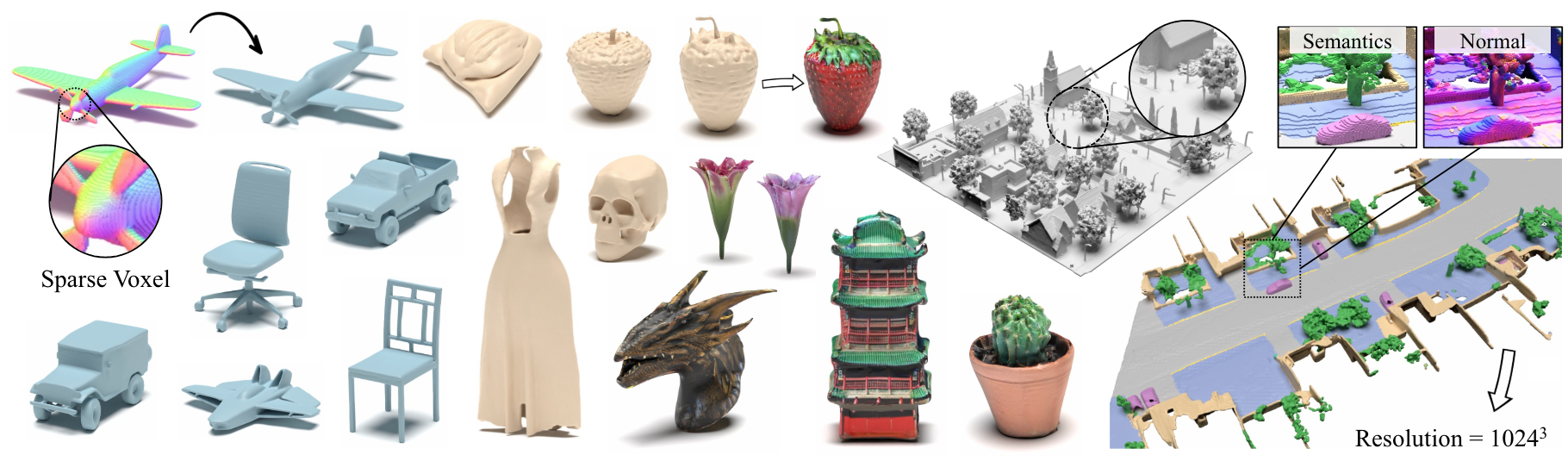
要約:任意の属性を持つ高解像度のスパース3Dボクセルグリッドの新しい生成モデルであるXcube( X 3と略された)を提示します。私たちのモデルは、時間のかかるテスト時間の最適化なしに、最大1024 3の最大1024 3の最大1024 3の最大の効果的な解像度で何百万ものボクセルを生成できます。これを達成するために、非常に効率的なVDBデータ構造に基づいて構築されたカスタムフレームワークを使用して、粗から高解像度の方法で徐々に高分解能グリッドを生成する階層ボクセル潜在拡散モデルを採用しています。高解像度のオブジェクトを生成することとは別に、10cmの小さなボクセルサイズの100m x 100mのスケールで大きな屋外シーンでXcubeの有効性を示します。過去のアプローチにおける明確な定性的および定量的改善を観察します。無条件の生成に加えて、モデルを使用して、ユーザーガイド付き編集、単一スキャンからのシーンの完了、テキストから3Dなどのさまざまなタスクを解決できることを示しています。
ビジネスに関するお問い合わせについては、当社のWebサイトにアクセスして、フォームを提出してください:Nvidia Research Licensing。モデルに関連する他の質問については、XuanchiまたはJiahuiにお問い合わせください。
現在、Linuxのみをサポートしていることに注意してください。他のプラットフォームのサポートを歓迎します。
(オプション)libmambaをインストールして、コンドラを使用する際の生活の質の大幅な改善
 conda update -n base conda
conda install -n base conda-libmamba-solver
conda config --set solver libmamba
 # Clone the repository
git clone [email protected]:nv-tlabs/XCube.git
cd XCube

# Create conda environment
conda env create -f environment.yml
conda activate xcube

# Install fVDB (3D learning framework; require GPU later than Ampere)
git clone https://github.com/AcademySoftwareFoundation/openvdb.git
cd openvdb
git fetch origin pull/1808/head:feature/fvdb
git checkout feature/fvdb
rm fvdb/setup.py && cp ../assets/setup.py fvdb/
cd fvdb && pip install .
cd ../..

# Mesh extraction
cd ext/nksr-cuda
python setup.py develop
cd ../..
Dockerユーザーの場合、ここからベース画像を使用し、上記のコンドラのセットアップを適用することをお勧めします。
Google Driveから事前に処理されたチェックポイントをダウンロードし、 checkpointsの下に置きます。または、すべてを自動的にダウンロードできるスクリプトを提供します(一時的に利用できません):
python inference/download_pretrain.py
Shapenetの推論:
 # Chair
python inference/sample_shapenet.py none --category chair --total_len 20 --batch_len 4 --ema --use_ddim --ddim_step 100 --extract_mesh

# Car
python inference/sample_shapenet.py none --category car --total_len 20 --batch_len 4 --ema --use_ddim --ddim_step 100 --extract_mesh

# Plane
python inference/sample_shapenet.py none --category plane --total_len 20 --batch_len 4 --ema --use_ddim --ddim_step 100 --extract_mesh

# Visualize
python visualize_object.py -p results/{YOUR_PATH} -i {YOUR_ID}
Waymo Inference:
 # Unconditional sampling
python inference/sample_waymo.py none --total_len 20 --batch_len 4 --ema --use_ddim --ddim_step 100 --extract_mesh

# Single-scan condition (coming soon)

# Visualize
python visualize_scene.py -p results/{YOUR_PATH} -i {YOUR_ID}
objaverse推論:
 # Text to 3D
python inference/sample_objaverse.py none --batch_len 4 --ema --use_ddim --ddim_step 100 --extract_mesh

# Visualize
python visualize_object.py -p results/{YOUR_PATH} -i {YOUR_ID}
リリースされたコードには、論文で説明されているバージョンとの違いがあります。
- 洗練されたネットワークはクリーンなコードの場合は省略されているため、結果にわずかなばらつきが発生する可能性がありますが、これらの違いは重要ではありません。
- メッシュ抽出プロセスは、VAEから後処理に移動しました。
Xcube Miscのデータ準備と有用なトリックに関する詳細な指示を準備しました。
データのダウンロードリンク:
../data/shapenetとして配置します。または、構成の_shapenet_path変更することをお勧めします。トレーニングオートエンコーダーモデル:
 # ShapeNet chair
python train.py ./configs/shapenet/chair/train_vae_16x16x16_dense.yaml --wname 16x16x16-kld-0.03_dim-16 --max_epochs 100 --cut_ratio 16 --gpus 8 --batch_size 32

# ShapeNet car
python train.py ./configs/shapenet/car/train_vae_16x16x16_dense.yaml --wname 16x16x16-kld-0.03_dim-16 --max_epochs 100 --cut_ratio 16 --gpus 8 --batch_size 32

# ShapeNet plane
python train.py ./configs/shapenet/plane/train_vae_16x16x16_dense.yaml --wname 16x16x16-kld-0.03_dim-16 --max_epochs 100 --cut_ratio 16 --gpus 8 --batch_size 32

# Waymo uncond
python train.py ./configs/waymo/train_vae_32x32x32_dense.yaml --wname 32x32x32-kld-0.03_dim-8 --max_epochs 50 --gpus 8 --batch_size 32 --eval_interval 1
潜在的な拡散モデルのトレーニング:
 # ShapeNet chair
python train.py ./configs/shapenet/chair/train_diffusion_16x16x16_dense.yaml --wname 16x16x16_kld-0.03 --eval_interval 5 --gpus 8 --batch_size 8 --accumulate_grad_batches 4

# ShapeNet car
python train.py ./configs/shapenet/car/train_diffusion_16x16x16_dense.yaml --wname 16x16x16_kld-0.03 --eval_interval 5 --gpus 8 --batch_size 8 --accumulate_grad_batches 4

# ShapeNet plane
python train.py ./configs/shapenet/plane/train_diffusion_16x16x16_dense.yaml --wname 16x16x16_kld-0.03 --eval_interval 5 --gpus 8 --batch_size 8 --accumulate_grad_batches 4

# Waymo uncond
python train_auto.py ./configs/waymo/train_diffusion_32x32x32_dense.yaml --wname 32x32x32_kld-0.03 --eval_interval 1 --gpus 8 --batch_size 16 --accumulate_grad_batches 4 --save_topk 2
トレーニングオートエンコーダーモデル:
 # ShapeNet chair
python train.py ./configs/shapenet/chair/train_vae_128x128x128_sparse.yaml --wname 512_to_128-kld-1.0 --max_epochs 100 --gpus 8 --batch_size 8 --accumulate_grad_batches 2

# ShapeNet car
python train.py ./configs/shapenet/car/train_vae_128x128x128_sparse.yaml --wname 512_to_128-kld-1.0 --max_epochs 100 --gpus 8 --batch_size 8 --accumulate_grad_batches 2

# ShapeNet plane
python train.py ./configs/shapenet/plane/train_vae_128x128x128_sparse.yaml --wname 512_to_128-kld-1.0 --max_epochs 100 --gpus 8 --batch_size 8 --accumulate_grad_batches 2

# Waymo uncond
python train.py ./configs/waymo/train_vae_256x256x256_sparse.yaml --wname 1024_to_256-kld-0.3 --max_epochs 50 --gpus 8 --batch_size 8 --accumulate_grad_batches 2
潜在的な拡散モデルのトレーニング:
 # ShapeNet chair
python train.py ./configs/shapenet/plane/train_diffusion_128x128x128_sparse.yaml --wname 128x128x128_kld-1.0_normal_cond --eval_interval 5 --gpus 8 --batch_size 8 --accumulate_grad_batches 8 --save_topk 2 --save_every 30

# ShapeNet car
python train.py ./configs/shapenet/car/train_diffusion_128x128x128_sparse.yaml --wname 128x128x128_kld-1.0_normal_cond --eval_interval 5 --gpus 8 --batch_size 8 --accumulate_grad_batches 8 --save_topk 2 --save_every 30

# ShapeNet plane
python train.py ./configs/shapenet/car/train_diffusion_128x128x128_sparse.yaml --wname 128x128x128_kld-1.0_normal_cond --eval_interval 5 --gpus 8 --batch_size 8 --accumulate_grad_batches 8 --save_topk 2 --save_every 30

# Waymo uncond
python train.py ./configs/waymo/train_diffusion_256x256x256_sparse.yaml --wname 256x256x64_kld-0.3_semantic_cond --eval_interval 1 --gpus 8 --batch_size 8 --accumulate_grad_batches 4 --save_topk 1
さらに、さまざまなトレーニング設定を手動で指定して、ニーズに合ったモデルを取得できます。一般的なフラグには以下が含まれます。
--wname :WandB Loggerを指定する追加の実験名。--batch_size : autoencoderの場合は合計で、 diffusionの場合はGPUあたりのバッチの数です。--logger_type :デフォルトでwandbを使用します。サポートされているnoneもありません。 Copyright©2024、Nvidia Corporation&Affiliates。無断転載を禁じます。この作業は、NVIDIAソースコードライセンスの下で利用可能になります。
 @inproceedings { ren2024xcube ,
    title = { XCube: Large-Scale 3D Generative Modeling using Sparse Voxel Hierarchies } ,
    author = { Ren, Xuanchi and Huang, Jiahui and Zeng, Xiaohui and Museth, Ken and Fidler, Sanja and Williams, Francis } ,
    booktitle = { Proceedings of the IEEE/CVF Conference on Computer Vision and Pattern Recognition } ,
    year = { 2024 }
}




