twitch text to speech bot for MacOS (, windows and linux via GoogleCloudTTS)
!!CAUTION!! / 注意
!!this readme might be incorrect / このREADMEは正しくない可能性があります!!
Concept / コンセプト
- Just double click and ready / ダブルクリックで起動するだけで使える
- No third party app for TTS (e.g. limechat) / メイン機能のTTSでは別のアプリケーション不要(limechatなど)
- Remember command for username and keywords / ユーザー名やキーワードを教育
- Listeners can check chat log before open the stream / 配信を開く前のチャットログをリスナーさんが見れる
- This is using discord... / discordを利用します。。
- Using discord, streamer can receive comment as notification of discord even if streaming with (via) iPhone or iPad. (e.g. I can't see "PC monitor" during playing Music Game)
/ discordを使うことでiPhone, iPad配信でもコメントを通知として受け取れます。(音ゲー中などPCを見れない場合でも通知であれば見れるという人
- TTS and Discord transfer functions should be turned off individually / TTSやdiscord転送は個別に使用・未使用を切り替えられる
Functions / 機能
- speak comment(this is main function. but optional) / コメントの読み上げ
- comment will be converted to voice data via
say command. / Macのsayコマンドを使ってtwitchのコメントを読み上げます
( Google TTS version is now developing. / Googleのテキスト読み上げサービスを利用したバージョンも開発中 )
- add
!remember {keyword}={how_to_read} and !forget {keyword} command for text to speech /
読み方の教育機能つけました。!remember {keyword}={how_to_read} で教育、!forget {keyword}で忘却
- add
!dice {options} command. / !dice コマンド
e.g.
!dice 1d6 3d4 => throw one normal die, and three 4-sided dice /
!dice 1d6 3d4 => 普通のサイコロを1個、4面サイコロを3個振る
- transfer comments to discord(optional)
- if notification setting of discord was ON, you can receive comment as notification on mobile devise during streaming iOS games or something /
discordの通知をONにしておけば、スマホ・タブレットなどでコメントを通知として表示できます。音ゲーなんかで目を離せない場合に便利
Requirement / 必要なもの
- Generous heart(mandatory) / 優しい心(必須
- Courage to talk to me when something wrong(optional) / 何かあったときに僕に話しかける勇気(任意
Mandatory for source use / sourceから使う場合に必須
- node(~12.6.0)
- yarn(~1.15.2)
Mandatory / 必須
- for text to speech / 読み上げに必要なもの
- twitch IRC token( see https://twitchapps.com/tmi/
Optional / 省略可能
- for text to speech / 読み上げに必要なもの
- mac
- install voice data via config / 音声データのインストール
- cloudTTS ( 1~4 of GCP TTS document)
- create or login to GCP / 既存のGCPプロジェクトへログインor作成
- make new service accout for cloudTTS / cloudTTS 用のサービスアカウント作成・DL
- setup
serviceAccount.json file to use (there is 2 method) / serviceAccount.json ファイルを使えるようにセットアップ(2つの中から好きな方法で)
- place file in
config dir / config フォルダへファイルを設置
- save to
config dir as serviceAccount.json / config フォルダの中に serviceAccount.json という名前で保存
- ( OR
- remove
.sample from filename of config/serviceAccount.json.sample / config/serviceAccount.json.sample のファイル名から .sample を削除
- paste contents of downloaded service account file / DLしたファイルの中身をリネームしたファイルにペースとして保存
- add
GOOGLE_APPLICATION_CREDENTIALS of Environment variable / 環境変数 GOOGLE_APPLICATION_CREDENTIALS へpathを追加
- for transfer to discord / discordへの転送に必要なもの
- create bot
- token
- channel ID
search at google, like discord+bot+token+channel+id
see e.g. https://github.com/Chikachi/DiscordIntegration/wiki/How-to-get-a-token-and-channel-ID-for-Discord
How to use / 使い方
Install / インストール
Using binary / こちらでビルドした実行ファイルを使う
- move to latest release / latest releaseに移動: https://github.com/allpaqa-jgk/twitch_text_to_speech_bot/releases/latest
- download as zip & unzip / zipで落として解凍
- download binary and place to same folder / 実行ファイルをDLして同じフォルダへ配置
- mac: twitch_text_to_speech_bot
- windows: twitch_text_to_speech_bot.exe
- edit config/default.js / コンフィグファイルセットアップ
Using source / ソースコードからyarn, nodeで使う
- download this repo / 下記の中から好きな方法でリポジトリをダウンロード
- clone / クローン
- use HTTPS
git clone https://github.com/allpaqa-jgk/twitch_text_to_speech_bot.git
- use SSH
- install node / nodeのインストール
- install using(homebrewを利用する場合
- mac: run
brew install node
- use
n or nodenv / (nやnodenvを使いたい人はご自由にどうぞ
- see https://github.com/tj/n
- see https://github.com/nodenv/nodenv
- install yarn / yarnというパッケージマネージャを入れる(別にnpmでもいいっちゃいいんだけど
- run
npm install -g yarn
- install packages / パッケージのインストール
- move to dir of this repository / このファイルのあるフォルダへ移動
- run
yarn install to install packages to node_module directory.
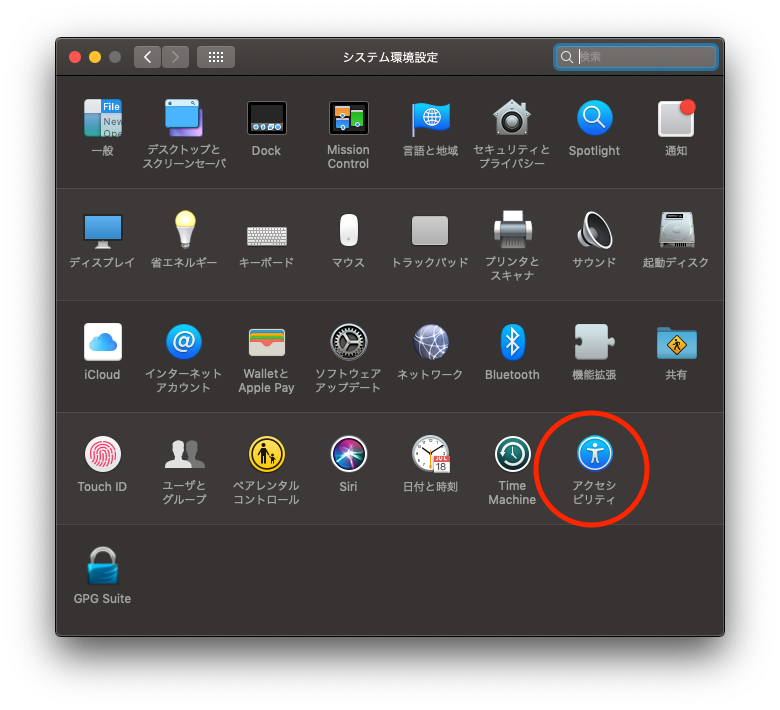
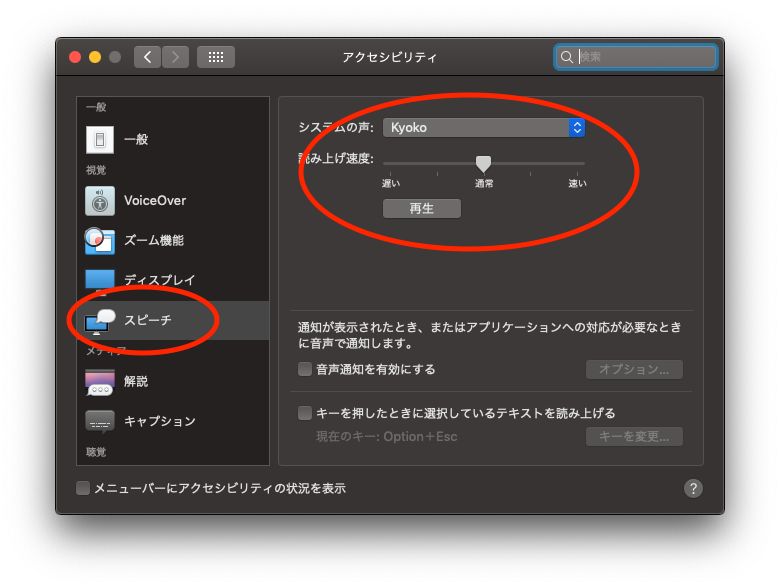
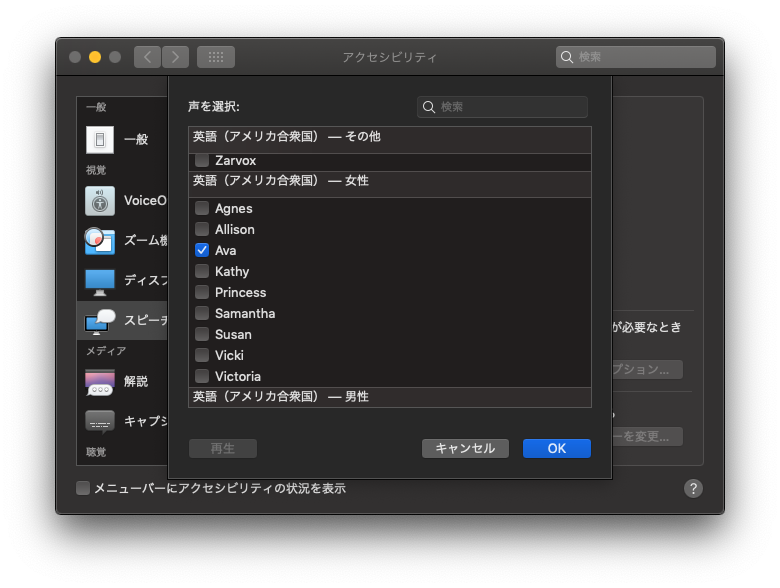
- install voice data / 音声データのインストール
Setting / 初期設定・設定変更
- copy
config.js.sample to config.js
- set token, ID and so on
- change setting if you need
- TTS_MODE: only 'Mac' is available, Google Cloud TTS version is now developing. Windows is not supported /
'Mac'のみ利用可能。Google Cloud TTS版開発中、Windowsはサポート外
- READ_USERNAME: speak username who commented or not / コメントしたユーザー名も読み上げるかどうか
- USE_SIMPLE_NAME: remove characters after '' or numbers end of username / '' や末尾の数字を除去して読み上げ
- SPEAKER_ENGLISH: "Susan" / 英語時の読み上げ音声の名前
- SPEAKER_JAPANESE: "Kyoko" / 日本語のような2バイト文字の読み上げ音声の名前
- RATE_ENGLISH: 150 / 英語の読み上げスピード
- RATE_JAPANESE: 200 / 日本語の読み上げスピード
- BILINGAL_MODE: false / 英語日本語で読み分けるかどうか
- COMMENT_REMEMVER_AVAILABLE: true / 教育機能オンオフ
- COMMENT_REMEMVER_REGEXP: "^!(remember)" / 教育コマンドのパターン
- COMMENT_FORGET_REGEXP: "^!(forget)" / 忘却コマンドのパターン
- DISCORD_TOKEN: '' / discord botのtoken
- DISCORD_CHANNEL_ID: '' / discordへ転送するチャンネルのID
- TW_OAUTH_TOKEN: '' / twitchのコメントを取得したりコメントを書き込んだりするユーザーのtoken(
{username}_botなどのアカウントをもう一つ作ってそいつにやらせるのがおすすめ)
- TW_CHANNEL_NAME: '' / twitchで監視するチャンネル名
- BOT_USERNAME: '' / botの名前を変えたいときに使う(微妙
Exec / 起動
Binary
- exec binary file ( downloaded from https://github.com/allpaqa-jgk/twitch_text_to_speech_bot/releases/latest
Source
- start / スタート
- move to repository dir / このリポジトリのディレクトリに移動
- run
yarn start
- stop / 終了
- push
ctrl - c on your keyboard / キーボードでctrl - c
Update / 更新
which way did you choose when you download repo? / ダウンロード方法によってアップデート方法が違うよ
- binary / 実行ファイルをダウンロードした場合
- Download new files from (latest release)[https://github.com/allpaqa-jgk/twitch_text_to_speech_bot/releases/latest] / (latest release)[https://github.com/allpaqa-jgk/twitch_text_to_speech_bot/releases/latest] から最新版をダウンロード
- unzip / 解凍
- overwrite existing files / 既存ファイル上書き
- clone as git repository / cloneした場合
git status
check unstaged change. / コミットしていない変更がないかチェック
memo which version you using. / 戻したいときに戻せるように使ってるバージョンをチェックgit pull origin master
- zip / zipでDLした場合
- take backup of your setting and convert list / フォルダーごとバックアップをとる
- download zip file of current
master branch / DLし直します
- unzip / 解凍
- overwrite files / 上書き
FAQ
- Who are you? / お前誰
- twitter: https://twitter.com/haaaaaaa_8
- twitch: https://www.twitch.tv/haaaaaaa
- Is this free to use? / ただで使える?
- for Mac mode / Mac モード
- YES! but I'm happy if you follow my twitch channel. /
いいよ!もし気に入ったらtwitchのチャンネルをフォローしてもらえると嬉しいな
- GoogleCloudTTS mode / GoogleCloudTTS モード
- Free up to 1 million character/month / 100万文字/月まで無料
- How can I use on Windows? / windowsで使える?
- This bot is available for only Mac OS. Windows can use only CloudTTS mode. /
MacモードはMacのみ対応。WindowsはCloudTTSモードのみ対応
- Bug! / Question! / Great idea! / ばぐみつけた! / 質問がある! / いいこと思いついた!
- tell me via twitter / 問題があったときや質問があればツイッターで教えて欲しいな
- feel free to make issue / issueにしてくれてもOK
- or discord / discordも可
(you can find invitation on info panel on my twitch channel / twitchのチャンネルの情報パネルに招待リンクあるはず
- How can I support of developing this repo? / 何かサポートしてやってもいいよって人
- twitter
- send message / リプ・DM多分返します。多分
- twitch
- make comment during streaming / コメント歓迎
- follow/subscribe / フォロー・サブスク
- donate / ドネーション(寄付)
see info panel of my twitch channel / 情報パネルにリンクがあるよ
- github
- star this repo / このリポジトリにスターをつける
- contribute to this repo / 開発社ぼしうちう
- make issue about bug, idea and so on. / バグやアイディアをissueに書いて欲しいな
- make PR for bugfix. / バグ修正
Special Thanks
Packages
- discordjs/uws
- google-cloud/text-to-speech
- config
- csv
- csv-parse
- discord.js
- forever
- forever-monitor
- play-sound
- request
- request-promise
- tmi.js
Packages for dev
I used this repository as reference
- https://blog.sikmi.com/twitch_speaker
- https://github.com/sikmi/twitch_speaker (ruby)
Please feel free to send message / なにかあればお気軽にー
- twitter: https://twitter.com/haaaaaaa_8
- twitch: https://www.twitch.tv/haaaaaaa








