twitch text to speech bot for MacOS (, windows and linux via GoogleCloudTTS)
!!CAUTION!! / Caution
!!This readme might be incorrect / This README may not be correct!!
Concept
- Just double click and ready / Can be used by simply launching it
- No third party app for TTS (eg limechat) / No other application is required for the main feature TTS (such as limechat)
- Remember command for username and keywords / Education for username and keywords
- Listeners can check chat log before open the stream / Listeners can view chat log before opening the stream
- Use this is using discord... / discord. .
- Using discord, streamer can receive comment as notification of discord even if streaming with (via) iPhone or iPad. (eg I can't see "PC monitor" during playing Music Game)
/ By using discord, you can receive comments as notifications on iPhone and iPad streams. (If you can't watch a PC, such as during a music game, you can watch it if you have a notification, even if you can't watch a PC, such as during a music game.
- TTS and Discord transfer functions should be turned off individually / TTS and discord transfers can be switched between individual and unused
Functions
- speak comment(this is main function. but optional) / Read a comment
- comment will be converted to voice data via
say command. / Use say command on Mac to read twitch comments aloud
(Google TTS version is now developing. / A version using Google's text-to-speech service is also under development) - add
!remember {keyword}={how_to_read} and !forget {keyword} command for text to speech /
I've added the educational function for reading. !remember {keyword}={how_to_read} , !forget {keyword} - add
!dice {options} command. / !dice command
eg
!dice 1d6 3d4 => throw one normal die, and three 4-sided dice /
!dice 1d6 3d4 => Roll one regular dice and three four-sided dice.
- transfer comments to discord(optional)
- if notification setting of discord was ON, you can receive comment as notification on mobile devise during streaming iOS games or something /
If you turn on discord notifications, you can display comments as notifications on your smartphone, tablet, etc. Useful when you can't take your eyes off music games
Requirement / What you need
- Generous heart(mandatory) / Kind heart (required
- Courage to talk to me when something wrong(optional) / The courage to talk to me when something wrong (optional)
Mandatory for source use / Required when using from source
- node(~12.6.0)
- yarn(~1.15.2)
Mandatory / Required
- for text to speech / What you need to read aloud
- twitch IRC token( see https://twitchapps.com/tmi/
Optional / Optional
- for text to speech / What you need to read aloud
- mac
- install voice data via config / Install voice data
- cloudTTS (1~4 of GCP TTS document)
- create or login to GCP / Log in or create an existing GCP project
- Make new service accout for cloudTTS / Creating and DL service accounts for cloudTTS
- setup
serviceAccount.json file to use (there is 2 method) / Set up serviceAccount.json file (in any of the two you like)- place file in
config dir / Place file in config folder- save to
config dir as serviceAccount.json / Save as serviceAccount.json in your config folder - ( OR
- remove
.sample from filename of config/serviceAccount.json.sample / config/serviceAccount.json.sample remove .sample from filename - paste contents of downloaded service account file / Save the contents of downloaded file to a renamed file as a pace
- add
GOOGLE_APPLICATION_CREDENTIALS of Environment Environment variable / Add path to GOOGLE_APPLICATION_CREDENTIALS
- for transfer to discord / What you need to transfer to discord
- create bot
- token
- channel ID
search at google, like discord+bot+token+channel+id
see eg https://github.com/Chikachi/DiscordIntegration/wiki/How-to-get-a-token-and-channel-ID-for-Discord
How to use
Install
Using binary / Use the executable file built here
- move to latest release / latest release: https://github.com/allpaqa-jgk/twitch_text_to_speech_bot/releases/latest
- download as zip & unzip / drop and unzip
- download binary and place to same folder / DL executable file and place it in the same folder
- mac: twitch_text_to_speech_bot
- windows: twitch_text_to_speech_bot.exe
- edit config/default.js / config file setup
Using source / Use source code with yarn, node
- download this repo / Download the repository in any way you like from the following
- clone
- use HTTPS
-
git clone https://github.com/allpaqa-jgk/twitch_text_to_speech_bot.git
- use SSH
- install node/node installation
- install using (if using homebrew
- mac: run
brew install node
- use
n or nodenv / (please feel free to use n or nodenv- see https://github.com/tj/n
- see https://github.com/nodenv/nodenv
- Install a package manager called install yarn / yarn (it's fine if it's npm too.
- run
npm install -g yarn
- install packages / Install packages
- move to dir of this repository / Move to the folder where this file is located
- run
yarn install to install packages to node_module directory.
- install voice data / Install voice data
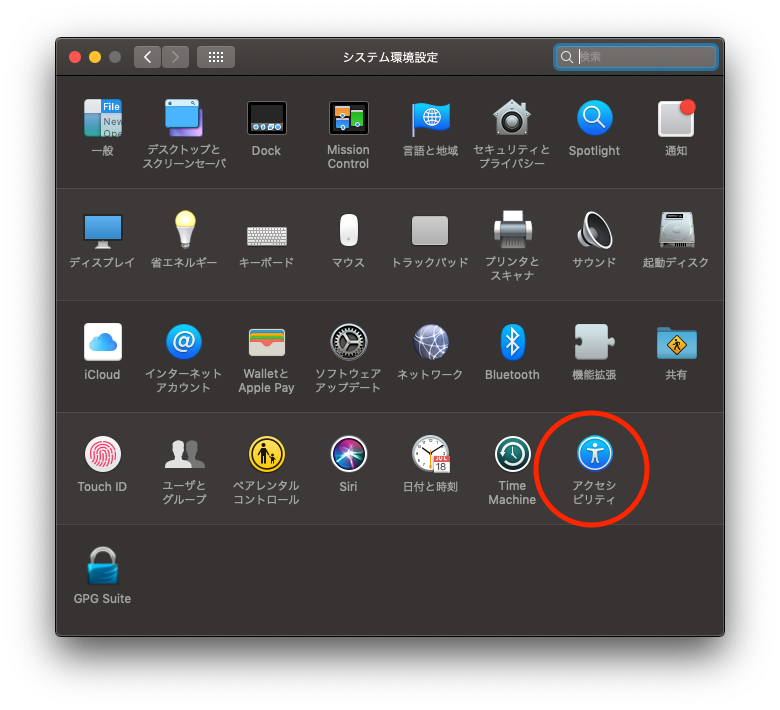
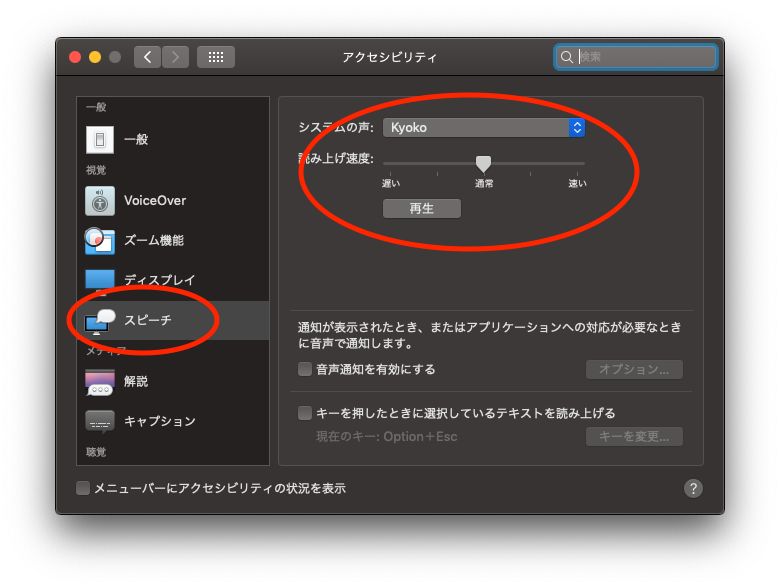
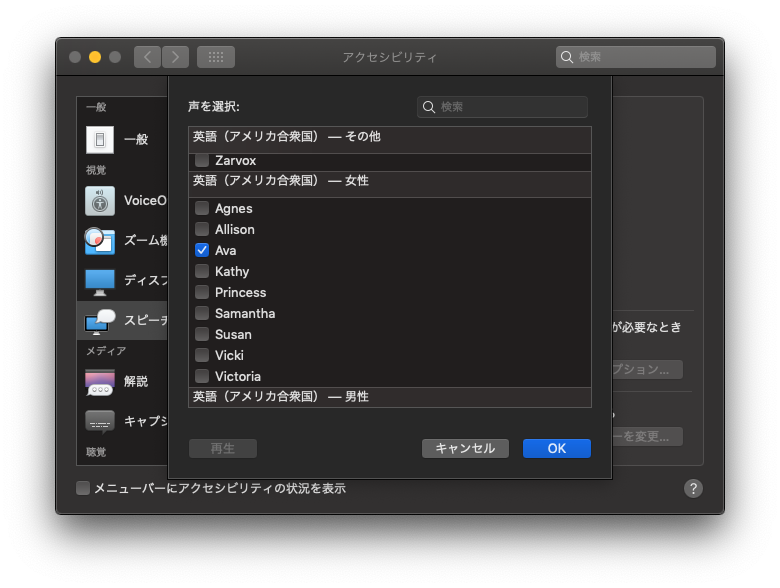
Setting / Initial settings and settings change
- copy
config.js.sample to config.js - set token, ID and so on
- change setting if you need
- TTS_MODE: only 'Mac' is available, Google Cloud TTS version is now developing. Windows is not supported /
Only 'Mac' is available. Google Cloud TTS version is currently being developed, Windows is not supported - READ_USERNAME: speak username who commented or not / Whether to read the commented username as well
- USE_SIMPLE_NAME: remove characters after ' ' or numbers end of username / ' ' or read aloud
- SPEAKER_ENGLISH: "Susan" / Name of the audio to be read out in English
- SPEAKER_JAPANESE: "Kyoko" / Name of audio that reads aloud double-byte characters like Japanese
- RATE_ENGLISH: 150 / English reading speed
- RATE_JAPANESE: 200 / Japanese reading speed
- BILINGAL_MODE: false / Whether to read English and Japanese
- COMMENT_REMEMVER_AVAILABLE: true / Educational function on/off
- COMMENT_REMEMVER_REGEXP: "^!(remember)" / pattern for educational commands
- COMMENT_FORGET_REGEXP: "^!(forget)" / Forget command pattern
- DISCORD_TOKEN: '' / discord bot token
- DISCORD_CHANNEL_ID: '' ID of the channel to be transferred to /discord
- TW_OAUTH_TOKEN: '' / Token of the user who retrieves and posts comments on twitch (it is recommended to have another account such as
{username}_bot and have him do it) - TW_CHANNEL_NAME: '' / Channel name to monitor on twitch
- BOT_USERNAME: '' / Use when you want to change the name of the bot (slightly clever)
Exec / Start
Binary
- exec binary file ( downloaded from https://github.com/allpaqa-jgk/twitch_text_to_speech_bot/releases/latest
Source
- start
- move to repository dir / Move to directory for this repository
- run
yarn start
- stop/end
- push
ctrl - c on your keyboard / ctrl - c
Update
Which way did you choose when you download repo? / The update method differs depending on the download method
- If you downloaded binary/executable file
- Download new files from (latest release)[https://github.com/allpaqa-jgk/twitch_text_to_speech_bot/releases/latest] / (latest release)[https://github.com/allpaqa-jgk/twitch_text_to_speech_bot/releases/latest]
- unzip / unzip
- overwrite existing files / Overwrite existing files
- clone as git repository / clone
-
git status
check unstaged change. / Check for uncommitted changes
memo which version you using. / Check the version you are using so that you can restore it when you want to -
git pull origin master
- If you downloaded using zip/zip
- take backup of your setting and convert list / Back up the entire folder
- download zip file of current
master branch / download again - unzip / unzip
- overwrite files / overwrite
FAQ
- Who are you? / Who are you?
- Twitter: https://twitter.com/haaaaaa_8
- twitch: https://www.twitch.tv/haaaaaaa
- Is this free to use? / Can you use it for free?
- for Mac mode / Mac mode
- YES! but I'm happy if you follow my twitch channel. /
That's fine! If you like it, I'd be happy if you follow the twitch channel
- GoogleCloudTTS mode / GoogleCloudTTS mode
- Free up to 1 million character/month / Free up to 1 million characters/month
- How can I use on Windows? / Can it be used on Windows?
- This bot is available for only Mac OS. Windows can use only CloudTTS mode. /
Mac mode is only compatible with Mac. Windows only supports CloudTTS mode
- Bug! / Question! / Great idea! / I've got it! / I have a question! / I came up with something good!
- tell me via twitter / If you have any problems or have any questions, please let me know on Twitter
- Feel free to make issue/It's okay if you make it an issue
- or discord/discord is also possible (you can find invitation on info panel on my twitch channel/twitch channel information panel should have an invitation link
- How can I support this repo? / People who say it's okay to support something
- Twitter
- send message / reply/DM I'll probably reply. perhaps
- twitch
- make comment during streaming / Comments welcome
- follow/subscribe / Follow/subscribe
- donate / Donation
see info panel of my twitch channel / There is a link in the information panel
- github
- star this repo / Star this repository
- contribute to this repo / Developer's Boshiuchi
- make issue about bug, idea and so on. / I would like to write bugs and ideas on the issue
- make PR for bugfix. / Bugfix
Special Thanks
Packages
- discordjs/uws
- google-cloud/text-to-speech
- config
- csv
- csv-parse
- discord.js
- forever
- forever-monitor
- play-sound
- request
- request-promise
- tmi.js
Packages for dev
I used this repository as reference
- https://blog.sikmi.com/twitch_speaker
- https://github.com/sikmi/twitch_speaker (ruby)
Please feel free to send message / If there is anything please feel free to send message
- Twitter: https://twitter.com/haaaaaa_8
- twitch: https://www.twitch.tv/haaaaaaa








