words2contact
1.0.0

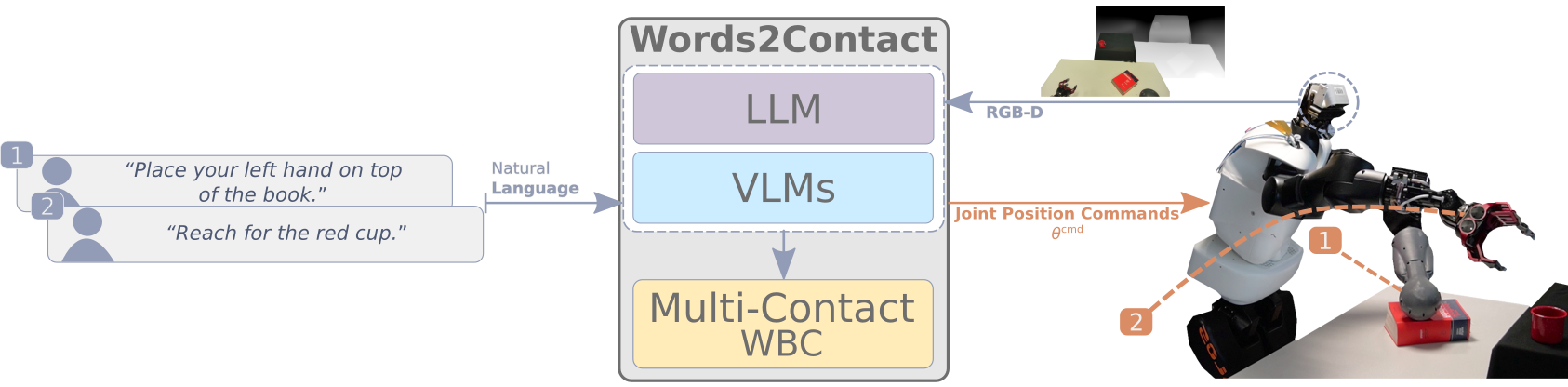
論文の公式実装「Words2Contact:Foundation Modelsを使用した言葉による指示からのサポート連絡先の識別IEEE-Ras Humanoids 2024で提示されています。
このリポジトリには、プロジェクトのLLMS/VLMS部分の実装が含まれています。マルチコンタクト全身コントローラーについては、このリポジトリにアクセスしてください。
詳細については、Paper Webサイトをご覧ください。
 .
├── .ci/                       # Docker configurations
│   └── Dockerfile             # Dockerfile to build the project's container
├── config/                    # Configuration files for models
│   └── GroundingDINO_SwinT_OGC.py # GroundingDINO configuration
├── data/                      # Test data and outputs
│   ├── test.png               # Example input image
│   └── test_output.png        # Example output image
├── media/                     # Media assets
│   ├── ack.png                # Acknowledgment image
│   └── concept_figure_wide.png # Conceptual figure for the project
├── submodules/                # External submodules
│   └── CLIP_Surgery/          # CLIP Surgery code and resources
├── words2contact/             # Core project source code
│   ├── grammar/               # Grammars for constraining language models
│   │   ├── classifier.gbnf    # Grammar for classifying outputs
│   │   └── README.md          # Grammar module documentation
│   ├── prompts/               # Prompts for LLMs
│   │   └── prompts.json       # JSON file with pre-defined prompts
│   ├── geom_utils.py          # Utilities for geometric calculations
│   ├── math_pars.py           # Parsing mathematical expressions
│   ├── saygment.py            # Language-grounded segmentation
│   ├── words2contacts.py      # Core script for Words2Contact
│   └── yello.py               # Language-grounded object detection
├── main.py                    # Entry point for the project
├── launch.sh                  # Docker launch script
├── object_detection.py        # Object detection testing
├── object_segmentation.py     # Object segmentation testing
└── README.md                  # Documentation (this file)
開始する前に、次のことを確認してください。
今のところ、Dockerのみがサポートされており、CondaとPIPの設置がまもなく追加されます。
リポジトリをクローンします:
git clone https://github.com/hucebot/words2contact.git
cd words2contact
Docker画像を作成します:
docker build -t words2contact -f .ci/Dockerfile . OpenAIのGPTベースのLLMSを使用する場合は、Dockerコンテナを起動する前にAPIキーを環境変数として設定します。
export OPENAI_KEY= < your_openai_api_key >次のコマンドを実行してコンテナを起動します。
bash launch.shこれにより、モデルがダウンロードおよび保存されるプロジェクトのルートにmodels/フォルダーが作成されます。
words2contactをテストするには、提供された例の画像を使用して:
python main.py --image_path data/test.png --prompt " Place your hand above the red bowl. "出力はdata/test_output.pngとして保存されます。
もうすぐその例が近づいています!
 usage: main.py [-h] [--image_path IMAGE_PATH] [--prompt PROMPT] [--use_gpt] [--yello_vlm YELLO_VLM] [--output_path OUTPUT_PATH] [--llm_path LLM_PATH] [--chat_template CHAT_TEMPLATE]

Run Words2Contact with an image and a text prompt.

options:
  -h, --help                    show this help message and exit
  --image_path IMAGE_PATH       Path to the input image file. Default: 'data/test.png'.
  --prompt PROMPT               Text prompt for Words2Contact. Default: 'Place your hand above the red bowl.'.
  --use_gpt                     Use OpenAI API for the LLM (requires `OPENAI_KEY`).
  --yello_vlm YELLO_VLM         Model to use for YELLO VLM. Default: 'GroundingDINO'.
  --output_path OUTPUT_PATH     Path to save the output image. Default: 'data/test_output.png'.
  --llm_path LLM_PATH           Path to the `.gguf` LLM model weights.
  --chat_template CHAT_TEMPLATE Chat template to use for local LLMs. Default: 'ChatML'.
.gguf Weightsをダウンロードしてください(たとえば、TheBlokeの抱き合った顔モデル)。models/フォルダーに配置します。--llm_path引数を指定します。 python main.py --image_path data/test.png --llm_path models/local_model.gguf質問やサポートについては、お問い合わせください。
words2contact、データセット、またはこのコードの一部を調査で使用する場合は、私たちの論文を引用してください。
 @INPROCEEDINGS { 10769902 ,
  author = { Totsila, Dionis and Rouxel, Quentin and Mouret, Jean-Baptiste and Ivaldi, Serena } ,
  booktitle = { 2024 IEEE-RAS 23rd International Conference on Humanoid Robots (Humanoids) } ,
  title = { Words2Contact: Identifying Support Contacts from Verbal Instructions Using Foundation Models } ,
  year = { 2024 } ,
  volume = { } ,
  number = { } ,
  pages = { 9-16 } ,
  keywords = { Accuracy;Large language models;Pipelines;Natural languages;Humanoid robots;Transforms;Benchmark testing;Iterative methods;Surface treatment } ,
doi = { 10.1109/Humanoids58906.2024.10769902 } }この研究は以下によってサポートされていました: