docker archivebox
1.0.0

Gambar Docker resmi untuk ArchiveBox, solusi pengarsipan Internet yang diselenggarakan sendiri.
https://hub.docker.com/r/archiveBox/archiveBox
docker pull archivebox/archivebox

# using Docker Compose
mkdir -p ~ /archivebox/data && cd ~ /archivebox
curl -fsSL ' https://docker-compose.archivebox.io ' > docker-compose.yml
docker compose up

# using Docker:
mkdir -p ~ /archivebox/data && cd ~ /archivebox/data
docker run -v $PWD :/data -it archivebox/archivebox init
Dockerfile atau Dockerfile.simpledocker-compose.ymlarchivebox-kubernetes.yml Disarankan untuk menggunakan :latest (stabil, cross-platform build untuk semua arsitektur yang didukung)
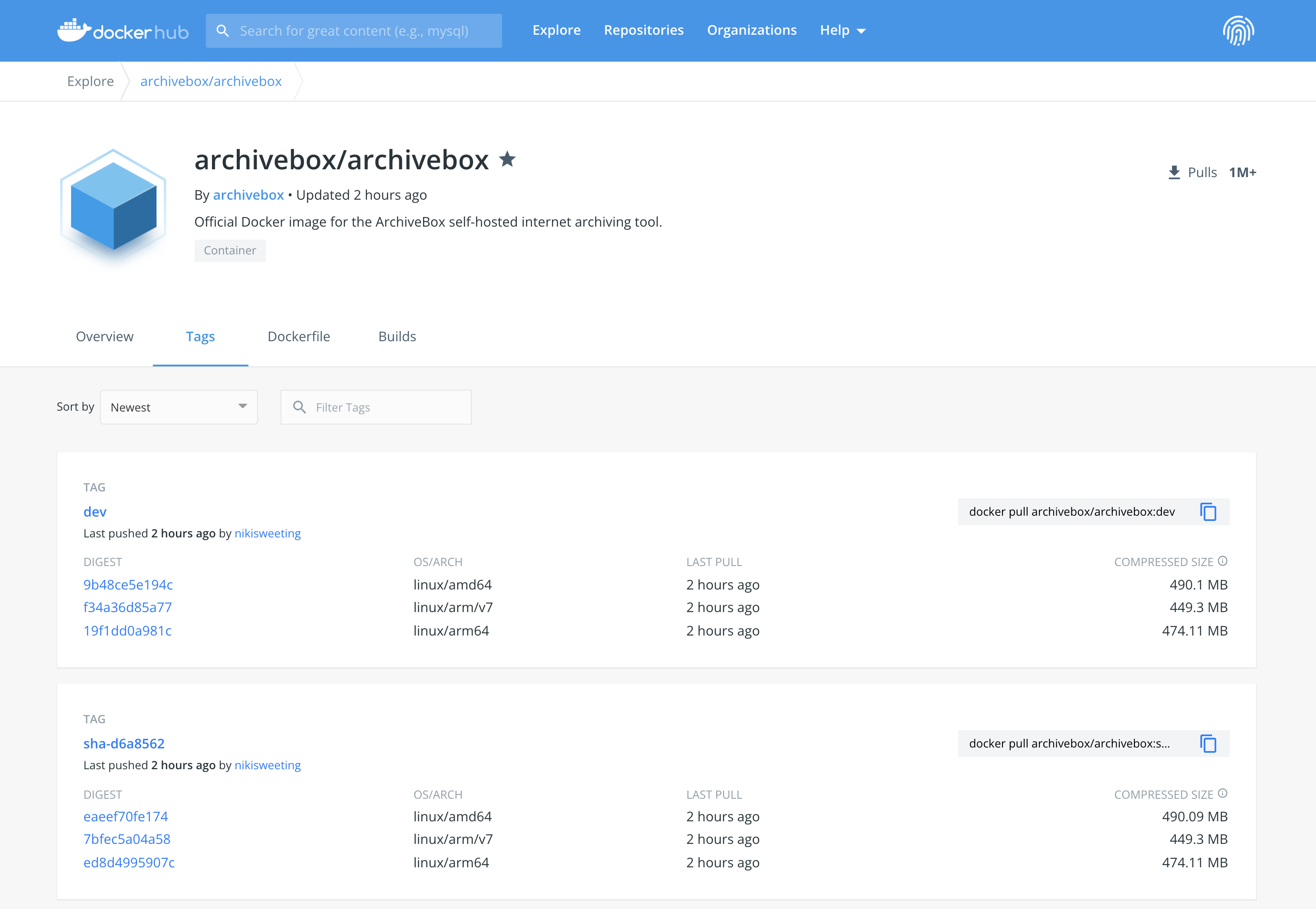
:latest (tag stabil default, 1: 1 dengan :stable / :master ):dev / :main / :<branchname> (tag untuk setiap cabang git, gunakan ini untuk mencoba beta atau pr spesifik)sha-2c7be14 / :sha-<commitid> (tag untuk setiap komit git, gunakan ini untuk menyematkan versi basis kode yang tepat)Untuk daftar lengkap gambar yang diterbitkan: https://hub.docker.com/r/archivebox/archivebox/tags
Linux, MacOS, Windows
OS mana pun di mana Docker atau Docker Desktop didukung.
amd64 Semua prosesor Intel/AMD 64-bit X86arm64 / aarch64 Raspberry Pi V4+, M1 atau Mac yang lebih baru, dan sistem berbasis lengan yang lebih baru (> = ARM V8) i386 x86 32-bit Intel/AMD Processorsarm/v7 / arm/v6 / arm/v5 Raspberry Pi V3 dan sistem lengan yang lebih tuariscv64 / riscv32 / ppc64le / ppc32 / s390x atau arsitektur lainnya Lihat Full docker-compose.yml dan dokumen Docker Archivebox untuk contoh dan dokumentasi yang lebih lengkap.
 services :
    archivebox :
        image : archivebox/archivebox:dev
        ports :
            - 8000:8000
        environment :
            # add any ArchiveBox config options you want here
            - ALLOWED_HOSTS=archivebox.example.com
            - ADMIN_USERNAME=admin
            - ADMIN_PASSWORD=...
            - MEDIA_MAX_SIZE=750m
        volumes :
- ./data:/data FROM python:3.12-slim
WORKDIR /data
RUN pip install archivebox==0.8.5rc44
RUN archivebox install
RUN useradd -ms /bin/bash archivebox && chown -R archivebox /data (Ganti 0.8.5rc44 dengan rilis terbaru)
Lihat lebih lanjut:
Dockerfile : Gambar siap-produksi penuh dengan caching build dan ukuran lapisan yang dioptimalkanDockerfile.simple : Contoh sederhana tentang cara menambahkan arsip ke DockerFile Anda sendiri (Beta: Pengguna Lanjutan saja, ArchiveBox tidak menguji rilis pada Kubernetes, tetapi harus bekerja secara teori)
./archivebox.yml berisi contoh manifes Kubernetes (dengan rook-ceph-rbd dan metallb ).
Gunakan AS-IS, atau edit sesuai kebutuhan Anda, objek akan dibuat di namespace: archivebox .
 apiVersion : apps/v1
kind : Deployment
metadata :
  name : archivebox-deployment
spec :
  selector :
    matchLabels :
      app : archivebox
  replicas : 1
  template :
    metadata :
      labels :
        app : archivebox
    spec :
      containers :
        - name : archivebox
          args : ["server", "--quick-init", "0.0.0.0:8000"]
          image : archivebox/archivebox
          ports :
            - containerPort : 8000
              protocol : TCP
              name : http
          volumeMounts :
            - mountPath : /data
              name : archivebox
      restartPolicy : Always
      volumes :
        - name : archivebox
          persistentVolumeClaim :
            claimName : archivebox
# run this to apply the configuration
kubectl apply -f archivebox.yml Gambar ini dibangun menggunakan docker : https://docs.docker.com/get-docker/ dan di-host di Docker Hub & Github Paket: https://hub.docker.com/r/archiveBox.
https://hub.docker.com/r/archiveBox/archiveBox
Definisi file / paket konfigurasi ada di sini: ArchiveBox/Dockerfile .
Untuk membangun paket ini, pastikan Anda berada di repo utama Archifebox terlebih dahulu.
 cd ArchiveBox/
git pull --recurse-submodules

# Build the docker image
./bin/build_docker.sh

# Push the image to Docker Hub & Github Packages
docker login
./bin/release_docker.sh 0.7.1 latestdocker image ls archivebox/archivebox
docker image inspect < image id > # view image details
docker image history < image id > # view image layer sizes Harap dicatat: Gambar lama di nikisweeting/archivebox sudah usang, gunakan archivebox/archivebox sebagai gantinya.





