Silero TTS Service
1.0.0

I have created this project to provide my smart home with a normal speech synthesis. Also, to provide RHASSPY with a normal speech synthesis. Already ready -made solutions did not suit me and it was decided to invent their bike. The Silero models were taken as the basis.
I was inspired by the Silero-Ha-Http-TTS project from Gromina. He was damp and I decided to do everything in mind, with settings and ready -made containers.
Follow the command:
docker run -p 9898:9898 -m 1g -e NUMBER_OF_THREADS=4 -e LANGUAGE=ru -e SAMPLE_RATE=48000 --name tts_silero -d navatusein/silero-tts-service
Create a docker-compose.yml file and transfer the contents to it:
 version : ' 3 '

services :
  silero-tts-service :
    image : " navatusein/silero-tts-service "
    container_name : " silero-tts-service "
    deploy :
      resources :
        limits :
          memory : 1G
    ports :
      - " 9898:9898 "
    restart : unless-stopped
    environment :
      NUMBER_OF_THREADS : 4
      LANGUAGE : ru
      SAMPLE_RATE : 48000
Follow the command:
docker-compose up
All server settings are transmitted as the Docker environment parameters to the container when starting.
The number of nuclei for speech processing NUMBER_OF_THREADS :
NUMBER_OF_THREADS : 4 The number of flows from 1 to the number of server processor cores.
By default: 4
Language synthesis LANGUAGE :
LANGUAGE : ru By default: ru
Supported languages with votes available to them:
| Language | Language code | Supported voices |
|---|---|---|
| Russian | ru | aidar baya kseniya xenia eugene random |
| Ukrainian | uk | mykyta random |
SAMPLE_RATE sampling frequency:
SAMPLE_RATE : 48000 Possible values: 48000 , 24000 , 8000
By default: 48000
SOX SOX_PARAM Utility Parameters:
SOX_PARAM : " reverb 50 50 10 " # Добавляет эхо на речьBy default: empty
The output file passes through the SOX utility. She can convey the parameters to impose effects on the speech: raise the timbre, add an echo, turn on the bass boost.
Link to the SOX utility documentation: https://linux.die.net/man/1/sox
Correction of the fraud of the end of the phrase HA_FIX :
HA_FIX : True Can take values: True False
By default: False
Corrects a mistake in which Home Assistant does not agree on the end of the phrase. Adds a second of silence to the end of speech.
In the configuration.yaml file, add a record:
 tts :
  - platform : marytts
    host : localhost # Адрес сервера
    port : 9898
    codec : WAVE_FILE
    voice : xenia # Имя голоса который хотите использовать.
language : ru # Не используется. Настройки языка указываются в настройках сервера. /process .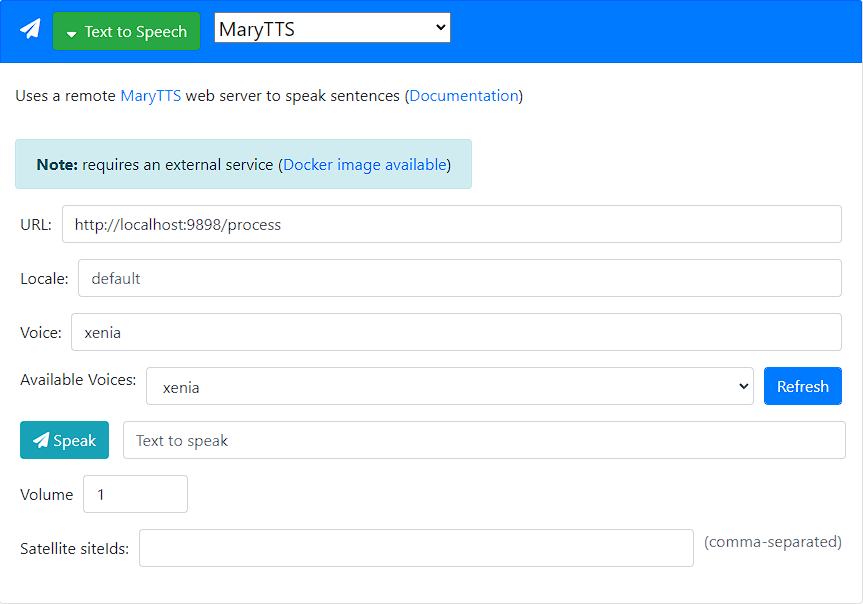
The service can translate numbers into text.
Example:
Текст с цифрой 1.
Normalization example 1
The service can bow nouns after numbers.
To do this, the word that needs to be persuaded after the number, take <d>слово</d> tag.
Example:
У меня было 15 <d>яблоко</d>.
Rlowing Example 1
If you need to persuade a few words, then each must be taken in the tag <d>слово</d> separately.
Мне осталось работать 15 <d>рабочий</d> <d>день</d>.
Lange Example 2
The service can pronounce translite.
Example:
Lorem ipsum dolor sit amet.
Translite example 1
Using SSML, you can control the pauses and proxy synthesized speech.
 <p>
  Когда я просыпаюсь, <prosody rate="x-slow">я говорю довольно медленно</prosody>.
  Потом я начинаю говорить своим обычным голосом,
  <prosody pitch="x-high"> а могу говорить тоном выше </prosody>,
  или <prosody pitch="x-low">наоборот, ниже</prosody>.
  Потом, если повезет – <prosody rate="fast">я могу говорить и довольно быстро.</prosody>
  А еще я умею делать паузы любой длины, например две секунды <break time="2000ms"/>.
  <p>
    Также я умею делать паузы между параграфами.
  </p>
  <p>
    <s>И также я умею делать паузы между предложениями</s>
    <s>Вот например как сейчас</s>
  </p>
</p>
SSML Example 1
GET /clear_cache - cleanses the cache of already synthesized messages.GET /settings - returns the current server settings.GET /voices - returns a list of available votes for the selected language.GET /process?VOICE=[Выбраный голос]&INPUT_TEXT=[Текст для обработки] - returns an audio file of synthesized speech.POST /process in the body of VOICE=[Выбраный голос] , INPUT_TEXT=[Текст для обработки] - returns an audio file of synthesized speech. Edit Client.conf
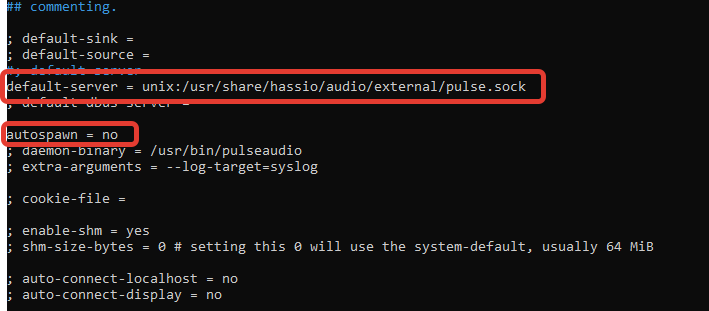
nano /etc/pulse/client.conf
Add the following:
 default-server = unix:/usr/share/hassio/audio/external/pulse.sock
autospawn = no
Restart Pulseaudio.
pulseaudio -k && pulseaudio --start
We put an addid version of Current Version: 2.1.1 and put only this version. Mopidy 2.2.0 do not put - it is broken. Read more about the broken version of Mopidy 2.2.0 Read here.
Add to configuration.yaml
 media_player :
  - platform : mpd
    name : " MPD Mopidy "
    host : localhost
    port : 6600
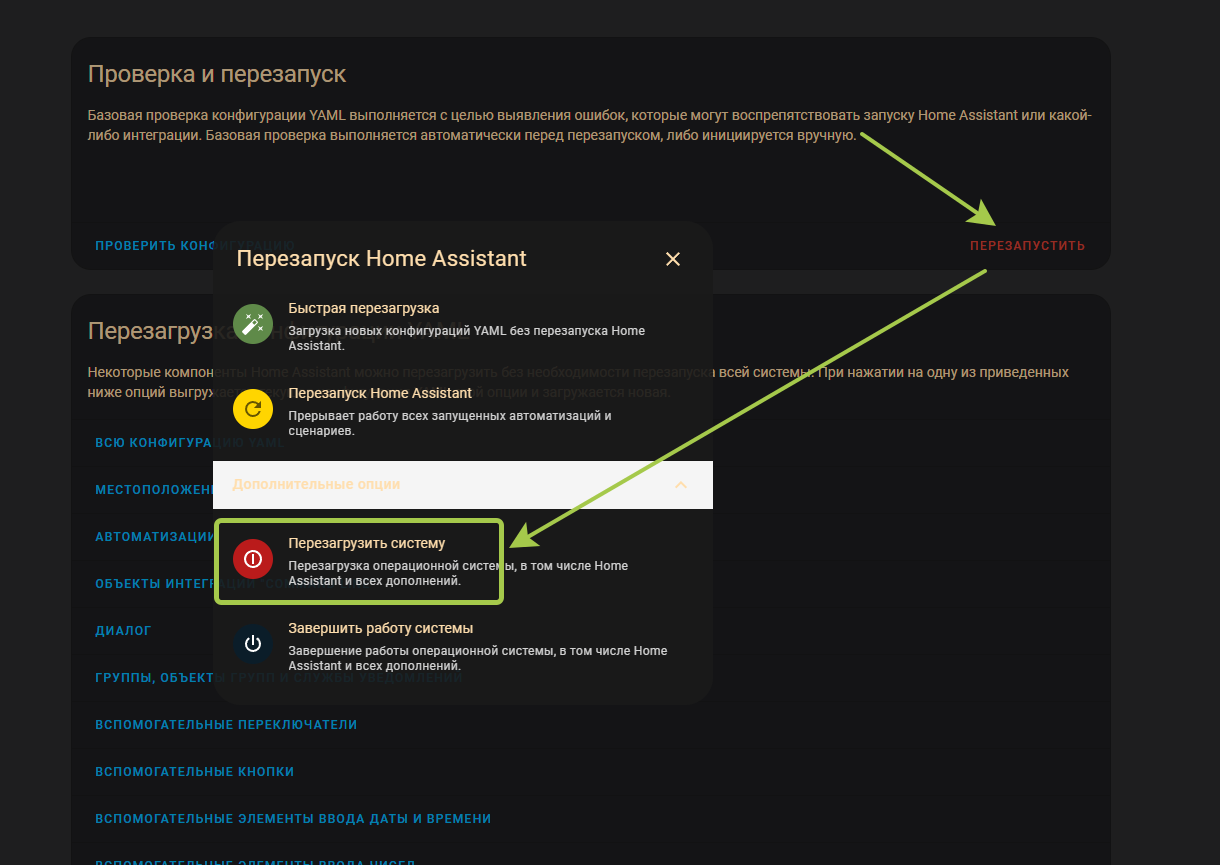
We reboot Home Assistant completely to reboot Debian itself.
Connect the Bluetooth column to Debian, KB, J through Gui, or through the console using the Bluetoothctl command
Turn on Bluetooth:
power on
Starting scanning devices:
scan on
As we saw our device, we mate with the device:
pair [mac адрес девайса]
We connect to the device:
connect [mac адрес девайса]
Add the device to trusted:
trust [mac адрес девайса]
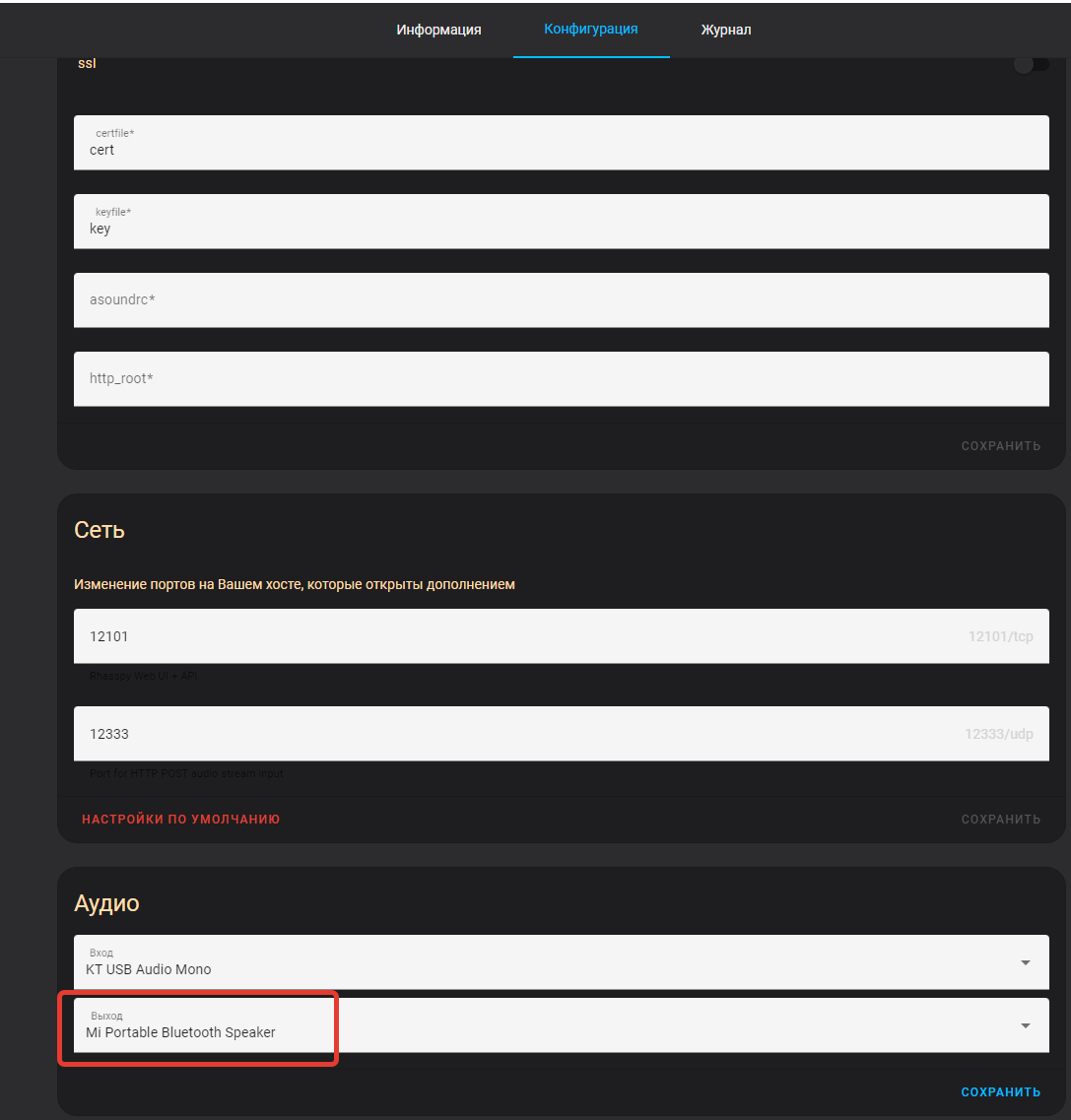
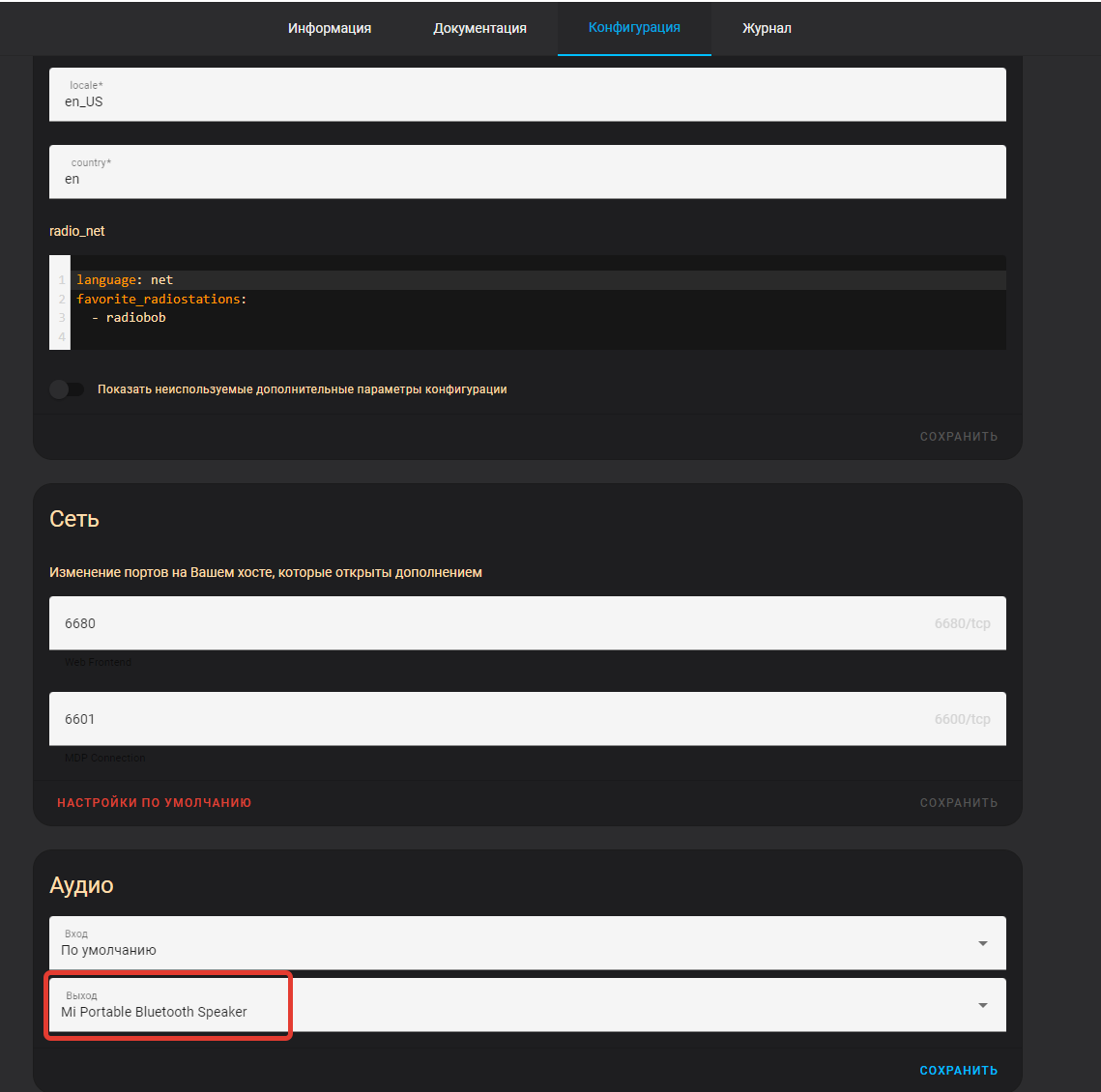
Further, how Bluetooth devices added in two addons of Rhasspy Assistant and Mopidy you need to specify the source of the sound of the Bluetooth device:
We check the performance:
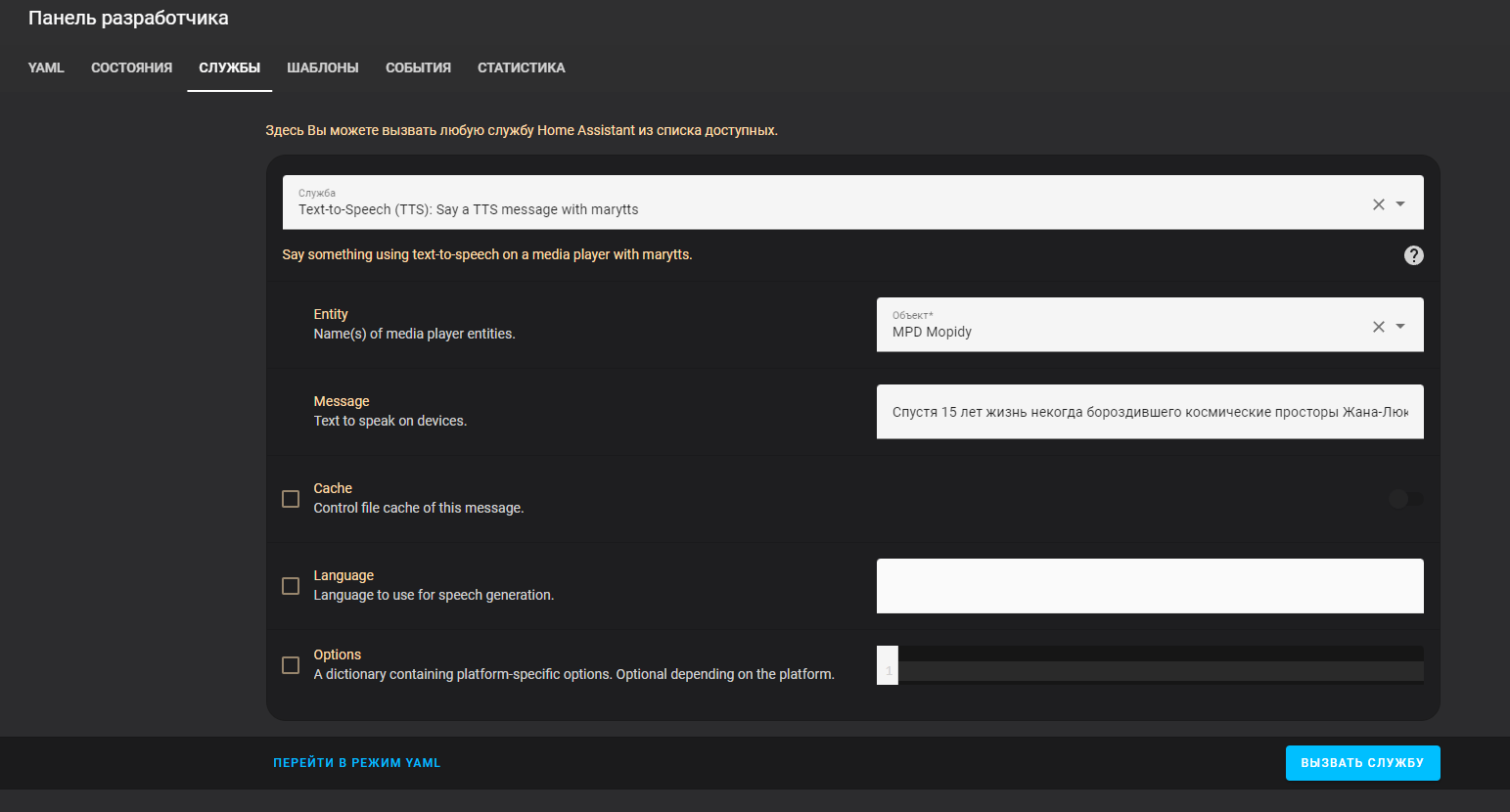
Code:
 service : tts.marytts_say
data :
  entity_id : media_player.mpd_mopidy
  message : >-
    Спустя 15 лет жизнь некогда бороздившего космические просторы Жана-Люка
    Пикара






